






Facebook Twitter Instagram
    Trending
    • MFU Shisha X6 75K Review: A Hookah-Style Vape That Puts the Experience First
    • Sora FG Max 80K Pod Review: A Replaceable Pod System That Redefines Longevity
    • OXBAR AIR 25K Review: A Disposable Vape That Prioritizes Practicality Over Gimmicks
    • VOOPOO VMATE MAX 2 Review: Battery, Pods, Controls and Daily Use
    • VOOPOO VMATE MAX 2 vs ARGUS Z3: Which Pod System Fits Your Vaping Style?
    • TOMORO D20 50K Review: Battery, E-Liquid, Modes and Daily Use
    • Maskking Ejuice: What GTS Flavors Are Available for Refillable Vapes?
    • MT200 Smart Watch: What Do Its ECG, AMOLED and Health Features Actually Offer?
    Facebook YouTube
    IGeeKphone China Phone, Tablet PC, VR, RC Drone News, Reviews
    • HOME
    • BREAKING NEWS
      • AI NEWS
    • Amazon
    • PHONE
      • Top Phones For Your First Choice
      • Phone Comparison
      • Xiaomi
      • Blackview
      • Doogee
      • Black Shark
      • Geekbuying
      • Banggood
      • TEMU
      • TikTok
      • Aliexpress
      • Walmart
      • MercadoLibre
      • Lazada
    • TOP VAPE Awards for 2026
    • VAPES
      • E-CIGAR Upcoming
      • Vape News
      • Vape Deals
      • Vape Comparison
      • Vape Guide
      • VAPE LAWS
      • Giveaway
    • BEST VAPE
      • Best Vape Stores
      • Best Starter Vape Kits
      • Best Vapes for Beginners
      • Best Disposable Vapes
      • Best Pod Systems
      • Best Pod Mod Vapes
      • Best Mods
      • Best Nicotine Pouches
      • Best Clearomizers/Tanks
      • Best E-Liquid
      • Best EGO/Pens
      • Best Vapes for Nic Salt E-Juice
      • Best Vapes to Quit Smoking
      • RDA vs. RDTA vs. RTA
    • Best Vape Brand 2026
      • VAPORESSO
      • VOOPOO
      • OXVA
      • NEXA BAR
      • MASKKING VAPE
      • SP2S
      • IPLAY
      • TODOO
      • MRFOG
      • LOSTVAPE
      • VEIIK
    • REVIEW
      • E-cigar Review
      • Phones
      • Tablet PC
      • TV Box
      • RC Drone
      • Wearables
      • Camera
      • Accessories
      • VR Headset
    • MORE
      • TABLET
        • Chuwi
        • INNOCN
        • Teclast
        • Top Tablet for Your First Choice
        • Tablet/Laptop Comparison
      • RC DRONE
      • CAMERA
      • WEARABLES
        • OneOdio
        • BlitzWolf
        • Top Smartwatch for First Choice
      • 3D PRINTER
        • 3D Printer Review
        • Anycubic
        • FLSUN
        • Xtool
        • LONGER
        • Top 3D printer to Choose First
      • POWER STATION
        • Oukitel
        • FOSSIBOT
      • GAMING
        • Top Gaming Products
      • E-BIKE
        • Samebike
        • Happyrun
        • ENGWE
      • SMART HOME
      • TV BOX
      • ACCESSORIES
      • VR HEADSET
      • CLOTHES
      • AUTO CAR
    • DEAL
    • Shop
    IGeeKphone China Phone, Tablet PC, VR, RC Drone News, Reviews
    You are at:Home»Guide»How to Recover Data from a Crashed Hard Drive
    Guide

    How to Recover Data from a Crashed Hard Drive

    HabibBy HabibJune 25, 2023
    Facebook Twitter Pinterest LinkedIn Tumblr Email

    Computers have become integral to our lives in today’s rapidly evolving world. They are invaluable tools for handling various tasks, and many of our important data and files are stored on these machines.

    However, there are instances where files stored on computers inexplicably disappear, causing significant trouble. So, how can we recover accidentally deleted files? This article will explain the common causes of data loss and provide a method for recovering data from computer hard disks.

    Significant Reasons for Computer Data Loss
    Why does computer data suddenly vanish? Here are some common causes of data loss:

    Accidental Deletion: Users may unintentionally delete files and empty the recycle bin or use the Shift+Delete key combination, permanently erasing files without sending them to the recycle bin.

    • Mistaken Disk Formatting: Users may inadvertently format a disk that contains important data.
    • Raw Disk Format: The data becomes inaccessible if a user’s disk becomes formatted as RAW.
    • Hardware Issues: Data can be lost if a user employs a low-quality hard disk or if the disk has bad sectors.

    Unformatted Memory Card: Failure to format a memory card before use is another principal reason for data loss in this area.

    Virus Infections: If users fail to update their systems and patch vulnerabilities timely, their computers may become infected with viruses, resulting in data loss.

    Computer Data Recovery Method

    Once computer data is lost, where does it go? And how is it possible to restore permanently deleted data? What precautions should be taken during a computer-challenging disk data recovery operation?

    If you habitually create backups of your computer data, you can use those backups to restore lost data. Open the control panel, click “Backup and Restore” under the “System and Security” section, and use the data backup to recover your lost files.

    However, many people do not regularly back up their computer data. In such cases, how can you restore the original data on your computer?

    This is where professional Deleted files recovery tools, such as the Niu Xuechang Data Recovery Tool, come into play. This software supports data recovery from hard disks, solid-state drives, SD/memory cards, USB drives, and external devices connected to digital cameras. It can recover various file types, including photos, videos, music/audio, RAR/ZIP archives, and Office files.

    The data recovery process involves the following steps:

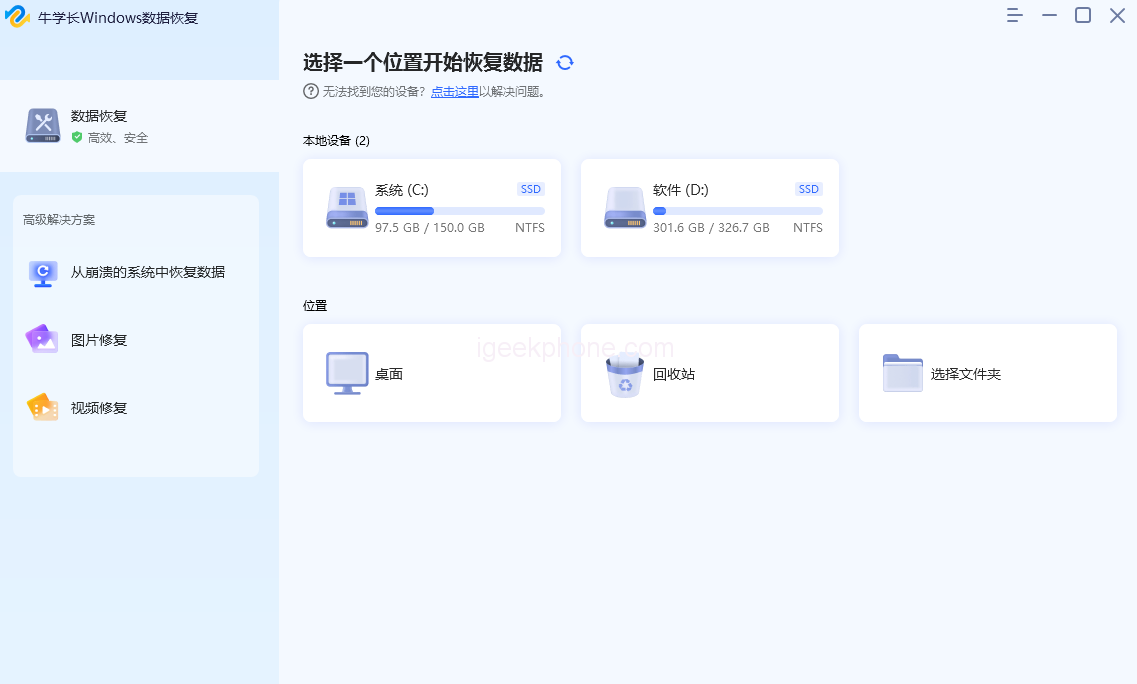
    • Step 1: Download and install the Niu Xuechang Data Recovery Tool. Select the location of the lost files on the main interface. Choose the corresponding storage disk based on the name of your camera memory card, for example.
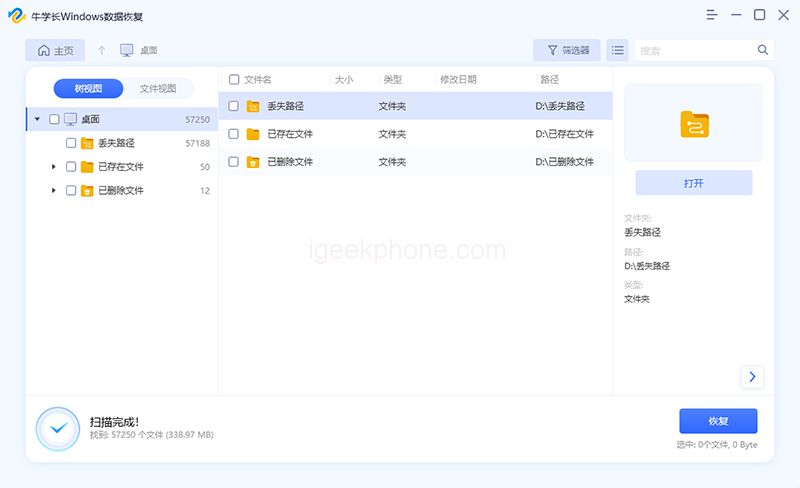
    • Step 2: Start the Niu Xuechang Windows Data Recovery Tool, which will scan the partition data and display the scan results in the left window.
    • Step 3: From the scan results, select the desired files and click the “Recover” button to restore them.

    When you encounter data loss on your computer, it is crucial to immediately stop using the hard disk where the lost data was located. Take prompt action by utilizing appropriate software or backups to restore your data. Once new data overwrite the files on the hard disk, it becomes impossible to recover the accidentally deleted data, leading to immeasurable losses.

    Read Also: iQOO Pad Review: A Powerful Tablet with a Great Display

    Do not forget to follow us on our Facebook group and page to keep you always aware of the latest advances, News, Updates, review, and giveaway on smartphones, tablets, gadgets, and more from the technology world of the future.

    Share. Facebook Twitter Pinterest LinkedIn Tumblr Email

    Related Posts

    CHUWI GTBook X Explained: What the Core 7 230H and RTX 3050 Mean at $999

    RedMagic Gaming Tablet 5 Pro 2026 Review: Portable 9-Inch Tablet for Steam Games

    REDMI K100 Pro Max Review 2026 – Gaming Phone with Full Frame Rate Performance

    Leave A Reply Cancel Reply

    You must be logged in to post a comment.

    voopoopintch
    oxva nexlim 2
    sp2s sen x disposable vape
    • Popular
    • 3D Printer REVIEW
    • XIAOMI
    July 13, 2026

    OXVA Nexlim 2 Mini Pod Vape Hands on Review

    July 13, 2026

    OXVA Nexlim 2 Pod Vape Hands on Review

    June 21, 2026

    iPlay LUMO 8K Review – A Compact Prefilled Pod Kit with Big Flavor and Everyday Convenience

    June 21, 2026

    iPlay HOOLA 150K Review – A Cloud-Chasing Giant with Music, Modes & Massive Longevity

    December 26, 2025

    ACMER ASCARVA 4S: Precision CNC Power for Makers, DIYers & Small Workshops

    June 23, 2024

    ACMER P2 20W Laser Engraver Fixed Focus Engraving: Hands on Review

    May 30, 2024

    xTool F1 Ultra Review: World’s First 20W Fiber & 20W Diode Laser Engraver

    May 30, 2024

    Anycubic Kobra 3 Combo Review: The Multicolor Masterpiece?

    August 24, 2026

    REDMI K100 Pro Max Review 2026 – Gaming Phone with Full Frame Rate Performance

    August 22, 2026

    Redmi K100 Pro Review: 185Hz Display, Snapdragon Performance & Gaming Test

    August 18, 2026

    Xiaomi 18 Series: First to Feature 2nm Snapdragon 8 Elite Gen 6 Pro, Dedicated AI Button, and 8000mAh Battery

    August 18, 2026

    Xiaomi 18 Ultra International Cancelled? OPPO and Vivo Also Pull Back Ultra Phones Overseas – Report

    fc 26 coins
    New Arrivals
    • MFU Shisha X6 75K Disposable Hookah Vape MFU Shisha X6 75K Disposable Hookah Vape
    • Sora FG Max 80K Disposable Pod Sora FG Max 80K Disposable Pod
    • OXBAR AIR 25K Dispoable Vape OXBAR AIR 25K Dispoable Vape
    • VIHO SHADOW 75K Disposable Kit VIHO SHADOW 75K Disposable Kit
    • Uwell Nunchaku Mini Pod System Kit Uwell Nunchaku Mini Pod System Kit
    • OXVA Vprime 2 Pod Mod Kit OXVA Vprime 2 Pod Mod Kit
    • Extre Bar Switch Ultra 50K Disposable Extre Bar Switch Ultra 50K Disposable
    • Artery Vapor CT3 45K Disposable Vape Artery Vapor CT3 45K Disposable Vape
    • Geek Labs Switch Pro 60K Nixodine Disposable Vape Geek Labs Switch Pro 60K Nixodine Disposable Vape
    About
  • Igeekphone.com provides the first global tech news and reviews about smartphone, vapes, e-cigar, smart home, 3D printers, e-bike,tablets, RC drones, VR headset, and other accessories. It's the best platform to improve your brand and product.
  • Contact us: info@igeekphone.com
  • Check Our Privacy Policy Here.
  • Note: *Right now we have US editor and EU editors for review, especially for Amazon US and EU.
  • *Shop and Compare Price Here*
  • Facebook
  • Youtube
  • OUR BEST VAPE PARTNERS
  • VAPE ONLINE STORE
  • VAPORESSO
  • VOOPOO
  • OXVA
  • NEXA
  • MASKKING
  • SP2S
  • IPLAY
  • TODOO
  • OTHER BEST PARTNERS
  • SVBONY
  • Chuwi
  • Blackview
  • Fossibot
  • Unihertz
  • Flsun
  • Anycubic
  • Xtool
  • Oukitel
  • Mukkpet Ebike
  • Ugreen
  • Copyright © 2026 igeekphone

    Type above and press Enter to search. Press Esc to cancel.