






Facebook Twitter Instagram
    Trending
    • JNR Meteorite 100K VS Maskking Camo 100K: Comparison Review
    • JNR Lila Kiss⁺ vs. IPLAY NOVA: High-Capacity Showdown
    • Spark Your Life: Join the VOOPOO Pitch Challenge and Win Big!
    • Upgrade Your Audio Setup with HiFiGo’s Summer Flash Sale
    • JNR Meteorite 100K Refillable Vape Kit Review: A Revolutionary Powerbank-Style Vaping System
    • Yocan Black Pocket Concentrate Vaporizer Review: Precision Dabbing in a Pocket-Sized Device
    • YiHi SXmini MQ Class Box Mod 60W Review: Features, Design & Technology
    • MJX H18P RTR 1/18 RC Car Review – Compact Brushless Crawler with Big Capability
    Facebook YouTube
    IGeeKphone China Phone, Tablet PC, VR, RC Drone News, Reviews
    • HOME
      • NEWS
        • DeepSeek
        • ChatGPT
        • Minecraft
    • Amazon
    • PHONE
      • Top Phones For Your First Choice
      • Phone Comparison
      • Xiaomi
      • Blackview
      • Doogee
      • Black Shark
      • Geekbuying
      • Banggood
      • TEMU
      • TikTok
      • Aliexpress
      • Walmart
      • MercadoLibre
      • Lazada
    • TOP VAPE Awards for 2026
    • VAPES
      • E-CIGAR Upcoming
      • Vape News
      • Vape Deals
      • Vape Comparison
      • Vape Guide
      • Giveaway
    • BEST VAPE
      • Best Vape Stores
      • Best Starter Vape Kits
      • Best Vapes for Beginners
      • Best Disposable Vapes
      • Best Pod Systems
      • Best Pod Mod Vapes
      • Best Mods
      • Best Nicotine Pouches
      • Best Clearomizers/Tanks
      • Best E-Liquid
      • Best EGO/Pens
      • Best Vapes for Nic Salt E-Juice
      • Best Vapes to Quit Smoking
      • RDA vs. RDTA vs. RTA
    • Best Vape Brand 2026
      • VAPORESSO
      • VOOPOO
      • OXVA
      • NEXA BAR
      • MASKKING VAPE
      • SP2S
      • IPLAY
      • TODOO
      • MRFOG
      • LOSTVAPE
      • VEIIK
    • REVIEW
      • E-cigar Review
      • Phones
      • Tablet PC
      • TV Box
      • RC Drone
      • Wearables
      • Camera
      • Accessories
      • VR Headset
    • MORE
      • TABLET
        • Chuwi
        • INNOCN
        • Teclast
        • Top Tablet for Your First Choice
        • Tablet/Laptop Comparison
      • RC DRONE
      • CAMERA
      • WEARABLES
        • OneOdio
        • BlitzWolf
        • Top Smartwatch for First Choice
      • 3D PRINTER
        • 3D Printer Review
        • Anycubic
        • FLSUN
        • Xtool
        • LONGER
        • Top 3D printer to Choose First
      • POWER STATION
        • Oukitel
        • FOSSIBOT
      • GAMING
        • Top Gaming Products
      • E-BIKE
        • Samebike
        • Happyrun
        • ENGWE
      • SMART HOME
      • TV BOX
      • ACCESSORIES
      • VR HEADSET
      • CLOTHES
      • AUTO CAR
    • DEAL
    • VAPE LAWS
    • Shop
    IGeeKphone China Phone, Tablet PC, VR, RC Drone News, Reviews
    You are at:Home»Guide»How to Recover Data from a Crashed Hard Drive
    Guide

    How to Recover Data from a Crashed Hard Drive

    HabibBy HabibJune 25, 2023
    Facebook Twitter Pinterest LinkedIn Tumblr Email

    Computers have become integral to our lives in today’s rapidly evolving world. They are invaluable tools for handling various tasks, and many of our important data and files are stored on these machines.

    However, there are instances where files stored on computers inexplicably disappear, causing significant trouble. So, how can we recover accidentally deleted files? This article will explain the common causes of data loss and provide a method for recovering data from computer hard disks.

    Significant Reasons for Computer Data Loss
    Why does computer data suddenly vanish? Here are some common causes of data loss:

    Accidental Deletion: Users may unintentionally delete files and empty the recycle bin or use the Shift+Delete key combination, permanently erasing files without sending them to the recycle bin.

    • Mistaken Disk Formatting: Users may inadvertently format a disk that contains important data.
    • Raw Disk Format: The data becomes inaccessible if a user’s disk becomes formatted as RAW.
    • Hardware Issues: Data can be lost if a user employs a low-quality hard disk or if the disk has bad sectors.

    Unformatted Memory Card: Failure to format a memory card before use is another principal reason for data loss in this area.

    Virus Infections: If users fail to update their systems and patch vulnerabilities timely, their computers may become infected with viruses, resulting in data loss.

    Computer Data Recovery Method

    Once computer data is lost, where does it go? And how is it possible to restore permanently deleted data? What precautions should be taken during a computer-challenging disk data recovery operation?

    If you habitually create backups of your computer data, you can use those backups to restore lost data. Open the control panel, click “Backup and Restore” under the “System and Security” section, and use the data backup to recover your lost files.

    However, many people do not regularly back up their computer data. In such cases, how can you restore the original data on your computer?

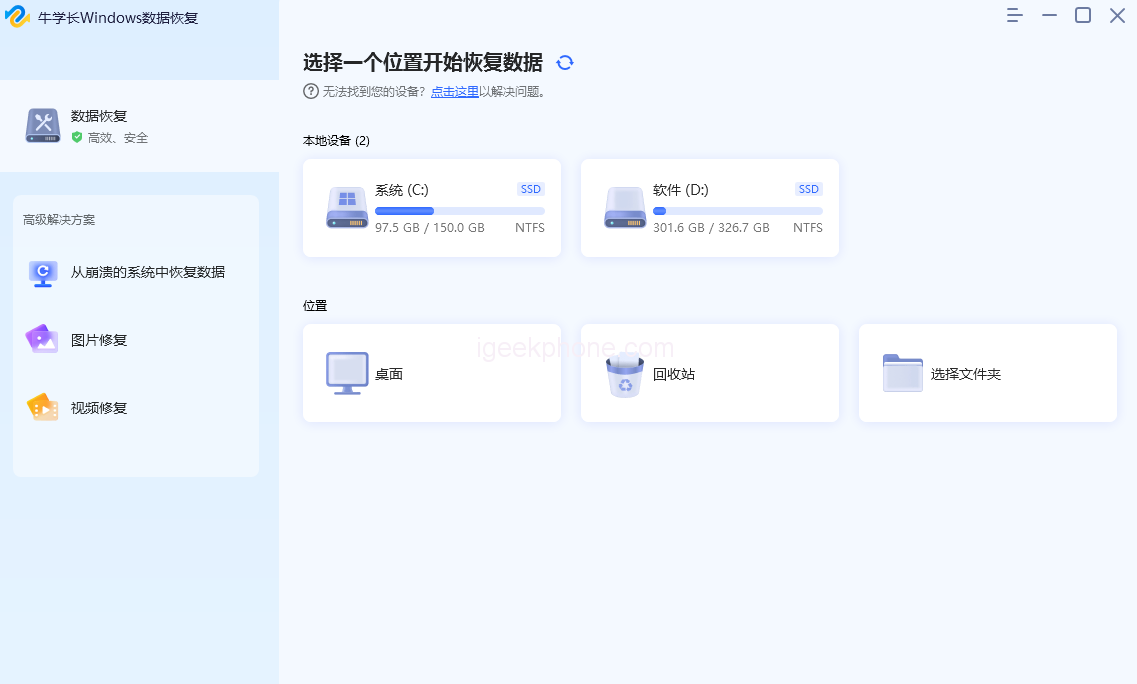
    This is where professional Deleted files recovery tools, such as the Niu Xuechang Data Recovery Tool, come into play. This software supports data recovery from hard disks, solid-state drives, SD/memory cards, USB drives, and external devices connected to digital cameras. It can recover various file types, including photos, videos, music/audio, RAR/ZIP archives, and Office files.

    The data recovery process involves the following steps:

    • Step 1: Download and install the Niu Xuechang Data Recovery Tool. Select the location of the lost files on the main interface. Choose the corresponding storage disk based on the name of your camera memory card, for example.
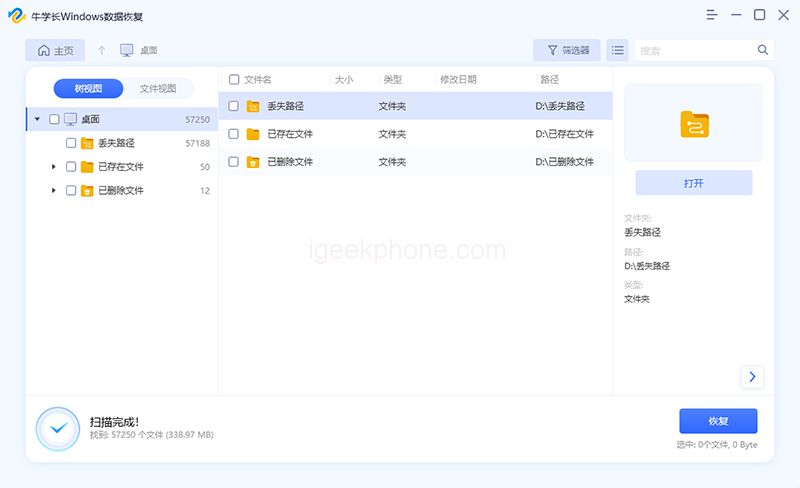
    • Step 2: Start the Niu Xuechang Windows Data Recovery Tool, which will scan the partition data and display the scan results in the left window.
    • Step 3: From the scan results, select the desired files and click the “Recover” button to restore them.

    When you encounter data loss on your computer, it is crucial to immediately stop using the hard disk where the lost data was located. Take prompt action by utilizing appropriate software or backups to restore your data. Once new data overwrite the files on the hard disk, it becomes impossible to recover the accidentally deleted data, leading to immeasurable losses.

    Read Also: iQOO Pad Review: A Powerful Tablet with a Great Display

    Do not forget to follow us on our Facebook group and page to keep you always aware of the latest advances, News, Updates, review, and giveaway on smartphones, tablets, gadgets, and more from the technology world of the future.

    Share. Facebook Twitter Pinterest LinkedIn Tumblr Email

    Related Posts

    Upgrade Your Audio Setup with HiFiGo’s Summer Flash Sale

    Beyond The Ordinary Grill: The Magic of Kamado Cookers

    Smart Homes, Safe Seniors: Leveraging Electronics to Combat Nursing Home Abuse

    Leave A Reply Cancel Reply

    You must be logged in to post a comment.

    voopoopintch
    oxva xlim go lite
    sp2s sen x disposable vape
    • Popular
    • 3D Printer REVIEW
    • XIAOMI
    June 17, 2026

    Nexa Ultra II vs Nexa Ultra 50K Disposable Vape Hands on Review

    June 17, 2026

    OXVA XLIM GO LITE VS OXVA XLIM GO 2 Vape Hands on Review

    June 13, 2026

    Vaporesso LUXE X3 & LUXE Q3 Review. Two Paths to Exceptional Flavor

    June 6, 2026

    VOOPOO ARGUS G4 & ARGUS G4 Mini Review – Smart Flavor Meets Everyday Simplicity

    December 26, 2025

    ACMER ASCARVA 4S: Precision CNC Power for Makers, DIYers & Small Workshops

    June 23, 2024

    ACMER P2 20W Laser Engraver Fixed Focus Engraving: Hands on Review

    May 30, 2024

    xTool F1 Ultra Review: World’s First 20W Fiber & 20W Diode Laser Engraver

    May 30, 2024

    Anycubic Kobra 3 Combo Review: The Multicolor Masterpiece?

    June 18, 2026

    Xiaomi’s first large-screen foldable flagship device, MIX Fold 5, has been Approved for Network Use

    June 17, 2026

    Xiaomi’s first large-screen foldable flagship device, MIX Fold 5, has been approved for network use: The first version features the self-developed chip by Xianji O3.

    June 12, 2026

    When will Redmi K40 be Released?

    June 10, 2026

    Xiaomi Hyper OS 3 Second Batch Beta Version Begins Recruitment: Covering Five Models Including Redmi K80 and Xiaomi MIX Flip2

    fc 26 coins
    New Arrivals
    • Olit Hookalit Nex 120K Disposable Vape Kit Olit Hookalit Nex 120K Disposable Vape Kit
    • Xiaomi 19 Xiaomi 19
    • Xiaomi 19 Pro Xiaomi 19 Pro
    • JNR Zpluse 42K+ Puffs Top-Fill Replaceable and Refillable Vape Kit JNR Zpluse 42K+ Puffs Top-Fill Replaceable and Refillable Vape Kit
    • Lost Vape Ursa Nano S 3 Pod System Kit Lost Vape Ursa Nano S 3 Pod System Kit
    • Honor Power 3 Honor Power 3
    • Redmi Note 17 Pro Plus Global Redmi Note 17 Pro Plus Global
    • Yocan Black Pocket Concentrate Vaporizer Yocan Black Pocket Concentrate Vaporizer
    • Loon Air Plus 6000 Disposable Loon Air Plus 6000 Disposable
    About
  • Igeekphone.com provides the first global tech news and reviews about smartphone, vapes, e-cigar, smart home, 3D printers, e-bike,tablets, RC drones, VR headset, and other accessories. It's the best platform to improve your brand and product.
  • Contact us: info@igeekphone.com
  • Check Our Privacy Policy Here.
  • Note: *Right now we have US editor and EU editors for review, especially for Amazon US and EU.
  • *Shop and Compare Price Here*
  • Facebook
  • Youtube
  • Mashable is a global, multi-platform media and entertainment company

    For more queries and news contact us on this

    Email: info@mashablepartners.com

  • OUR BEST VAPE PARTNERS
  • VAPE ONLINE STORE
  • HAYATI PRO MAX PLUS
  • VAPORESSO
  • VOOPOO
  • OXVA
  • NEXA
  • MASKKING
  • SP2S
  • IPLAY
  • TODOO
  • OTHER BEST PARTNERS
  • SVBONY
  • Chuwi
  • Blackview
  • Fossibot
  • Unihertz
  • Flsun
  • Anycubic
  • Xtool
  • Oukitel
  • Mukkpet Ebike
  • Ugreen
  • Copyright © 2026 igeekphone

    Type above and press Enter to search. Press Esc to cancel.