









Facebook Twitter Instagram
    Trending
    • OXVA XLIM PRO 4 Pod Compatibility: ABT vs Standard XLIM Cartridges Explained
    • HUQA 120K E-Hookah Kit Review: How Its Replaceable Pod and Dual Inhalation Modes Work
    • Vietnam Passes Sweeping Tobacco Law Amendment: E-Cigarettes, Heated Tobacco and Nicotine Pouches Face Expanded Ban From July 2027
    • GM2mini Smartwatch Review: 1.27-Inch HD Display, Bluetooth Calling and Everyday Health Tracking
    • Yesido EP18 ANC Headset Review: 35dB Noise Cancellation, 40mm Drivers and 40-Hour Battery Life
    • SJGAM M41P Buyer’s Guide: What to Check Before Choosing This 4.2-Inch Retro Gaming Handheld
    • ZLL SG110MAX Review: A 1:10 Brushless RC Truck Built for 80km/h Off-Road Performance
    • Huawei Mate X8 vs iPhone Duo: Bigger, Thinner and Lighter with a Major Display Advantage
    Facebook YouTube
    IGeeKphone China Phone, Tablet PC, VR, RC Drone News, Reviews
    • HOME
    • NEWS
      • AI NEWS
    • Black Friday
    • PHONE
      • Top Phones For Your First Choice
      • Phone Comparison
      • Xiaomi
      • Blackview
      • Doogee
      • Black Shark
      • Geekbuying
      • Banggood
      • TEMU
      • TikTok
      • Aliexpress
      • Walmart
      • Lazada
    • TOP VAPE Awards for 2026
    • VAPES
      • E-CIGAR Upcoming
      • Vape News
      • Vape Deals
      • Vape Comparison
      • Vape Guide
      • VAPE LAWS
      • Giveaway
    • BEST VAPE
      • Best Vape Stores
      • Best Starter Vape Kits
      • Best Vapes for Beginners
      • Best Disposable Vapes
      • Best Pod Systems
      • Best Pod Mod Vapes
      • Best Mods
      • Best Nicotine Pouches
      • Best Clearomizers/Tanks
      • Best E-Liquid
      • Best EGO/Pens
      • Best Vapes for Nic Salt E-Juice
      • Best Vapes to Quit Smoking
      • RDA vs. RDTA vs. RTA
    • Best Vape Brand 2026
      • VAPORESSO
      • VOOPOO
      • OXVA
      • NEXA BAR
      • MASKKING VAPE
      • SP2S
      • IPLAY
      • TODOO
      • MRFOG
      • LOSTVAPE
      • VEIIK
    • REVIEW
      • E-cigar Review
      • Phones
      • Tablet PC
      • TV Box
      • RC Drone
      • Wearables
      • Camera
      • Accessories
      • VR Headset
    • MORE
      • TABLET
        • Chuwi
        • INNOCN
        • Teclast
        • Top Tablet for Your First Choice
        • Tablet/Laptop Comparison
      • RC DRONE
      • CAMERA
      • WEARABLES
        • OneOdio
        • BlitzWolf
        • Top Smartwatch for First Choice
      • 3D PRINTER
        • 3D Printer Review
        • Anycubic
        • FLSUN
        • Xtool
        • LONGER
        • Top 3D printer to Choose First
      • POWER STATION
        • Oukitel
        • FOSSIBOT
      • GAMING
        • Top Gaming Products
      • E-BIKE
        • Samebike
        • Happyrun
        • ENGWE
      • SMART HOME
      • TV BOX
      • ACCESSORIES
      • VR HEADSET
      • CLOTHES
      • AUTO CAR
    • DEAL
    • Shop
    IGeeKphone China Phone, Tablet PC, VR, RC Drone News, Reviews
    You are at:Home»Guide»Online Free Photo Restoration: Renew Old Photos with AI
    Guide

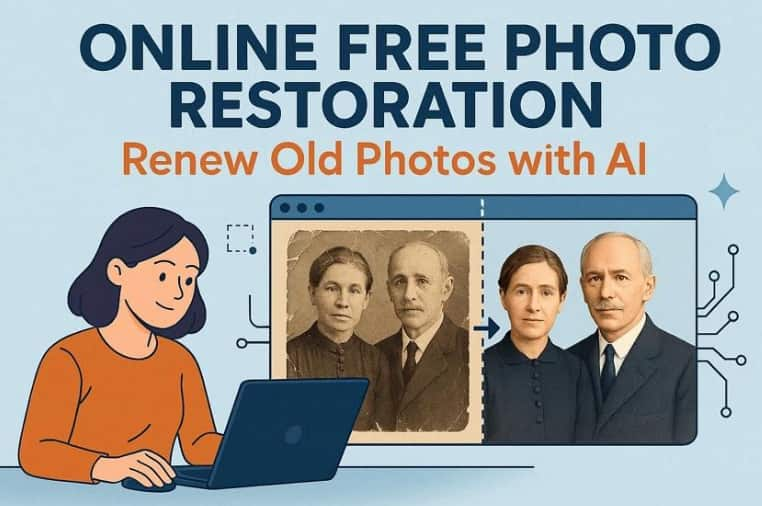
    Online Free Photo Restoration: Renew Old Photos with AI

    Brady CottonBy Brady CottonAugust 2, 2026
    Facebook Twitter Pinterest LinkedIn Tumblr Email
    guide to online free photo restoration
    guide to online free photo restoration

    You open a dusty photo album and notice that many cherished pictures have faded or torn edges. The joy of reliving old memories turns into disappointment when images appear blurry, scratched, or discolored. Fortunately, modern technology allows you to restore photos online without expensive software or professional help.

    AI-powered tools can intelligently reconstruct missing details, adjust colors, and remove damage automatically. By using online free photo restoration solutions, you can breathe new life into treasured photographs. This article explores why images deteriorate, common restoration mistakes, and provides a step-by-step guide to renew old photo memories effectively.

    Part 1. Understanding Photo Damage: Why Your Old Images Deteriorate

    Before attempting to renew old photos, it’s important to understand the factors causing their deterioration. Recognizing these helps in choosing the right restoration method or tool.

    • Physical Wear and Tear: Repeated handling, folding, or exposure to air and dust can cause scratches, tears, or fading. These damages make the image appear blurred or incomplete over time.
    • Environmental Effects: Humidity, temperature fluctuations, and sunlight exposure accelerate chemical reactions in photo paper. This often leads to discoloration, yellowing, or brittleness.
    • Improper Storage: Storing photos in non-archival materials or near magnetic sources can affect image integrity. Over time, even slight chemical reactions degrade the photo quality.
    • Aging of Photographic Materials: Ink, dyes, and emulsions naturally deteriorate with time. Older photos are more prone to fading, color shifts, and loss of detail.
    • Digital Scanning or Conversion Errors: When old photos are scanned or digitized, improper settings or low-resolution captures can reduce clarity. This often introduces pixelation, noise, or color distortion.

    Part 2. Restoring Old Photos Online? Watch Out for These Mistakes

    Even when using AI photo restoration, beginners can make mistakes that reduce effectiveness. Avoiding these ensures better results.

    • Over-Reliance on Automatic Filters: Some online tools over-enhance images, making them look unnatural. Excessive sharpening or color correction can distort original features.
    • Ignoring File Format Compatibility: Uploading unsupported or low-quality images can prevent restoration tools from fully repairing them. Always check format guidelines before restoring your photos.
    • Neglecting Backup Copies: Working directly on the original file may result in permanent changes. Always keep a backup before restoration attempts.
    • Skipping Advanced Repair Options: Many online tools offer reference-based or AI-guided advanced repairs. Ignoring these can leave severe damage unrepaired.
    • Using Low-Quality Tools: Free tools with limited AI capabilities may fail to reconstruct damaged areas properly. This often produces incomplete or pixelated results.

    Part 3. Step-by-Step Guide: Restore Old Photos for Free Online with Repairit Online 

    Online photo restoration has never been easier thanks to AI-driven solutions. Repairit Online is designed to restore old, damaged images efficiently while preserving original quality. Users can upload faded, torn, or partially corrupted images, and the tool quickly analyzes pixels, colors, and textures. 

    Its AI technology intelligently reconstructs missing or broken elements, ensuring a natural appearance. Supported formats include JPG, PNG, and RAW. For complex cases, an advanced mode uses a reference image to accurately recover lost details. Users can download the repaired images instantly.

    Coherent Features of Repairit Online

    • Multiple Restoration Models: Repairit provides various restoration AI models depending on the type of damage that occurred to the image.
    • Repair History: The platform maintains a record of all restored photos for easy reference and organization.
    • Preview Before Saving: Users can examine repaired images before downloading to confirm the restoration meets expectations.

    Step-by-Step Guide on How to Repair Images With Repairit Online

    As mentioned, Repairit Online provides comprehensive AI photo restoration for images and other file types. The following steps show how to fix corrupted photos with this tool:

    Step 1. Begin By Uploading Old Damaged Photos
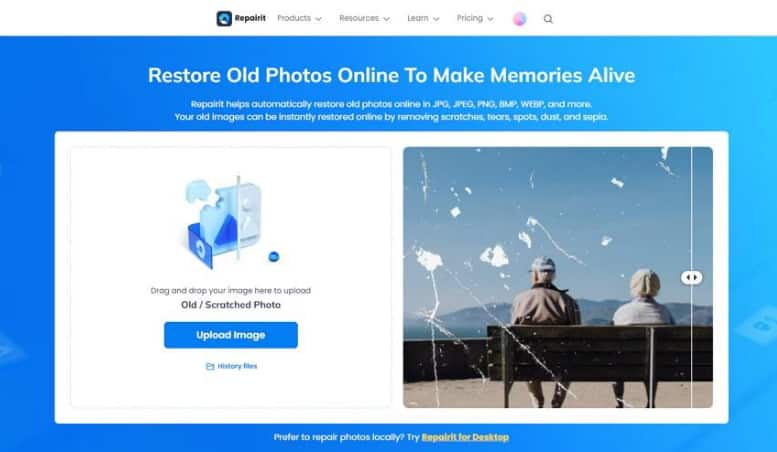
    start by uploading old photos
    start by uploading old photos

    Open Repairit Online on your browser and go to the old photo restoration section. Then click the “Upload Image” button to upload your corrupted images to the interface.

    Step 2. Start with the Repair Process
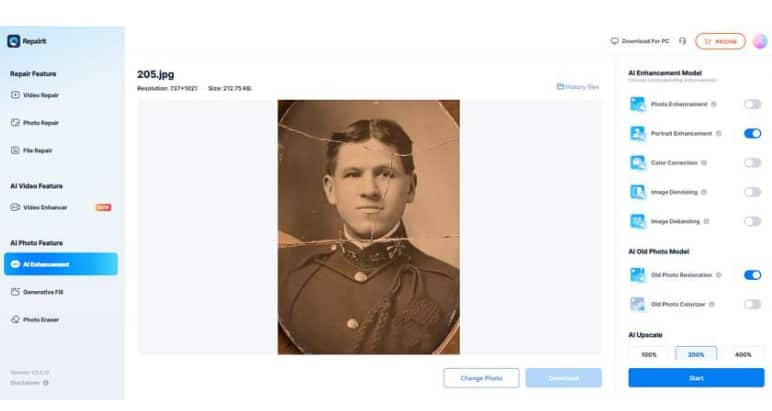
    choose ai model press start
    choose ai model press start

    After uploading, select the restoration model from the options on the right. Click the “Start” button at the bottom and wait a few seconds for completion.

    Step 3. Preview and Save Photos
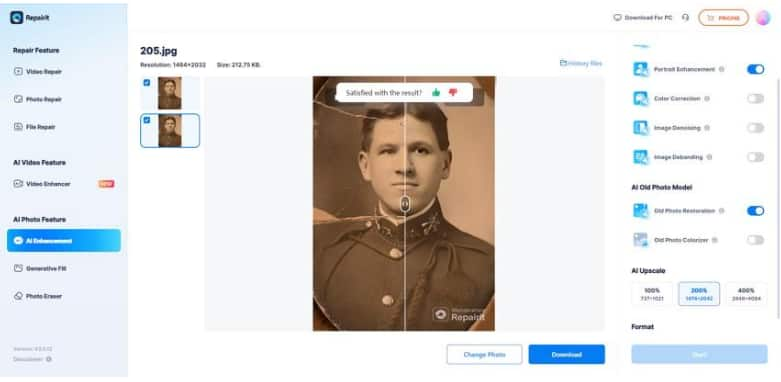
    preview and save photos 
    preview and save photos

    Once the restoration finishes, preview the restored images within the interface. When satisfied with the results, click the “Download” button to save them to your device.

    Part 4. Repairit Online vs. Other Tools: Why It’s the Best Option

    When comparing online photo restoration tools, Repairit Online stands out for its AI capabilities. Provided next is a comparison table between Repairit Online and other online tools available across the internet:

    Feature Repairit Online Other Tools
    AI-Powered Repair Uses advanced AI to reconstruct damaged pixels accurately Limited AI or manual fixes
    Supported Formats JPG, PNG, RAW, and many more Often limited to JPG or PNG
    Batch Repair Repair multiple images at once Rarely available
    Repair History Keeps a record of all repaired photos Not included
    Preview Before Saving Allows users to check restored images before downloading Limited or unavailable
    Ease of Use Intuitive interface suitable for beginners Medium to complex

    Conclusion 

    To sum it up, this article provided a detailed guide on restoring old photos using AI technology. Repairit Online is highly recommended for anyone looking for online free photo restoration. Its AI-powered features, reference-based repair, and secure processing make renewing old photo memories simple and reliable. By choosing Repairit Online, users can restore image quality, recover details, and preserve cherished moments efficiently.

    Share. Facebook Twitter Pinterest LinkedIn Tumblr Email

    Related Posts

    Broadcasting Beacon: Setting Up a Live Streaming Server

    From Gamer to Professional: Building a Career You Love

    How to iPhone Repair That Keeps Crashing While Charging

    Leave A Reply Cancel Reply

    You must be logged in to post a comment.

    black friday
    voopoomagic
    oxva vprime 2
    • Popular
    • 3D Printer REVIEW
    • XIAOMI
    November 21, 2026

    OXVA XLIM PRO 4 Hands-On Review: Performance, & How-To Guide

    October 24, 2026

    OXVA Vprime 2 Unboxing Review: Performance, Test, Battery

    October 13, 2026

    OXVA XLIM 4 Vape Hands on Review: Pocket Luxury, Serious Stamina

    October 11, 2026

    MAXRAY RUSH 80K Review – More Than Just a Puff Count: Meet the Disposable That Controls Its Own E-Liquid

    December 26, 2025

    ACMER ASCARVA 4S: Precision CNC Power for Makers, DIYers & Small Workshops

    June 23, 2024

    ACMER P2 20W Laser Engraver Fixed Focus Engraving: Hands on Review

    May 30, 2024

    xTool F1 Ultra Review: World’s First 20W Fiber & 20W Diode Laser Engraver

    May 30, 2024

    Anycubic Kobra 3 Combo Review: The Multicolor Masterpiece?

    November 19, 2026

    Xiaomi 18 Standard Edition Tipped to Launch in December with a Starting Price of 5,699 Yuan

    November 18, 2026

    Xiaomi 18 Pro Series Goes Global: Rear Display Arrives in International Markets, Starting at €1,399

    November 17, 2026

    Xiaomi Watch 6 Could Launch Alongside Xiaomi 18, Expected to Feature Full eSIM Smartwatch Capabilities

    November 13, 2026

    Xiaomi’s New Smartphone Passes 3C Certification With 67W Charging, Likely Part of the REDMI Note 18 Series

    fc 26 coins
    New Arrivals
    • Huqa 120K E-Hookah Disposable Vape Kit Huqa 120K E-Hookah Disposable Vape Kit
    • Airmez Energy Bull Shisha Edition 100K Disposable Vape Airmez Energy Bull Shisha Edition 100K Disposable Vape
    • Keystone AURA+ 65K Disposable Vape Keystone AURA+ 65K Disposable Vape
    • DOOGEE Note70 DOOGEE Note70
    • Huawei Mate 90 Air Huawei Mate 90 Air
    • RAZ VUE 70K Christmas Edition Disposable Vape Kit RAZ VUE 70K Christmas Edition Disposable Vape Kit
    • Geek Bar Pulse 2 25K Zero Nicotine Disposable Vape Geek Bar Pulse 2 25K Zero Nicotine Disposable Vape
    • ATVS Al Sahim 300K Shisha Disposable Vape ATVS Al Sahim 300K Shisha Disposable Vape
    • Urban Tale X Lost Mary REFOG Disposable Vape Kit Urban Tale X Lost Mary REFOG Disposable Vape Kit
    About
  • Igeekphone.com provides the first global tech news and reviews about smartphone, vapes, e-cigar, smart home, 3D printers, e-bike,tablets, RC drones, VR headset, and other accessories. It's the best platform to improve your brand and product.
  • Contact us: info@igeekphone.com
  • Check Our Privacy Policy Here.
  • Note: *Right now we have US editor and EU editors for review, especially for Amazon US and EU.
  • *Shop and Compare Price Here*
  • Facebook
  • Youtube
  • OUR BEST VAPE PARTNERS
  • VAPE ONLINE STORE
  • VAPORESSO
  • VOOPOO
  • OXVA
  • NEXA
  • MASKKING
  • SP2S
  • IPLAY
  • TODOO
  • OTHER BEST PARTNERS
  • SVBONY
  • Chuwi
  • Blackview
  • Fossibot
  • Unihertz
  • Flsun
  • Anycubic
  • Xtool
  • Oukitel
  • Mukkpet Ebike
  • Ugreen
  • Copyright © 2026 igeekphone

    Type above and press Enter to search. Press Esc to cancel.