







Facebook Twitter Instagram
    Trending
    • iPlay LUMO 8K Review – A Compact Prefilled Pod Kit with Big Flavor and Everyday Convenience
    • iPlay HOOLA 150K Review – A Cloud-Chasing Giant with Music, Modes & Massive Longevity
    • HBX 3100A V3 RTR RC Car Review at $129.99: A Mini Desert Truck Built for Big Off-Road Adventures
    • Vaporesso VIBE SE 2 Review – Simple on the Outside, Surprisingly Smart on the Inside
    • HoverAir AQUA Flying Camera Drone Review: The World’s Most Adventurous Waterproof AI Drone
    • VOOPOO DRAG H40 Pro Review – The Return of the Pocket Powerhouse
    • DARK ALIEN X8Pro Max Tri-Mode Gaming Mouse Review: Lightweight Performance Meets Smart Display Innovation
    • 39114/39214 McLaren F1 2.4G Racing Drift RC Car Review: Officially Licensed Formula Racing Excitement
    Facebook YouTube
    IGeeKphone China Phone, Tablet PC, VR, RC Drone News, Reviews
    • HOME
      • NEWS
        • DeepSeek
        • ChatGPT
        • Minecraft
    • Amazon
    • PHONE
      • Top Phones For Your First Choice
      • Phone Comparison
      • Xiaomi
      • Blackview
      • Doogee
      • Black Shark
      • Geekbuying
      • Banggood
      • TEMU
      • TikTok
      • Aliexpress
      • Walmart
      • MercadoLibre
      • Lazada
    • TOP VAPE Awards for 2026
    • VAPES
      • E-CIGAR Upcoming
      • Vape News
      • Vape Deals
      • Vape Comparison
      • Vape Guide
      • Giveaway
    • BEST VAPE
      • Best Vape Stores
      • Best Starter Vape Kits
      • Best Vapes for Beginners
      • Best Disposable Vapes
      • Best Pod Systems
      • Best Pod Mod Vapes
      • Best Mods
      • Best Nicotine Pouches
      • Best Clearomizers/Tanks
      • Best E-Liquid
      • Best EGO/Pens
      • Best Vapes for Nic Salt E-Juice
      • Best Vapes to Quit Smoking
      • RDA vs. RDTA vs. RTA
    • Best Vape Brand 2026
      • VAPORESSO
      • VOOPOO
      • OXVA
      • NEXA BAR
      • MASKKING VAPE
      • SP2S
      • IPLAY
      • TODOO
      • MRFOG
      • LOSTVAPE
      • VEIIK
    • REVIEW
      • E-cigar Review
      • Phones
      • Tablet PC
      • TV Box
      • RC Drone
      • Wearables
      • Camera
      • Accessories
      • VR Headset
    • MORE
      • TABLET
        • Chuwi
        • INNOCN
        • Teclast
        • Top Tablet for Your First Choice
        • Tablet/Laptop Comparison
      • RC DRONE
      • CAMERA
      • WEARABLES
        • OneOdio
        • BlitzWolf
        • Top Smartwatch for First Choice
      • 3D PRINTER
        • 3D Printer Review
        • Anycubic
        • FLSUN
        • Xtool
        • LONGER
        • Top 3D printer to Choose First
      • POWER STATION
        • Oukitel
        • FOSSIBOT
      • GAMING
        • Top Gaming Products
      • E-BIKE
        • Samebike
        • Happyrun
        • ENGWE
      • SMART HOME
      • TV BOX
      • ACCESSORIES
      • VR HEADSET
      • CLOTHES
      • AUTO CAR
    • DEAL
    • VAPE LAWS
    • Shop
    IGeeKphone China Phone, Tablet PC, VR, RC Drone News, Reviews
    You are at:Home»Guide»How to Fix the Black Screen Issue on a Lenovo G510 Computer in 5 Simple Steps
    Guide

    How to Fix the Black Screen Issue on a Lenovo G510 Computer in 5 Simple Steps

    Brady CottonBy Brady CottonMay 7, 2026
    Facebook Twitter Pinterest LinkedIn Tumblr Email

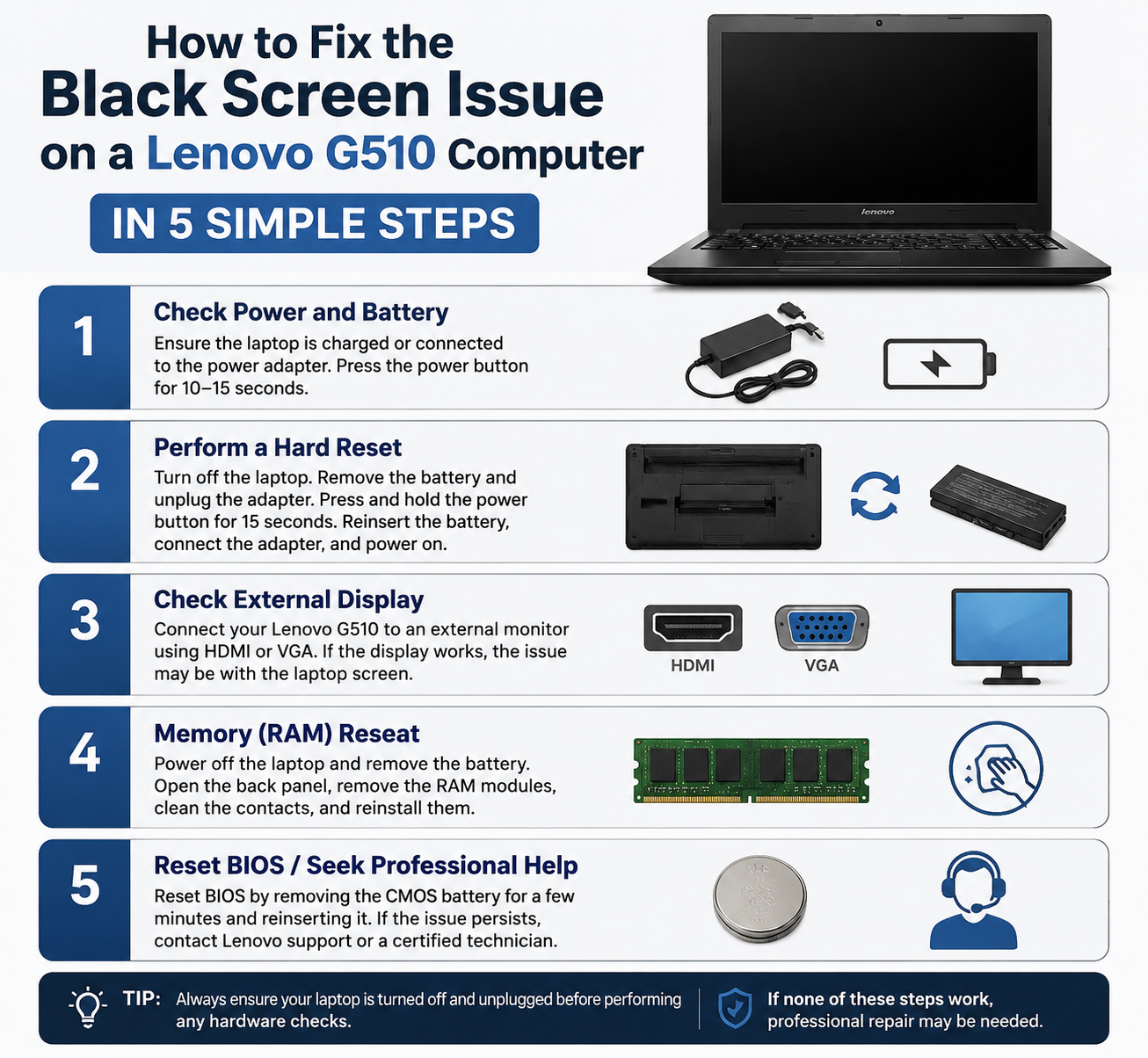
    Experiencing a black screen on your Lenovo G510 can be frustrating, especially if your computer powers on but displays nothing. This issue can be caused by software glitches, driver problems, or hardware failures. Fortunately, you can troubleshoot and fix the problem with these five simple steps.

    Step 1: Perform a Hard Reset

    A hard reset can resolve temporary hardware or power issues:

    1. Turn off your Lenovo G510 completely.
    2. Disconnect the power adapter and remove the battery.
    3. Press and hold the power button for 30–60 seconds to drain residual power.
    4. Reconnect the battery and power adapter, then turn on the laptop.

    This often clears minor power-related glitches that cause a black screen.

    Step 2: Check Display Brightness and External Monitors

    Sometimes the screen appears black simply due to brightness or output settings:

    1. Press Fn + F5/F6 (or the display function key) to adjust brightness.
    2. If you use an external monitor, ensure it is properly connected and powered on.
    3. Toggle display output with Fn + F4 to switch between laptop screen and external display.

    Step 3: Boot into Safe Mode

    If a driver or software issue is causing the black screen:

    1. Turn off your laptop.
    2. Turn it on and immediately start pressing F8 repeatedly until the Advanced Boot Options menu appears.
    3. Select Safe Mode and press Enter.

    In Safe Mode, you can update or roll back display drivers to resolve conflicts.

    Step 4: Reset or Update Graphics Drivers

    Outdated or corrupted graphics drivers often cause black screens:

    1. Open Device Manager (press Windows + X → Device Manager).
    2. Expand Display adapters and right-click your graphics card.
    3. Select Update driver or Uninstall device and restart. Windows will reinstall the driver automatically.

    Step 5: Check Hardware Connections

    If the black screen persists, it may be a hardware issue:

    1. Ensure the RAM and hard drive are securely connected.
    2. Disconnect and reconnect the LCD cable if comfortable opening the laptop.
    3. Test with a known-working external monitor to see if the issue is with the internal display.

    If these steps fail, the problem may require professional repair.

    Conclusion

    The black screen issue on a Lenovo G510 is usually fixable with simple troubleshooting. Start with a hard reset, check brightness and external displays, boot into Safe Mode, update graphics drivers, and verify hardware connections. Following these five steps resolves most common causes and can get your laptop back up and running.

    Share. Facebook Twitter Pinterest LinkedIn Tumblr Email

    Related Posts

    Gnome Pattern PDF: Crafting Enchantment

    How to Clean Your Computer Memory: A Step-by-Step Guide to Boost Performance

    What to Do When There is Insufficient Memory: A Guide to Freeing Up Space

    Leave A Reply Cancel Reply

    You must be logged in to post a comment.

    voopoopintch
    oxva xlim go lite
    sp2s sen x disposable vape
    • Popular
    • 3D Printer REVIEW
    • XIAOMI
    June 21, 2026

    iPlay LUMO 8K Review – A Compact Prefilled Pod Kit with Big Flavor and Everyday Convenience

    June 21, 2026

    iPlay HOOLA 150K Review – A Cloud-Chasing Giant with Music, Modes & Massive Longevity

    June 21, 2026

    Vaporesso VIBE SE 2 Review – Simple on the Outside, Surprisingly Smart on the Inside

    June 21, 2026

    VOOPOO DRAG H40 Pro Review – The Return of the Pocket Powerhouse

    December 26, 2025

    ACMER ASCARVA 4S: Precision CNC Power for Makers, DIYers & Small Workshops

    June 23, 2024

    ACMER P2 20W Laser Engraver Fixed Focus Engraving: Hands on Review

    May 30, 2024

    xTool F1 Ultra Review: World’s First 20W Fiber & 20W Diode Laser Engraver

    May 30, 2024

    Anycubic Kobra 3 Combo Review: The Multicolor Masterpiece?

    June 18, 2026

    Xiaomi’s first large-screen foldable flagship device, MIX Fold 5, has been Approved for Network Use

    June 17, 2026

    Xiaomi’s first large-screen foldable flagship device, MIX Fold 5, has been approved for network use: The first version features the self-developed chip by Xianji O3.

    June 12, 2026

    When will Redmi K40 be Released?

    June 10, 2026

    Xiaomi Hyper OS 3 Second Batch Beta Version Begins Recruitment: Covering Five Models Including Redmi K80 and Xiaomi MIX Flip2

    fc 26 coins
    New Arrivals
    • Olit Hookalit Nex 120K Disposable Vape Kit Olit Hookalit Nex 120K Disposable Vape Kit
    • Xiaomi 19 Xiaomi 19
    • Xiaomi 19 Pro Xiaomi 19 Pro
    • JNR Zpluse 42K+ Puffs Top-Fill Replaceable and Refillable Vape Kit JNR Zpluse 42K+ Puffs Top-Fill Replaceable and Refillable Vape Kit
    • Lost Vape Ursa Nano S 3 Pod System Kit Lost Vape Ursa Nano S 3 Pod System Kit
    • Honor Power 3 Honor Power 3
    • Redmi Note 17 Pro Plus Global Redmi Note 17 Pro Plus Global
    • Yocan Black Pocket Concentrate Vaporizer Yocan Black Pocket Concentrate Vaporizer
    • Loon Air Plus 6000 Disposable Loon Air Plus 6000 Disposable
    About
  • Igeekphone.com provides the first global tech news and reviews about smartphone, vapes, e-cigar, smart home, 3D printers, e-bike,tablets, RC drones, VR headset, and other accessories. It's the best platform to improve your brand and product.
  • Contact us: info@igeekphone.com
  • Check Our Privacy Policy Here.
  • Note: *Right now we have US editor and EU editors for review, especially for Amazon US and EU.
  • *Shop and Compare Price Here*
  • Facebook
  • Youtube
  • Mashable is a global, multi-platform media and entertainment company

    For more queries and news contact us on this

    Email: info@mashablepartners.com

  • OUR BEST VAPE PARTNERS
  • VAPE ONLINE STORE
  • HAYATI PRO MAX PLUS
  • VAPORESSO
  • VOOPOO
  • OXVA
  • NEXA
  • MASKKING
  • SP2S
  • IPLAY
  • TODOO
  • OTHER BEST PARTNERS
  • SVBONY
  • Chuwi
  • Blackview
  • Fossibot
  • Unihertz
  • Flsun
  • Anycubic
  • Xtool
  • Oukitel
  • Mukkpet Ebike
  • Ugreen
  • Copyright © 2026 igeekphone

    Type above and press Enter to search. Press Esc to cancel.