






Facebook Twitter Instagram
    Trending
    • Why Can’t My iPad Charge? 5 Common Reasons and Quick Solutions
    • Alldocube iPlay 80 Mini Ultra Review: A High-Performance Gaming Tablet in a Compact Form
    • MESWAO B3 Tablet PC Review: Power, Portability, and Productivity in One Device
    • GGIRC 823 UFO RC Quadcopter Review: A Fun and Creative Drone for All Ages
    • GGIRC G8 WiFi FPV RC Drone Review: A Cutting-Edge Drone Experience for Hobbyists and Enthusiasts
    • Lenovo ThinkPad T14s Gen 2 Flip Laptop Released: Highest-performance Core Ultra 7 366H Processor, 64GB RAM
    • Honor 600 Series phones have Officially Announced their Debut Featuring a 7x ultra-long Zoom Function
    • The Case for Apple’s iPhone 18 Pro series has been Revealed, and the Camera Module is Expected to be Further Enlarged.
    Facebook YouTube
    IGeeKphone China Phone, Tablet PC, VR, RC Drone News, Reviews
    • HOME
      • NEWS
        • DeepSeek
        • ChatGPT
        • Minecraft
    • Amazon
    • PHONE
      • Top Phones For Your First Choice
      • Phone Comparison
      • Xiaomi
      • Blackview
      • Doogee
      • Black Shark
      • Geekbuying
      • Banggood
      • TEMU
      • TikTok
      • Aliexpress
      • Walmart
      • MercadoLibre
      • Lazada
    • TOP VAPE Awards for 2026
    • VAPES
      • E-CIGAR Upcoming
      • Vape News
      • Vape Deals
      • Vape Comparison
      • Vape Guide
      • Giveaway
    • BEST VAPE
      • Best Vape Stores
      • Best Starter Vape Kits
      • Best Vapes for Beginners
      • Best Disposable Vapes
      • Best Pod Systems
      • Best Pod Mod Vapes
      • Best Mods
      • Best Nicotine Pouches
      • Best Clearomizers/Tanks
      • Best E-Liquid
      • Best EGO/Pens
      • Best Vapes for Nic Salt E-Juice
      • Best Vapes to Quit Smoking
      • RDA vs. RDTA vs. RTA
    • Best Vape Brand 2026
      • VAPORESSO
      • VOOPOO
      • OXVA
      • NEXA BAR
      • MASKKING VAPE
      • SP2S
      • IPLAY
      • TODOO
      • MRFOG
      • LOSTVAPE
      • VEIIK
    • REVIEW
      • E-cigar Review
      • Phones
      • Tablet PC
      • TV Box
      • RC Drone
      • Wearables
      • Camera
      • Accessories
      • VR Headset
    • MORE
      • TABLET
        • Chuwi
        • INNOCN
        • Teclast
        • Top Tablet for Your First Choice
        • Tablet/Laptop Comparison
      • RC DRONE
      • CAMERA
      • WEARABLES
        • OneOdio
        • BlitzWolf
        • Top Smartwatch for First Choice
      • 3D PRINTER
        • 3D Printer Review
        • Anycubic
        • FLSUN
        • Xtool
        • LONGER
        • Top 3D printer to Choose First
      • POWER STATION
        • Oukitel
        • FOSSIBOT
      • GAMING
        • Top Gaming Products
      • E-BIKE
        • Samebike
        • Happyrun
        • ENGWE
      • SMART HOME
      • TV BOX
      • ACCESSORIES
      • VR HEADSET
      • CLOTHES
      • AUTO CAR
    • DEAL
    • VAPE LAWS
    • Shop
    IGeeKphone China Phone, Tablet PC, VR, RC Drone News, Reviews
    You are at:Home»Guide»Why Can’t My iPad Charge? 5 Common Reasons and Quick Solutions
    Guide

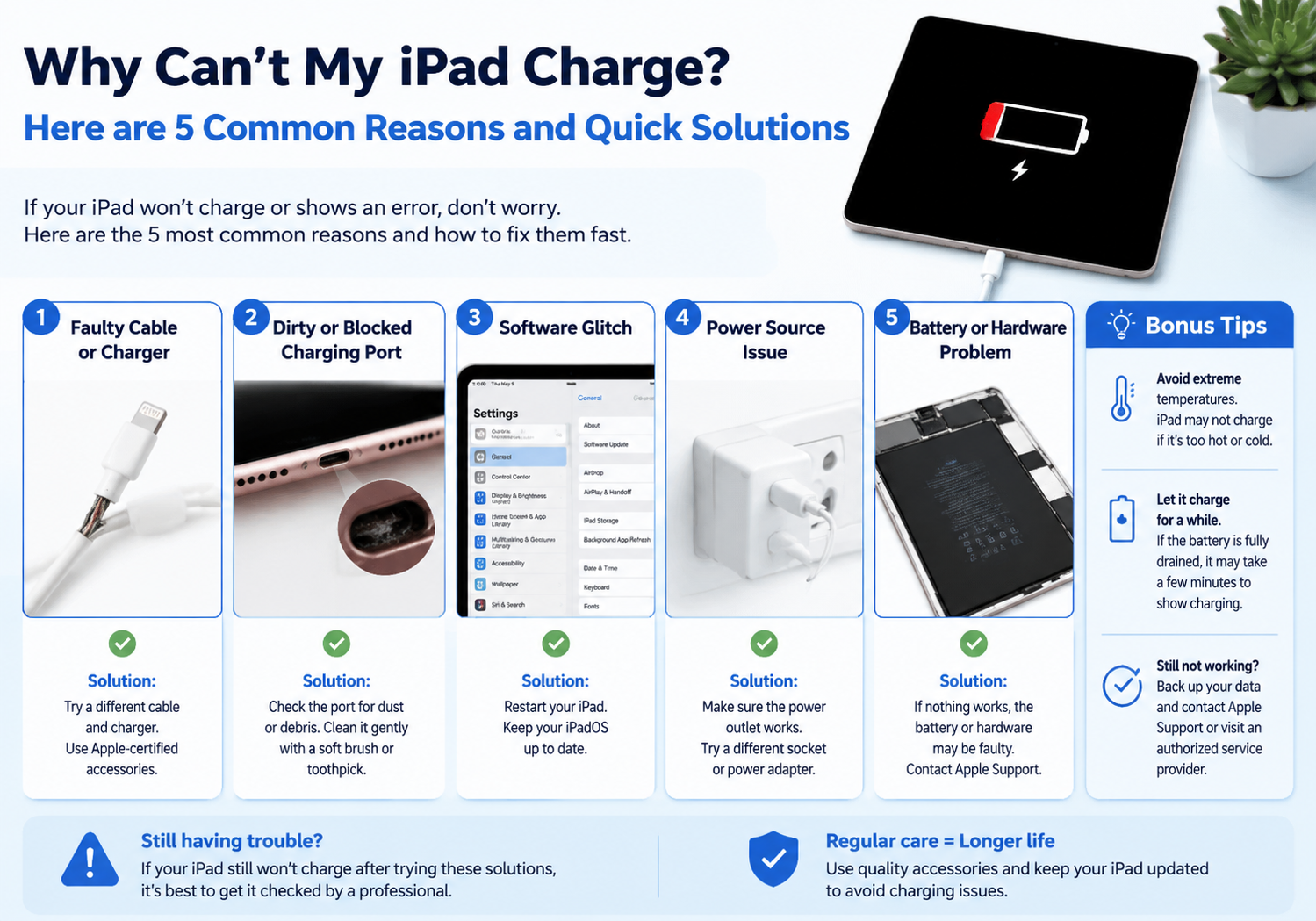
    Why Can’t My iPad Charge? 5 Common Reasons and Quick Solutions

    Brady CottonBy Brady CottonMay 18, 2026
    Facebook Twitter Pinterest LinkedIn Tumblr Email

    Few things are more frustrating than trying to charge your iPad, only to find it’s not responding. Charging issues can happen for a variety of reasons—some simple, others a bit more technical. Here’s a guide to the five most common causes of iPad charging problems and how to fix them quickly.

    1. Faulty or Damaged Charging Cable

    Why it happens: Over time, charging cables can fray, bend, or break internally, especially around the ends. Even minor damage can prevent proper power delivery.

    Quick fix:

    • Inspect your cable for visible damage or exposed wires.
    • Try using a different, certified Apple cable.
    • Avoid cheap or non-certified cables—they can be unreliable or even damage your iPad.

    2. Dirty or Obstructed Charging Port

    Why it happens: Dust, lint, or debris can accumulate inside the iPad’s charging port, blocking the connection and preventing charging.

    Quick fix:

    • Turn off your iPad before cleaning.
    • Use a soft brush, toothpick, or compressed air to gently remove debris.
    • Avoid using metal tools that could damage the connectors.

    3. Faulty Wall Adapter or Power Source

    Why it happens: Sometimes the problem isn’t the iPad but the charger or outlet. Wall adapters can fail, or USB ports on computers may not supply enough power.

    Quick fix:

    • Try a different wall adapter.
    • Plug your iPad into a different outlet or a direct wall socket rather than a power strip.
    • Avoid charging via a low-power USB port, as it may not provide enough current.

    4. Software Glitches or Battery Issues

    Why it happens: iPads occasionally experience software bugs that prevent proper charging, or the battery may have temporary issues.

    Quick fix:

    • Restart your iPad: Press and hold the power button and slide to power off. Then turn it back on.
    • Force restart: For newer models, quickly press Volume Up, then Volume Down, then hold the Power button until the Apple logo appears.
    • If the battery is very low, let it charge for at least 30 minutes before turning it on.

    5. Hardware or Battery Failure

    Why it happens: If your iPad has been exposed to liquid, extreme heat, or has aged significantly, internal hardware or battery components may fail.

    Quick fix:

    • If none of the previous solutions work, it may require professional repair.
    • Visit an Apple Store or authorized repair center to have the battery or charging port inspected.

    Quick Tips to Prevent Future Charging Problems

    • Always use certified Apple cables and adapters.
    • Keep the charging port clean and free of debris.
    • Avoid charging in extremely hot or cold conditions.
    • Disconnect the charger gently to prevent cable damage.

    Conclusion:
    Most iPad charging issues are caused by simple problems like faulty cables, dirty ports, or software glitches. By systematically checking each possibility, you can usually fix the problem quickly. However, persistent issues may indicate a hardware or battery failure that requires professional attention.

    Share. Facebook Twitter Pinterest LinkedIn Tumblr Email

    Related Posts

    What Should I Do If My Phone is Getting Slower and Laggy?

    Empowering Education: The Transformative Impact of K-12 Software Development

    New Fitness Bracelet Takes TikTok by Storm, Selling Out in Minutes

    Leave A Reply Cancel Reply

    You must be logged in to post a comment.

    voopoo drag 6
    oxva xlim 3 ultra
    sp2s sen x disposable vape
    • Popular
    • 3D Printer REVIEW
    • XIAOMI
    May 17, 2026

    iPlay Nova 45K Review – High Puff Performance with a Futuristic Twist

    May 17, 2026

    Vaporesso XROS 6 & XROS 6 Mini Review – The Evolution of Portable Vaping

    May 7, 2026

    OXVA Xlim Go Lite Review: Compact, Powerful, and Beginner-Friendly

    April 18, 2026

    VOOPOO DRAG 6 Hands on Review: Vape Beast with Smart Power & Premium Control

    December 26, 2025

    ACMER ASCARVA 4S: Precision CNC Power for Makers, DIYers & Small Workshops

    June 23, 2024

    ACMER P2 20W Laser Engraver Fixed Focus Engraving: Hands on Review

    May 30, 2024

    xTool F1 Ultra Review: World’s First 20W Fiber & 20W Diode Laser Engraver

    May 30, 2024

    Anycubic Kobra 3 Combo Review: The Multicolor Masterpiece?

    May 18, 2026

    Pre-release information for Xiaomi 17T series: Kirin chip + Leica photography

    May 18, 2026

    Details of Xiaomi 17 Air have Emerged: Snapdragon 8E5+200 million Pixels. The Ultra-thin Flagship Dream has Shattered

    May 17, 2026

    Xiaomi Speaker Pro 50W Speaker Review: Available on Banggood

    May 15, 2026

    Xiaomi 18 launched! Hyper OS 4 embraces liquid glass: The UI interface undergoes an epic upgrade

    fc 26 coins
    New Arrivals
    • Xiaomi 17 Max Xiaomi 17 Max
    • Geek Bar Burj 80K Disposable Vape Geek Bar Burj 80K Disposable Vape
    • Hellvape Vsee Neo Pod System Kit Hellvape Vsee Neo Pod System Kit
    • Lost Mary MT35000 Turbo Carnival Edition Disposable Vape Lost Mary MT35000 Turbo Carnival Edition Disposable Vape
    • RAZ Vue 70K Disposable Vape Kit RAZ Vue 70K Disposable Vape Kit
    • Remit Popmist 60K Nicotine Free Disposable Vape Remit Popmist 60K Nicotine Free Disposable Vape
    • Realme C100i Realme C100i
    • Dovpo Flipside Squonk Mod Dovpo Flipside Squonk Mod
    • OnePlus Nord CE6 Lite OnePlus Nord CE6 Lite
    About
  • Igeekphone.com provides the first global tech news and reviews about smartphone, vapes, e-cigar, smart home, 3D printers, e-bike,tablets, RC drones, VR headset, and other accessories. It's the best platform to improve your brand and product.
  • Contact us: info@igeekphone.com
  • Check Our Privacy Policy Here.
  • Note: *Right now we have US editor and EU editors for review, especially for Amazon US and EU.
  • *Shop and Compare Price Here*
  • Facebook
  • Youtube
  • OUR BEST VAPE PARTNERS
  • VAPE ONLINE STORE
  • HAYATI PRO MAX PLUS
  • VAPORESSO
  • VOOPOO
  • OXVA
  • NEXA
  • MASKKING
  • SP2S
  • IPLAY
  • TODOO
  • OTHER BEST PARTNERS
  • SVBONY
  • Chuwi
  • Blackview
  • Fossibot
  • Unihertz
  • Flsun
  • Anycubic
  • Xtool
  • Oukitel
  • Mukkpet Ebike
  • Ugreen
  • Copyright © 2026 igeekphone

    Type above and press Enter to search. Press Esc to cancel.