








Facebook Twitter Instagram
    Trending
    • Does Windows Keep Deleted Photos? Here’s What the Windows Thumbnail Cache Really Does
    • Huawei MatePad Mini 2 Rumored to Launch Before Year-End With 5G Support
    • Motorola’s First Wide-Screen Foldable Phone Leaked in Renders With 6.92-Inch Inner Display
    • Maskking CAMO vs UCEE MAX Review: Comparing Two High-Capacity Refillable Pod Systems
    • JNR PowerMate Pro 70K vs JNR Shisha Hookah 70K Review: Two Very Different 70K Vape Designs
    • Best OXVA Pod Systems in 2026: VPRIME 2, NeXLIM 2 and XLIM GO LITE
    • MAXRAY RUSH 80K vs VOOPOO NAVI x Cyph 80K Review: Two Very Different 80K Vapes
    • Vaporesso Armour G2 vs Armour Octa Review: Two Very Different Approaches to a Durable Vape
    Facebook YouTube
    IGeeKphone China Phone, Tablet PC, VR, RC Drone News, Reviews
    • HOME
    • BREAKING NEWS
      • AI NEWS
    • Amazon
    • PHONE
      • Top Phones For Your First Choice
      • Phone Comparison
      • Xiaomi
      • Blackview
      • Doogee
      • Black Shark
      • Geekbuying
      • Banggood
      • TEMU
      • TikTok
      • Aliexpress
      • Walmart
      • MercadoLibre
      • Lazada
    • TOP VAPE Awards for 2026
    • VAPES
      • E-CIGAR Upcoming
      • Vape News
      • Vape Deals
      • Vape Comparison
      • Vape Guide
      • VAPE LAWS
      • Giveaway
    • BEST VAPE
      • Best Vape Stores
      • Best Starter Vape Kits
      • Best Vapes for Beginners
      • Best Disposable Vapes
      • Best Pod Systems
      • Best Pod Mod Vapes
      • Best Mods
      • Best Nicotine Pouches
      • Best Clearomizers/Tanks
      • Best E-Liquid
      • Best EGO/Pens
      • Best Vapes for Nic Salt E-Juice
      • Best Vapes to Quit Smoking
      • RDA vs. RDTA vs. RTA
    • Best Vape Brand 2026
      • VAPORESSO
      • VOOPOO
      • OXVA
      • NEXA BAR
      • MASKKING VAPE
      • SP2S
      • IPLAY
      • TODOO
      • MRFOG
      • LOSTVAPE
      • VEIIK
    • REVIEW
      • E-cigar Review
      • Phones
      • Tablet PC
      • TV Box
      • RC Drone
      • Wearables
      • Camera
      • Accessories
      • VR Headset
    • MORE
      • TABLET
        • Chuwi
        • INNOCN
        • Teclast
        • Top Tablet for Your First Choice
        • Tablet/Laptop Comparison
      • RC DRONE
      • CAMERA
      • WEARABLES
        • OneOdio
        • BlitzWolf
        • Top Smartwatch for First Choice
      • 3D PRINTER
        • 3D Printer Review
        • Anycubic
        • FLSUN
        • Xtool
        • LONGER
        • Top 3D printer to Choose First
      • POWER STATION
        • Oukitel
        • FOSSIBOT
      • GAMING
        • Top Gaming Products
      • E-BIKE
        • Samebike
        • Happyrun
        • ENGWE
      • SMART HOME
      • TV BOX
      • ACCESSORIES
      • VR HEADSET
      • CLOTHES
      • AUTO CAR
    • DEAL
    • Shop
    IGeeKphone China Phone, Tablet PC, VR, RC Drone News, Reviews
    You are at:Home»NEWS»Does Windows Keep Deleted Photos? Here’s What the Windows Thumbnail Cache Really Does
    NEWS

    Does Windows Keep Deleted Photos? Here’s What the Windows Thumbnail Cache Really Does

    Brady CottonBy Brady CottonSeptember 29, 2026
    Facebook Twitter Pinterest LinkedIn Tumblr Email

    A recent social media post has sparked discussion over whether Windows secretly keeps thumbnails of deleted photos. The claim sounds alarming, but the underlying technology is much less mysterious than it first appears.

    Windows does maintain a thumbnail cache that can contain image previews after the original files have been deleted. However, that does not mean Windows automatically creates and permanently stores a thumbnail of every photo on your PC.

    The thumbnail cache is primarily a performance feature designed to make File Explorer load image previews faster.

    What Is the Windows Thumbnail Cache?

    When you browse folders containing images in Windows File Explorer, the operating system can generate small previews of those images instead of displaying generic file icons.

    To avoid rebuilding every preview whenever you reopen the same folder in Windows File Explorer, Windows stores thumbnail data in a local cache.

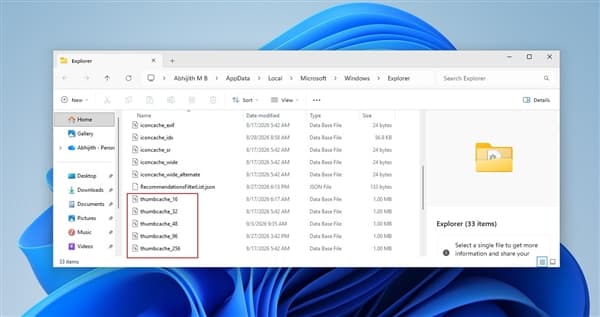
    You can find these database files by pressing Windows + R, entering:

    %LOCALAPPDATA%\Microsoft\Windows\Explorer

    and pressing Enter.

    Depending on the Windows version and configuration, you may see files such as:

    • thumbcache_32.db
    • thumbcache_96.db
    • thumbcache_256.db
    • thumbcache_1024.db

    The different database files correspond to thumbnail sizes used by Windows.
    Does Windows Cache Every Photo You Delete?

    This is where the viral claim becomes misleading.

    Simply creating, downloading or copying an image file does not necessarily cause Windows to create a thumbnail-cache entry.

    Microsoft developer Raymond Chen explained this behavior back in 2016. A thumbnail is generally generated when File Explorer or another application that uses the Windows thumbnail infrastructure actually requests one.

    In other words, if an image was never displayed in a thumbnail view, there may be no cached preview of it at all.

    This means the statement that every deleted photo remains inside Windows as a thumbnail is an exaggeration.

    Why Can a Thumbnail Remain After the Original Photo Is Deleted?

    When Windows needs to display an image preview, it can extract a thumbnail from the original file and store a copy in the thumbnail cache.

    That cached preview is separate from the original image.

    As a result, deleting the original photo does not necessarily cause Windows to immediately remove the corresponding cached thumbnail.

    This explains why a thumbnail database can potentially contain a preview associated with a file that no longer exists.

    However, the cached thumbnail is not the original photograph. It is a smaller preview generated for display purposes.

    The cache is also not permanent. Windows can remove or rebuild cached data as part of normal system maintenance and file browsing activity.

    Thumbnail Caching Is Optional for Applications

    Another important detail is that Windows does not force every application to cache every thumbnail.

    Microsoft’s thumbnail-related APIs include the WTS_EXTRACTDONOTCACHE flag, which allows an application to extract a thumbnail without adding it to the cache.

    This is another reason why it would be inaccurate to assume that every image viewed on a Windows computer must leave a thumbnail behind.

    The actual behavior depends on how the image is accessed and which application requests the preview.

    How to Clear the Windows Thumbnail Cache

    If you simply want to remove existing thumbnail cache files clearing Windows cache, Windows includes a built-in cleanup option.

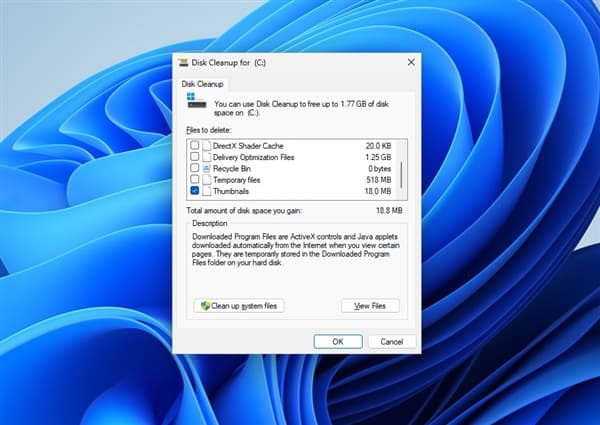
    Press Windows + R, type:

    cleanmgr

    and press Enter.

    Select the system drive, usually C:, and choose Thumbnails in Disk Cleanup.

    You can leave other categories unchecked if your only goal is to remove thumbnail data, then confirm the cleanup.

    Windows can automatically create new thumbnail cache entries again when you browse folders containing images.

    So clearing the cache is not a permanent way to prevent thumbnails from being generated.
    How to Stop Windows From Generating Thumbnail Previews

    Windows 11 Pro, Enterprise and Education users can use the Local Group Policy Editor to disable thumbnail caching.

    Press Windows + R, enter:

    gpedit.msc

    Then navigate to:

    User Configuration → Administrative Templates → Windows Components → File Explorer

    From there, users can enable the policy related to turning off thumbnail caching.

    The exact policy wording can vary slightly depending on the Windows version and policy configuration.

    What About Windows Home?

    Windows Home does not normally include the Local Group Policy Editor.

    However, users can disable thumbnail previews through File Explorer Windows 11 settings.

    Open File Explorer Options, switch to the View tab, and enable:

    Always show icons, never thumbnails

    This prevents Windows File Explorer from displaying image thumbnails in the usual way.

    Thumbnail Caches Are Not Unique to Windows

    Thumbnail caching is not an unusual Windows-only technology.

    Other operating systems and desktop environments also use cached image previews to improve browsing performance. Apple’s Quick Look, Linux desktop thumbnail-cache standards and Android’s thumbnail-related APIs all provide mechanisms for storing or generating image previews.

    The basic idea is the same: generating a preview from an original image can take additional processing time, so keeping a smaller cached version can make the interface feel faster.

    The Bottom Line: Windows Is Not Secretly Saving Every Deleted Photo

    The Windows thumbnail cache is real, and it can sometimes contain a small preview after the original image has been deleted.

    But that is very different from saying Windows secretly saves every deleted photo.

    A thumbnail is normally created because File Explorer or another compatible application requested an image preview. If the image was never processed for thumbnail display, there may be no cached entry. Even when a thumbnail exists, it is only a reduced preview rather than the original photograph, and cached data can be removed or rebuilt.

    For most users, the Windows thumbnail cache is simply a performance mechanism designed to make File Explorer display image previews more quickly—not a hidden backup of every photo stored on the computer.

    Share. Facebook Twitter Pinterest LinkedIn Tumblr Email

    Related Posts

    Huawei MatePad Mini 2 Rumored to Launch Before Year-End With 5G Support

    How Orlistat Works to Support Your Weight Loss Journey

    Honor Magic9 Pro Max Launches With ARRI Camera System and Dual 200MP Cameras

    Leave A Reply Cancel Reply

    You must be logged in to post a comment.

    voopoopintch
    oxva vprime 2
    nomadz
    • Popular
    • 3D Printer REVIEW
    • XIAOMI
    September 27, 2026

    Vaporesso ARMOUR OCTA Review – Built Like a Tank, Vapes Like a Beast

    September 27, 2026

    VOOPOO ARGUS Multi-Ohm Cartridge Review – One Magic Pod, Three Completely Different Vapes

    September 18, 2026

    OXVA VPRIME 2 vs VPRIME: What’s New in the Latest Version

    July 13, 2026

    OXVA Nexlim 2 Mini Pod Vape Hands on Review

    December 26, 2025

    ACMER ASCARVA 4S: Precision CNC Power for Makers, DIYers & Small Workshops

    June 23, 2024

    ACMER P2 20W Laser Engraver Fixed Focus Engraving: Hands on Review

    May 30, 2024

    xTool F1 Ultra Review: World’s First 20W Fiber & 20W Diode Laser Engraver

    May 30, 2024

    Anycubic Kobra 3 Combo Review: The Multicolor Masterpiece?

    September 23, 2026

    Xiaomi Pad 9 Pro Launches With 12.5-Inch 3.2K 144Hz Display and 11,000mAh Battery

    September 23, 2026

    Xiaomi 18 Pro Max Launches With Snapdragon 8 Elite Extreme Gen 6 and 8500mAh Battery

    September 23, 2026

    Xiaomi 18 Pro Launches With Snapdragon 8 Elite Gen 6 and Rear Display, Starts at 5,999 Yuan

    September 22, 2026

    REDMI Buds 8S Launches With 70% Better Noise Cancellation and 40-Hour Battery Life

    fc 26 coins
    New Arrivals
    • JNR PowerMate Pro JNR PowerMate Pro
    • MAXRAY RUSH 80K Disposable Vape MAXRAY RUSH 80K Disposable Vape
    • MERRYMI Blade 30000 Disposable Vape MERRYMI Blade 30000 Disposable Vape
    • Dip Devices Dipper Portable Vaporizer Dip Devices Dipper Portable Vaporizer
    • Exxus Vape Mini Plus Vaporizer Exxus Vape Mini Plus Vaporizer
    • JNR Lion King Shisha JNR Lion King Shisha
    • Fumot Eco 4-in-1 80K Disposable Vape Fumot Eco 4-in-1 80K Disposable Vape
    • MERRYMI Blade 30000 Disposable Vape MERRYMI Blade 30000 Disposable Vape
    • Bang Blaze 250K Disposable Vape Bang Blaze 250K Disposable Vape
    About
  • Igeekphone.com provides the first global tech news and reviews about smartphone, vapes, e-cigar, smart home, 3D printers, e-bike,tablets, RC drones, VR headset, and other accessories. It's the best platform to improve your brand and product.
  • Contact us: info@igeekphone.com
  • Check Our Privacy Policy Here.
  • Note: *Right now we have US editor and EU editors for review, especially for Amazon US and EU.
  • *Shop and Compare Price Here*
  • Facebook
  • Youtube
  • OUR BEST VAPE PARTNERS
  • VAPE ONLINE STORE
  • VAPORESSO
  • VOOPOO
  • OXVA
  • NEXA
  • MASKKING
  • SP2S
  • IPLAY
  • TODOO
  • OTHER BEST PARTNERS
  • SVBONY
  • Chuwi
  • Blackview
  • Fossibot
  • Unihertz
  • Flsun
  • Anycubic
  • Xtool
  • Oukitel
  • Mukkpet Ebike
  • Ugreen
  • Copyright © 2026 igeekphone

    Type above and press Enter to search. Press Esc to cancel.