











A recent social media post has sparked discussion over whether Windows secretly keeps thumbnails of deleted photos. The claim sounds alarming, but the underlying technology is much less mysterious than it first appears.
Windows does maintain a thumbnail cache that can contain image previews after the original files have been deleted. However, that does not mean Windows automatically creates and permanently stores a thumbnail of every photo on your PC.
The thumbnail cache is primarily a performance feature designed to make File Explorer load image previews faster.
What Is the Windows Thumbnail Cache?
When you browse folders containing images in Windows File Explorer, the operating system can generate small previews of those images instead of displaying generic file icons.
To avoid rebuilding every preview whenever you reopen the same folder in Windows File Explorer, Windows stores thumbnail data in a local cache.
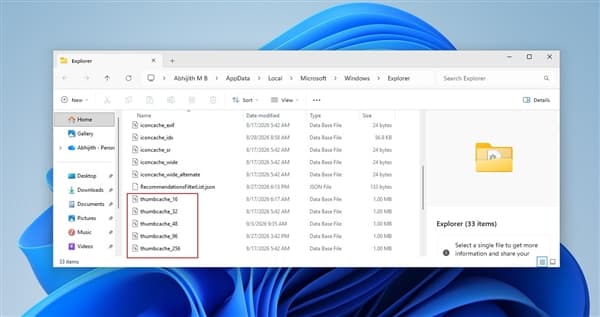
You can find these database files by pressing Windows + R, entering:
%LOCALAPPDATA%\Microsoft\Windows\Explorer
and pressing Enter.
Depending on the Windows version and configuration, you may see files such as:
thumbcache_32.dbthumbcache_96.dbthumbcache_256.dbthumbcache_1024.db
The different database files correspond to thumbnail sizes used by Windows.
Does Windows Cache Every Photo You Delete?
This is where the viral claim becomes misleading.
Simply creating, downloading or copying an image file does not necessarily cause Windows to create a thumbnail-cache entry.
Microsoft developer Raymond Chen explained this behavior back in 2016. A thumbnail is generally generated when File Explorer or another application that uses the Windows thumbnail infrastructure actually requests one.
In other words, if an image was never displayed in a thumbnail view, there may be no cached preview of it at all.
This means the statement that every deleted photo remains inside Windows as a thumbnail is an exaggeration.
Why Can a Thumbnail Remain After the Original Photo Is Deleted?
When Windows needs to display an image preview, it can extract a thumbnail from the original file and store a copy in the thumbnail cache.
That cached preview is separate from the original image.
As a result, deleting the original photo does not necessarily cause Windows to immediately remove the corresponding cached thumbnail.
This explains why a thumbnail database can potentially contain a preview associated with a file that no longer exists.
However, the cached thumbnail is not the original photograph. It is a smaller preview generated for display purposes.
The cache is also not permanent. Windows can remove or rebuild cached data as part of normal system maintenance and file browsing activity.
Thumbnail Caching Is Optional for Applications
Another important detail is that Windows does not force every application to cache every thumbnail.
Microsoft’s thumbnail-related APIs include the WTS_EXTRACTDONOTCACHE flag, which allows an application to extract a thumbnail without adding it to the cache.
This is another reason why it would be inaccurate to assume that every image viewed on a Windows computer must leave a thumbnail behind.
The actual behavior depends on how the image is accessed and which application requests the preview.
How to Clear the Windows Thumbnail Cache
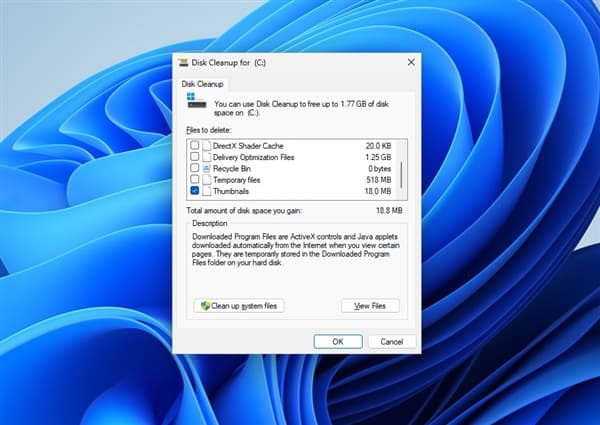
If you simply want to remove existing thumbnail cache files clearing Windows cache, Windows includes a built-in cleanup option.
Press Windows + R, type:
cleanmgr
and press Enter.
Select the system drive, usually C:, and choose Thumbnails in Disk Cleanup.
You can leave other categories unchecked if your only goal is to remove thumbnail data, then confirm the cleanup.
Windows can automatically create new thumbnail cache entries again when you browse folders containing images.
So clearing the cache is not a permanent way to prevent thumbnails from being generated.
How to Stop Windows From Generating Thumbnail Previews
Windows 11 Pro, Enterprise and Education users can use the Local Group Policy Editor to disable thumbnail caching.
Press Windows + R, enter:
gpedit.msc
Then navigate to:
User Configuration → Administrative Templates → Windows Components → File Explorer
From there, users can enable the policy related to turning off thumbnail caching.
The exact policy wording can vary slightly depending on the Windows version and policy configuration.
What About Windows Home?
Windows Home does not normally include the Local Group Policy Editor.
However, users can disable thumbnail previews through File Explorer Windows 11 settings.
Open File Explorer Options, switch to the View tab, and enable:
Always show icons, never thumbnails
This prevents Windows File Explorer from displaying image thumbnails in the usual way.
Thumbnail Caches Are Not Unique to Windows
Thumbnail caching is not an unusual Windows-only technology.
Other operating systems and desktop environments also use cached image previews to improve browsing performance. Apple’s Quick Look, Linux desktop thumbnail-cache standards and Android’s thumbnail-related APIs all provide mechanisms for storing or generating image previews.
The basic idea is the same: generating a preview from an original image can take additional processing time, so keeping a smaller cached version can make the interface feel faster.
The Bottom Line: Windows Is Not Secretly Saving Every Deleted Photo
The Windows thumbnail cache is real, and it can sometimes contain a small preview after the original image has been deleted.
But that is very different from saying Windows secretly saves every deleted photo.
A thumbnail is normally created because File Explorer or another compatible application requested an image preview. If the image was never processed for thumbnail display, there may be no cached entry. Even when a thumbnail exists, it is only a reduced preview rather than the original photograph, and cached data can be removed or rebuilt.
For most users, the Windows thumbnail cache is simply a performance mechanism designed to make File Explorer display image previews more quickly—not a hidden backup of every photo stored on the computer.