








Facebook Twitter Instagram
    Trending
    • Magic Data Recovery Review: Windows File Recovery After Deletion or Format
    • iPhone 20 Pro Leak Reveals Quad-Curved Display Design and Dynamic Island Cutout
    • Huawei MateBook Fold S Storage Options Revealed: Starts at 16GB RAM and 256GB, Up to 32GB and 1TB
    • AMD HRX Loom AI Tool Ports 50 Large Models to Radeon GPUs in Just Three Days, Boosting Performance by Up to 2.1x
    • Huawei Pura X View Sales Surpass 1 Million Units, Reportedly Attracting iPhone Users
    • NVIDIA Loses $573 Billion in Market Value as Jensen Huang Scandal Raises Stock Trading Questions
    • Seedance 2.5 Explained: ByteDance’s AI Video Generator and Key Features
    • MOSMO SULTAN 80K Disposable Vape: Specifications, Capacity and Design
    Facebook YouTube
    IGeeKphone China Phone, Tablet PC, VR, RC Drone News, Reviews
    • HOME
    • NEWS
      • AI NEWS
    • Black Friday
    • PHONE
      • Top Phones For Your First Choice
      • Phone Comparison
      • Xiaomi
      • Blackview
      • Doogee
      • Black Shark
      • Geekbuying
      • Banggood
      • TEMU
      • TikTok
      • Aliexpress
      • Walmart
      • Lazada
    • TOP VAPE Awards for 2026
    • VAPES
      • E-CIGAR Upcoming
      • Vape News
      • Vape Deals
      • Vape Comparison
      • Vape Guide
      • VAPE LAWS
      • Giveaway
    • BEST VAPE
      • Best Vape Stores
      • Best Starter Vape Kits
      • Best Vapes for Beginners
      • Best Disposable Vapes
      • Best Pod Systems
      • Best Pod Mod Vapes
      • Best Mods
      • Best Nicotine Pouches
      • Best Clearomizers/Tanks
      • Best E-Liquid
      • Best EGO/Pens
      • Best Vapes for Nic Salt E-Juice
      • Best Vapes to Quit Smoking
      • RDA vs. RDTA vs. RTA
    • Best Vape Brand 2026
      • VAPORESSO
      • VOOPOO
      • OXVA
      • NEXA BAR
      • MASKKING VAPE
      • SP2S
      • IPLAY
      • TODOO
      • MRFOG
      • LOSTVAPE
      • VEIIK
    • REVIEW
      • E-cigar Review
      • Phones
      • Tablet PC
      • TV Box
      • RC Drone
      • Wearables
      • Camera
      • Accessories
      • VR Headset
    • MORE
      • TABLET
        • Chuwi
        • INNOCN
        • Teclast
        • Top Tablet for Your First Choice
        • Tablet/Laptop Comparison
      • RC DRONE
      • CAMERA
      • WEARABLES
        • OneOdio
        • BlitzWolf
        • Top Smartwatch for First Choice
      • 3D PRINTER
        • 3D Printer Review
        • Anycubic
        • FLSUN
        • Xtool
        • LONGER
        • Top 3D printer to Choose First
      • POWER STATION
        • Oukitel
        • FOSSIBOT
      • GAMING
        • Top Gaming Products
      • E-BIKE
        • Samebike
        • Happyrun
        • ENGWE
      • SMART HOME
      • TV BOX
      • ACCESSORIES
      • VR HEADSET
      • CLOTHES
      • AUTO CAR
    • DEAL
    • Shop
    IGeeKphone China Phone, Tablet PC, VR, RC Drone News, Reviews
    You are at:Home»Guide»Magic Data Recovery Review: Windows File Recovery After Deletion or Format
    Guide

    Magic Data Recovery Review: Windows File Recovery After Deletion or Format

    Brady CottonBy Brady CottonNovember 16, 2026
    Facebook Twitter Pinterest LinkedIn Tumblr Email

    A USB drive gets formatted before its photos are backed up. A folder disappears after the Recycle Bin is emptied. In both cases, the first question is whether the files can still be opened. Magic Data Recovery is a Windows data recovery tool from Amagicsoft that scans internal and external storage for deleted or lost files, previews supported results, and saves selected files to a separate drive.

    The software is easy to try on a small recovery job because the free trial can save up to 500 MB. Its developer’s published exFAT USB test offers a more specific picture. All 47 recovered files opened after both deletion and quick formatting, although two filenames changed after the format.

    Magic Data Recovery Pros and Cons

    Pros Cons
    A guided workflow for scanning, previewing, and saving files The application runs on Windows
    Supports HDDs, SSDs, USB drives, and SD or microSD cards connected to a Windows PC Some file formats have no in-app preview
    Includes deep scanning and filters for finding specific files Recovery jobs above 500 MB require a paid license
    The trial lets users save and open sample files before buying Original names and folders can be harder to recover when file system records are damaged

    Features That Matter During Windows Data Recovery

    Magic Data Recovery begins with a quick scan, then continues with a deeper search. The initial pass is useful for recently deleted files. The deeper search is worth letting finish when a drive was quick-formatted or the first results leave out important files. Scan time varies with the storage device, so the size of the missing folder alone offers little guidance on how long the job will take.

    When results start to accumulate, the search box and filters make it easier to find a particular file. Searching for part of a filename or narrowing the list by extension, size, or date is more practical than scrolling through thousands of results. Amagicsoft’s documentation lists NTFS, FAT, and exFAT among the supported file systems, with recovery support for common formats such as DOCX, PDF, JPEG, MP4, and ZIP.

    A supported preview can help identify the right file. Exporting a sample and opening it in its usual application gives a better idea of what came back. For a spreadsheet, check the tabs and values. For a video, skip through several points and play the ending. Some formats that cannot be previewed in the app may still open after recovery.

    Data Recovery Test Results

    Amagicsoft, the developer of Magic Data Recovery, published results from a Windows 10 test using a 32 GB ThinkBook BU100 USB drive formatted as exFAT. The test set held 47 files totaling about 300 MB, including documents, images, and two videos. The lab used the full version of Magic Data Recovery 3.13.271, Build 151, and ran one full scan per scenario.

    Scenario Full-scan time Recovered files that opened Filename observations
    Ordinary file deletion 27 minutes 47 of 47 No filename issues reported
    exFAT quick format 32 minutes 47 of 47 One DOC and one MOV had altered filenames

    The lab reported that the original folders were restored in both scenarios. It checked document text, tables, and embedded images and played both videos from start to finish. The changed filenames after quick formatting show why it pays to verify names and folder paths separately from file contents, especially when those names identify projects or records.

    The lab used manual checks without published file hashes. Its results cover one run per scenario on exFAT USB storage. SSD deletion with TRIM, other file systems, and physically failing drives can produce different outcomes.

    How to Use Magic Data Recovery

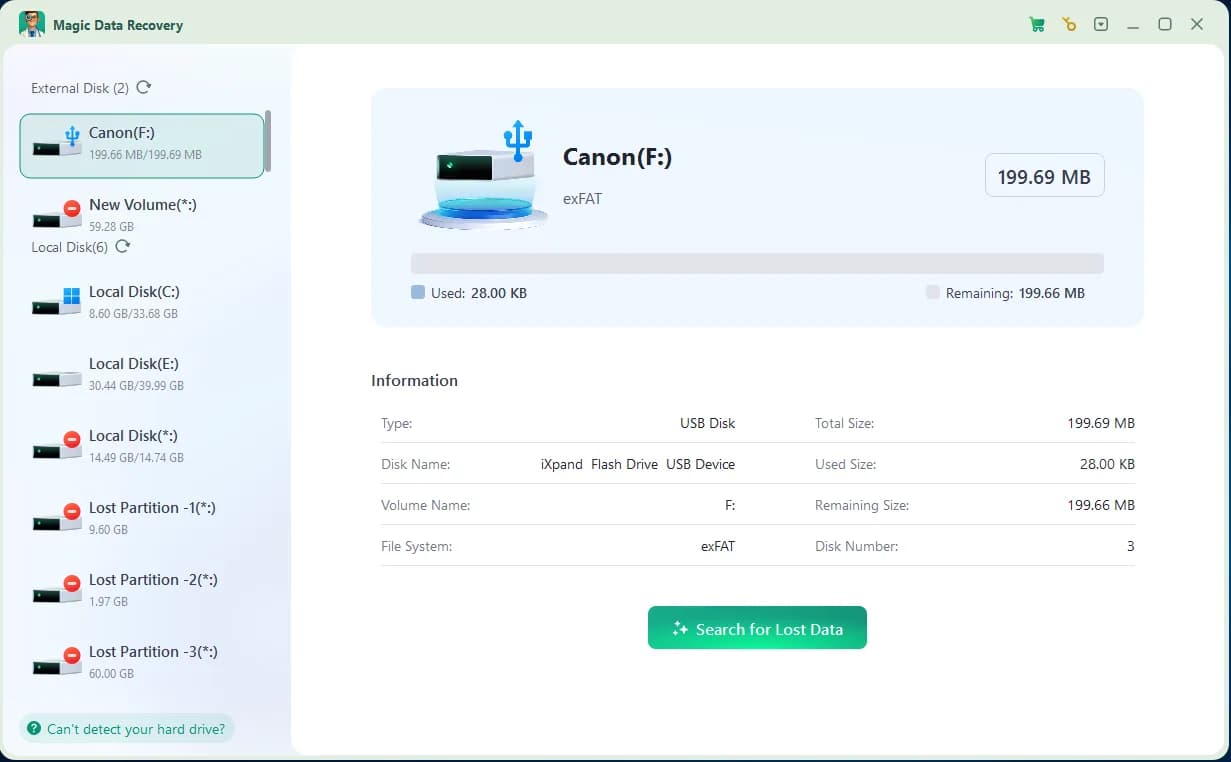
    1. Select the source drive.Install the software on a different physical drive from the one that held the missing files. Open the program and select the affected disk, partition, or removable device.
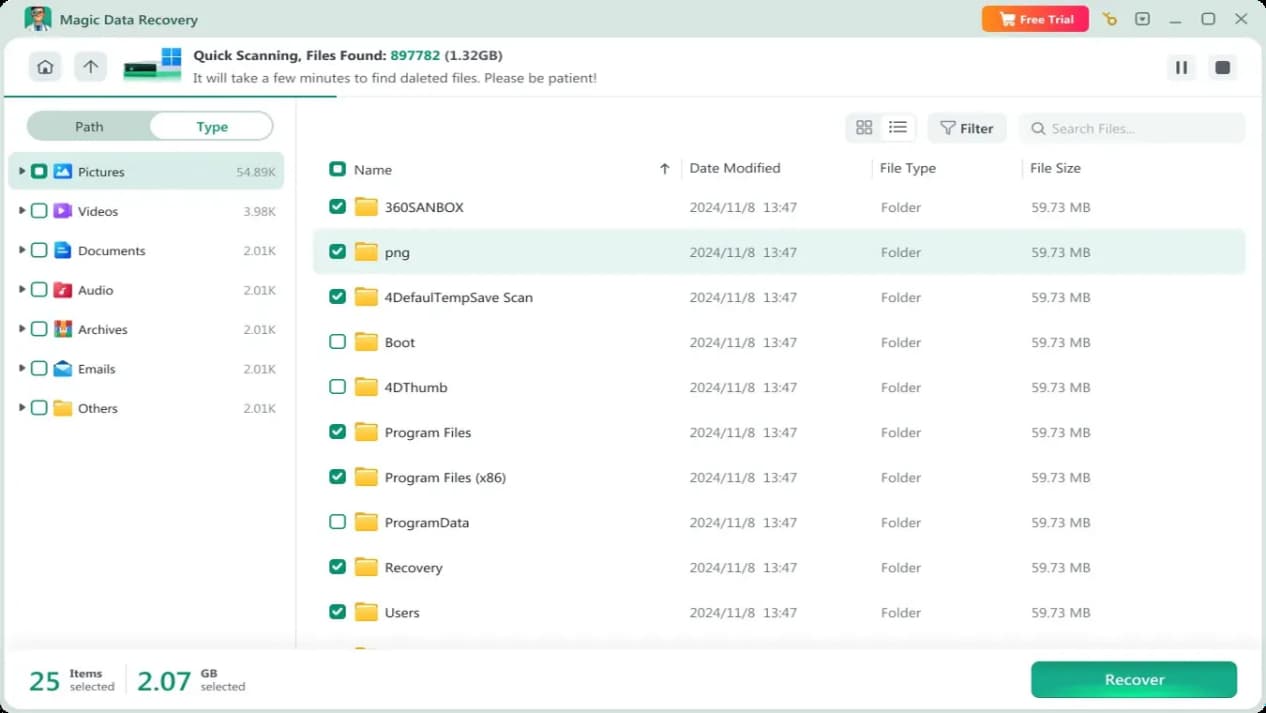
    2. Scan and inspect the results.Start the scan, then use search, filters, and previews to identify priority files. Give the deep scan time to finish if those files are missing from the early results.
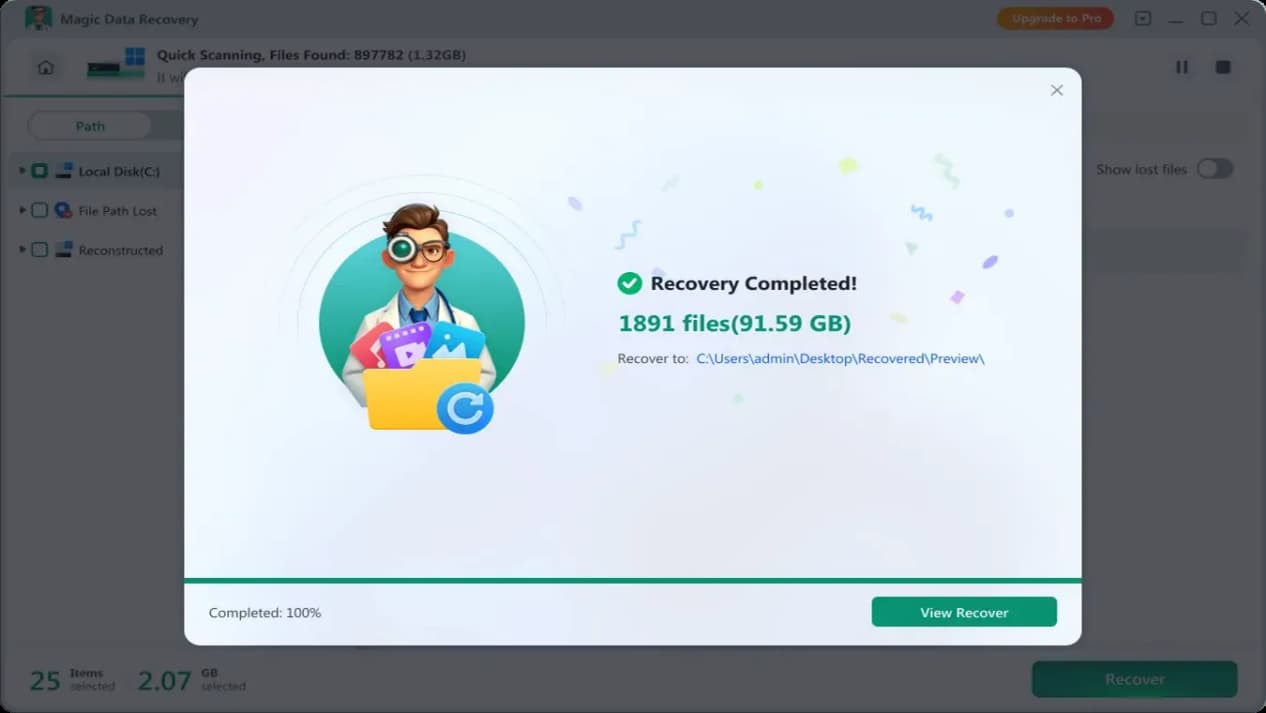
    3. Save and verify.Recover the selected files to a separate physical drive. Open the saved copies and check the content that matters before making changes to the source.
    If Windows asks to format a drive that still holds important data, cancel the prompt. If a hard drive clicks or repeatedly disconnects, stop scanning and consider a professional data recovery service.

    Free Trial and Pro Pricing

    Amagicsoft lists a 500 MB free recovery allowance, which includes scanning, supported previews, and saving files within that limit. It can cover a batch of documents or photos. For a larger job, use the allowance to test representative files before deciding whether to upgrade.

    The official store displayed the following US dollar prices. Both Pro options cover one computer and remove the recovery-size limit.

    Pro plan Displayed price Upgrade coverage
    One year $49.95 One year of upgrades
    Perpetual $69.95 Lifetime upgrades

    Final Verdict

    Magic Data Recovery is worth trying when the storage device is stable, Windows still detects it, and the files disappeared after deletion or a quick format. The guided scan is easy to follow, and the 500 MB trial gives users room to save and check the files that matter most. For larger jobs, especially after formatting, use that allowance to verify a few important files and check how well the scan preserves their names and folders before buying Pro.

    Share. Facebook Twitter Pinterest LinkedIn Tumblr Email

    Related Posts

    Shedding Light on Wellness: A Comprehensive Review of the Bestqool Pro200 Red Light Therapy Device

    iPhone 17 Find My Guide: How to Track, Locate, and Recover Your Lost Phone

    The Bridge to Decentralized Abundance: Crypto Bridges and the Future of Cross-Chain Collaboration

    Leave A Reply Cancel Reply

    You must be logged in to post a comment.

    voopoomagic
    oxva vprime 2
    • Popular
    • 3D Printer REVIEW
    • XIAOMI
    October 24, 2026

    OXVA Vprime 2 Unboxing Review: Performance, Test, Battery

    October 13, 2026

    OXVA XLIM 4 Vape Hands on Review: Pocket Luxury, Serious Stamina

    October 11, 2026

    MAXRAY RUSH 80K Review – More Than Just a Puff Count: Meet the Disposable That Controls Its Own E-Liquid

    October 1, 2026

    VOOPOO ARGUS Z3 Review – Flip the Pod, Change the Vape! Keep It Simple!

    December 26, 2025

    ACMER ASCARVA 4S: Precision CNC Power for Makers, DIYers & Small Workshops

    June 23, 2024

    ACMER P2 20W Laser Engraver Fixed Focus Engraving: Hands on Review

    May 30, 2024

    xTool F1 Ultra Review: World’s First 20W Fiber & 20W Diode Laser Engraver

    May 30, 2024

    Anycubic Kobra 3 Combo Review: The Multicolor Masterpiece?

    November 13, 2026

    Xiaomi’s New Smartphone Passes 3C Certification With 67W Charging, Likely Part of the REDMI Note 18 Series

    November 12, 2026

    Xiaomi 18 Reportedly Set for December Launch With 2nm Snapdragon 8E6 and Dual 200MP Leica Cameras

    November 5, 2026

    Xiaomi’s New Smartphones Pass SRRC Certification Ahead of Early 2027 Launch

    November 4, 2026

    Xiaomi Smart Door Lock 5 Launches with Quieter Automatic Lock Body and Emergency Unlock Button

    fc 26 coins
    New Arrivals
    • SMOK Arco S2 Pod System Kit SMOK Arco S2 Pod System Kit
    • Fumot Throne 70k Shisha Disposable Vape Fumot Throne 70k Shisha Disposable Vape
    • FUMI X Cloud Nurdz 55K Zero Nicotine Disposable Vape FUMI X Cloud Nurdz 55K Zero Nicotine Disposable Vape
    • SP2S MATCH Vape SP2S MATCH Vape
    • Off-Stamp X-CUBE PRO 35K Disposable Vape Kit Off-Stamp X-CUBE PRO 35K Disposable Vape Kit
    • IPLAY DUAL 2-in-1 100K Disposable Vape IPLAY DUAL 2-in-1 100K Disposable Vape
    • YOVO JB 50K Disposable Pod YOVO JB 50K Disposable Pod
    • Motorola Signature 27 Motorola Signature 27
    • OnePlus 16 OnePlus 16
    About
  • Igeekphone.com provides the first global tech news and reviews about smartphone, vapes, e-cigar, smart home, 3D printers, e-bike,tablets, RC drones, VR headset, and other accessories. It's the best platform to improve your brand and product.
  • Contact us: info@igeekphone.com
  • Check Our Privacy Policy Here.
  • Note: *Right now we have US editor and EU editors for review, especially for Amazon US and EU.
  • *Shop and Compare Price Here*
  • Facebook
  • Youtube
  • OUR BEST VAPE PARTNERS
  • VAPE ONLINE STORE
  • VAPORESSO
  • VOOPOO
  • OXVA
  • NEXA
  • MASKKING
  • SP2S
  • IPLAY
  • TODOO
  • OTHER BEST PARTNERS
  • SVBONY
  • Chuwi
  • Blackview
  • Fossibot
  • Unihertz
  • Flsun
  • Anycubic
  • Xtool
  • Oukitel
  • Mukkpet Ebike
  • Ugreen
  • Copyright © 2026 igeekphone

    Type above and press Enter to search. Press Esc to cancel.