











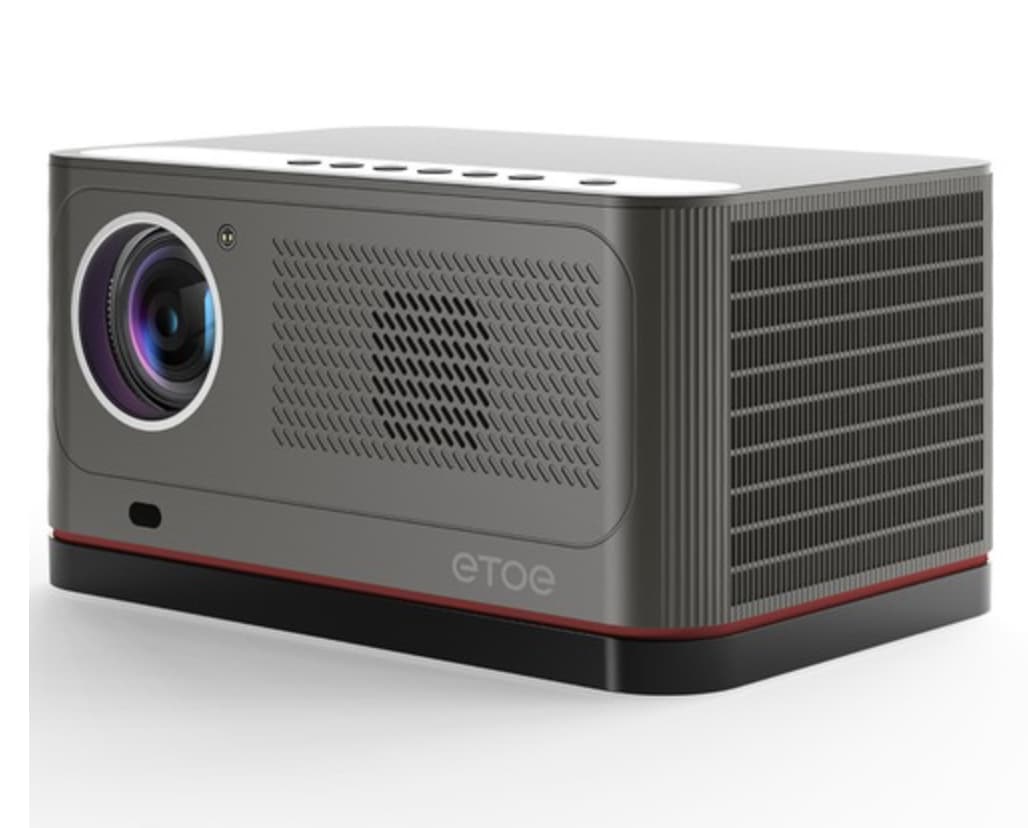
Building a home cinema does not necessarily require a large television, a complicated installation, or a collection of separate streaming devices. A smart projector with built-in entertainment software and a dedicated projection screen can provide a simpler alternative, particularly for bedrooms, apartments, and smaller living spaces.
The ETOE Whale Pro 1800 ANSI Projector with a 50-inch Projection Screen takes this all-in-one approach. Instead of selling the projector as an isolated device, this Geekbuying package combines a Full HD smart projector with a matching screen, giving buyers the essential components for creating a dedicated viewing area.
The Whale Pro offers native 1920 × 1080 resolution, 1800 ANSI lumens of brightness, Android TV 14.0, automatic focus, and automatic keystone correction. It also includes two 10W speakers, dual-band Wi-Fi, and support for 4K video decoding.
What makes this particular package interesting is its combination of smart entertainment features and a relatively compact 50-inch screen. It targets people who want a straightforward movie-watching setup without immediately investing in a large projection system.
For another example of a streaming-focused home entertainment device, readers can also explore the BlitzWolf BW-V9 Ultra smart projector, which combines native 1080P projection with Netflix certification and automatic image adjustment.
A 50-Inch Screen Changes the Way You Approach a Home Projector
One detail that deserves more attention than it usually receives in projector listings is the included screen.
Many entry-level projector buyers concentrate on brightness and resolution but overlook the importance of the projection surface. A wall may appear convenient, but its color, texture, and imperfections can affect the final image.
The ETOE Whale Pro package includes a 50-inch projection screen, allowing users to establish a dedicated viewing area without searching for a compatible screen separately.
This smaller format has several practical advantages.
For bedroom entertainment, a 50-inch image can provide a comfortable viewing experience without dominating the room. It also makes sense for apartment residents who cannot permanently install a large screen or dedicate an entire wall to home cinema equipment.
The included screen is also useful for people experimenting with projection for the first time. Rather than beginning with a complicated ceiling-mounted installation, they can start with a more manageable setup and adjust their viewing arrangement later.
The Whale Pro itself supports projection sizes from 45 to 120 inches, so the included 50-inch screen does not represent the projector’s maximum capability. Users can explore larger image sizes when they have sufficient wall space and a suitable projection distance.
1800 ANSI Lumens and Native 1080P: Understanding the Picture Quality
The ETOE Whale Pro uses an LCD projection system with a native resolution of 1920 × 1080 pixels.
This is an important distinction because the product also advertises 4K decoding. The projector can process compatible 4K video content, but its physical display resolution remains Full HD rather than native 4K.
For everyday entertainment, native 1080P is still a practical resolution. Movies, television programs, online videos, and sports broadcasts can look detailed on a 50-inch screen when the projector is correctly positioned and focused.
The advertised brightness is 1800 ANSI lumens, which helps the projector maintain a visible image in dim indoor environments.
However, brightness expectations should be realistic. A projector cannot reproduce the same perceived brightness and contrast as a modern television in direct sunlight. The best results will come from a room with controlled lighting, especially when watching movies with darker scenes.
The listed contrast ratio is 3000:1, while HDR10 decoding is also supported. These features help the projector handle compatible video content, although actual contrast performance will depend on the room and projection surface.
For users who mainly watch movies at night, stream television shows, or enjoy weekend sports broadcasts, the combination of Full HD resolution and 1800 ANSI lumens offers a sensible starting point.
Android TV 14.0 Means Fewer External Devices
A major reason to consider the Whale Pro over a basic projector is its built-in smart entertainment system.
The device runs Android TV 14.0 and comes with Netflix certification, allowing users to access supported streaming applications directly through the projector.
The advertised ecosystem includes popular services such as:
- Netflix
- YouTube
- Prime Video
- Disney+
- HBO and other supported streaming services
The projector also provides access to Google Play and supports Google Assistant voice interaction.
This reduces the need to connect a separate Android TV box or streaming stick for ordinary entertainment.
Its internal hardware includes an Amlogic 905 processor, G31MP2 graphics, 2GB of RAM, and 16GB of storage.
The memory configuration is suitable for a dedicated streaming device, although users should not expect the multitasking performance of a modern television or premium streaming box.
The built-in Chromecast feature provides another convenient option for casting supported content from compatible devices.
For people who frequently switch between streaming services, having the entertainment interface integrated into the projector makes the overall setup considerably simpler.
Automatic Focus and Keystone Correction Solve Two Common Setup Problems
Projector installation can be frustrating when the image appears blurry or distorted.
The Whale Pro addresses these two common problems with automatic focus and automatic keystone correction.
Automatic focus
The autofocus system adjusts the lens to produce a clearer image without requiring users to repeatedly turn a manual focusing wheel.
This is especially convenient when moving the projector between rooms or changing its position.
Automatic keystone correction
The projector also supports automatic keystone correction of up to ±40 degrees, helping correct image distortion when the device is not perfectly aligned with the projection surface.
Additional digital and four-point keystone adjustment options provide further control over image geometry.
The device also supports digital zoom from 50% to 100%, allowing users to adjust the projected image size without physically moving the projector.
These features are particularly useful in bedrooms and apartments, where the available placement position may be limited by furniture, shelves, or room layout.
One consideration is that digital zoom and keystone correction can reduce the effective image area or resolution. For the cleanest picture, positioning the projector as close as possible to the correct alignment remains preferable.
20W Stereo Speakers: Can You Skip an External Sound System?
Audio is another area where the ETOE Whale Pro tries to provide a complete entertainment experience.
The projector incorporates two 10W speakers, delivering a combined rated output of 20W. Dolby Audio certification and customizable sound modes are also advertised.
Users can choose from different audio profiles, including:
- Standard mode for everyday television programs.
- Movie mode for cinematic content.
- Music mode for music playback.
- Personal mode for customized sound preferences.
For a bedroom or smaller entertainment room, integrated speakers offer a practical advantage. There is no immediate need to purchase a soundbar or connect an external speaker system.
The projector also supports Bluetooth 5.1, providing another way to connect compatible audio devices.
However, anyone building a more serious home theater should consider an external sound system. Dedicated speakers can provide better stereo separation, stronger bass, and a more immersive soundstage than the compact speakers inside a projector.
The Whale Pro’s built-in audio is best viewed as a convenient starting point rather than a replacement for a dedicated home theater system.
Another option in the Full HD category is the WUPRO Cinema G2 Full HD 1080P smart projector, which offers a different combination of smart entertainment features and home cinema functionality.
Dual-Band Wi-Fi and Multiple Connections for Everyday Entertainment
A smart projector needs a reliable network connection, particularly when streaming Full HD content.
The ETOE Whale Pro supports both 2.4GHz and 5GHz Wi-Fi networks.
The 2.4GHz band generally offers broader coverage, while 5GHz can provide higher wireless speeds when the router and signal conditions are suitable.
For users who prefer wired connections, the projector includes:
- 1 × HDMI port
- 1 × USB port
- 1 × 3.5mm AUX audio port
- 1 × DC power input
The HDMI connection is useful for connecting gaming consoles, laptops, TV boxes, and other external video sources.
The USB port provides another way to access compatible media files and peripherals.
Wireless screen mirroring is also supported through Chromecast and AirPlay-compatible workflows, making it easier to share content from supported smartphones and computers.
For gaming, HDMI is the recommended connection because it avoids the additional uncertainty associated with wireless screen transmission. However, the manufacturer does not provide a confirmed input-lag figure in the product specifications, so competitive gamers should not assume it offers the responsiveness of a dedicated gaming display.
A Sealed Optical Engine Designed to Reduce Dust Problems
Dust accumulation is a common maintenance concern with LCD projectors.
Over time, dust entering the optical system can affect image quality and potentially produce unwanted spots or discoloration.
ETOE equips the Whale Pro with a fully sealed optical engine designed to keep dust and debris away from important internal components.
The manufacturer also advertises a light-source lifespan of up to 30,000 hours in Standard Mode.
This is a useful feature for households that expect to use the projector regularly rather than occasionally.
A sealed optical system can reduce maintenance associated with internal dust contamination, although it does not mean the entire projector is maintenance-free. External ventilation openings and air circulation should still be kept clear.
Where Does the ETOE Whale Pro Fit Best?
The Whale Pro’s specifications make it suitable for several everyday scenarios, but its real appeal depends on how and where it will be used.
Bedroom cinema
The included 50-inch screen offers a convenient starting point for creating a dedicated movie-watching area. Built-in Android TV also eliminates the need for an additional streaming device.
Apartment entertainment
People living in smaller apartments may appreciate the flexibility of a projector that can produce an image larger than its included screen when the room allows it.
Family streaming
With Netflix certification, YouTube access, Google Assistant, and integrated speakers, the Whale Pro can serve as a shared entertainment device for family members.
Casual gaming
The HDMI connection allows users to connect a console or computer. Its Full HD resolution is suitable for ordinary gaming, although dedicated gaming projectors may offer more advanced responsiveness features.
Outdoor movie nights
The projector can also be used for occasional backyard movie sessions when connected to an appropriate power supply. A suitable projection surface and controlled ambient lighting are important for achieving a good image.
ETOE Whale Pro vs. Buying a Projector Without a Screen
The included screen is arguably the most practical difference between this Geekbuying package and purchasing a projector alone.
| Consideration | Whale Pro Bundle | Projector-Only Purchase |
|---|---|---|
| Projector | Included | Included |
| Projection screen | 50-inch screen included | Usually purchased separately |
| Initial setup | More straightforward | Requires a suitable wall or screen |
| Image positioning | Dedicated viewing surface | Depends on available surface |
| Additional shopping | Fewer essential items to source | May require additional accessories |
| Flexibility | Projector supports up to 120 inches | Depends on the selected model |
For someone who already owns a quality projection screen, a projector-only deal may offer better value.
However, first-time buyers who want a more complete package may appreciate having the screen included from the beginning.
ETOE Whale Pro 1800 ANSI Projector Specifications
| Specification | Details |
|---|---|
| Brand | ETOE |
| Model | Whale Pro |
| Projection technology | LCD |
| Light source | LED |
| Brightness | 1800 ANSI lumens |
| Native resolution | 1920 × 1080 |
| Video decoding | Up to 4K |
| Contrast ratio | 3000:1 |
| HDR | HDR10 decoding |
| Operating system | Android TV 14.0 |
| Processor | Amlogic 905 |
| GPU | G31MP2 |
| Memory | 2GB RAM + 16GB storage |
| Projection size | 45–120 inches |
| Throw ratio | 1.23:1 |
| Projection distance | 1.2–3.3m |
| Focus | Automatic and digital |
| Keystone correction | ±40° automatic |
| Digital zoom | 50%–100% |
| Speakers | 2 × 10W |
| Audio | Dolby Audio |
| Wi-Fi | 2.4GHz / 5GHz |
| Bluetooth | 5.1 |
| Screen mirroring | Chromecast / AirPlay |
| Interfaces | HDMI, USB, AUX, DC input |
| Optical engine | Fully sealed |
| Rated light-source lifespan | Up to 30,000 hours |
| Projector weight | Approximately 3.67kg |
| Included screen | 50 inches |
What Is Included in the Package?
The Geekbuying bundle contains:
- 1 × ETOE Whale Pro projector
- 1 × 50-inch projection screen
- 1 × Power adapter
- 1 × Power cable
- 1 × Remote control
- 1 × User manual
The screen is the key package addition, making this version more suitable for buyers who do not already have a dedicated projection surface.
Final Verdict: Is the ETOE Whale Pro 1800 ANSI Worth Considering?
ETOE Whale Pro is not trying to compete with expensive native 4K home theater projectors. Instead, it focuses on making everyday projection entertainment easier to access.
Its strongest combination is native 1080P resolution, 1800 ANSI lumens, Android TV 14.0, automatic image adjustment, and integrated 20W stereo speakers.
The included 50-inch projection screen adds another layer of convenience, especially for buyers who want to start watching movies without spending additional time selecting compatible accessories.
There are some limitations worth understanding. The projector does not offer native 4K resolution, its integrated speakers are not a substitute for a dedicated surround-sound system, and its advertised brightness is best enjoyed in controlled lighting.
Nevertheless, for bedroom cinema, family streaming, and casual home entertainment, the ETOE Whale Pro offers a practical feature set.
The Geekbuying 50-inch bundle is particularly worth considering if you are buying your first home projector and want the screen included rather than treating it as a separate purchase.