




Facebook Twitter Instagram
    Trending
    • Glas stated that the G2 Vape device, which has received FDA approval, is equipped with an age verification technology.
    • Oxbar Maglink 75K Disposable Pod Review: The Ultimate Convenience for Vapers
    • What is the best choice: hiring an in-house developer or outsourcing?
    • VOOPOO Argus Rise Pod System Kit Review: The Ultimate Vaping Experience
    • How to Reset the Pairing of iPhone 17 Pro Max Headphones?
    • What is a crypto stamp and what are its special features?
    • Mspy App offers a comprehensive and essential suite of parental control utilities
    • Useful Amazing Benefits of Playing Online casinos
    Facebook YouTube
    IGeeKphone China Phone, Tablet PC, VR, RC Drone News, Reviews
    • HOME
      • NEWS
        • DeepSeek
        • ChatGPT
        • Minecraft
    • Amazon
    • PHONE
      • Top Phones For Your First Choice
      • Phone Comparison
      • Xiaomi
      • Blackview
      • Doogee
      • Black Shark
      • Geekbuying
      • Banggood
      • TEMU
      • TikTok
      • Aliexpress
      • Walmart
      • MercadoLibre
      • Lazada
    • TOP VAPE Awards for 2026
    • VAPES
      • E-CIGAR Upcoming
      • Vape News
      • Vape Deals
      • Vape Comparison
      • Vape Guide
      • Giveaway
    • BEST VAPE
      • Best Vape Stores
      • Best Starter Vape Kits
      • Best Vapes for Beginners
      • Best Disposable Vapes
      • Best Pod Systems
      • Best Pod Mod Vapes
      • Best Mods
      • Best Nicotine Pouches
      • Best Clearomizers/Tanks
      • Best E-Liquid
      • Best EGO/Pens
      • Best Vapes for Nic Salt E-Juice
      • Best Vapes to Quit Smoking
      • RDA vs. RDTA vs. RTA
    • Best Vape Brand 2026
      • VAPORESSO
      • VOOPOO
      • OXVA
      • NEXA BAR
      • ORIONBARTECH
      • MASKKING VAPE
      • MEMERS
      • SP2S
      • TODOO
      • MRFOG
      • VEIIK
    • REVIEW
      • E-cigar Review
      • Phones
      • Tablet PC
      • TV Box
      • RC Drone
      • Wearables
      • Camera
      • Accessories
      • VR Headset
    • MORE
      • TABLET
        • Chuwi
        • INNOCN
        • Teclast
        • Top Tablet for Your First Choice
        • Tablet/Laptop Comparison
      • RC DRONE
      • CAMERA
      • WEARABLES
        • OneOdio
        • BlitzWolf
        • Top Smartwatch for First Choice
      • 3D PRINTER
        • 3D Printer Review
        • Anycubic
        • FLSUN
        • Xtool
        • LONGER
        • Top 3D printer to Choose First
      • POWER STATION
        • Oukitel
        • FOSSIBOT
      • GAMING
        • Top Gaming Products
      • E-BIKE
        • Samebike
        • Happyrun
        • ENGWE
      • SMART HOME
      • TV BOX
      • ACCESSORIES
      • VR HEADSET
      • CLOTHES
      • AUTO CAR
    • DEAL
    • VAPE LAWS
    • Shop
    IGeeKphone China Phone, Tablet PC, VR, RC Drone News, Reviews
    You are at:Home»GAMING»How to Get Rid of Personal Information Leaks on Different Devices Using iTop VPN?
    GAMING

    How to Get Rid of Personal Information Leaks on Different Devices Using iTop VPN?

    Brady CottonBy Brady CottonMay 16, 2023
    Facebook Twitter Pinterest LinkedIn Tumblr Email

    In today’s digital age, personal information leaks have become a major concern for many individuals. With the increasing number of cyber threats and data breaches, it’s essential to take proactive measures to safeguard your privacy online. One of the most effective ways to protect your personal information is by using a VPN (Virtual Private Network). In this article, we will discuss how to get rid of personal information leaks on different devices using iTop VPN.
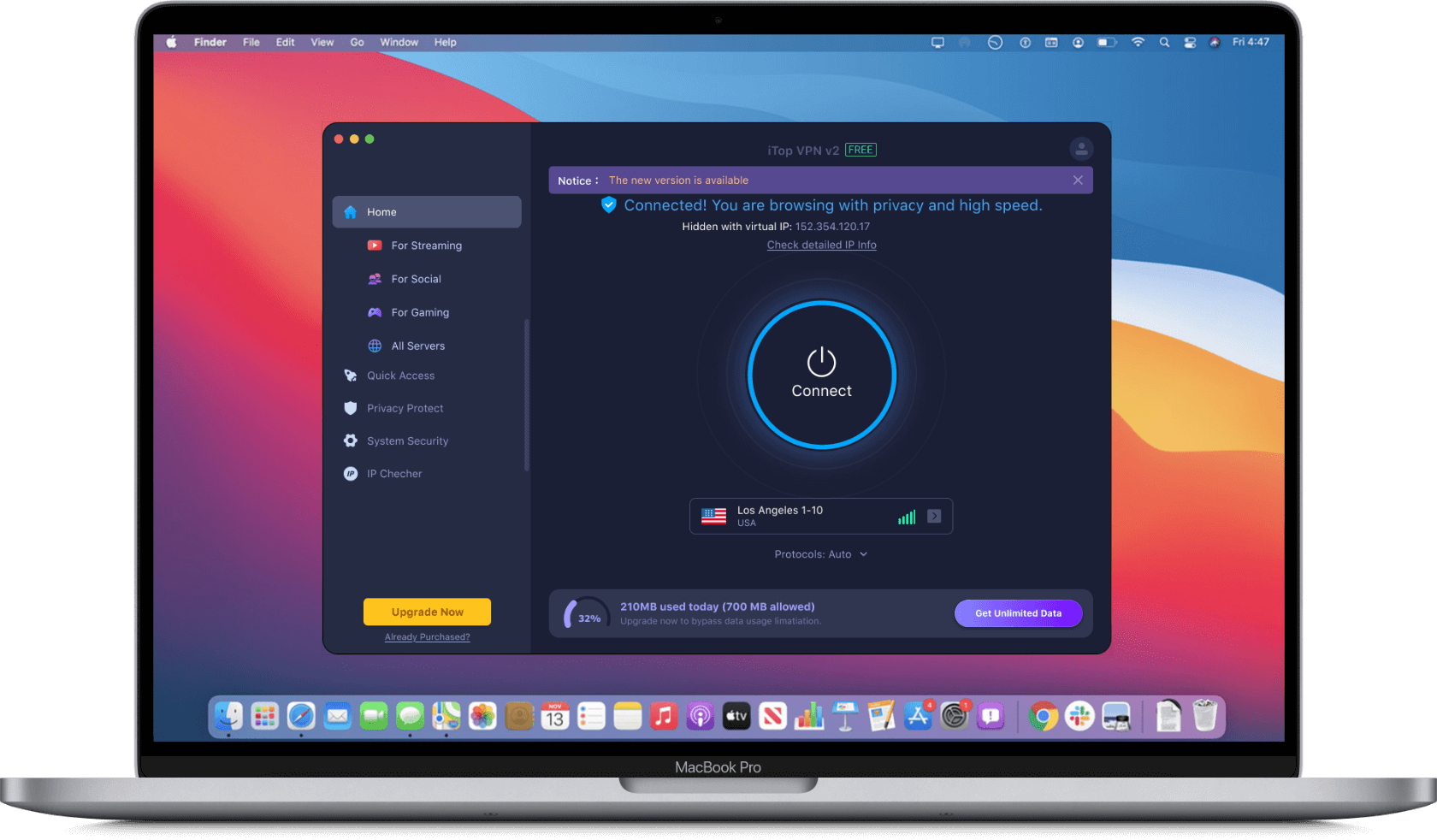
    VPN is generally a string that secures the connection between the device and the Internet. Every time we see other advertisements on our screen, this is only possible when others are watching our data. To avoid all these worries, we have a good choice to choose the iTop VPN .

    iTop VPN avoids all the threats we may face while surfing the internet on a daily basis. We see multiple malicious links on our screens. Many links to connect to the website have been hacked before. iTop VPN protects us from all the threats we may face online while browsing the internet. It also secures all your data and activities while surfing. It provides all the safeguards for the data and activities that it will secure against any cyber problem.

    What is iTop VPN?

    iTop VPN is a free VPN service provider that offers fast and secure internet access to its users. It allows you to access blocked websites and apps, protects your online privacy, and secures your internet connection from hackers and cyber threats. iTop VPN has a user-friendly interface and is compatible with Windows, macOS, iOS, and Android devices.

    How does it work?

    iTop VPN does not require a login like some competitors. In addition to subscribing to a VIP account, it offers a free VPN service. Multiple VPN services will ask for crucial information. However, iTop VPN has no such policy. It is very beneficial to the user. But one thing should be mentioned, iTop VPN is a VPN that uses its protocols and guidelines to secure the data.

    How to surf the web easily with iTop VPN?

    Surfing the Internet is what people enjoy most, but what we all know is that it is also a bit risky. However, using iTop VPN has made it easy. It has an extensive list of pros that can ensure user safety and provide a great experience. This VPN always provides a secure and private link that only you can access.

    The VPN ultimately protects you from hackers, external ads, and agents. It provides a strict boundary for a no-logging policy. It also provides users with additional security by providing a sudden click-to-stop option if the internet connection fails.

    Plus, you can connect your VPN to whichever country you want. iTop VPN has a free trial, but it also has a variety of budget-friendly packages. Unlike other VPN networks, iTop VPN charges you a reasonable amount for the VIP services they offer to users.

    How to Get Rid of Personal Information Leaks Using iTop VPN?
    1. Download and Install iTop VPN

    The first step to using iTop VPN is to download and install it on your device. You can download iTop VPN from its official website or from the app store of your device.

    2. Connect to iTop VPN

    After installing iTop VPN, launch the app and click on the “Connect” button to connect to the VPN server. Once connected, iTop VPN will encrypt your internet traffic and protect your online activities from prying eyes.

    3. Browse Anonymously

    Now that you’re connected to iTop VPN, you can browse the internet anonymously without revealing your real IP address. iTop VPN will assign you a new IP address that is different from your actual location. This makes it difficult for anyone to track your online activities.

    4. Access Blocked Websites and Apps

    iTop VPN allows you to access blocked websites and apps that may be restricted in your region. You can select a VPN server located in a different country and bypass geo-restrictions to access content that is not available in your region.

    5. Protect Your Personal Information

    iTop VPN encrypts your internet traffic and secures your online activities from hackers and cyber threats. This prevents your personal information from being leaked or stolen while you’re connected to the internet.

    Conclusion

    To visit most of the local websites, you need to choose the VPN to get there because the internet has restricted these sites for certain reasons. For that reason, iTop VPN is one of the best choices a user should opt for. It provides the user with all the security and resources for a great experience. A user can easily surf the internet by switching on the iTop VPN. It has all the safety protocols.

    Choosing the iTop VPN service will definitely bring you a good experience, and you won’t regret it later.

    Share. Facebook Twitter Pinterest LinkedIn Tumblr Email

    Related Posts

    What is the best choice: hiring an in-house developer or outsourcing?

    How to Reset the Pairing of iPhone 17 Pro Max Headphones?

    Mspy App offers a comprehensive and essential suite of parental control utilities

    Leave A Reply Cancel Reply

    You must be logged in to post a comment.

    voopoo drag 6
    oxva xlim 3 ultra
    sp2s sen x disposable vape
    • Popular
    • 3D Printer REVIEW
    • XIAOMI
    March 16, 2026

    OXVA Slimstick VS OXVA Slimstick X Vape Hands-on Review

    March 5, 2026

    OXVA XLIM PRO 3 vs XLIM Pro 2 DNA: Hands-On Review

    March 5, 2026

    OXVA XLIM PRO 3 vs XLIM GO 2: Hands-On Review

    March 2, 2026

    OXVA XLIM PRO 3 vs XLIM 3 ULTRA: Hands-On Review

    December 26, 2025

    ACMER ASCARVA 4S: Precision CNC Power for Makers, DIYers & Small Workshops

    June 23, 2024

    ACMER P2 20W Laser Engraver Fixed Focus Engraving: Hands on Review

    May 30, 2024

    xTool F1 Ultra Review: World’s First 20W Fiber & 20W Diode Laser Engraver

    May 30, 2024

    Anycubic Kobra 3 Combo Review: The Multicolor Masterpiece?

    March 16, 2026

    Co-released with SU7! Xiaomi Notebook Pro 14 and Xiaomi Smart Watch S5 are scheduled to be launched on March 19th.

    March 16, 2026

    Xiaomi 18 Camera System is like a burst of toothpaste! The standard version now features a telephoto lens, directly catching up with the Pro model

    March 16, 2026

    Xiaomi Notebook Pro 14 is Scheduled to be Released on March 19th: 50W long-lasting performance release, dual fans and three air channels for cooling.

    March 16, 2026

    Xiaomi Tag Bluetooth Tracker Key Finder Review: The Ultimate Solution for Lost Items

    fc 26 coins
    New Arrivals
    • Oxbar Maglink 75K Disposable Pod Oxbar Maglink 75K Disposable Pod
    • VOOPOO Argus Rise Pod System Kit VOOPOO Argus Rise Pod System Kit
    • Ulefone RugKing 5 Pro 4G Ulefone RugKing 5 Pro 4G
    • Nothing phone 4a Pro Nothing phone 4a Pro
    • RIFBAR MIXPRO 40K DISPOSABLE RIFBAR MIXPRO 40K DISPOSABLE
    • Uwell Caliburn G5 Pod System Kit Uwell Caliburn G5 Pod System Kit
    • Geek Bar Mate 60K Disposable Pod Geek Bar Mate 60K Disposable Pod
    • ICEBOMB 18K Disposable Vape ICEBOMB 18K Disposable Vape
    • Juice Head iFlex Nixodine 50K Disposable Vape Juice Head iFlex Nixodine 50K Disposable Vape
    About
  • Igeekphone.com provides the first global tech news and reviews about smartphone, vapes, e-cigar, smart home, 3D printers, e-bike,tablets, RC drones, VR headset, and other accessories. It's the best platform to improve your brand and product.
  • Contact us: info@igeekphone.com
  • Check Our Privacy Policy Here.
  • Note: *Right now we have US editor and EU editors for review, especially for Amazon US and EU.
  • *Shop and Compare Price Here*
  • Facebook
  • Youtube
  • OUR BEST VAPE PARTNERS
  • VAPE ONLINE STORE
  • HAYATI PRO MAX PLUS
  • VAPORESSO
  • VOOPOO
  • OXVA
  • NEXA
  • MASKKING
  • TODOO
  • SP2S
  • VEIIK
  • OTHER BEST PARTNERS
  • SVBONY
  • Chuwi
  • Blackview
  • Fossibot
  • Unihertz
  • Flsun
  • Anycubic
  • Xtool
  • Oukitel
  • Mukkpet Ebike
  • Ugreen
  • Copyright © 2026 igeekphone

    Type above and press Enter to search. Press Esc to cancel.