




Facebook Twitter Instagram
    Trending
    • Fourth-generation Snapdragon 7, IP69 full-level water resistance! OPPO Reno15c released: Starting from 2,899 yuan
    • Oneplus has officially announced its new Turbo series: The new models focus on long battery life and high performance, and will be launched next month
    • Huawei nova 15 Ultra has made its debut: featuring a horizontal dual-ring camera group and a cool green color design, with Yi Yangqianxi as its spokesperson
    • AE AE5 PRO WiFi FPV RC Quadcopter Review: A Comprehensive Overview
    • LXY 730-A2, 730-A3, and 730-B2 RC Drift Cars Review: Ultimate Speed and Style for Racing Enthusiasts
    • DT NO.1 DTG1 Smart Watch Review: The Ultimate Companion for Health, Fitness, and Daily Convenience
    • DOOGEE S200 VIP Edition 5G Smartphone Review: Power, Durability, and Innovation Combined
    • SG901 PRO & MAX GPS Drone Soars with Power & Intelligence Review
    Facebook YouTube
    Login Register
    IGeeKphone China Phone, Tablet PC, VR, RC Drone News, Reviews
    • HOME
      • NEWS
        • DeepSeek
        • ChatGPT
        • Minecraft
    • Amazon
    • CHRISTMAS
    • PHONE
      • Top Phones For Your First Choice
      • Phone Comparison
      • Xiaomi
      • Blackview
      • Unihertz
      • Doogee
      • Black Shark
      • Geekbuying
      • Banggood
      • TEMU
      • TikTok
      • Aliexpress
      • Walmart
      • Newegg
      • MercadoLibre
      • Lazada
    • TOP VAPE Awards for 2025
    • VAPES
      • E-CIGAR Upcoming
      • Vape News
      • Vape Market Trend
      • Vape Deals
      • Expo News
      • Vape Comparison
      • Vape Guide
        • Guide For Beginners
        • Guide for Best Users
      • Giveaway
    • BEST VAPE
      • Best Vape Stores
      • Best Starter Vape Kits
      • Best Vapes for Beginners
      • Best Disposable Vapes
      • Best Pod Systems
      • Best Pod Mod Vapes
      • Best Mods
      • Best Nicotine Pouches
      • Best Clearomizers/Tanks
      • Best E-Liquid
      • Best EGO/Pens
      • Best Vapes for Nic Salt E-Juice
      • Best Vapes to Quit Smoking
      • RDA vs. RDTA vs. RTA
    • Best Vape Brand 2025
      • VAPORESSO
      • VOOPOO
      • OXVA
      • NEXA BAR
      • ORIONBARTECH
      • MASKKING VAPE
      • VEIIK
      • MEMERS
      • SP2S
      • JNR
      • TODOO
      • MRFOG
    • REVIEW
      • E-cigar Review
      • Phones
      • Tablet PC
      • TV Box
      • RC Drone
      • Wearables
      • Camera
      • Accessories
      • VR Headset
    • MORE
      • 3D PRINTER
        • 3D Printer Review
        • Anycubic
        • FLSUN
        • Xtool
        • LONGER
        • Top 3D printer to Choose First
      • TREND
      • CLOTHES
      • AUTO CAR
      • POWER STATION
        • Oukitel
        • FOSSIBOT
      • GAMING
        • Top Gaming Products
      • E-BIKE
        • Samebike
        • Happyrun
        • ENGWE
      • TABLET
        • Chuwi
        • INNOCN
        • Teclast
        • Top Tablet for Your First Choice
        • Tablet/Laptop Comparison
      • WEARABLES
        • OneOdio
        • BlitzWolf
        • Top Smartwatch for First Choice
      • SMART HOME
      • TV BOX
        • Chuwi mini pc
        • Beelink
        • GMKTEC
        • MOREFINE
      • RC DRONE
        • DJI
        • MJX
        • JJRC
        • Hubsan
        • Top RC Drone
      • CAMERA
        • Gopro
        • Insta360
        • Andoer
      • ACCESSORIES
      • VR HEADSET
      • ROM
        • SAMSUNG
        • XIAOMI
        • ASUS
        • MEIZU
        • LENOVO
        • HUAWEI
        • ONEPLUS
        • ZTE
        • UMIDIGI
        • DOOGEE
        • HOMTOM
        • ELEPHONE
        • ULEFONE
        • BLACKVIEW
        • VERNEE
        • LEAGOO
        • CHUWI
        • TECLAST
        • PIPO
        • TV BOX ROM
    • DEAL
    • Shop
    IGeeKphone China Phone, Tablet PC, VR, RC Drone News, Reviews
    You are at:Home»Guide»How to Set up Apple iPhone ringtone? iPhone14 custom ringtone Tutorial
    Guide

    How to Set up Apple iPhone ringtone? iPhone14 custom ringtone Tutorial

    Brady CottonBy Brady CottonFebruary 23, 2023
    Facebook Twitter Pinterest LinkedIn Tumblr Email

    Do you want a personalized ringtone when you get your iPhone14, iPhone14 Pro, etc.?

    But go to [Settings] – [Sound & Feel] – [Ringtone] on the iPhone14 and find all the ringtones that come with Apple, only to find that the ones that come with Apple are too monotonous?
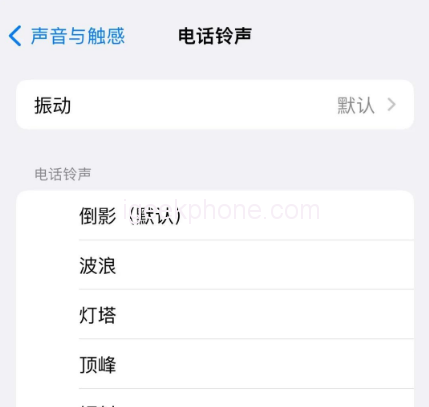
    Want a custom ringtone for your iPhone14?

    iPhone14 ringtone custom operation tutorial is coming, Apple fans hurry to collect it!

    Do not need to use iTunes operation, complete directly on the iPhone14 mobile phone, less than 1 minute, successfully add and change a new ringtone.

    Custom ringtone Settings with the help of APP
    First of all, need to download and install on iPhone14 “ringtone” class App (such as cool dog ringtone), of course, can also be in accordance with their own needs, choose to download other “ringtone” App. The operation is basically the same.

    Second, there’s Apple’s official Library Band App. “Library Band” is Apple’s own APP, and can be searched and installed in the App Store.
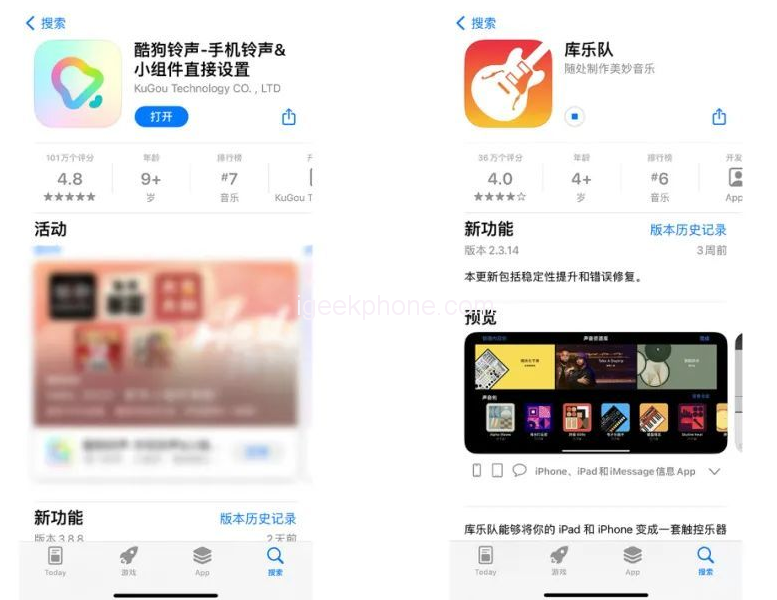
    Let’s focus on Apple’s two limitations on custom ringtone Settings:

    1. The duration of the customized ringtone cannot exceed 30 seconds, and the ringtone must be in.m4r format.

    2. Custom ringtones must be imported into the built-in ringtone library of iPhone before use, that is, the reason to library band APP.

    iPhone14 custom ringtone operation details
    This article takes “Cool dog ringtone” App as an example, iPhone14 custom ringtone operation is as follows:

    Step 1: Open the Kougou ringtone App, select a favorite music ringtone in the APP, click “Set Ringtone”, note that some ringtones may be charged, select some free ringtones.
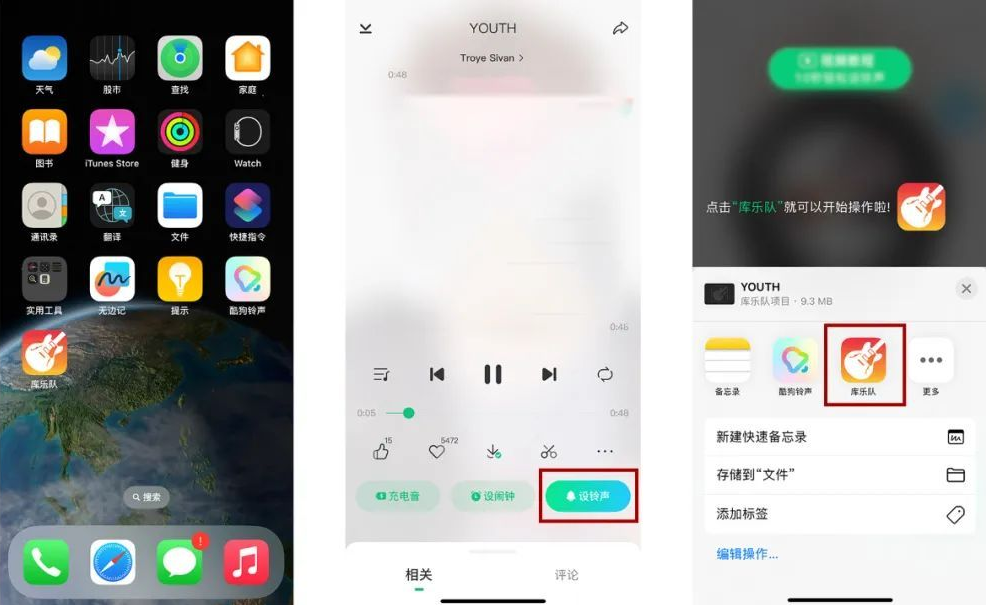
    Click “Set Ringtone” below the ringtone, click “Library Band” in the pop-up option box, and then the ringtone will be turned on in the library band.

    Step 2: When using the library band for the first time, follow the prompts to set up some basic Settings. When the Settings are complete, the function Settings page will be displayed. Then click “Return to My Music” in the top left corner.
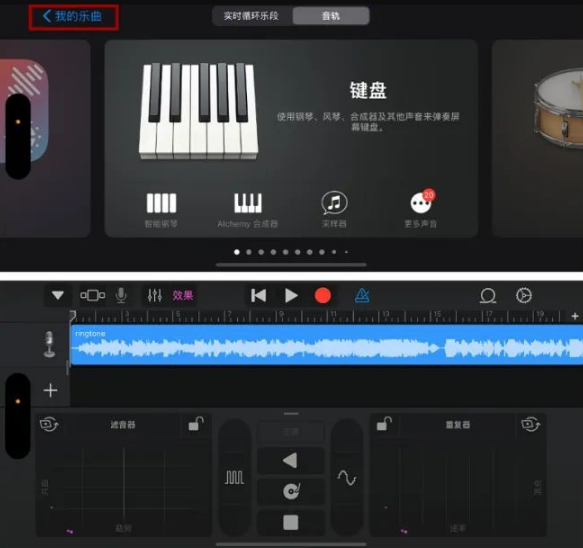
    Because the iPhone ring tone can only be less than 30 seconds, you can click the ring tone first, and here you can cut the ring tone, choose your favorite clip, and adjust other effects.

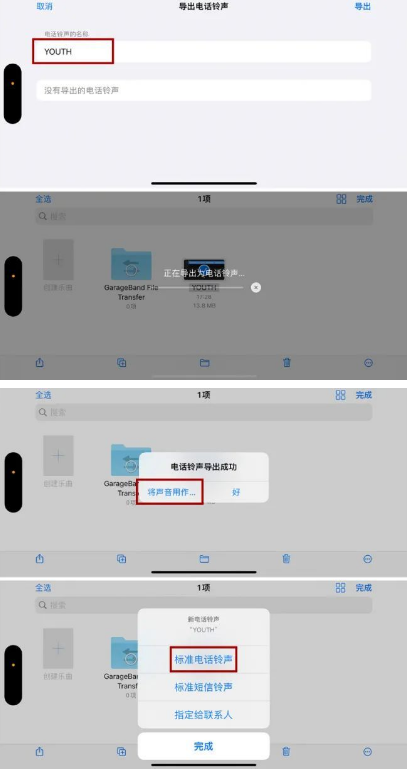
    Step 3: After tailoring the ringtone, open the “Browse” page, click the three-point circle in the upper right corner of the page, click “Select”, and select the ringtone to be set.

    Then click the share icon and click “Ring tone”. There will be a prompt box indicating that the ring tone can only be set for 30 seconds. Click “Continue”. Then we can name the ringtone.

    Step 4: After the name is finished, click Export in the upper right corner to proceed to the next step. In the dialog box indicating that the ringtone is successfully exported, click “Use sound as…”. , you can quickly set the ring tone to Standard, or assign the ring tone to a contact.

    The ringtone is now set for the iPhone14.

    You can also return to [Ring tone] in [Settings] to check, and the customized ringtone will be synchronized here. You can switch to it directly during daily Settings.

    Now, is the ringtone of the iPhone14 series cool? With such a detailed tutorial on customizing ringtones, you can’t get started!
    Share. Facebook Twitter Pinterest LinkedIn Tumblr Email

    Related Posts

    Fourth-generation Snapdragon 7, IP69 full-level water resistance! OPPO Reno15c released: Starting from 2,899 yuan

    Oneplus has officially announced its new Turbo series: The new models focus on long battery life and high performance, and will be launched next month

    Huawei nova 15 Ultra has made its debut: featuring a horizontal dual-ring camera group and a cool green color design, with Yi Yangqianxi as its spokesperson

    Leave A Reply Cancel Reply

    You must be logged in to post a comment.

    voopoo drag s3
    oxva xlim go 2
    sp2s sen x disposable vape
    jnr 100k
    • Popular
    • 3D Printer REVIEW
    • XIAOMI
    December 9, 2025

    OXVA Xlim Go vs. OXVA Xlim Go 2: Hands-On Review

    December 9, 2025

    OXVA XLIM PRO 3 VS XLIM PRO 2 Review: Hands-on Comparison

    December 9, 2025

    OXVA XLIM 3 Ultra vs. XLIM Pro 2 DNA Review: Hands-on Comparison

    December 8, 2025

    OXVA XLIM SQ PRO 2 vs XLIM SQ PRO Hands on Comparison Review

    June 23, 2024

    ACMER P2 20W Laser Engraver Fixed Focus Engraving: Hands on Review

    May 30, 2024

    xTool F1 Ultra Review: World’s First 20W Fiber & 20W Diode Laser Engraver

    May 30, 2024

    Anycubic Kobra 3 Combo Review: The Multicolor Masterpiece?

    May 15, 2024

    SCULPFUN SF-A9 40W Laser Engraver Cutting Machine: Hands On Review

    December 11, 2025

    Xiaomi 17 Ultra will officially announce next week: it will be the first to feature a brand-new Leica 1-inch main camera

    December 10, 2025

    The official version of Xiaomi Hyper OS 3 covers more models. MIX Fold 3 and others will start to be rolled out in gray scale and gradually from today

    December 9, 2025

    The Appearance Renderings of Xiaomi 17 Ultra are here: The classic large round lens returns without a back screen

    December 8, 2025

    Comeback: Xiaomi triple foldable screen was once aborted due to the overheating of the Snapdragon 8 Gen1

    fc 26 coins
    New Arrivals
    • Arc Hypertine 35K Zero Nicotine Disposable Vape Arc Hypertine 35K Zero Nicotine Disposable Vape
    • Oppo Reno 15c Oppo Reno 15c
    • lost vape le bar 40k lost vape le bar 40k
    • RAZ RX 50K DISPOSABLE RAZ RX 50K DISPOSABLE
    • Xiaomi Poco C85 Xiaomi Poco C85
    • Innokin Foretex Pod System Kit Innokin Foretex Pod System Kit
    • Geekvape Aegis Mini 5 Vape Mod Kit Geekvape Aegis Mini 5 Vape Mod Kit
    • Freemax Albar MX 20K Disposable Vape Freemax Albar MX 20K Disposable Vape
    • Innokin EZ Leva Pod System Kit with PCC 2400mAh Innokin EZ Leva Pod System Kit with PCC 2400mAh
    About
  • Igeekphone.com provides the first global tech news and reviews about smartphone, vapes, e-cigar, smart home, 3D printers, e-bike,tablets, RC drones, VR headset, and other accessories. It's the best platform to improve your brand and product.
  • Contact us: info@igeekphone.com
  • Check Our Privacy Policy Here.
  • Note: *Right now we have US editor and EU editors for review, especially for Amazon US and EU.
  • *Shop and Compare Price Here*
  • Facebook
  • Youtube
  • OUR BEST VAPE PARTNERS
  • VAPE ONLINE STORE
  • HAYATI PRO MAX PLUS
  • VAPORESSO
  • VOOPOO
  • OXVA
  • NEXA
  • MASKKING
  • LOSTVAPE ORIONBAR
  • VEIIK
  • MEMERS
  • TODOO
  • SP2S
  • JNR
  • OTHER BEST PARTNERS
  • SVBONY
  • Chuwi
  • Blackview
  • Fossibot
  • Unihertz
  • Flsun
  • Anycubic
  • Xtool
  • Oukitel
  • Mukkpet Ebike
  • Ugreen
  • Copyright © 2025 igeekphone

    Type above and press Enter to search. Press Esc to cancel.