









1. Introduction: Would You Choose an All-ARM Surface?
Can Qualcomm’s Snapdragon X2 Elite finally make a Windows tablet fast enough to compete with traditional x86 laptops without giving up battery life?
We’ve recently had the opportunity to test the new Surface Pro (13-inch), Microsoft’s latest premium 2-in-1 powered by Qualcomm’s newest Snapdragon platform. Like last year’s Surface Laptop (13-inch), this year’s Surface Pro continues Microsoft’s transition toward ARM-based Windows PCs. Microsoft also retains its somewhat unusual naming convention, officially branding the device as “Surface Pro, 13-inch” with a comma separating the product name and screen size—a naming style that’s become uniquely Microsoft.
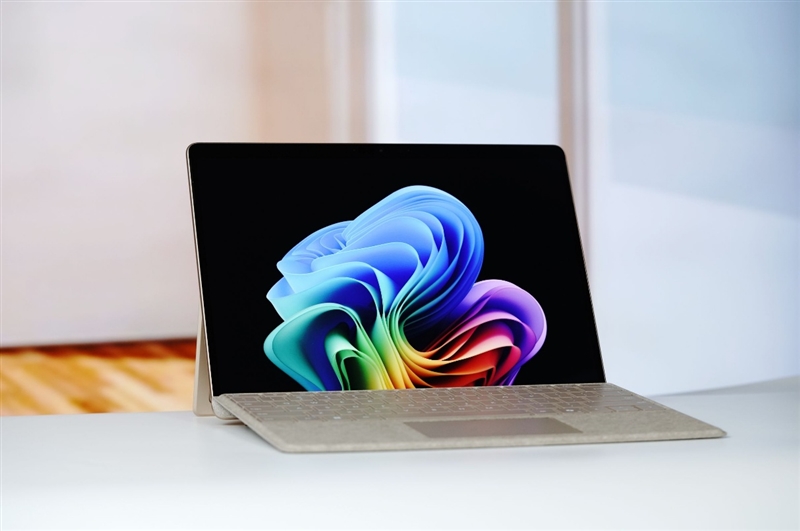
While the processor architecture has evolved, the Surface Pro continues to showcase everything that has made Microsoft’s flagship Windows devices stand out over the years: premium craftsmanship, elegant industrial design, and exceptional versatility.
Its 13-inch 3:2 touchscreen is ideal for productivity, reading, note-taking, and creative work. Paired with the Surface Slim Pen 2, it offers an experience traditional laptops simply can’t match. Attach the optional magnetic keyboard cover, and the tablet instantly transforms into a full-featured laptop without compromising the familiar Windows workflow.
Microsoft also continues to emphasize sustainability. The new Surface Pro features:
- 100% recycled aluminum alloy enclosure
- 100% recycled rare-earth metals in its magnets
- 100% recycled cobalt in the battery
While these environmentally friendly materials may not be a deciding factor for every buyer, they reflect Microsoft’s ongoing commitment to reducing the environmental impact of its hardware without sacrificing durability or build quality.
Because the Surface Pro is fundamentally a tablet, its hardware layout naturally differs from a conventional laptop.
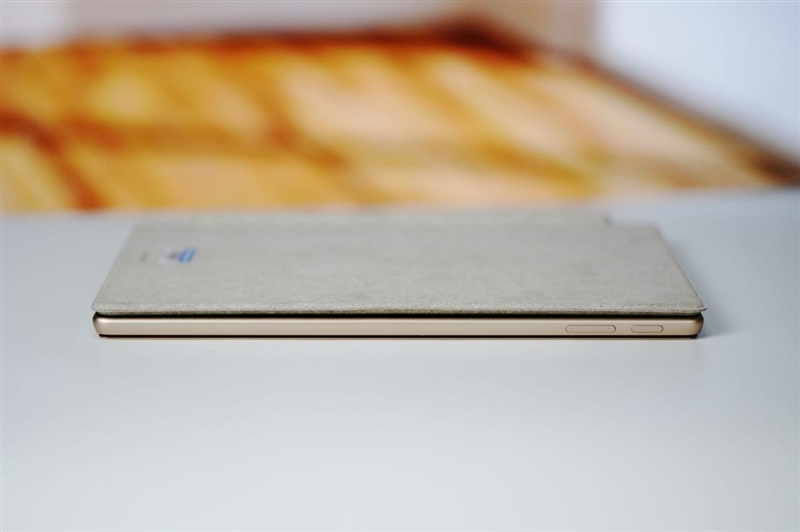
The device features physical power and volume buttons on the side, much like a smartphone, making them easy to reach whether you’re holding the tablet in portrait or landscape orientation. Although this arrangement may seem unusual to laptop users, it quickly becomes intuitive in everyday use.
Connectivity is minimalist but modern.
In addition to Microsoft’s proprietary Surface Connect magnetic charging port, the tablet includes two identical USB4 Type-C ports. While two ports may sound limited compared to many laptops, both are fully featured and support:
- High-speed USB4 data transfer
- DisplayPort 1.4a video output
- Up to three external 4K displays at 60Hz
- USB Power Delivery fast charging up to 60W
In practical terms, the limited number of ports is offset by their impressive versatility.
Powering the new Surface Pro is Qualcomm’s latest Snapdragon X2 Elite, the company’s flagship Windows processor for 2026.
Built on Qualcomm’s third-generation Oryon CPU architecture, the chip delivers substantial improvements in both performance and energy efficiency over its predecessor. It also integrates a next-generation Hexagon NPU capable of delivering up to 80 TOPS of AI computing performance, fully unlocking Microsoft’s latest Windows 11 AI+ PC features.
One interesting aspect of Microsoft’s AI ecosystem is that Windows 11 AI+ currently relies almost entirely on the CPU and NPU for on-device AI acceleration. Unlike desktop gaming PCs equipped with powerful discrete GPUs, these AI features cannot yet take advantage of dedicated graphics hardware. As a result, ARM-powered laptops like the new Surface Pro actually offer one of the best native experiences for Microsoft’s latest AI capabilities.
2. Design & Build Quality: A Classic Surface Experience, Refined
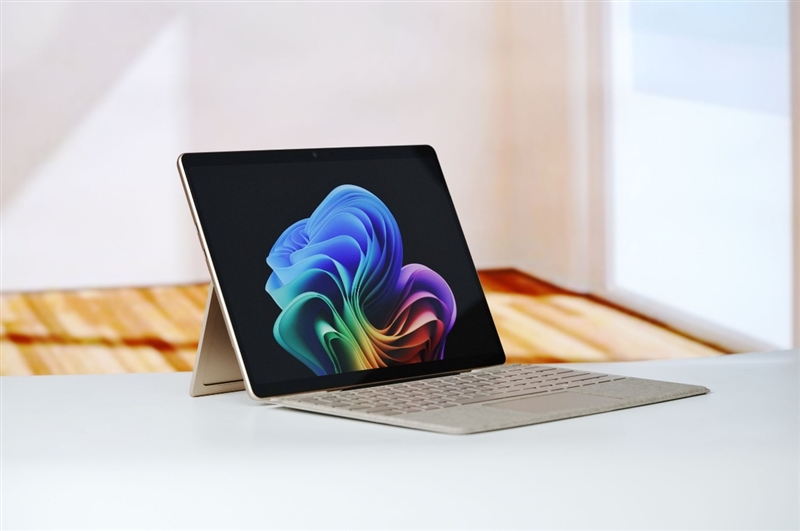
The latest Surface Pro (13-inch) continues Microsoft’s iconic 2-in-1 design philosophy. As the 12th-generation Surface Pro, it retains the familiar detachable tablet form factor while refining nearly every detail. The front is dominated by a clean 13-inch display with slim bezels, creating an elegant, distraction-free appearance. Users can operate it as a standalone tablet or attach the magnetic keyboard cover to enjoy a laptop-like experience within seconds.
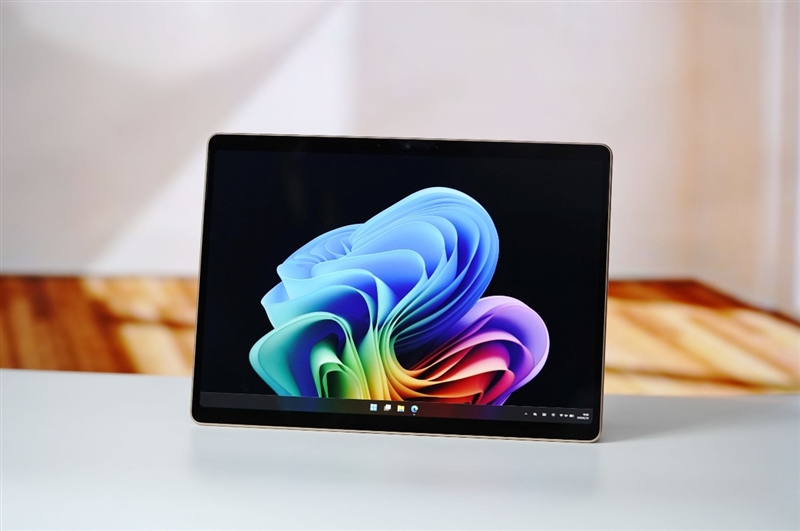
Microsoft offers the device in Platinum, Black, and the new Sand Gold finish. Our review unit came in Sand Gold, which features a smooth matte texture that feels both premium and resistant to fingerprints. The polished Microsoft logo on the rear contrasts beautifully with the matte aluminum chassis, giving the tablet a refined yet understated aesthetic.
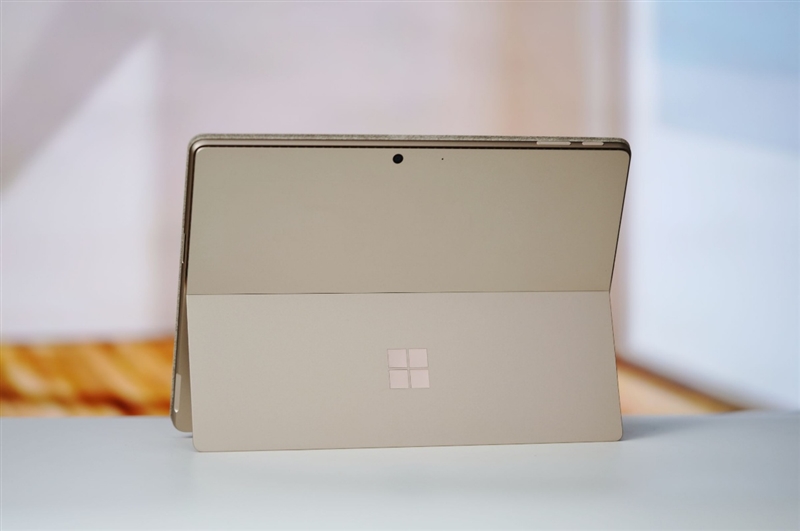
Although Windows 11 is primarily designed for landscape use, Microsoft has thoughtfully positioned the power and volume buttons along the side of the tablet, much like a modern smartphone. The layout feels natural whether you’re holding the Surface in portrait or landscape orientation, making everyday operation intuitive from the start.
Attach the Surface Pro Keyboard, unfold the built-in kickstand, and the tablet instantly transforms into a conventional notebook. Thanks to the rigid keyboard base and adjustable kickstand, the overall experience closely resembles that of a traditional laptop, making it equally suitable for productivity and entertainment.
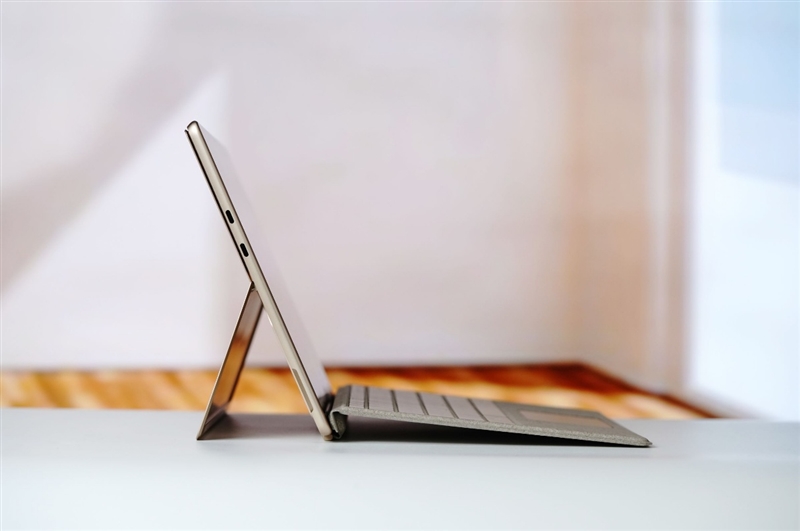
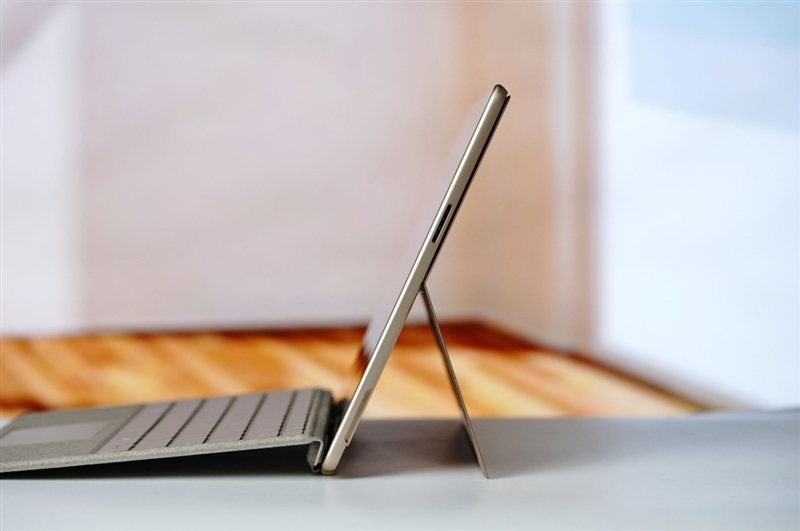
Connectivity remains simple but highly capable. Both USB-C ports are identical and fully support USB4, enabling:
- High-speed data transfer
- DisplayPort video output
- Support for up to three 4K displays at 60Hz
- USB Power Delivery fast charging up to 60W
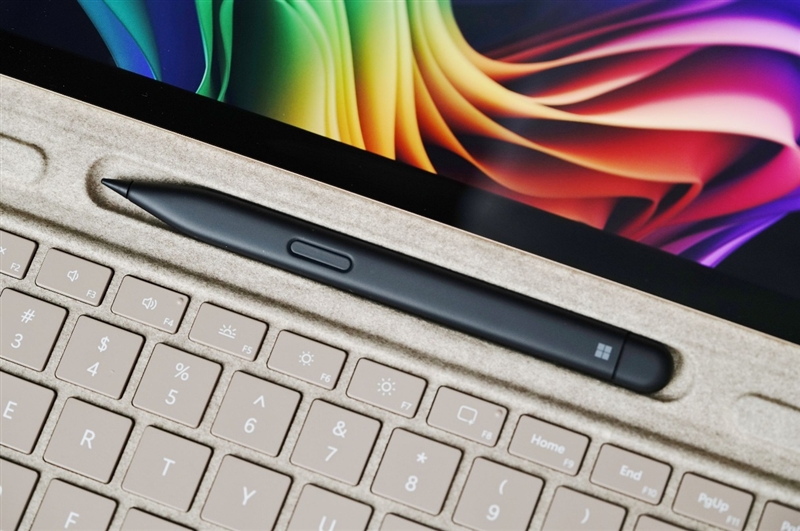
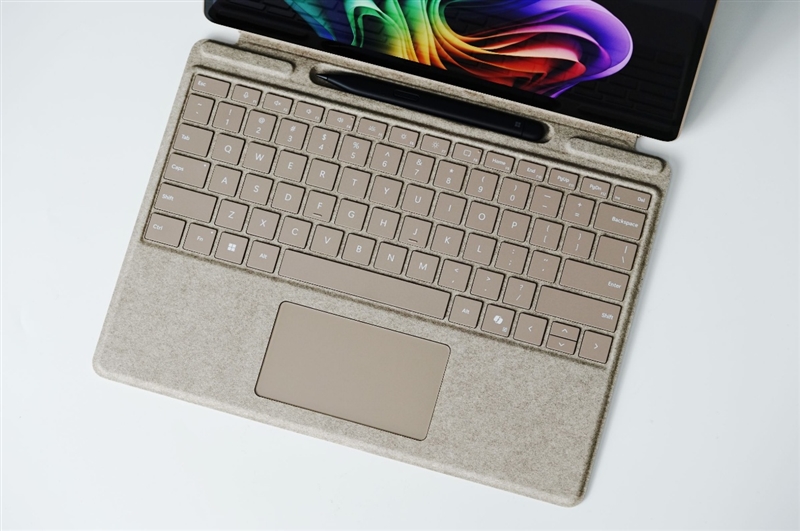
Despite offering only two ports, their versatility minimizes the need for additional connectivity options.
On the opposite side sits Microsoft’s proprietary Surface Connect magnetic charging port. At first glance it resembles an SD card slot, but the magnetic connector supports reversible attachment, allowing the charging cable to naturally route according to how the tablet is positioned.
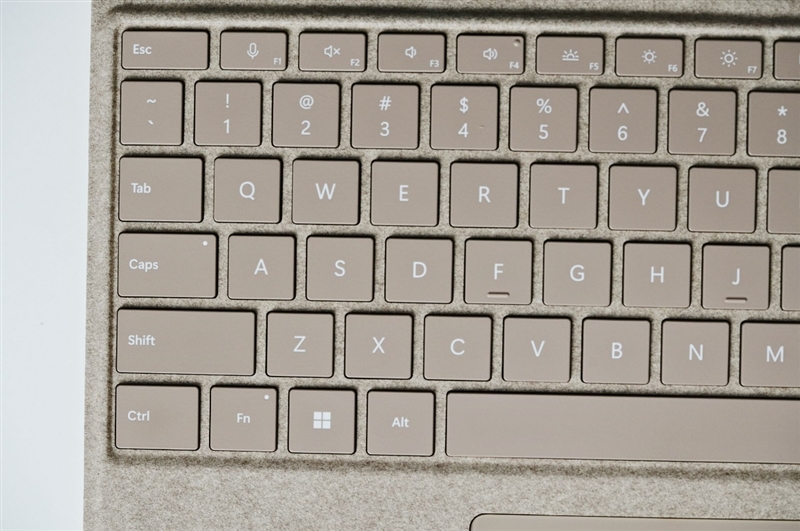
The magnetic keyboard is another highlight of the Surface ecosystem.
By default, the front edge folds upward and magnetically attaches to the lower bezel of the display, creating a slight incline that provides a more ergonomic typing angle. Users can also unfold the keyboard completely to reveal the hidden storage and charging compartment for the Surface Slim Pen 2.
Microsoft continues its focus on sustainability by using an eco-friendly Alcantara-like material on the keyboard cover. The keyboard itself offers generously sized keys with comfortable travel and firm tactile feedback, making extended typing sessions surprisingly enjoyable. Although the touchpad is somewhat smaller than those found on conventional laptops, the touchscreen and stylus reduce the need to rely on it extensively.
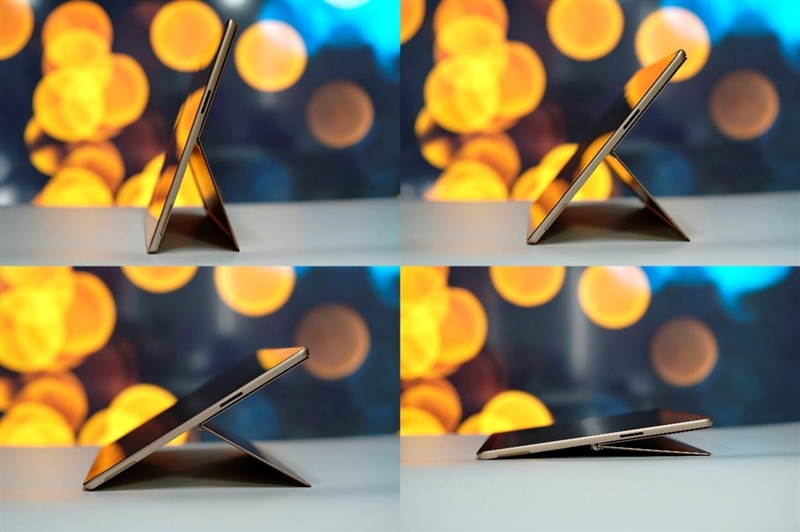
The integrated kickstand remains one of the Surface Pro’s defining features.
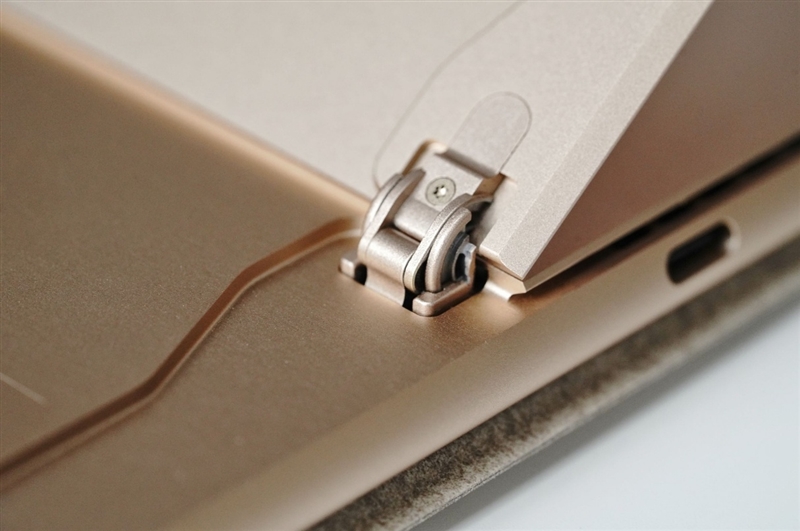
Constructed entirely from metal, the hinge feels exceptionally sturdy while providing smooth, controlled resistance. It holds its position securely at virtually any angle and opens up to 165 degrees, allowing the Surface Pro to function equally well as a laptop, media viewer, digital sketchpad, or note-taking tablet.
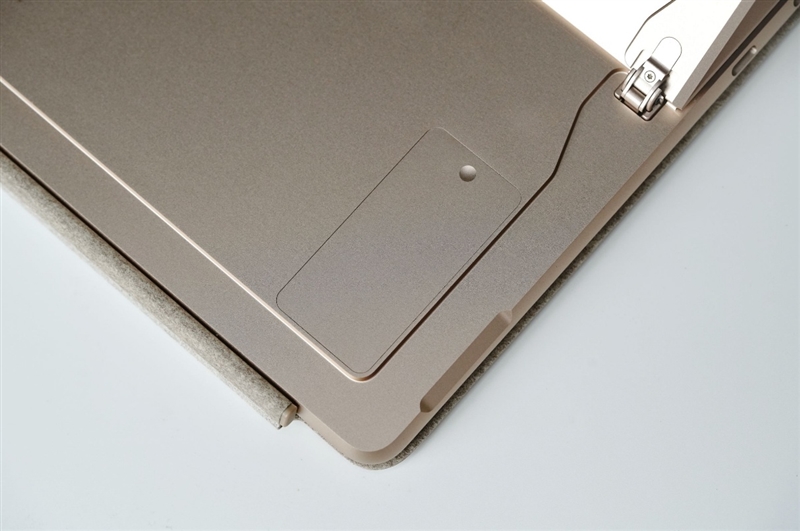
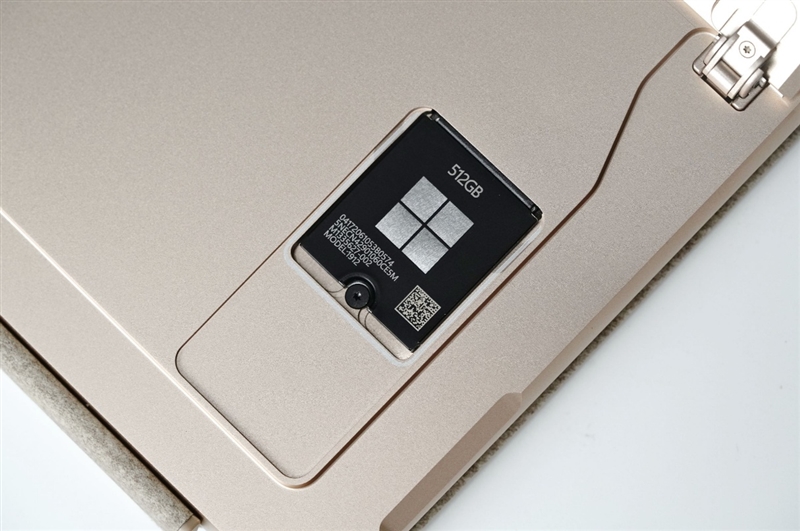
Hidden beneath the kickstand is Microsoft’s removable SSD compartment. Our review unit is equipped with a 512GB SSD, giving users the option of replacing or upgrading the storage in the future—a rare feature among today’s premium ultra-portable devices.
The included 39W charger is remarkably compact and lightweight, making it ideal for travel. Alternatively, users can charge the device via USB-C using any compatible power adapter, although 60W or higher is recommended to achieve the fastest charging speeds.
3. Performance & Software Compatibility: ARM Has Finally Come of Age
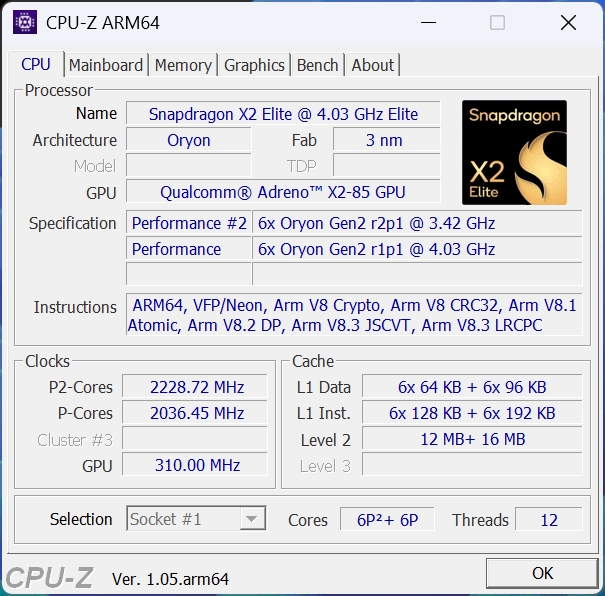
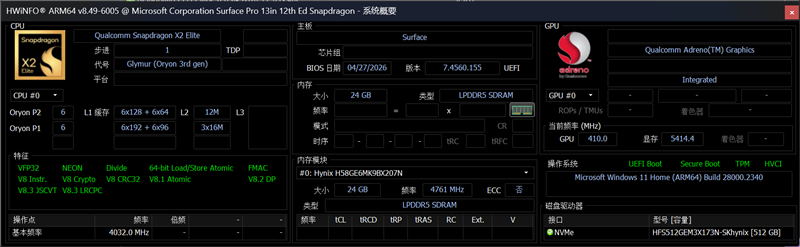
The new Surface Pro is powered by Qualcomm’s flagship Snapdragon X2 Elite, featuring the enhanced second-generation Oryon architecture.
The processor adopts a 12-core (6 Performance + 6 Efficiency) design manufactured on TSMC’s advanced 3nm process, delivering significant improvements in both computing performance and energy efficiency while maintaining impressively low power consumption.
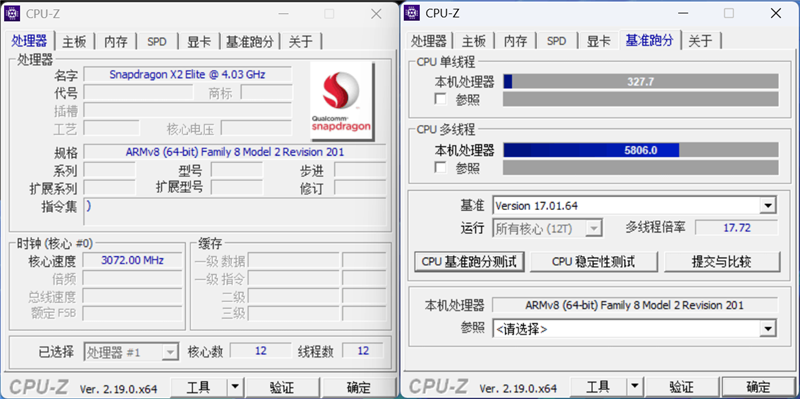
One of the biggest concerns surrounding ARM-based Windows PCs has always been software compatibility. Fortunately, Microsoft’s Prism translation layer continues to mature.
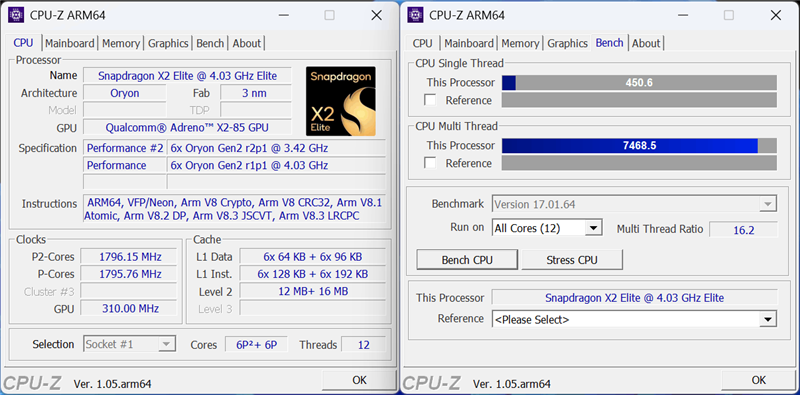
Interestingly, the traditional x64 version of CPU-Z still runs correctly under emulation, although it can no longer accurately identify many ARM-specific processor details. Even so, benchmark testing completed successfully, producing the following results:
- Single-core: 327.7
- Multi-core: 5806.0
These scores demonstrate that translated x86 applications now operate reliably on Windows ARM.
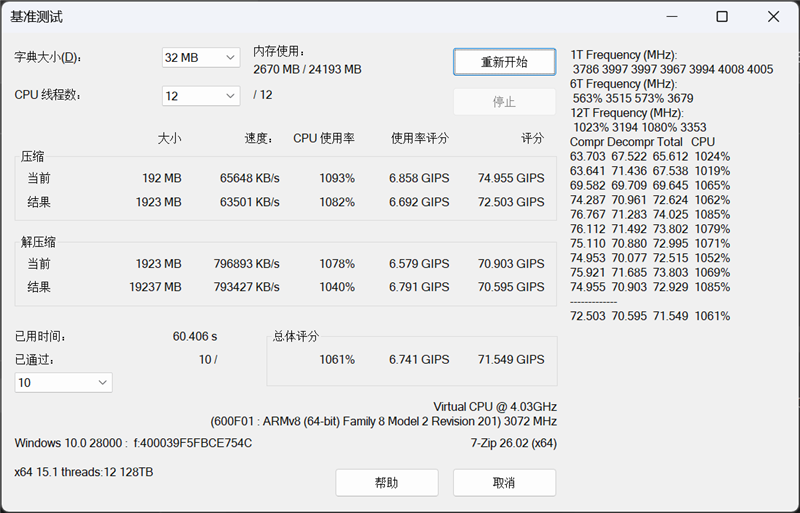
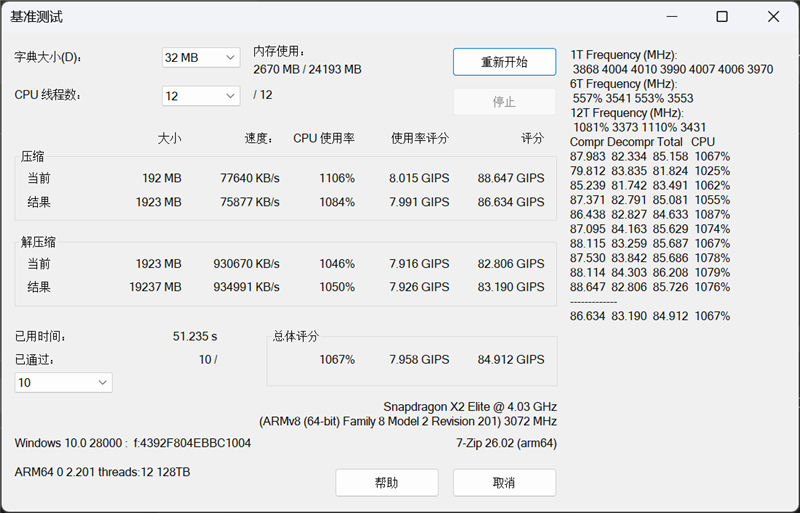
Running the native ARM version of CPU-Z reveals the processor’s full capabilities.
Native benchmark scores increased substantially:
- Single-core: 450.6
- Multi-core: 7468.5
Compared with native execution, Microsoft’s translation layer incurs approximately 22% performance loss, a noticeable improvement over previous ARM generations and a perfectly acceptable compromise for legacy software compatibility.
The trend continues in 7-Zip compression testing.
The native ARM version completed the benchmark in 51.2 seconds, while the translated x64 version finished in 60.4 seconds, representing only about 16% performance loss during software emulation. Such results indicate that most traditional desktop applications can now run with surprisingly little overhead.
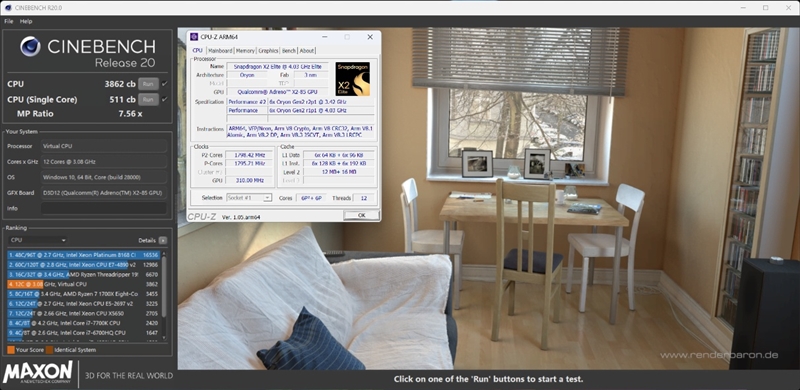
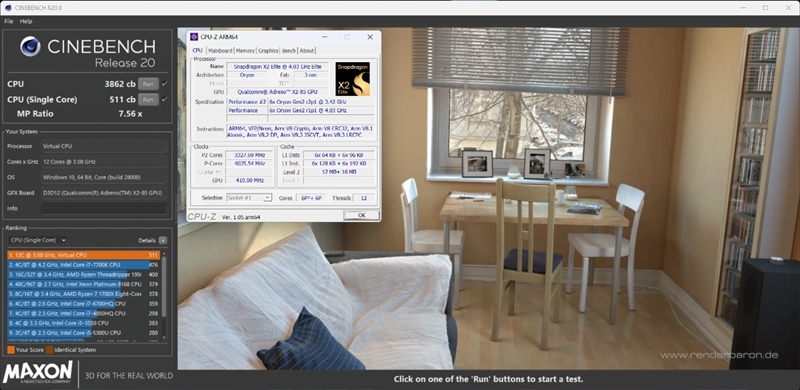
In Cinebench R20, running under x86 translation, the Snapdragon X2 Elite achieved:
- 511 cb (Single-Core)
- 3862 cb (Multi-Core)
The processor even outperformed AMD’s older Ryzen 7 1700X in multi-core performance while delivering substantially stronger single-core results—an impressive achievement considering its far lower power consumption.
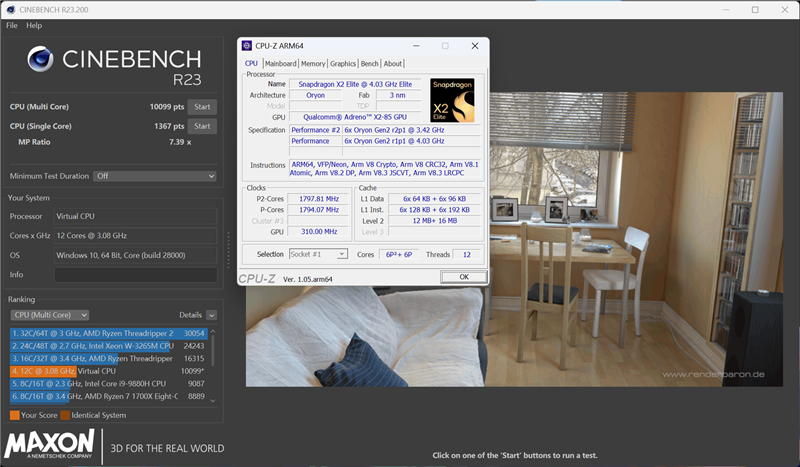
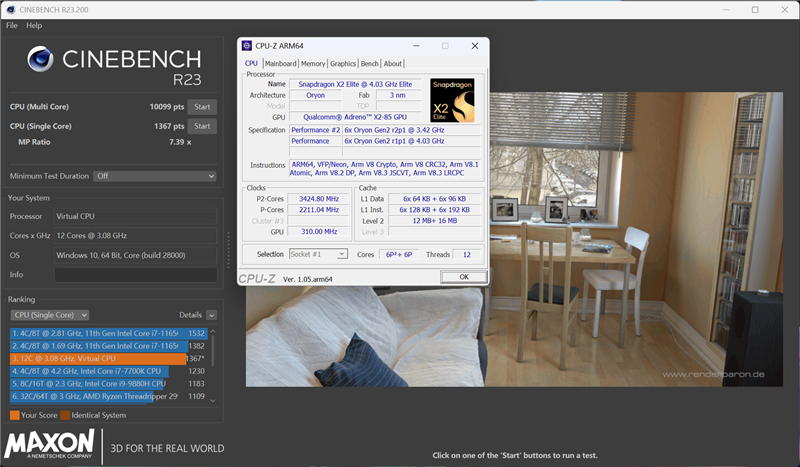
The newer Cinebench R23 paints a similarly positive picture.
The Snapdragon X2 Elite scored:
- 1367 points (Single-Core)
- 10,099 points (Multi-Core)
Even while running translated x86 code, both single-threaded and multi-threaded performance surpassed Intel’s once-flagship Core i9-9880H, highlighting just how far Qualcomm’s Windows processors have evolved.
4. Graphics Performance: Integrated GPU Now Rivals Modern x86 Solutions
One of the most significant improvements in the Snapdragon X2 Elite isn’t just the CPU—it’s the integrated graphics processor.
The chip features Qualcomm’s latest Adreno X2-85 GPU, representing a substantial leap over the previous generation. While many benchmark applications still require x86 emulation on Windows ARM, Microsoft’s Prism translation layer has matured enough that most graphics benchmarks now run reliably, allowing us to evaluate real-world GPU performance.
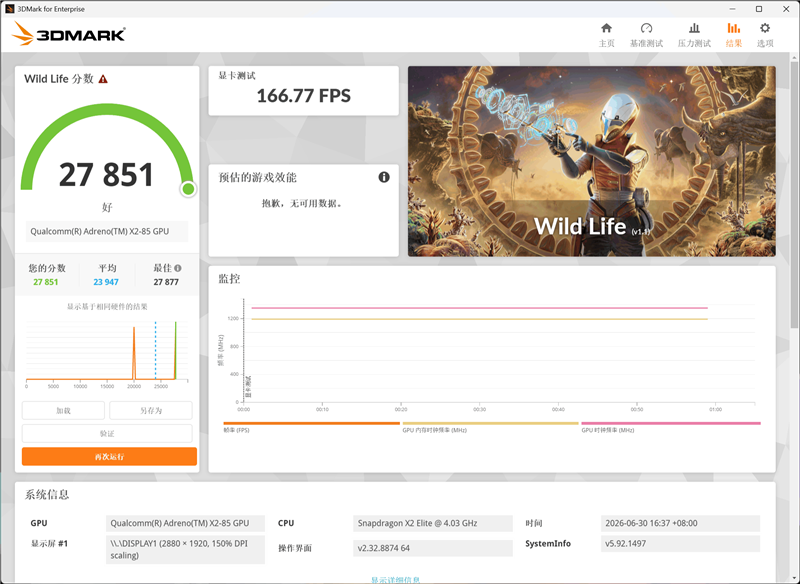
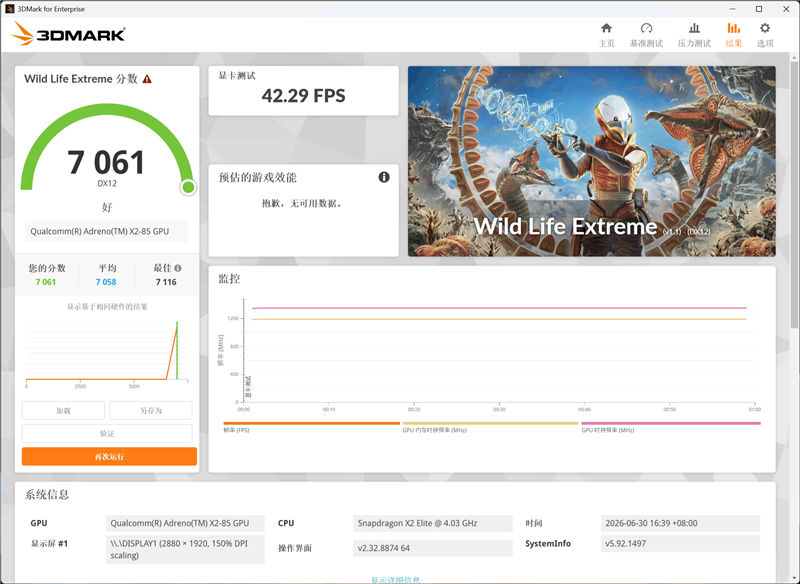
We first ran 3DMark Wild Life and Wild Life Extreme, two cross-platform graphics tests designed to compare GPU performance across different architectures.
The Surface Pro achieved:
| Benchmark | Score | Average FPS |
|---|---|---|
| Wild Life | 27,851 | 166.77 FPS |
| Wild Life Extreme | 7,061 | 42.29 FPS |
These results demonstrate a dramatic improvement over Qualcomm’s previous integrated graphics solutions and place the new Adreno GPU firmly in competition with the latest integrated graphics from Intel and AMD.
The device also successfully completed 3DMark Time Spy (DirectX 12) and Fire Strike (DirectX 11) under emulation.
The Adreno X2-85 recorded graphics scores of:
- Time Spy: 2,581
- Fire Strike: 7,516
For an ultra-portable ARM tablet without a dedicated GPU, these are impressive numbers. The graphics performance is now comparable to current-generation integrated graphics found in mainstream Intel Core Ultra and AMD Ryzen mobile processors, making casual gaming and GPU-accelerated creative workloads far more practical than before.
While this Surface Pro isn’t intended to replace a gaming laptop, it comfortably handles lightweight games, indie titles, emulators, cloud gaming, and even many older PC games with ease.
5. Memory, Storage & Surface Slim Pen 2
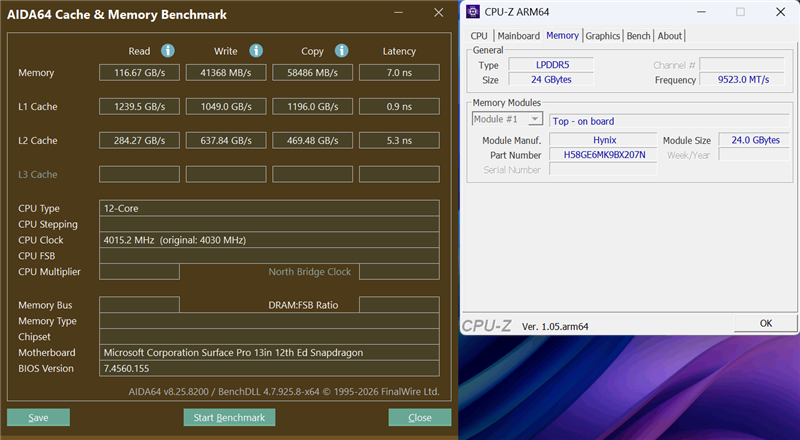
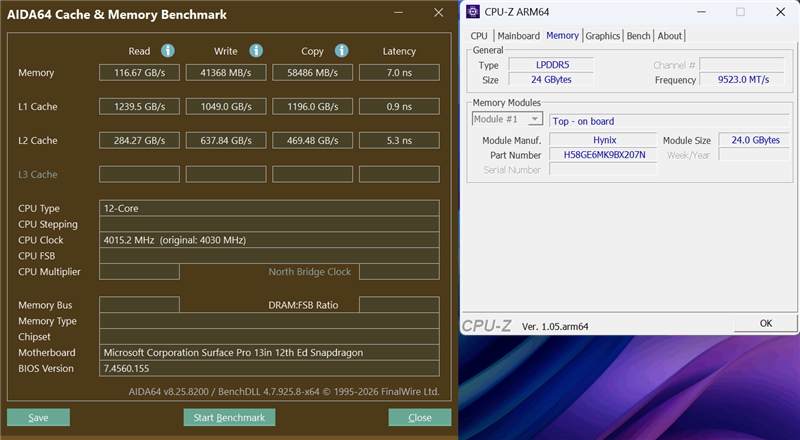
Our review unit comes equipped with 24GB of LPDDR5 memory running at 9,523MT/s, providing ample bandwidth for multitasking, creative applications, and AI workloads.
Although memory benchmarking tools such as AIDA64 still operate under translation mode on Windows ARM, the results indicate that memory performance is fully in line with expectations for a premium ultraportable device.
Storage performance is equally solid.
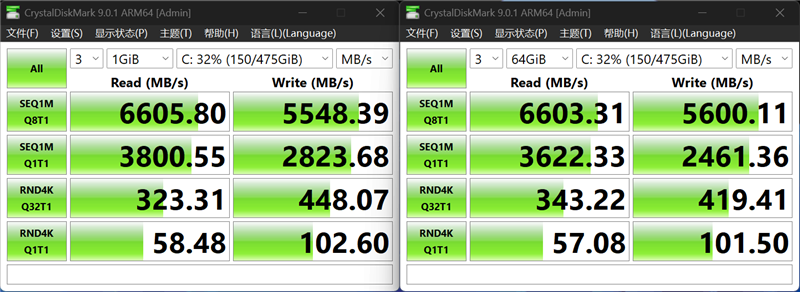
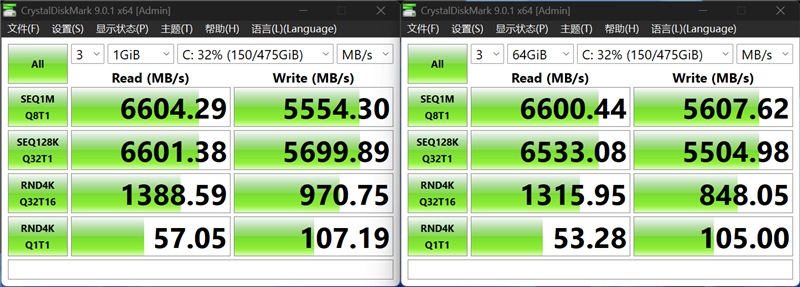
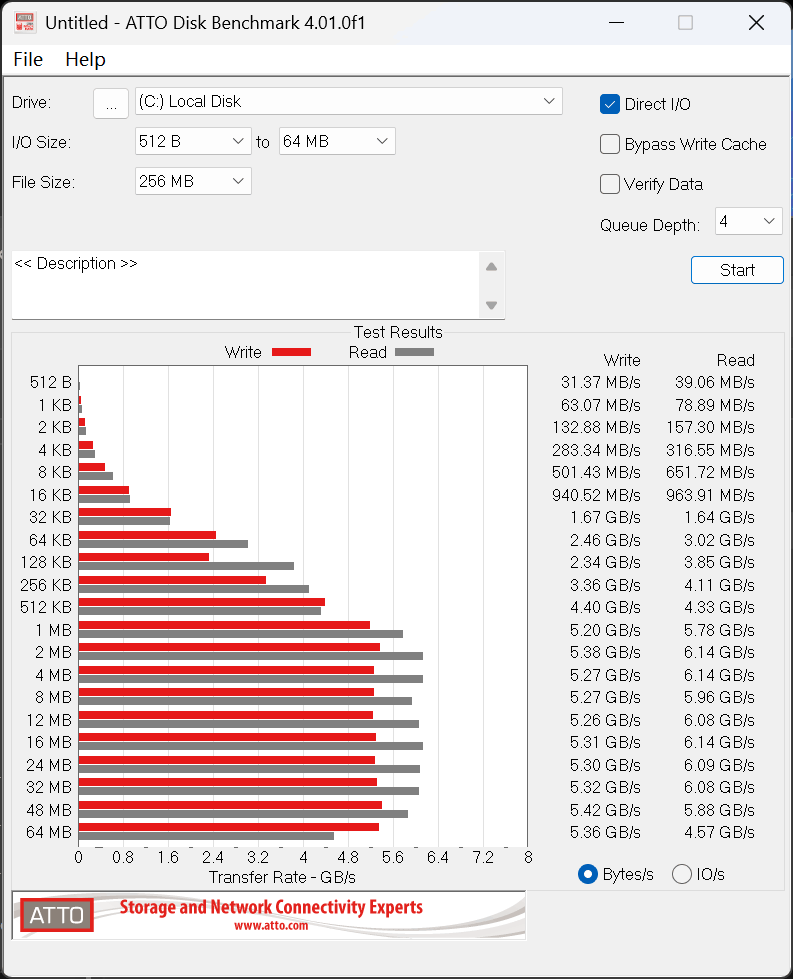
Microsoft includes a 512GB PCIe 4.0 SSD, and benchmark testing with both native ARM and translated x64 versions of CrystalDiskMark showed virtually identical results, suggesting that Microsoft’s storage subsystem suffers almost no measurable performance penalty under emulation.
Overall SSD performance reaches the level expected from a modern PCIe 4.0 drive, providing fast boot times, responsive application loading, and excellent file transfer speeds.
During ATTO Disk Benchmark testing, write performance dipped only during the largest sustained transfers, likely because the SSD exhausted its high-speed cache. This behavior is typical of many consumer PCIe 4.0 SSDs and should have little impact on everyday use.
Surface Slim Pen 2 Experience
The included Surface Slim Pen 2 remains one of the best styluses available for Windows devices.
Although its flattened body initially appears smaller than a conventional pen, it measures approximately 135mm in length, making it just as comfortable to hold during long writing or drawing sessions. In practice, it feels much more natural than its appearance might suggest.
Because it’s a first-party Microsoft accessory, Windows 11 offers seamless native support without requiring any additional software installation.
Nearly every pen function can be customized directly through the Windows Settings app, resulting in an exceptionally polished user experience.
During handwriting tests in Microsoft Paint, pen latency was virtually imperceptible. Ink appeared instantly beneath the pen tip, making note-taking and sketching feel fluid and responsive.
The pen’s rear button functions as an eraser by default—simply flip the pen over to erase handwritten content, closely mimicking the experience of using a traditional pencil.
The Surface Slim Pen 2 also includes two programmable buttons:
- Top button
- Single press: Launch OneNote
- Long press: Launch OneNote
- Double press: Activate Windows 11’s AI-powered Click to Do feature
- Side button
- Functions as a right-click shortcut, allowing quick access to context menus while drawing or navigating Windows.
These thoughtful shortcuts significantly improve productivity and reinforce Microsoft’s focus on pen-based workflows.
6. Battery Life & Thermal Performance: ARM Efficiency Sets a New Standard
One of the biggest advantages of Qualcomm’s ARM platform is its exceptional power efficiency, and the new Surface Pro (13-inch) fully demonstrates just how far Windows on ARM has come.
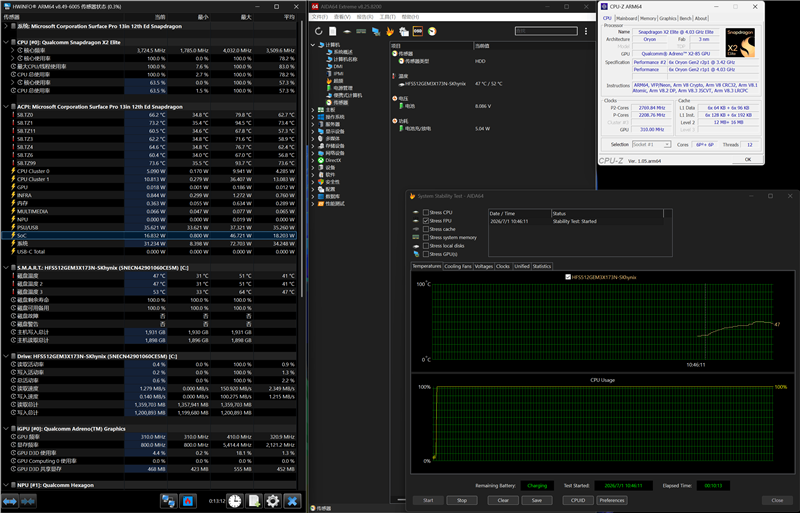
Although we were unable to disassemble the device due to Microsoft’s tightly integrated construction, hardware monitoring software confirmed that the tablet houses a 54.5Wh battery, which is quite generous for such a slim and lightweight 2-in-1.
Outstanding Battery Life
To evaluate real-world endurance, we used PCMark 10’s Applications Battery Test, which simulates everyday productivity tasks using Microsoft Office applications such as Word, Excel, and PowerPoint.
It’s worth noting that only certain PCMark 10 workloads currently support ARM devices under Microsoft’s Prism translation layer, so these results shouldn’t be directly compared with previous laptop reviews that used different battery benchmarks.
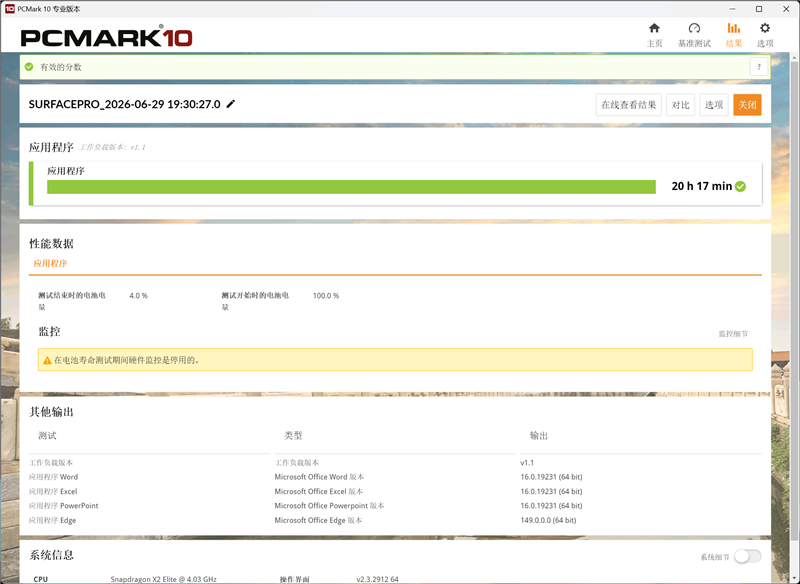
Even so, the results were nothing short of remarkable.
Starting from a full charge, the Surface Pro continued running until the battery reached 4%, delivering an impressive:
- 20 hours and 17 minutes of continuous runtime
For a full Windows PC, this level of endurance is outstanding. It easily covers an entire workday—and even two days of moderate office use—without requiring a charger. Qualcomm’s Snapdragon X2 Elite clearly sets a new benchmark for energy efficiency in Windows laptops and tablets.
Thermal Performance
We also conducted a sustained stress test using AIDA64.
Due to current limitations in ARM monitoring software, some utilities were unable to accurately report CPU frequency and temperature during the test. Native ARM versions of HWiNFO and CPU-Z provided only partial monitoring information, so the following figures should be viewed as approximate rather than absolute.
At the beginning of the stress test, the Snapdragon X2 Elite’s SoC briefly reached a power draw of approximately 46.7W before gradually stabilizing at around 16.8W under sustained load.
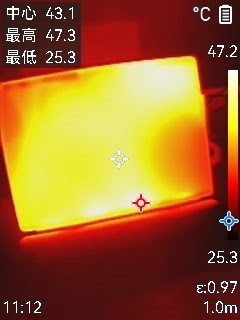
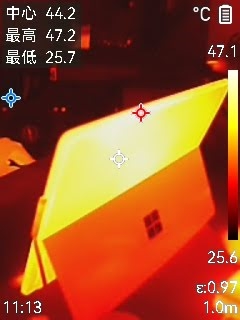
This behavior suggests that Microsoft allows the processor to boost aggressively for short bursts of demanding work before settling into a highly efficient operating range. Naturally, the tablet’s fanless-like thin chassis imposes some thermal limitations compared to thicker laptops, but sustained performance remains very respectable.
Surface temperatures also remained well controlled.
The aluminum chassis distributed heat evenly across the device, preventing noticeable hotspots. Most warmth was concentrated near the rear exhaust area, while the front display stayed relatively cool, particularly around the center where users are most likely to interact with the touchscreen.
Overall, Microsoft’s thermal design strikes an excellent balance between comfort and performance.
7. Verdict: Windows on ARM Has Finally Reached Maturity
Last year, when we reviewed the Surface Laptop (13-inch), we focused heavily on software compatibility because Windows on ARM was still proving itself. At the time, Microsoft’s Prism translation layer had already reached a point where most everyday applications ran smoothly, with only a handful of professional programs lacking ARM support.
One year later, the situation has improved even further.
Today, nearly all mainstream Windows applications run without issue, and many professional software developers have released native ARM versions of their applications. Software compatibility is no longer the major concern it once was.
The Snapdragon X2 Elite also delivers noticeably better performance when running translated x86 software.
Using CPU-Z as an example, the translated version achieves approximately 77% of the native multi-core performance and 72% of the native single-core performance. While there is still some performance overhead associated with emulation, it has been reduced enough that most users are unlikely to notice it during everyday computing.
Compared with last year’s Snapdragon X Plus platform, the improvements are substantial.
Although the processors belong to different product tiers and aren’t directly comparable, benchmark results clearly show the rapid evolution of Qualcomm’s PC processors:
- Around 50% higher multi-core performance in CPU-Z
- Approximately 20–30% higher scores in Cinebench R20 and R23
- Significant gains in both performance and efficiency
These improvements make the new Surface Pro feel considerably faster than its predecessor across a wide range of workloads.
Perhaps the biggest surprise, however, is the new Adreno X2-85 GPU.
In 3DMark’s Wild Life benchmark, graphics performance has nearly doubled compared to the previous generation. Even more importantly, DirectX 11 and DirectX 12 benchmarks now place Qualcomm’s integrated graphics on par with the latest mainstream integrated GPUs from Intel.
For the first time, an ARM-based Windows PC is capable of handling not only office productivity but also light gaming and multimedia entertainment with confidence.
The Surface Pro (13-inch) ultimately succeeds because it combines several key strengths into one elegant device:
- Excellent build quality
- Premium 2-in-1 versatility
- Mature Windows on ARM compatibility
- Outstanding battery life exceeding 20 hours
- Dramatically improved CPU and GPU performance
- AI-ready Snapdragon X2 Elite platform
- Superb Surface Slim Pen 2 experience
For business professionals, students, digital artists, and frequent travelers, the Surface Pro delivers one of the best mobile productivity experiences currently available.
Who Should Buy the Surface Pro 13-inch?
Good choice for:
- Students
- Business travelers
- Office users
- Note-taking and handwriting
- Users who value long battery life
- People who want a tablet/laptop hybrid
Less suitable for:
- Serious PC gamers
- Users dependent on specialist x86 software
- People who need many built-in ports
- Users doing sustained heavy workloads
And thanks to its vastly improved integrated graphics, it is no longer just a productivity machine. Casual gaming, media consumption, and creative work are now genuine strengths, making the latest Surface Pro one of the most complete ARM-powered Windows devices Microsoft has ever produced.