






Facebook Twitter Instagram
    Trending
    • How to Activate Power Saving Mode on iPhone 16: Essential Tips to Extend Battery Life
    • Segway-Ninebot Teases New Mz3 Electric Scooter Ahead of July Debut with Updated Mecha-Inspired Design
    • StepFun Reportedly Preparing Its First AI Smartphone with Native AI Agent Capabilities
    • OpenAI Unveils GPT-Live: A New Voice Model That Listens and Speaks Simultaneously for More Natural Conversations
    • OPPO Find N7 Reportedly Set for Q1 Launch with 2nm Snapdragon 8 Elite Gen 6 and 6,500mAh Battery
    • Google Pixel 11 series scheduled for August: First release with TSMC’s 2nm chip
    • Xiaomi Launches Mijia Washing Machine Pro 10kg with Ultra-Electrolysis Technology and Smart AI Features
    • Xiaomi 18 Pro Specifications Leak: 2nm Snapdragon 8 Elite Gen 6, Dual 200MP Cameras, and 7,000mAh Battery
    Facebook YouTube
    IGeeKphone China Phone, Tablet PC, VR, RC Drone News, Reviews
    • HOME
    • BREAKING NEWS
      • AI NEWS
    • Amazon
    • PHONE
      • Top Phones For Your First Choice
      • Phone Comparison
      • Xiaomi
      • Blackview
      • Doogee
      • Black Shark
      • Geekbuying
      • Banggood
      • TEMU
      • TikTok
      • Aliexpress
      • Walmart
      • MercadoLibre
      • Lazada
    • TOP VAPE Awards for 2026
    • VAPES
      • E-CIGAR Upcoming
      • Vape News
      • Vape Deals
      • Vape Comparison
      • Vape Guide
      • VAPE LAWS
      • Giveaway
    • BEST VAPE
      • Best Vape Stores
      • Best Starter Vape Kits
      • Best Vapes for Beginners
      • Best Disposable Vapes
      • Best Pod Systems
      • Best Pod Mod Vapes
      • Best Mods
      • Best Nicotine Pouches
      • Best Clearomizers/Tanks
      • Best E-Liquid
      • Best EGO/Pens
      • Best Vapes for Nic Salt E-Juice
      • Best Vapes to Quit Smoking
      • RDA vs. RDTA vs. RTA
    • Best Vape Brand 2026
      • VAPORESSO
      • VOOPOO
      • OXVA
      • NEXA BAR
      • MASKKING VAPE
      • SP2S
      • IPLAY
      • TODOO
      • MRFOG
      • LOSTVAPE
      • VEIIK
    • REVIEW
      • E-cigar Review
      • Phones
      • Tablet PC
      • TV Box
      • RC Drone
      • Wearables
      • Camera
      • Accessories
      • VR Headset
    • MORE
      • TABLET
        • Chuwi
        • INNOCN
        • Teclast
        • Top Tablet for Your First Choice
        • Tablet/Laptop Comparison
      • RC DRONE
      • CAMERA
      • WEARABLES
        • OneOdio
        • BlitzWolf
        • Top Smartwatch for First Choice
      • 3D PRINTER
        • 3D Printer Review
        • Anycubic
        • FLSUN
        • Xtool
        • LONGER
        • Top 3D printer to Choose First
      • POWER STATION
        • Oukitel
        • FOSSIBOT
      • GAMING
        • Top Gaming Products
      • E-BIKE
        • Samebike
        • Happyrun
        • ENGWE
      • SMART HOME
      • TV BOX
      • ACCESSORIES
      • VR HEADSET
      • CLOTHES
      • AUTO CAR
    • DEAL
    • Shop
    IGeeKphone China Phone, Tablet PC, VR, RC Drone News, Reviews
    You are at:Home»Guide»How to Activate Power Saving Mode on iPhone 16: Essential Tips to Extend Battery Life
    Guide

    How to Activate Power Saving Mode on iPhone 16: Essential Tips to Extend Battery Life

    Brady CottonBy Brady CottonJuly 9, 2026
    Facebook Twitter Pinterest LinkedIn Tumblr Email

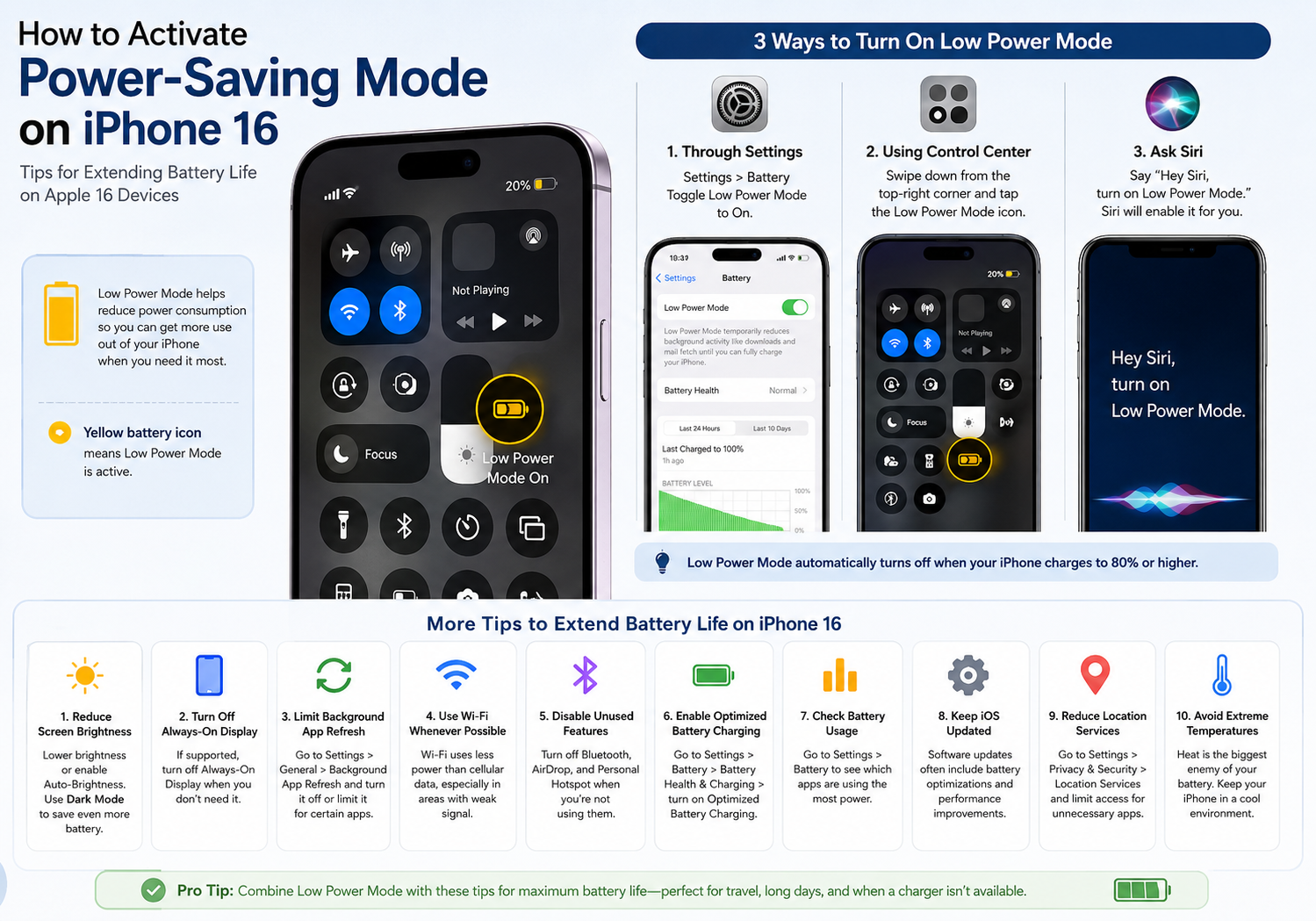
    Battery life is one of the most important factors for smartphone users, especially when you’re traveling, working remotely, or spending long hours away from a charger. While the iPhone 16 lineup offers excellent battery performance thanks to Apple’s latest A-series chip and iOS optimizations, enabling Low Power Mode can significantly extend usage time when your battery starts running low.

    In this guide, we’ll explain how to activate Low Power Mode on your iPhone 16 and share practical tips to maximize battery life throughout the day.

    What Is Low Power Mode?

    Low Power Mode is a built-in iOS feature designed to reduce power consumption by temporarily disabling or limiting certain background activities.

    When enabled, your iPhone automatically makes several adjustments, including:

    • Reducing background app refresh
    • Lowering automatic downloads
    • Limiting some visual effects
    • Reducing screen refresh rate where applicable
    • Delaying certain iCloud syncing tasks
    • Optimizing system performance for better battery efficiency

    You’ll know Low Power Mode is active when the battery icon turns yellow.

    How to Turn On Low Power Mode on iPhone 16

    Activating Low Power Mode only takes a few seconds.

    Method 1: Through Settings

    1. Open Settings.
    2. Tap Battery.
    3. Toggle Low Power Mode to On.

    Once activated, the battery indicator in the status bar will change from green to yellow.

    Method 2: Using Control Center

    For faster access:

    1. Open Control Center by swiping down from the top-right corner of the screen.
    2. Tap the Low Power Mode icon (if it has been added).

    If you don’t see the icon:

    1. Go to Settings > Control Center.
    2. Add Low Power Mode to your controls.

    This allows you to enable or disable the feature with a single tap.

    Method 3: Ask Siri

    You can also activate Low Power Mode hands-free by saying:

    • “Hey Siri, turn on Low Power Mode.”

    Siri will enable the feature immediately.

    When Does Low Power Mode Turn Off?

    Low Power Mode automatically turns off once your iPhone charges to 80% battery or higher.

    You can also disable it manually at any time through Settings or Control Center.

    Additional Ways to Extend Battery Life on iPhone 16

    While Low Power Mode is highly effective, combining it with a few simple habits can help your iPhone last even longer.

    1. Reduce Screen Brightness

    The display is one of the largest power consumers.

    To save battery:

    • Lower brightness manually.
    • Enable Auto-Brightness in Accessibility settings.
    • Use Dark Mode, especially on OLED-equipped iPhone 16 models.

    2. Turn Off Always-On Display (Supported Models)

    If your iPhone 16 model supports Always-On Display, disabling it can help reduce battery drain.

    Go to:

    Settings > Display & Brightness > Always On Display

    Toggle it off when battery life is a priority.

    3. Limit Background App Refresh

    Many apps continue updating even when you’re not using them.

    To reduce background activity:

    1. Open Settings.
    2. Tap General.
    3. Select Background App Refresh.
    4. Turn it off completely or disable it for selected apps.

    4. Use Wi-Fi Whenever Possible

    Wi-Fi generally consumes less power than mobile data, especially in areas with weak cellular reception.

    Whenever available, connect to a stable Wi-Fi network instead of relying on 5G.

    5. Disable Unused Wireless Features

    Turn off features you’re not actively using, including:

    • Bluetooth
    • AirDrop
    • Personal Hotspot

    These can all consume power when left enabled.

    6. Enable Optimized Battery Charging

    Apple includes a feature that helps reduce battery aging by learning your charging habits.

    To enable it:

    1. Open Settings.
    2. Tap Battery.
    3. Select Battery Health & Charging.
    4. Turn on Optimized Battery Charging.

    This helps preserve long-term battery health.

    7. Check Battery Usage

    To identify battery-hungry apps:

    1. Open Settings.
    2. Tap Battery.
    3. Scroll down to view battery usage by app.

    If an app consumes unusually high power, consider limiting its background activity or updating it.

    8. Keep iOS Updated

    Apple regularly releases software updates that include battery optimizations and performance improvements.

    Go to:

    Settings > General > Software Update

    Install the latest version whenever available.

    9. Reduce Location Services

    Some apps constantly access your location.

    To adjust permissions:

    1. Open Settings.
    2. Tap Privacy & Security.
    3. Select Location Services.
    4. Set unnecessary apps to While Using the App or Never.

    10. Avoid Extreme Temperatures

    Lithium-ion batteries perform best between 16°C and 22°C (62°F–72°F).

    Avoid exposing your iPhone to:

    • Direct sunlight
    • Hot vehicles
    • Freezing temperatures

    Extreme heat is particularly harmful to long-term battery health.

    Is Low Power Mode Safe to Use All the Time?

    Yes. Low Power Mode is completely safe and is designed by Apple to reduce power consumption without harming your device.

    However, because it limits certain background functions and performance, most users only enable it when battery life becomes a concern or when they know they won’t have access to a charger for an extended period.

    Final Thoughts

    iPhone 16 series already delivers impressive battery efficiency, but Low Power Mode remains one of the easiest and most effective ways to extend battery life during busy days or while traveling. By combining this feature with smart charging habits, reduced background activity, and optimized display settings, you can enjoy significantly longer usage without sacrificing the overall user experience.

    Whether you’re streaming videos, navigating with Maps, taking photos, or working on the go, these simple battery-saving techniques will help ensure your iPhone 16 keeps going when you need it most.

    Share. Facebook Twitter Pinterest LinkedIn Tumblr Email

    Related Posts

    Completely changing the rules of the game! I’ve replaced my only gaming earphones

    Strategies for Harnessing SEO Consulting to Drive Business Expansion

    Why Does iPhone 15 Stop Charging at 80%? Understanding Apple’s Battery Optimization Feature

    Leave A Reply Cancel Reply

    You must be logged in to post a comment.

    voopoopintch
    oxva nexlim 2
    sp2s sen x disposable vape
    • Popular
    • 3D Printer REVIEW
    • XIAOMI
    June 21, 2026

    iPlay LUMO 8K Review – A Compact Prefilled Pod Kit with Big Flavor and Everyday Convenience

    June 21, 2026

    iPlay HOOLA 150K Review – A Cloud-Chasing Giant with Music, Modes & Massive Longevity

    June 21, 2026

    Vaporesso VIBE SE 2 Review – Simple on the Outside, Surprisingly Smart on the Inside

    June 21, 2026

    VOOPOO DRAG H40 Pro Review – The Return of the Pocket Powerhouse

    December 26, 2025

    ACMER ASCARVA 4S: Precision CNC Power for Makers, DIYers & Small Workshops

    June 23, 2024

    ACMER P2 20W Laser Engraver Fixed Focus Engraving: Hands on Review

    May 30, 2024

    xTool F1 Ultra Review: World’s First 20W Fiber & 20W Diode Laser Engraver

    May 30, 2024

    Anycubic Kobra 3 Combo Review: The Multicolor Masterpiece?

    July 9, 2026

    Xiaomi 18 Pro Specifications Leak: 2nm Snapdragon 8 Elite Gen 6, Dual 200MP Cameras, and 7,000mAh Battery

    July 9, 2026

    Redmi Note 17 Pro is equipped with a 9000mAh Xiaomi Jinshajiang battery: it supports 67W fast charging.

    July 8, 2026

    Xiaomi REDMI Note 17 Appears on Geekbench with Snapdragon 6s Gen 4 Ahead of Official Launch

    July 8, 2026

    Xiaomi Unveils New Automotive Brand “SkyNomad” with Chinese Name “Pengcheng,” Targeting Family SUVs and Outdoor Adventures

    fc 26 coins
    New Arrivals
    • Xiaomi Poco F9 Pro Xiaomi Poco F9 Pro
    • Xiaomi Poco Pad X2 Xiaomi Poco Pad X2
    • Xiaomi Poco F10 Ultra Xiaomi Poco F10 Ultra
    • Xiaomi Poco F10 Pro Xiaomi Poco F10 Pro
    • Summo 150K Refillable Disposable Vape Summo 150K Refillable Disposable Vape
    • Google Pixel 12 Google Pixel 12
    • Google Pixel 12 Pro Google Pixel 12 Pro
    • Google Pixel 12a Google Pixel 12a
    • SMOK Novo Axis Pod System Kit SMOK Novo Axis Pod System Kit
    About
  • Igeekphone.com provides the first global tech news and reviews about smartphone, vapes, e-cigar, smart home, 3D printers, e-bike,tablets, RC drones, VR headset, and other accessories. It's the best platform to improve your brand and product.
  • Contact us: info@igeekphone.com
  • Check Our Privacy Policy Here.
  • Note: *Right now we have US editor and EU editors for review, especially for Amazon US and EU.
  • *Shop and Compare Price Here*
  • Facebook
  • Youtube
  • OUR BEST VAPE PARTNERS
  • VAPE ONLINE STORE
  • HAYATI PRO MAX PLUS
  • VAPORESSO
  • VOOPOO
  • OXVA
  • NEXA
  • MASKKING
  • SP2S
  • IPLAY
  • TODOO
  • OTHER BEST PARTNERS
  • SVBONY
  • Chuwi
  • Blackview
  • Fossibot
  • Unihertz
  • Flsun
  • Anycubic
  • Xtool
  • Oukitel
  • Mukkpet Ebike
  • Ugreen
  • Copyright © 2026 igeekphone

    Type above and press Enter to search. Press Esc to cancel.