






Facebook Twitter Instagram
    Trending
    • UK Launches Consultation on Stricter E-Cigarette Packaging and Marketing Rules to Reduce Youth Appeal
    • Germany Expands Mandatory Recycling for Disposable Vapes, Requiring Retailers to Accept Used Devices
    • How to Use App Split View on Apple’s Foldable iPhone?
    • CZ31 Rocket-Style RC Drone Review: A Fun FPV Quadcopter with Brushless Power and Immersive Rocket Effects
    • T13 AI Translation Bluetooth 5.4 Earphones Review at $15.99: Smart Touchscreen Earbuds with Real-Time Translation and Immersive Audio
    • LYZRC L900 PLUS Review: A Foldable GPS Drone with 5G FPV, Dual Cameras, and LCD Controller
    • HELIWAY HKRC 1205 RTR Review: A 70km/h Brushless 1/14 RC Short Course Truck Built for Speed and Adventure
    • Renderings of Motorola Edge 70 Max smartphone have been released: 5th generation Snapdragon 8 processor, 7100mAh battery
    Facebook YouTube
    IGeeKphone China Phone, Tablet PC, VR, RC Drone News, Reviews
    • HOME
    • BREAKING NEWS
      • AI NEWS
    • Amazon
    • PHONE
      • Top Phones For Your First Choice
      • Phone Comparison
      • Xiaomi
      • Blackview
      • Doogee
      • Black Shark
      • Geekbuying
      • Banggood
      • TEMU
      • TikTok
      • Aliexpress
      • Walmart
      • MercadoLibre
      • Lazada
    • TOP VAPE Awards for 2026
    • VAPES
      • E-CIGAR Upcoming
      • Vape News
      • Vape Deals
      • Vape Comparison
      • Vape Guide
      • VAPE LAWS
      • Giveaway
    • BEST VAPE
      • Best Vape Stores
      • Best Starter Vape Kits
      • Best Vapes for Beginners
      • Best Disposable Vapes
      • Best Pod Systems
      • Best Pod Mod Vapes
      • Best Mods
      • Best Nicotine Pouches
      • Best Clearomizers/Tanks
      • Best E-Liquid
      • Best EGO/Pens
      • Best Vapes for Nic Salt E-Juice
      • Best Vapes to Quit Smoking
      • RDA vs. RDTA vs. RTA
    • Best Vape Brand 2026
      • VAPORESSO
      • VOOPOO
      • OXVA
      • NEXA BAR
      • MASKKING VAPE
      • SP2S
      • IPLAY
      • TODOO
      • MRFOG
      • LOSTVAPE
      • VEIIK
    • REVIEW
      • E-cigar Review
      • Phones
      • Tablet PC
      • TV Box
      • RC Drone
      • Wearables
      • Camera
      • Accessories
      • VR Headset
    • MORE
      • TABLET
        • Chuwi
        • INNOCN
        • Teclast
        • Top Tablet for Your First Choice
        • Tablet/Laptop Comparison
      • RC DRONE
      • CAMERA
      • WEARABLES
        • OneOdio
        • BlitzWolf
        • Top Smartwatch for First Choice
      • 3D PRINTER
        • 3D Printer Review
        • Anycubic
        • FLSUN
        • Xtool
        • LONGER
        • Top 3D printer to Choose First
      • POWER STATION
        • Oukitel
        • FOSSIBOT
      • GAMING
        • Top Gaming Products
      • E-BIKE
        • Samebike
        • Happyrun
        • ENGWE
      • SMART HOME
      • TV BOX
      • ACCESSORIES
      • VR HEADSET
      • CLOTHES
      • AUTO CAR
    • DEAL
    • Shop
    IGeeKphone China Phone, Tablet PC, VR, RC Drone News, Reviews
    You are at:Home»Guide»How to Use App Split View on Apple’s Foldable iPhone?
    Guide

    How to Use App Split View on Apple’s Foldable iPhone?

    Brady CottonBy Brady CottonJuly 10, 2026
    Facebook Twitter Pinterest LinkedIn Tumblr Email

    Apple’s first foldable iPhone is expected to introduce a new level of multitasking by taking advantage of its larger flexible display. Among the most anticipated features is App Split View, which allows users to run two apps side by side, making the foldable iPhone a far more capable productivity device than a traditional smartphone.

    If you’re new to foldable devices, here’s everything you need to know about using App Split View on Apple’s foldable iPhone.

    What Is App Split View?

    App Split View is a multitasking feature that lets you open and interact with two compatible apps simultaneously on the foldable display. Instead of constantly switching between applications, you can work with both at the same time.

    For example, you can:

    • Browse Safari while taking notes
    • Watch YouTube while chatting in Messages
    • Compare documents side by side
    • Drag photos into Mail
    • Copy text from one app into another
    • Manage your calendar while replying to emails

    The larger foldable screen makes these tasks far more comfortable than on a standard smartphone.

    How to Open Split View

    Although Apple has yet to officially detail the interface, the expected workflow will be similar to multitasking on iPadOS.

    Step 1: Open Your First App

    Launch the app you want to use first, such as Safari, Notes, or Mail.

    Step 2: Access the Dock or Multitasking Menu

    Swipe up gently from the bottom edge to reveal the Dock or multitasking interface without closing the current app.
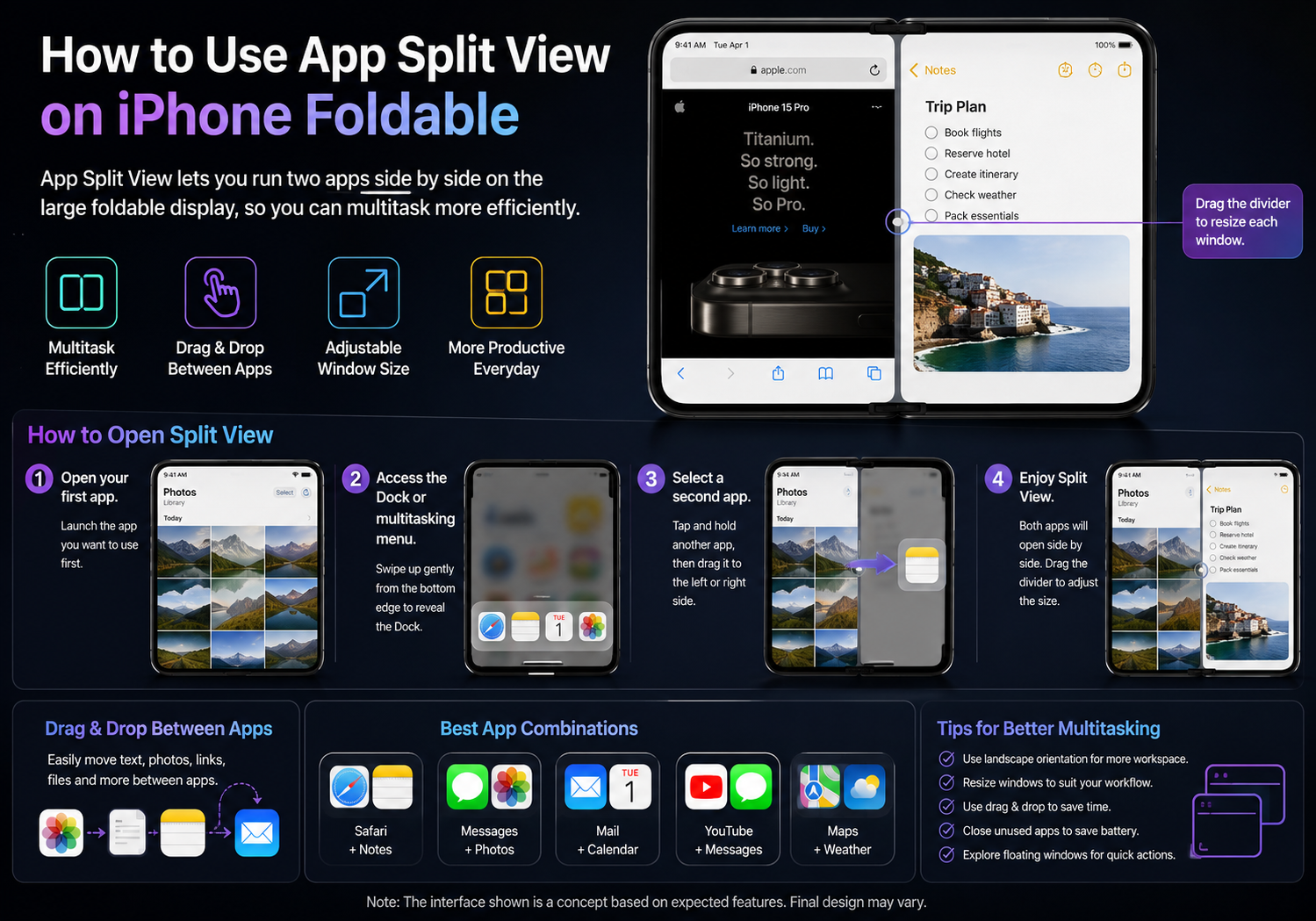
    Step 3: Select a Second App

    Tap and hold another compatible app, then drag it toward either the left or right side of the display.

    The foldable iPhone should automatically arrange both apps into a split-screen layout.

    Step 4: Adjust Window Size

    Drag the divider between the two apps to resize each window according to your needs.

    For example:

    • 50/50 split for equal workspace
    • 70/30 split when one app requires more room
    • Quick resizing while both apps remain active

    Drag and Drop Between Apps

    One advantage of Split View is seamless drag-and-drop support.

    You may be able to:

    • Drag images from Photos into Messages
    • Move files into the Files app
    • Copy text between Notes and Mail
    • Share links from Safari directly into messaging apps
    • Attach documents to emails without switching screens

    This workflow significantly speeds up everyday tasks.

    Best App Combinations

    Some of the most useful Split View combinations include:

    Work & Productivity

    • Mail + Calendar
    • Notes + Safari
    • Files + Pages
    • Reminders + Maps

    Communication

    • Messages + Photos
    • FaceTime + Notes
    • WhatsApp + Safari

    Entertainment

    • YouTube + Messages
    • Apple Music + Notes
    • Podcasts + Safari

    Travel

    • Maps + Weather
    • Translate + Safari
    • Booking apps + Notes

    Use Floating Windows for More Flexibility

    Apple may also allow certain apps to open as floating windows instead of occupying half the screen.

    This could let users:

    • Reply to a message without leaving another app
    • Open Calculator over a spreadsheet
    • Watch a video while browsing the web
    • Access quick tools without interrupting their workflow

    These floating windows would make multitasking even more efficient.

    Tips for Better Multitasking

    To get the most out of Split View:

    • Use landscape orientation for more workspace.
    • Pair frequently used apps together.
    • Enable drag-and-drop whenever possible.
    • Keep one app for reference while working in another.
    • Close unused apps to conserve battery life.

    Which Apps Support Split View?

    Most Apple apps are expected to support multitasking, including:

    • Safari
    • Mail
    • Messages
    • Notes
    • Calendar
    • Photos
    • Files
    • Maps
    • Music

    Many third-party developers are also expected to optimize their apps for Apple’s foldable display, especially productivity, office, and media applications.

    Why Foldable iPhones Benefit Most

    Unlike conventional smartphones, a foldable iPhone provides nearly tablet-sized screen space when unfolded. This extra display area makes multitasking feel natural rather than cramped.

    Whether you’re working, studying, traveling, or simply browsing the web, Split View transforms the foldable iPhone into a more capable mobile productivity device, reducing the need to constantly switch between apps.

    Final Thoughts

    App Split View is expected to become one of the defining features of Apple’s foldable iPhone. By allowing two apps to run side by side, users can browse, communicate, edit documents, and manage daily tasks more efficiently on the larger flexible display.

    While Apple has not yet officially unveiled its foldable iPhone or confirmed the final multitasking interface, Split View is widely expected to play a central role in maximizing the potential of the device’s expansive screen, bringing an iPad-like productivity experience to a pocket-sized form factor.

    Share. Facebook Twitter Pinterest LinkedIn Tumblr Email

    Related Posts

    Revolutionizing Digital Access: Learning More About Fiber Internet

    How to Activate Power Saving Mode on iPhone 16: Essential Tips to Extend Battery Life

    What Types of Student Loans Are Available? Exploring Your Options

    Leave A Reply Cancel Reply

    You must be logged in to post a comment.

    voopoopintch
    oxva nexlim 2
    sp2s sen x disposable vape
    • Popular
    • 3D Printer REVIEW
    • XIAOMI
    June 21, 2026

    iPlay LUMO 8K Review – A Compact Prefilled Pod Kit with Big Flavor and Everyday Convenience

    June 21, 2026

    iPlay HOOLA 150K Review – A Cloud-Chasing Giant with Music, Modes & Massive Longevity

    June 21, 2026

    Vaporesso VIBE SE 2 Review – Simple on the Outside, Surprisingly Smart on the Inside

    June 21, 2026

    VOOPOO DRAG H40 Pro Review – The Return of the Pocket Powerhouse

    December 26, 2025

    ACMER ASCARVA 4S: Precision CNC Power for Makers, DIYers & Small Workshops

    June 23, 2024

    ACMER P2 20W Laser Engraver Fixed Focus Engraving: Hands on Review

    May 30, 2024

    xTool F1 Ultra Review: World’s First 20W Fiber & 20W Diode Laser Engraver

    May 30, 2024

    Anycubic Kobra 3 Combo Review: The Multicolor Masterpiece?

    July 10, 2026

    Xiaomi Band 11 Series Certified Ahead of Launch, Retains 233mAh Battery Capacity

    July 9, 2026

    Xiaomi 18 Pro Specifications Leak: 2nm Snapdragon 8 Elite Gen 6, Dual 200MP Cameras, and 7,000mAh Battery

    July 9, 2026

    Redmi Note 17 Pro is equipped with a 9000mAh Xiaomi Jinshajiang battery: it supports 67W fast charging.

    July 8, 2026

    Xiaomi REDMI Note 17 Appears on Geekbench with Snapdragon 6s Gen 4 Ahead of Official Launch

    fc 26 coins
    New Arrivals
    • Xiaomi 18T Xiaomi 18T
    • Xiaomi 18T Pro Xiaomi 18T Pro
    • Huawei Mate 80 Air Huawei Mate 80 Air
    • Xiaomi Poco F9 Ultra Xiaomi Poco F9 Ultra
    • JNR Falcon Mini 20K Puffs Refillable Vape Kit JNR Falcon Mini 20K Puffs Refillable Vape Kit
    • Hyrise Hybrid Vaporizer Kit Hyrise Hybrid Vaporizer Kit
    • Hyrise Hydden 510 Thread Battery 1000mAh Hyrise Hydden 510 Thread Battery 1000mAh
    • Smoant Flex Neo Pod System Kit Smoant Flex Neo Pod System Kit
    • Xiaomi Poco F9 Pro Xiaomi Poco F9 Pro
    About
  • Igeekphone.com provides the first global tech news and reviews about smartphone, vapes, e-cigar, smart home, 3D printers, e-bike,tablets, RC drones, VR headset, and other accessories. It's the best platform to improve your brand and product.
  • Contact us: info@igeekphone.com
  • Check Our Privacy Policy Here.
  • Note: *Right now we have US editor and EU editors for review, especially for Amazon US and EU.
  • *Shop and Compare Price Here*
  • Facebook
  • Youtube
  • OUR BEST VAPE PARTNERS
  • VAPE ONLINE STORE
  • HAYATI PRO MAX PLUS
  • VAPORESSO
  • VOOPOO
  • OXVA
  • NEXA
  • MASKKING
  • SP2S
  • IPLAY
  • TODOO
  • OTHER BEST PARTNERS
  • SVBONY
  • Chuwi
  • Blackview
  • Fossibot
  • Unihertz
  • Flsun
  • Anycubic
  • Xtool
  • Oukitel
  • Mukkpet Ebike
  • Ugreen
  • Copyright © 2026 igeekphone

    Type above and press Enter to search. Press Esc to cancel.