Facebook Twitter Instagram
    Trending
    • Wireless Earbuds, Bluetooth 5.4 Headphones Multi-function To-JM19 TWS Earbuds Review at $21.99
    • X60 20W Portable Bluetooth Speaker Review-Powerful Sound Anywhere
    • Blackview OSCAL Spider 10 Rugged Tablet PC Review-Your Best Gaming and Video Player
    • DOOGEE Tab G6 MAX Tablet PC Review-Big Screen Meets Smart Performance
    • VOOPOO ARGUS P3 VS ARGUS P2: Which Square Pod Suits You?
    • VOOPOO Drag X3 vs VOOPOO Drag X2: Hands-On Comparison
    • Best Disposable Vape in 2026 With Long-Lasting Battery Life
    • Al Fakher Crown Bar 60K E-Hose X Review: A Premium Long-Lasting Disposable Vape
    Facebook YouTube
    Login Register
    IGeeKphone China Phone, Tablet PC, VR, RC Drone News, Reviews
    • HOME
      • NEWS
        • DeepSeek
        • ChatGPT
        • Minecraft
    • Amazon
    • NEW YEAR
    • PHONE
      • Top Phones For Your First Choice
      • Phone Comparison
      • Xiaomi
      • Blackview
      • Doogee
      • Black Shark
      • Geekbuying
      • Banggood
      • TEMU
      • TikTok
      • Aliexpress
      • Walmart
      • MercadoLibre
      • Lazada
    • TOP VAPE Awards for 2026
    • VAPES
      • E-CIGAR Upcoming
      • Vape News
      • Vape Deals
      • Vape Comparison
      • Vape Guide
      • Giveaway
    • BEST VAPE
      • Best Vape Stores
      • Best Starter Vape Kits
      • Best Vapes for Beginners
      • Best Disposable Vapes
      • Best Pod Systems
      • Best Pod Mod Vapes
      • Best Mods
      • Best Nicotine Pouches
      • Best Clearomizers/Tanks
      • Best E-Liquid
      • Best EGO/Pens
      • Best Vapes for Nic Salt E-Juice
      • Best Vapes to Quit Smoking
      • RDA vs. RDTA vs. RTA
    • Best Vape Brand 2026
      • VAPORESSO
      • VOOPOO
      • OXVA
      • NEXA BAR
      • ORIONBARTECH
      • MASKKING VAPE
      • MEMERS
      • SP2S
      • JNR
      • TODOO
      • MRFOG
      • VEIIK
    • REVIEW
      • E-cigar Review
      • Phones
      • Tablet PC
      • TV Box
      • RC Drone
      • Wearables
      • Camera
      • Accessories
      • VR Headset
    • MORE
      • TABLET
        • Chuwi
        • INNOCN
        • Teclast
        • Top Tablet for Your First Choice
        • Tablet/Laptop Comparison
      • RC DRONE
      • CAMERA
      • WEARABLES
        • OneOdio
        • BlitzWolf
        • Top Smartwatch for First Choice
      • 3D PRINTER
        • 3D Printer Review
        • Anycubic
        • FLSUN
        • Xtool
        • LONGER
        • Top 3D printer to Choose First
      • POWER STATION
        • Oukitel
        • FOSSIBOT
      • GAMING
        • Top Gaming Products
      • E-BIKE
        • Samebike
        • Happyrun
        • ENGWE
      • SMART HOME
      • TV BOX
      • ACCESSORIES
      • VR HEADSET
      • CLOTHES
      • AUTO CAR
    • DEAL
    • Shop
    IGeeKphone China Phone, Tablet PC, VR, RC Drone News, Reviews
    You are at:Home»Guide»How to Improve Computer Performance by 30% with 1 minute of simple hands-on operation without upgrading any configuration?
    Guide

    How to Improve Computer Performance by 30% with 1 minute of simple hands-on operation without upgrading any configuration?

    Brady CottonBy Brady CottonMay 17, 2024
    Facebook Twitter Pinterest LinkedIn Tumblr Email

    Today, more and more users intend to upgrade from Windows 10 to Windows 11, and many friends may not know that after upgrading to Windows 11, a small operation can improve the performance of the whole machine by nearly 30%.

    Yes, you read that right, you can improve your computer’s performance by nearly 30% without upgrading any configuration, and this is very simple: turn off VBS (Virtualization security) features.

    What is VBS?

    What exactly is VBS? It’s essentially Microsoft’s Virtual security feature, which aims to make personal computers as secure as business computers. But everything has two sides, the so-called fish and bear PAWS can not have it both ways.
    In fact, the impact of VBS on gaming users is more obvious, and on some AMD processors, the performance drop after VBS is turned on can be as high as 28%. On most hardware, the average impact of VBS on performance is around 5%, so it is necessary to shut down VBS in order to fully release the performance of Windows 11 computers.

    So how does that work?

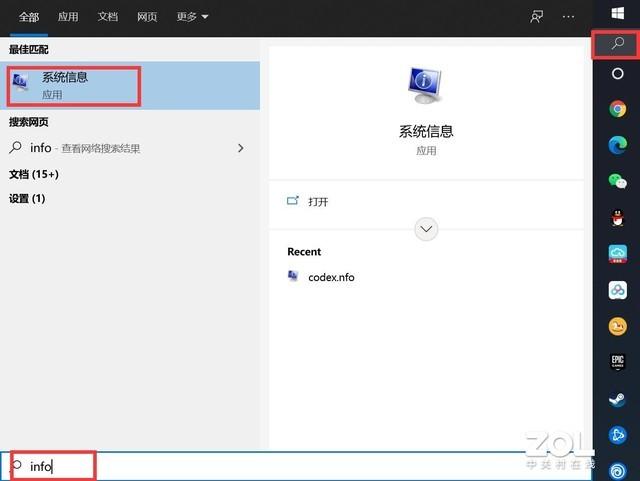
    The easiest way to do this is to open the search bar, type info, and then click the System Info App.

    On the system information page, “Virtualization Based Security” is displayed in the lower part of the page, and the current status of the VBS is displayed.
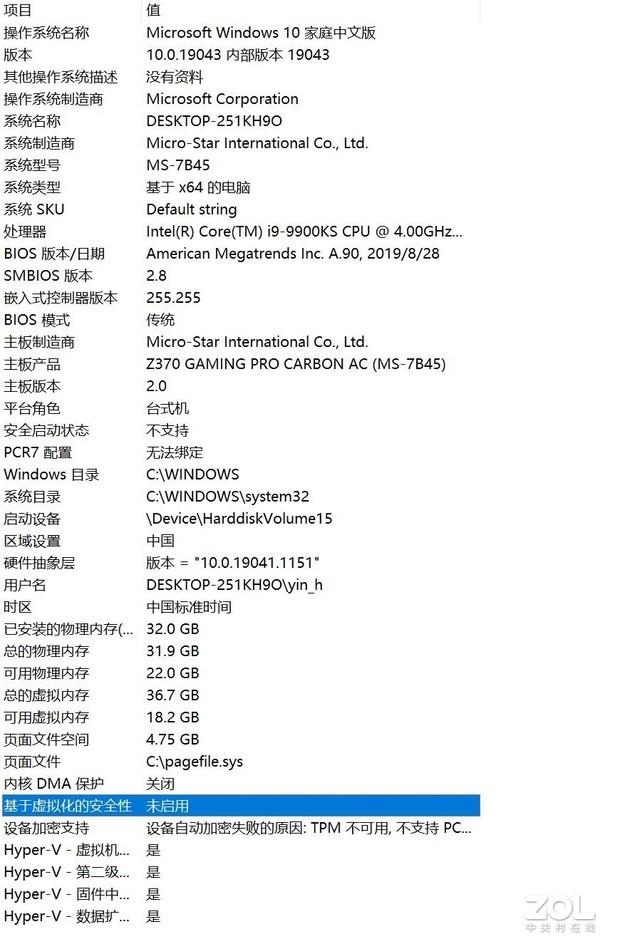
    If the VBS displays “Not enabled,” then nothing needs to be done. If it says “Running”, then proceed to the closing method below.

    How do I disable VBS?

    In general, there are two ways to disable VBS:

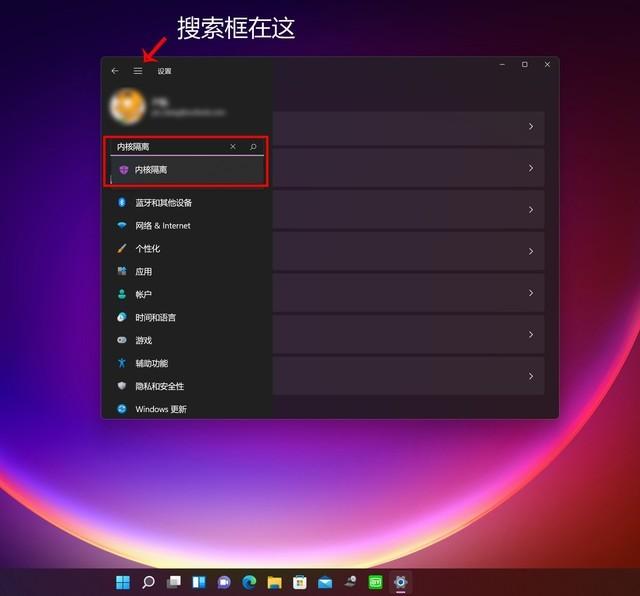
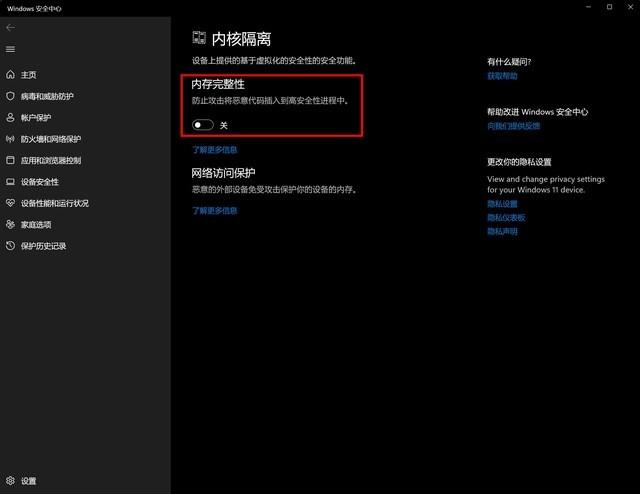
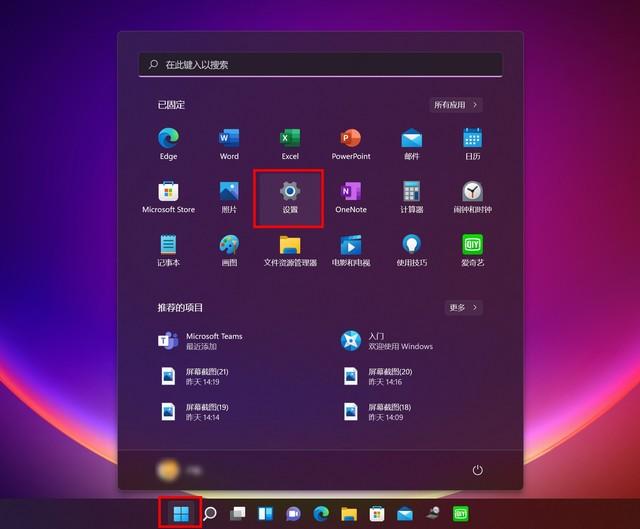
    Method 1: Open the Settings panel in the Start menu – search for the keyword “kernel isolation” and click – Memory integrity click Close – Restart the computer.

    Please refer to the following three pictures for detailed steps:

    Method 2: The keyboard key combination “Windows+R” opens the run dialog – type regedit and click OK to open the registry – navigate through the left position to find “HKEY_LOCAL_MACHINE/System\CurrentControlSet\Control\DeviceGuard” “– will”
    EnableVirtualizationBasedSecurity DWORD value in “option is set to 0, restart the computer.
    Simply put, VBS is about preventing hackers from getting their hands on your productivity tools. However, objectively speaking, this feature is not really needed by most ordinary users. If you do not disable VBS, then the computer performance will be affected to a certain extent, so I still recommend that you disable this function. In this way, you will find that the performance of your computer will improve as if you were upgrading the configuration.

    Share. Facebook Twitter Pinterest LinkedIn Tumblr Email

    Related Posts

    How to Set up Screen Fingerprint Unlocking on iPhone 17 Pro?

    How to Take Multiple Exposures with Oppo Find X9 Smartphone?

    Tech Innovations in Personal Injury Law: Enhancing Case Strategies with AI and Analytics

    Leave A Reply Cancel Reply

    You must be logged in to post a comment.

    voopoo drag s3
    oxva xlim 3 ultra
    sp2s sen x disposable vape
    jnr 100k
    • Popular
    • 3D Printer REVIEW
    • XIAOMI
    January 21, 2026

    VOOPOO ARGUS P3 VS ARGUS P2: Which Square Pod Suits You?

    January 21, 2026

    VOOPOO Drag X3 vs VOOPOO Drag X2: Hands-On Comparison

    January 1, 2026

    VOOPOO ARGUS P3: The Touchscreen Pod That Feels Like a Mini Mod (Review)

    December 26, 2025

    Vaporesso XROS 5 Nano: Touchscreen Control Meets True Nano Portability (Review)

    December 26, 2025

    ACMER ASCARVA 4S: Precision CNC Power for Makers, DIYers & Small Workshops

    June 23, 2024

    ACMER P2 20W Laser Engraver Fixed Focus Engraving: Hands on Review

    May 30, 2024

    xTool F1 Ultra Review: World’s First 20W Fiber & 20W Diode Laser Engraver

    May 30, 2024

    Anycubic Kobra 3 Combo Review: The Multicolor Masterpiece?

    January 20, 2026

    The New Version of Xiaomi Band 9 Pro’s Pioneer Program has begun! A new “tap-to-pay” function has been Added.

    January 19, 2026

    The Appearance of Xiaomi Redmi Turbo 5 Max Phone has been Revealed

    January 16, 2026

    Xiaomi REDMI Turbo 5 Max is Claimed to Dominate the mainstream gaming performance category in the 2.5K Range

    January 16, 2026

    New smartwatch and Smartband of Xiaomi have been Revealed, and the Battery Capacity of Redmi K Pad 2 Mini Tablet is Expected to be Significantly Increased

    fc 26 coins
    New Arrivals
    • Al Fakher Crown Bar 60K E-Hose X Disposable Vape Al Fakher Crown Bar 60K E-Hose X Disposable Vape
    • PeakBar H2O 40K Disposable Vape PeakBar H2O 40K Disposable Vape
    • NOVA BAR 35K DISPOSABLE NOVA BAR 35K DISPOSABLE
    • FIFTY BAR X HUMBLE 20K DISPOSABLE FIFTY BAR X HUMBLE 20K DISPOSABLE
    • FASTA ALIEN 51K DISPOSABLE FASTA ALIEN 51K DISPOSABLE
    • Vivo V70 FE SmartPhone Vivo V70 FE SmartPhone
    • Uwell Nunchaku 10000 Pod System Kit Uwell Nunchaku 10000 Pod System Kit
    • OnePlus Turbo 6V OnePlus Turbo 6V
    • Uwell Caliburn G5 KOKO Pod System Kit Uwell Caliburn G5 KOKO Pod System Kit
    About
  • Igeekphone.com provides the first global tech news and reviews about smartphone, vapes, e-cigar, smart home, 3D printers, e-bike,tablets, RC drones, VR headset, and other accessories. It's the best platform to improve your brand and product.
  • Contact us: info@igeekphone.com
  • Check Our Privacy Policy Here.
  • Note: *Right now we have US editor and EU editors for review, especially for Amazon US and EU.
  • *Shop and Compare Price Here*
  • Facebook
  • Youtube
  • OUR BEST VAPE PARTNERS
  • VAPE ONLINE STORE
  • HAYATI PRO MAX PLUS
  • VAPORESSO
  • VOOPOO
  • OXVA
  • NEXA
  • MASKKING
  • LOSTVAPE ORIONBAR
  • MEMERS
  • TODOO
  • SP2S
  • JNR
  • VEIIK
  • OTHER BEST PARTNERS
  • SVBONY
  • Chuwi
  • Blackview
  • Fossibot
  • Unihertz
  • Flsun
  • Anycubic
  • Xtool
  • Oukitel
  • Mukkpet Ebike
  • Ugreen
  • Copyright © 2026 igeekphone

    Type above and press Enter to search. Press Esc to cancel.