




Facebook Twitter Instagram
    Trending
    • Geek Bar Ice Prince 50K Disposable Vape Review: A Majestic Cloud of Flavor and Endurance
    • Which type of Vape is Harmless to the Human Body?
    • EA FC 26: 4 Best Goalkeepers to Build Your Ultimate Squad
    • Swedish food product manufacturer WiJo is set to establish a manufacturing base in the United States
    • The Impact of Pusoy Dos on Improving Strategic Mindset
    • The manual of Samsung’s most expensive mobile phone: Galaxy Z TriFold has been exposed
    • Online Casinos Adapting New Tech Trends
    • Xiaomi’s new phone has made an appearance at GSMA: The MIX TriFold triple foldable screen phone is expected to be released in Q3 next year
    Facebook YouTube
    Login Register
    IGeeKphone China Phone, Tablet PC, VR, RC Drone News, Reviews
    • HOME
      • NEWS
        • DeepSeek
        • ChatGPT
        • Minecraft
    • Amazon
    • CHRISTMAS
    • PHONE
      • Top Phones For Your First Choice
      • Phone Comparison
      • Xiaomi
      • Blackview
      • Unihertz
      • Doogee
      • Black Shark
      • Geekbuying
      • Banggood
      • TEMU
      • TikTok
      • Aliexpress
      • Walmart
      • Newegg
      • MercadoLibre
      • Lazada
    • TOP VAPE Awards for 2025
    • VAPES
      • E-CIGAR Upcoming
      • Vape News
      • Vape Market Trend
      • Vape Deals
      • Expo News
      • Vape Comparison
      • Vape Guide
        • Guide For Beginners
        • Guide for Best Users
      • Giveaway
    • BEST VAPE
      • Best Vape Stores
      • Best Starter Vape Kits
      • Best Vapes for Beginners
      • Best Disposable Vapes
      • Best Pod Systems
      • Best Pod Mod Vapes
      • Best Mods
      • Best Nicotine Pouches
      • Best Clearomizers/Tanks
      • Best E-Liquid
      • Best EGO/Pens
      • Best Vapes for Nic Salt E-Juice
      • Best Vapes to Quit Smoking
      • RDA vs. RDTA vs. RTA
    • Best Vape Brand 2025
      • VAPORESSO
      • VOOPOO
      • OXVA
      • NEXA BAR
      • ORIONBARTECH
      • MASKKING VAPE
      • VEIIK
      • MEMERS
      • SP2S
      • JNR
      • TODOO
      • MRFOG
    • REVIEW
      • E-cigar Review
      • Phones
      • Tablet PC
      • TV Box
      • RC Drone
      • Wearables
      • Camera
      • Accessories
      • VR Headset
    • MORE
      • 3D PRINTER
        • 3D Printer Review
        • Anycubic
        • FLSUN
        • Xtool
        • LONGER
        • Top 3D printer to Choose First
      • TREND
      • CLOTHES
      • AUTO CAR
      • POWER STATION
        • Oukitel
        • FOSSIBOT
      • GAMING
        • Top Gaming Products
      • E-BIKE
        • Samebike
        • Happyrun
        • ENGWE
      • TABLET
        • Chuwi
        • INNOCN
        • Teclast
        • Top Tablet for Your First Choice
        • Tablet/Laptop Comparison
      • WEARABLES
        • OneOdio
        • BlitzWolf
        • Top Smartwatch for First Choice
      • SMART HOME
      • TV BOX
        • Chuwi mini pc
        • Beelink
        • GMKTEC
        • MOREFINE
      • RC DRONE
        • DJI
        • MJX
        • JJRC
        • Hubsan
        • Top RC Drone
      • CAMERA
        • Gopro
        • Insta360
        • Andoer
      • ACCESSORIES
      • VR HEADSET
      • ROM
        • SAMSUNG
        • XIAOMI
        • ASUS
        • MEIZU
        • LENOVO
        • HUAWEI
        • ONEPLUS
        • ZTE
        • UMIDIGI
        • DOOGEE
        • HOMTOM
        • ELEPHONE
        • ULEFONE
        • BLACKVIEW
        • VERNEE
        • LEAGOO
        • CHUWI
        • TECLAST
        • PIPO
        • TV BOX ROM
    • DEAL
    • Shop
    IGeeKphone China Phone, Tablet PC, VR, RC Drone News, Reviews
    You are at:Home»Guide»How to Record Screen and Webcam at the Same Time with a Free Screen Recorder?
    Guide

    How to Record Screen and Webcam at the Same Time with a Free Screen Recorder?

    Reyan SiddiquiBy Reyan SiddiquiJune 7, 2023
    Facebook Twitter Pinterest LinkedIn Tumblr Email

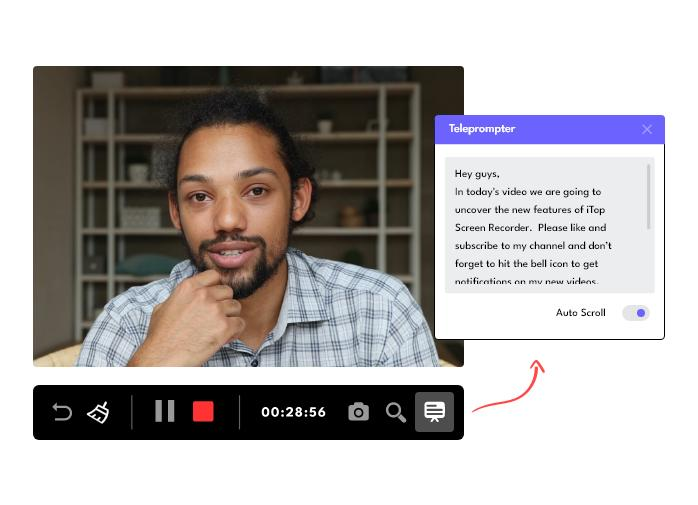
    iTop Screen Recorder is a versatile software that combines screen recording, video editing, and screenshot capture functionalities into a single, user-friendly tool. With its comprehensive set of features, it empowers users to capture high-quality videos and screenshots, edit them to perfection, and easily share them with others. Whether you need to record video conferences, create engaging presentations, capture gameplay, or simply enhance your multimedia content, iTop Screen Recorder proves to be an invaluable asset. In this review article, we will delve into the standout features that make iTop Screen Recorder a top choice for users seeking a reliable and feature-rich solution.
    Flexible Screen Capture:

    One of the standout features of iTop Screen Recorder is its ability to capture any area of your screen. Whether you want to record the entire screen, a specific window, or a selected region, iTop Screen Recorder offers the flexibility to cater to your specific needs. With support for high-quality 4K recordings, users can expect crisp and detailed visuals in their captured videos.

    Simultaneous Recording of Video, Audio, and Webcam:

    iTop Screen Recorder allows users to record not only their screens but also their faces and voices using a webcam and microphone. This proves particularly useful for tutorial creators, gamers, and content creators who want to provide a more personalized touch to their recordings. Furthermore, users have the option to save separate audio files for music or voiceovers, giving them greater control over the final output.

    Professional Game Recording Mode:

    Gamers will appreciate iTop Screen Recorder’s professional game recording mode, which sets it apart from common game recording tools. By leveraging advanced GPU rendering and encoding technology, the software ensures a smooth recording experience without any noticeable lag. The exclusive Boost feature optimizes system configurations and hardware parameters during recording, resulting in seamless gameplay capture even at high frame rates. Users can record HD videos for a variety of games, such as Minecraft, PlayerUnknown’s Battlegrounds, Roblox, World of Warcraft, and League of Legends, and directly share them on popular third-party platforms like YouTube.

    Personalized Webcam Recording:

    To add uniqueness to recorded videos, iTop Screen Recorder provides various customization options for webcam frames. Users can select from shapes like Circle, Rectangle, and Rounded Rectangle, and easily blur, remove, or replace the webcam background with any preferred picture or the default green screen. With brightness adjustment capabilities, users can ensure their recordings perfectly fit different environments. Furthermore, the software offers the flexibility to record webcam-only footage, catering to specific recording needs.

    Handy Cloud Storage:

    With the integration of a convenient cloud storage feature, iTop Screen Recorder allows users to upload their recorded files for easy management and sharing. This ensures seamless access to files from anywhere at any time, offering enhanced convenience and collaboration possibilities.

    All-round Screenshot Tool:

    In addition to its robust recording capabilities, iTop Screen Recorder serves as a comprehensive screenshot tool. Users can effortlessly capture full-screen shots, active windows, scrolling windows, or any selected region. Moreover, the software supports adding annotations to screenshots, empowering users to create informative and visually engaging images. The Mini Window feature provides quick access to screenshot functionality, further streamlining the process.

    Powerful Editor Tool:

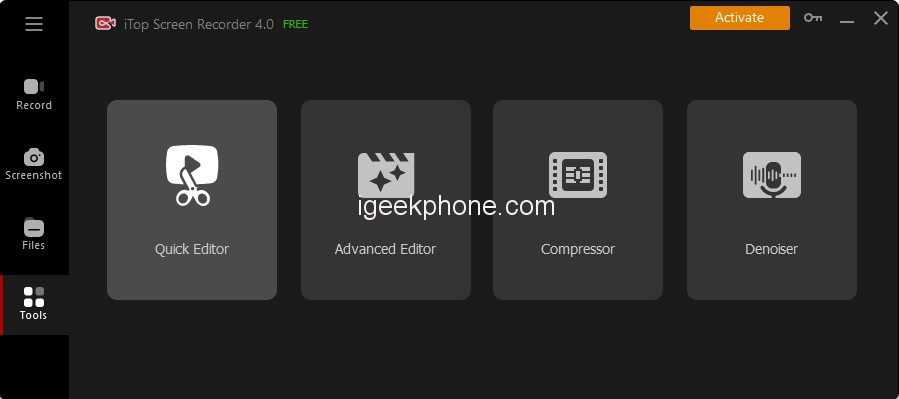
    iTop Screen Recorder comes equipped with two video editor tools: Quick Editor and Advanced Editor. The Quick Editor offers essential editing features such as filters, stickers, background music, and subtitles, allowing users to quickly enhance their videos. On the other hand, the Advanced Editor provides more comprehensive editing capabilities, including transitions, effects, text overlays, split-screen functionality, fading, and speed adjustments. Users can leverage multi-track visual editing and fine-tune both recorded and local videos frame by frame. The software supports exporting high-quality videos in different aspect ratios and formats, including MP4, MP3, GIF, AVI, and TS, facilitating easy sharing with others.

    Download and use iTop Screen Recorder

    We have already said that iTop recorder is currently only available for Windows users. You can opt for iTop recorder free download but you should be aware of its limitations. First of all, the free version puts a watermark on your recording. File formats are limited and the schedule recording function is not available. The recording quality is lower in the free version. To overcome these limitations, you have to opt for its premium version. Here are the steps to download and use the free version of iTop recorder.
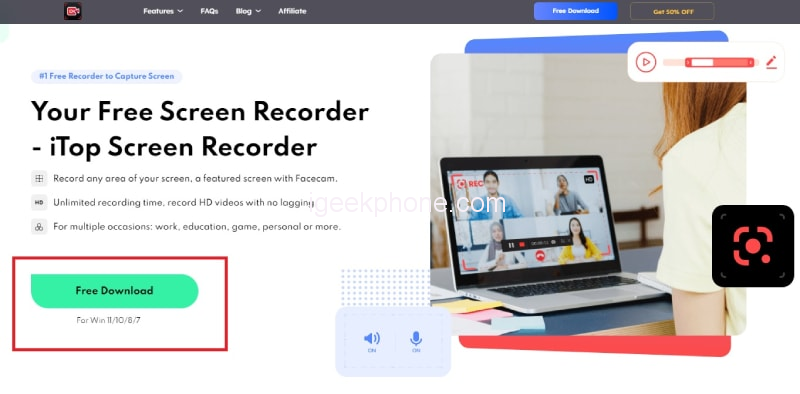
    Step 1: From your web browser, visit “recorder.itopvpn.com” and click the free download button to download iTop screen recorder.
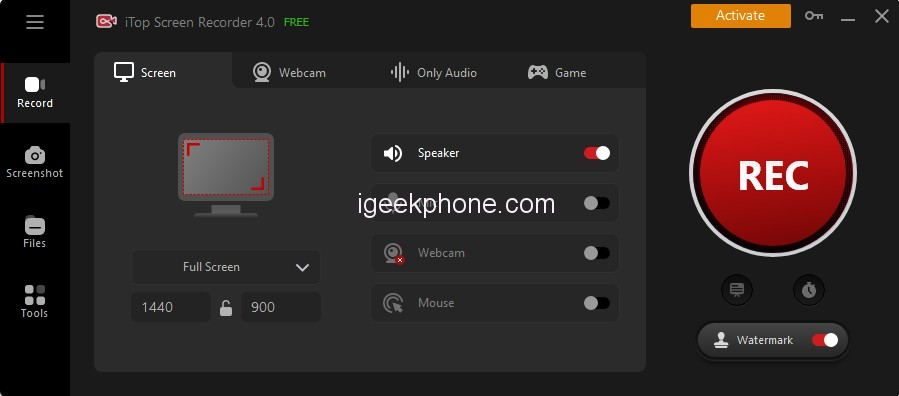
    Step 2: Install the recorder and launch the software. Select the recording area according to your needs.
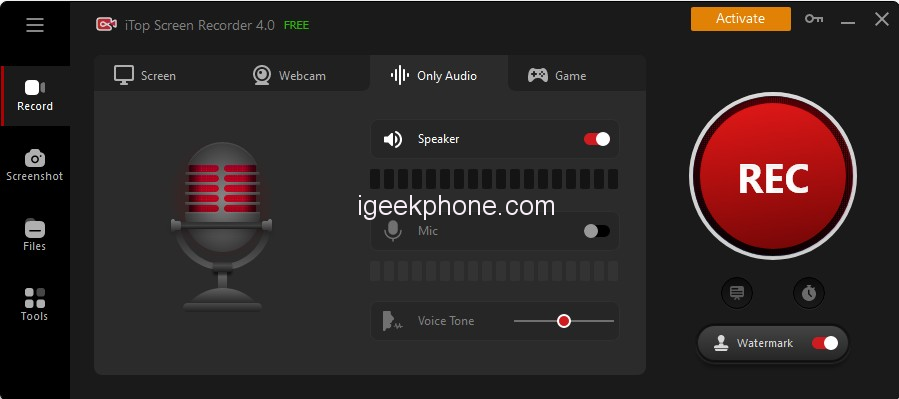
    Step 3: Activate the speaker, microphone, mouse effect or webcam according to your preferences.

    Step 4: Prepare your screen for recording and when ready, click the Rec button. You will have a few seconds of buffer before the recording starts.

    Step 5: To stop recording, click the Stop button on the widget located in the bottom right corner.

    Step 6: You will find your recording in the section of my creations. Click the Edit icon to edit the video from the Video Editor.
    1. Advantages and disadvantages

    Now we come to the main part of the review of iTop Screen Recorder. Every screen recorder has strong and weak points and you should be aware of them so that you can judge the product correctly. Here are the pros and cons of the iTop recorder.

    Advantages

    • Record screen, gameplay, and audio.
    • Flexible screenshot recording area.
    • Edit the video recording, apply filters and add stickers.
    • Different hotkeys and multiple output formats.
    • Screenshot and record webcam video.
    • You can customize the watermark in the Pro version.
    • You can schedule the recording in the Pro version.

    Cons

    • It is only available for Windows.
    • The free version is not useful because of the watermark.
    • You may experience lag while recording high-end games.

    Conclusion

    iTop Screen Recorder proves to be an indispensable tool for anyone seeking a robust and user-friendly solution for screen recording, video editing, and screenshot capture. With its extensive range of features, including flexible screen capture options, simultaneous recording of video, audio, and webcam, professional game recording mode, personalized webcam recording, cloud storage integration, comprehensive screenshot capabilities, powerful video editing tools, and convenient sharing options, iTop Screen Recorder offers a complete package for users of all levels of expertise. Whether you are a content creator, educator, gamer, or professional, iTop Screen Recorder provides the tools necessary to elevate your multimedia content and streamline your workflow.

    Share. Facebook Twitter Pinterest LinkedIn Tumblr Email

    Related Posts

    EA FC 26: 4 Best Goalkeepers to Build Your Ultimate Squad

    The manual of Samsung’s most expensive mobile phone: Galaxy Z TriFold has been exposed

    Xiaomi’s new phone has made an appearance at GSMA: The MIX TriFold triple foldable screen phone is expected to be released in Q3 next year

    Leave A Reply Cancel Reply

    You must be logged in to post a comment.

    voopoo drag s3
    oxva xlim go 2
    sp2s sen x disposable vape
    jnr 100k
    • Popular
    • 3D Printer REVIEW
    • XIAOMI
    November 23, 2025

    VOOPOO DRAG X3 – Big Battery, Smart Tech, Pod-Mod Powerhouse (Review)

    November 23, 2025

    VOOPOO VINCI S: Pocket-Power Pod with a 2,000 mAh Heart — Big Battery, Simple Use (Review)

    November 19, 2025

    OXVA XLIM PRO 3 Pod Vape Quick Hands-on Review (Video Test Included)

    November 19, 2025

    OXVA XLIM 3 Ultra Pod Vape: Hands-on Review (Video Test Included)

    June 23, 2024

    ACMER P2 20W Laser Engraver Fixed Focus Engraving: Hands on Review

    May 30, 2024

    xTool F1 Ultra Review: World’s First 20W Fiber & 20W Diode Laser Engraver

    May 30, 2024

    Anycubic Kobra 3 Combo Review: The Multicolor Masterpiece?

    May 15, 2024

    SCULPFUN SF-A9 40W Laser Engraver Cutting Machine: Hands On Review

    December 5, 2025

    Xiaomi’s new phone has made an appearance at GSMA: The MIX TriFold triple foldable screen phone is expected to be released in Q3 next year

    December 5, 2025

    The Prototype photos of Xiaomi 17 Ultra phone have been exposed, featuring a triple-camera layout on the back

    December 2, 2025

    Xiaomi REDMI Turbo5 Pro phone will be launched before the Spring Festival, equipped with the only flagship chip in its class

    December 2, 2025

    Xiaomi has Released REDMI TV X55/65/75 2026: Mini LED starts at only 2,499 yuan

    fc 26 coins
    New Arrivals
    • Redmi Note 15 5G Redmi Note 15 5G
    • Geek Bar Ice Prince 50K Disposable Vape Geek Bar Ice Prince 50K Disposable Vape
    • IPLAY OOKA150k Disposable vape IPLAY OOKA150k Disposable vape
    • IPLAY LUMO 8K Puffs 2+10ml Prefilled Pod Kit IPLAY LUMO 8K Puffs 2+10ml Prefilled Pod Kit
    • Uwell Caliburn G5 Lite SE Pod System Kit Uwell Caliburn G5 Lite SE Pod System Kit
    • Uwell Caliburn G5 Lite KOKO Pod System Kit Uwell Caliburn G5 Lite KOKO Pod System Kit
    • Uwell Caliburn G5 Lite Pod System Kit Uwell Caliburn G5 Lite Pod System Kit
    • Freeton Trimax 60k Disposable Vape Freeton Trimax 60k Disposable Vape
    • Smoant Pasito 3 Vape Smoant Pasito 3 Vape
    About
  • Igeekphone.com provides the first global tech news and reviews about smartphone, vapes, e-cigar, smart home, 3D printers, e-bike,tablets, RC drones, VR headset, and other accessories. It's the best platform to improve your brand and product.
  • Contact us: info@igeekphone.com
  • Check Our Privacy Policy Here.
  • Note: *Right now we have US editor and EU editors for review, especially for Amazon US and EU.
  • *Shop and Compare Price Here*
  • Facebook
  • Youtube
  • OUR BEST VAPE PARTNERS
  • VAPE ONLINE STORE
  • HAYATI PRO MAX PLUS
  • VAPORESSO
  • VOOPOO
  • OXVA
  • NEXA
  • MASKKING
  • LOSTVAPE ORIONBAR
  • VEIIK
  • MEMERS
  • TODOO
  • SP2S
  • JNR
  • OTHER BEST PARTNERS
  • SVBONY
  • Chuwi
  • Blackview
  • Fossibot
  • Unihertz
  • Flsun
  • Anycubic
  • Xtool
  • Oukitel
  • Mukkpet Ebike
  • Ugreen
  • Copyright © 2025 igeekphone

    Type above and press Enter to search. Press Esc to cancel.