




Facebook Twitter Instagram
    Trending
    • Glas stated that the G2 Vape device, which has received FDA approval, is equipped with an age verification technology.
    • Oxbar Maglink 75K Disposable Pod Review: The Ultimate Convenience for Vapers
    • What is the best choice: hiring an in-house developer or outsourcing?
    • VOOPOO Argus Rise Pod System Kit Review: The Ultimate Vaping Experience
    • How to Reset the Pairing of iPhone 17 Pro Max Headphones?
    • What is a crypto stamp and what are its special features?
    • Mspy App offers a comprehensive and essential suite of parental control utilities
    • Useful Amazing Benefits of Playing Online casinos
    Facebook YouTube
    IGeeKphone China Phone, Tablet PC, VR, RC Drone News, Reviews
    • HOME
      • NEWS
        • DeepSeek
        • ChatGPT
        • Minecraft
    • Amazon
    • PHONE
      • Top Phones For Your First Choice
      • Phone Comparison
      • Xiaomi
      • Blackview
      • Doogee
      • Black Shark
      • Geekbuying
      • Banggood
      • TEMU
      • TikTok
      • Aliexpress
      • Walmart
      • MercadoLibre
      • Lazada
    • TOP VAPE Awards for 2026
    • VAPES
      • E-CIGAR Upcoming
      • Vape News
      • Vape Deals
      • Vape Comparison
      • Vape Guide
      • Giveaway
    • BEST VAPE
      • Best Vape Stores
      • Best Starter Vape Kits
      • Best Vapes for Beginners
      • Best Disposable Vapes
      • Best Pod Systems
      • Best Pod Mod Vapes
      • Best Mods
      • Best Nicotine Pouches
      • Best Clearomizers/Tanks
      • Best E-Liquid
      • Best EGO/Pens
      • Best Vapes for Nic Salt E-Juice
      • Best Vapes to Quit Smoking
      • RDA vs. RDTA vs. RTA
    • Best Vape Brand 2026
      • VAPORESSO
      • VOOPOO
      • OXVA
      • NEXA BAR
      • ORIONBARTECH
      • MASKKING VAPE
      • MEMERS
      • SP2S
      • TODOO
      • MRFOG
      • VEIIK
    • REVIEW
      • E-cigar Review
      • Phones
      • Tablet PC
      • TV Box
      • RC Drone
      • Wearables
      • Camera
      • Accessories
      • VR Headset
    • MORE
      • TABLET
        • Chuwi
        • INNOCN
        • Teclast
        • Top Tablet for Your First Choice
        • Tablet/Laptop Comparison
      • RC DRONE
      • CAMERA
      • WEARABLES
        • OneOdio
        • BlitzWolf
        • Top Smartwatch for First Choice
      • 3D PRINTER
        • 3D Printer Review
        • Anycubic
        • FLSUN
        • Xtool
        • LONGER
        • Top 3D printer to Choose First
      • POWER STATION
        • Oukitel
        • FOSSIBOT
      • GAMING
        • Top Gaming Products
      • E-BIKE
        • Samebike
        • Happyrun
        • ENGWE
      • SMART HOME
      • TV BOX
      • ACCESSORIES
      • VR HEADSET
      • CLOTHES
      • AUTO CAR
    • DEAL
    • VAPE LAWS
    • Shop
    IGeeKphone China Phone, Tablet PC, VR, RC Drone News, Reviews
    You are at:Home»Guide»How to Run Ezviv on Windows and Mac
    Guide

    How to Run Ezviv on Windows and Mac

    Brady CottonBy Brady CottonMarch 11, 2024
    Facebook Twitter Pinterest LinkedIn Tumblr Email

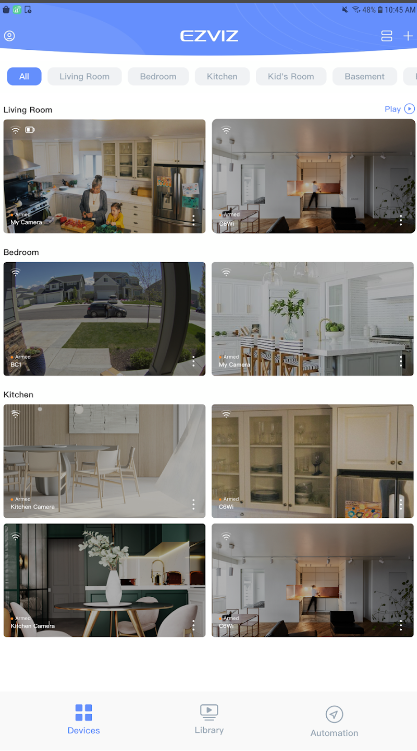
    The EZVIZ game is not a traditional game, but rather a mobile app designed for security purposes. It works with EZVIZ Security Cameras and Smart Home products. With this app, you can remotely manage your cameras and smart devices from anywhere in the world. Features include live streaming, night vision, playback of recorded videos, two-way audio communication, motion detection alerts, customization of detection zones, scheduling recordings, and device sharing with friends and family for enhanced home and business security.

    High-definition live stream viewing.

    Imagine this: you can see what your security camera sees, but in super clear detail! That’s what the first feature is all about. When you open the EZVIZ app, you get this amazing high-definition live stream. It’s like having a live window to your camera, but it’s right on your phone. You can check in on your home or business from anywhere, and everything looks so crisp and clear. It’s like bringing your camera’s view right into the palm of your hand!
    Infrared night vision with IR light.

    This feature is like magic for your camera – when it gets dark, this special thing called infrared night vision kicks in. It’s like a secret superpower for your camera, letting you see everything even in the dark. No need to worry about things going bump in the night – your camera’s got it covered with its own invisible flashlight, making sure you can still keep an eye on things when the lights are out.

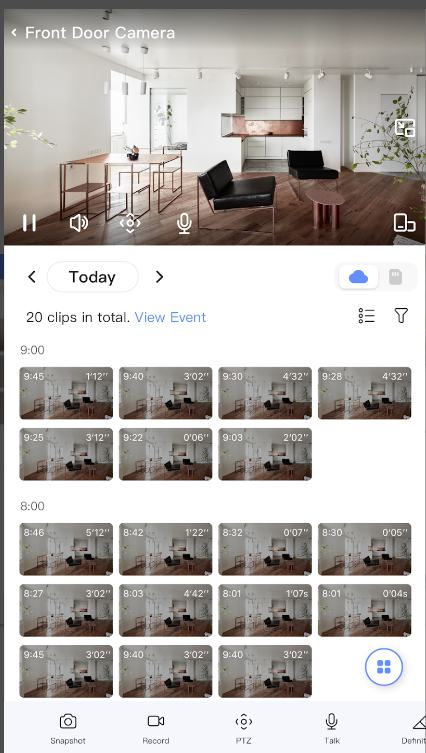
    Playback of recorded videos via CloudPlay or SD card.

    So, this cool thing with EZVIZ is that you can watch recorded videos anytime. It’s like having a personal time machine for your security camera footage! Whether it’s CloudPlay or your trusty SD card, you can play back the moments you’ve missed. Imagine catching that funny pet moment or checking who rang your doorbell when you were away.
    Two-way audio communication.

    This feature called Two-Way Audio is pretty cool. It’s like having a mini walkie-talkie with your security camera. Imagine you can not only see what’s happening but also talk through your camera to anyone on the other side. It’s great for saying a quick hello to delivery folks or scaring away unexpected visitors.

    Instant motion detection alerts with customization options.

    I bet you might not have come across such a feature. You can customize it, so you only get alerts for the areas you care about. It’s like having an extra set of eyes on your home, giving you peace of mind. Plus, you can adjust the sensitivity to make sure you’re getting just the right amount of alerts.

    How to download Ezviv on a PC or Laptop

    Looking to enhance your Ezviz experience on a bigger screen? Well, you’re in luck! For a seamless setup, just like Ezviz download PC, make sure to download the Memu emulator from its official website. It’s your key to unlocking a more expansive view of your security setup. Follow these easy steps: download the Ezviz app, open Memu, login using your Google account, drag in the Ezviz app, double-click, and voila! Now, you can enjoy monitoring your space on a larger screen effortlessly.

    Share. Facebook Twitter Pinterest LinkedIn Tumblr Email

    Related Posts

    What is the best choice: hiring an in-house developer or outsourcing?

    How to Reset the Pairing of iPhone 17 Pro Max Headphones?

    Mspy App offers a comprehensive and essential suite of parental control utilities

    Leave A Reply Cancel Reply

    You must be logged in to post a comment.

    voopoo drag 6
    oxva xlim 3 ultra
    sp2s sen x disposable vape
    • Popular
    • 3D Printer REVIEW
    • XIAOMI
    March 16, 2026

    OXVA Slimstick VS OXVA Slimstick X Vape Hands-on Review

    March 5, 2026

    OXVA XLIM PRO 3 vs XLIM Pro 2 DNA: Hands-On Review

    March 5, 2026

    OXVA XLIM PRO 3 vs XLIM GO 2: Hands-On Review

    March 2, 2026

    OXVA XLIM PRO 3 vs XLIM 3 ULTRA: Hands-On Review

    December 26, 2025

    ACMER ASCARVA 4S: Precision CNC Power for Makers, DIYers & Small Workshops

    June 23, 2024

    ACMER P2 20W Laser Engraver Fixed Focus Engraving: Hands on Review

    May 30, 2024

    xTool F1 Ultra Review: World’s First 20W Fiber & 20W Diode Laser Engraver

    May 30, 2024

    Anycubic Kobra 3 Combo Review: The Multicolor Masterpiece?

    March 16, 2026

    Co-released with SU7! Xiaomi Notebook Pro 14 and Xiaomi Smart Watch S5 are scheduled to be launched on March 19th.

    March 16, 2026

    Xiaomi 18 Camera System is like a burst of toothpaste! The standard version now features a telephoto lens, directly catching up with the Pro model

    March 16, 2026

    Xiaomi Notebook Pro 14 is Scheduled to be Released on March 19th: 50W long-lasting performance release, dual fans and three air channels for cooling.

    March 16, 2026

    Xiaomi Tag Bluetooth Tracker Key Finder Review: The Ultimate Solution for Lost Items

    fc 26 coins
    New Arrivals
    • Oxbar Maglink 75K Disposable Pod Oxbar Maglink 75K Disposable Pod
    • VOOPOO Argus Rise Pod System Kit VOOPOO Argus Rise Pod System Kit
    • Ulefone RugKing 5 Pro 4G Ulefone RugKing 5 Pro 4G
    • Nothing phone 4a Pro Nothing phone 4a Pro
    • RIFBAR MIXPRO 40K DISPOSABLE RIFBAR MIXPRO 40K DISPOSABLE
    • Uwell Caliburn G5 Pod System Kit Uwell Caliburn G5 Pod System Kit
    • Geek Bar Mate 60K Disposable Pod Geek Bar Mate 60K Disposable Pod
    • ICEBOMB 18K Disposable Vape ICEBOMB 18K Disposable Vape
    • Juice Head iFlex Nixodine 50K Disposable Vape Juice Head iFlex Nixodine 50K Disposable Vape
    About
  • Igeekphone.com provides the first global tech news and reviews about smartphone, vapes, e-cigar, smart home, 3D printers, e-bike,tablets, RC drones, VR headset, and other accessories. It's the best platform to improve your brand and product.
  • Contact us: info@igeekphone.com
  • Check Our Privacy Policy Here.
  • Note: *Right now we have US editor and EU editors for review, especially for Amazon US and EU.
  • *Shop and Compare Price Here*
  • Facebook
  • Youtube
  • OUR BEST VAPE PARTNERS
  • VAPE ONLINE STORE
  • HAYATI PRO MAX PLUS
  • VAPORESSO
  • VOOPOO
  • OXVA
  • NEXA
  • MASKKING
  • TODOO
  • SP2S
  • VEIIK
  • OTHER BEST PARTNERS
  • SVBONY
  • Chuwi
  • Blackview
  • Fossibot
  • Unihertz
  • Flsun
  • Anycubic
  • Xtool
  • Oukitel
  • Mukkpet Ebike
  • Ugreen
  • Copyright © 2026 igeekphone

    Type above and press Enter to search. Press Esc to cancel.