











Qt Group has officially released Qt Creator 21, the latest version of its integrated development environment (IDE), introducing a series of improvements aimed at making software development more efficient and intelligent. The update places particular emphasis on AI Agent integration, performance profiling, debugging, Git workflows and cross-platform development.
Announced on November 23, Qt Creator 21 brings a more tightly connected AI-assisted development experience through Agentic AI Chat and the Model Context Protocol (MCP). It also introduces a new Profile mode, expands C++ and QML debugging capabilities, and adds experimental support for Huawei HarmonyOS devices.
For developers working with Qt-based applications, the release offers several practical improvements across the entire development workflow.
AI is becoming an increasingly important part of modern software development, as discussed in our report on how AI programming is transforming the work of software developers.
Qt Creator 21 Makes AI Agent Integration a Core Feature
One of the biggest changes in Qt Creator 21 is the expanded integration of AI-powered development agents.
The new version enables Agentic AI Chat through the Agent Client Protocol (ACP) by default and also activates its MCP server integration. To improve connection security, the MCP server now uses Bearer Token authentication by default. External AI agents connecting to Qt Creator must include the appropriate authorization token in their requests.
The updated MCP server also introduces additional tools, with individual activation settings available directly through the IDE preferences. This gives developers more control over which capabilities external agents can access.
Agentic AI Chat receives several usability improvements as well. It can automatically update registered agents, create new sessions for previously used workspaces, and display token consumption and estimated costs for individual conversations and interaction rounds.
Users can also switch between different agents, remove existing sessions, and use filtering and favorites to organize their model selections.
These changes make Qt Creator 21 better suited to developers who rely on AI agents for code generation, project exploration and other programming tasks.
New Profile Mode Replaces the Previous QML Profiler
Performance analysis is another major focus of this release.
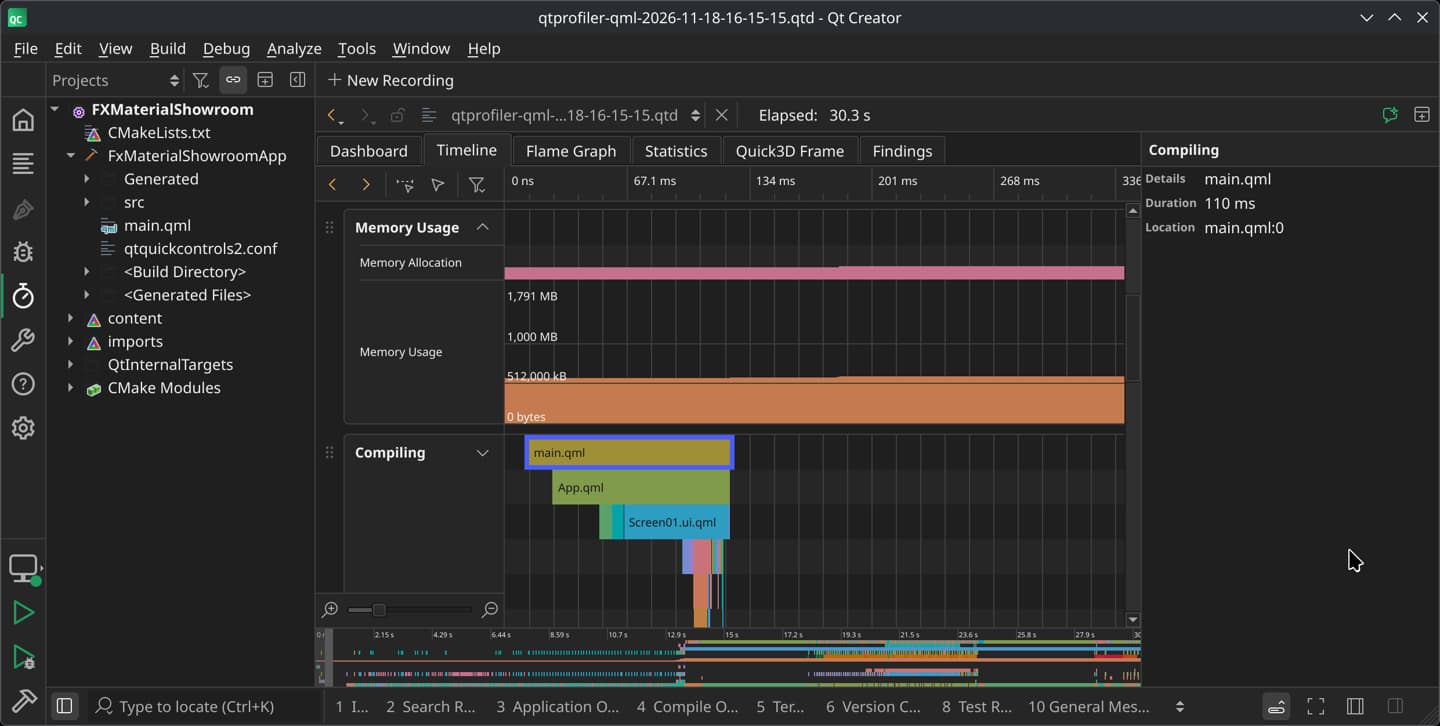
Qt Creator 21 introduces a dedicated Profile mode powered by a redesigned Qt Profiler, replacing the previous QML Profiler. The new interface includes a performance dashboard that evaluates multiple application metrics and provides recommendations for addressing potential bottlenecks.
Instead of simply presenting profiling data, the updated dashboard aims to help developers understand where performance problems occur and what improvements may be worth investigating.
Profiling traces can now be opened as standalone documents, making it easier to inspect and revisit performance results.
Platform support has also been expanded. The release adds call stack sampling capabilities for Windows and macOS, alongside support for Qt Tracepoints.
Huawei is also expanding its software ecosystem with new AI-powered features, including the Xiaoyi Companion AI introduced with the Huawei Pura X Max.
Improved C++ and QML Debugging
Debugging mixed C++ and QML applications becomes more convenient in Qt Creator 21.
The release introduces an experimental combined C++/QML debugging engine capable of displaying merged call stack information. Developers can enable both debugging environments simultaneously through the Debug settings in their run configurations.
Qt Creator 21 also introduces a modular debugger backend architecture. This makes the debugging system easier to test, extend and adapt to additional development requirements.
Although the combined debugging engine is still experimental, it represents an important improvement for projects that combine native C++ components with QML-based interfaces.
Git and Code Editor Receive Major Workflow Improvements
Qt Creator 21 also makes everyday source-code management more flexible.
A new Changes navigation view provides a central location for reviewing modified files. Developers can compare differences, stage changes, revert modifications, inspect logs and access annotation information without constantly switching between different views.
Single-file diff views now support live editing, allowing developers to make changes directly while reviewing code differences.
The update also adds a dedicated Git Log navigation view. It displays commit relationships in a graphical history and provides information about the files affected by individual commits. Developers can inspect commits, switch branches and perform Cherry-pick operations from the interface.
The code editor receives several smaller but useful additions:
- A dedicated editor and rendered preview for
.qdocdocumentation files. - Spell checking for code comments, text files and Git commit messages.
- Improved visualization of Git merge conflict markers.
- Additional FakeVim fixes and expanded support for selected Vimscript and plugin features.
These changes should make documentation editing, code reviews and version control more straightforward.
CMake 4.2 Support and New Configuration Options
For developers using CMake-based projects, Qt Creator 21 updates its CMake parser to support CMake 4.2.
The IDE also introduces a built-in CMake file indenter, providing an alternative to external formatting utilities such as cmake-format.
Additional improvements include an Outline view and dropdown navigation in the CMake editor, making it easier to move between different sections of large configuration files.
CMake Presets also gain Qt Creator-specific runSettings and runDevice extensions, offering more flexibility when configuring application execution environments.
Experimental Huawei HarmonyOS Device Support Arrives
One of the most notable additions for the wider development community is experimental Huawei HarmonyOS support.
Qt Creator 21 adds the ability to work with HarmonyOS devices, opening up another development option for programmers building applications within Huawei’s ecosystem.
However, this feature is still experimental, so developers should not assume that every device, deployment workflow or development capability is fully supported yet.
The update also expands remote development and device management options:
- Remote Windows devices can now be accessed through SSH.
- Developers can use containers managed by Podman directly within the IDE.
- Android development gains a new Logcat view for inspecting application logs.
- An issue affecting application execution on iOS devices under Xcode 27 has been fixed.
The HarmonyOS addition is particularly relevant alongside Qt 6.12, which Qt officially released in October. Developers can combine Qt Creator 21 with Qt 6.12 to explore Qt-based HarmonyOS application development.
Qt Creator 21 Is Available for Free Upgrade
Qt Creator 21 is now available through the Qt Online Installer. Both commercial and open-source edition users can access the new release, and the update is free for existing users.
With stronger AI Agent integration, a redesigned profiling experience, improved Git and CMake tools, and experimental HarmonyOS support, Qt Creator 21 represents a substantial update to Qt’s development environment.
For developers building cross-platform applications, the combination of these improvements makes the latest release worth exploring, particularly if AI-assisted programming or HarmonyOS development is part of their workflow.