





Facebook Twitter Instagram
    Trending
    • Untraceable Solutions to Elevate Your Apex Legends Experience
    • The crypto commitments continue to rise: the third place of Britons who purchase cryptocurrency
    • Guide on 5 Advancements of Mobile Sports Betting in Recent Years
    • Role and impact of bitcoin trading in USA
    • Mureka: An Innovative Song Maker Empowering Music Creators Everywhere
    • The Rise of Stablecoins: Bitcoin and Terra (LUNA)
    • Must-Have Business Gadgets for Start-up Businesses
    • VOOPOO NAVI X Cyph 80K Disposable Vape Kit Review: Long-Lasting, Powerful, and Flavorful
    Facebook YouTube
    Login Register
    IGeeKphone China Phone, Tablet PC, VR, RC Drone News, Reviews
    • HOME
      • NEWS
        • DeepSeek
        • ChatGPT
        • Minecraft
    • Amazon
    • NEW YEAR
    • PHONE
      • Top Phones For Your First Choice
      • Phone Comparison
      • Xiaomi
      • Blackview
      • Doogee
      • Black Shark
      • Geekbuying
      • Banggood
      • TEMU
      • TikTok
      • Aliexpress
      • Walmart
      • MercadoLibre
      • Lazada
    • TOP VAPE Awards for 2026
    • VAPES
      • E-CIGAR Upcoming
      • Vape News
      • Vape Deals
      • Vape Comparison
      • Vape Guide
      • Giveaway
    • BEST VAPE
      • Best Vape Stores
      • Best Starter Vape Kits
      • Best Vapes for Beginners
      • Best Disposable Vapes
      • Best Pod Systems
      • Best Pod Mod Vapes
      • Best Mods
      • Best Nicotine Pouches
      • Best Clearomizers/Tanks
      • Best E-Liquid
      • Best EGO/Pens
      • Best Vapes for Nic Salt E-Juice
      • Best Vapes to Quit Smoking
      • RDA vs. RDTA vs. RTA
    • Best Vape Brand 2026
      • VAPORESSO
      • VOOPOO
      • OXVA
      • NEXA BAR
      • ORIONBARTECH
      • MASKKING VAPE
      • MEMERS
      • SP2S
      • JNR
      • TODOO
      • MRFOG
      • VEIIK
    • REVIEW
      • E-cigar Review
      • Phones
      • Tablet PC
      • TV Box
      • RC Drone
      • Wearables
      • Camera
      • Accessories
      • VR Headset
    • MORE
      • TABLET
        • Chuwi
        • INNOCN
        • Teclast
        • Top Tablet for Your First Choice
        • Tablet/Laptop Comparison
      • RC DRONE
      • CAMERA
      • WEARABLES
        • OneOdio
        • BlitzWolf
        • Top Smartwatch for First Choice
      • 3D PRINTER
        • 3D Printer Review
        • Anycubic
        • FLSUN
        • Xtool
        • LONGER
        • Top 3D printer to Choose First
      • POWER STATION
        • Oukitel
        • FOSSIBOT
      • GAMING
        • Top Gaming Products
      • E-BIKE
        • Samebike
        • Happyrun
        • ENGWE
      • SMART HOME
      • TV BOX
      • ACCESSORIES
      • VR HEADSET
      • CLOTHES
      • AUTO CAR
    • DEAL
    • Shop
    IGeeKphone China Phone, Tablet PC, VR, RC Drone News, Reviews
    You are at:Home»NEWS»Vivo/iQOO Mobile First Android 13 Developer Experience is Available for Downloading
    NEWS

    Vivo/iQOO Mobile First Android 13 Developer Experience is Available for Downloading

    Brady CottonBy Brady CottonAugust 30, 2022
    Facebook Twitter Pinterest LinkedIn Tumblr Email

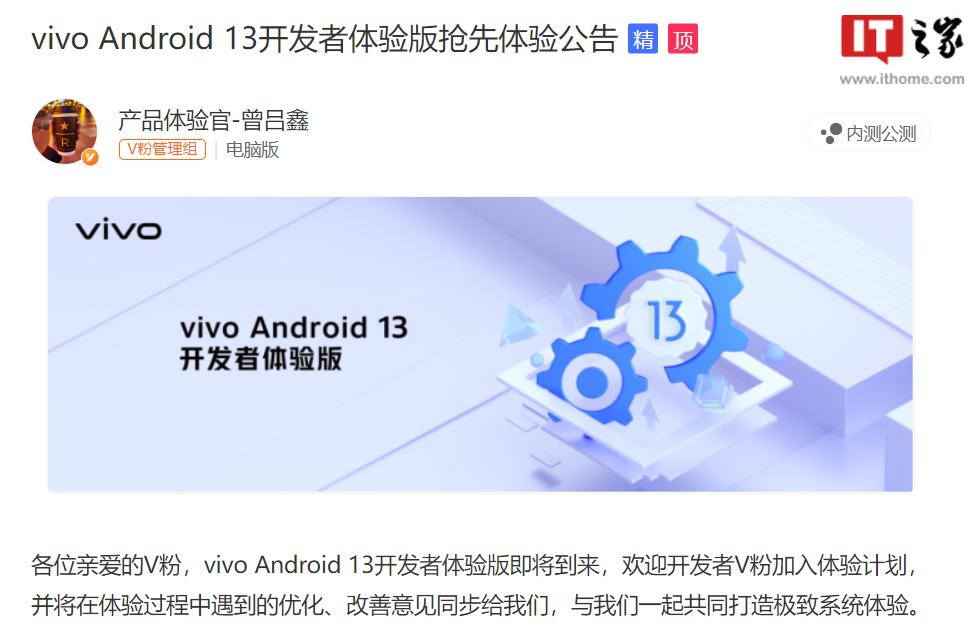
    Vivo official community announced that Vivo Android 13 Developer Experience edition is coming soon, the first models include iQOO 10, iQOO 10 Pro, Vivo X80 Pro.

    Vivo Android 13 Developer Experience version is only for developers and geek users (informal version), which may be unstable. For ordinary users, it is strongly recommended not to use it, please download with caution.

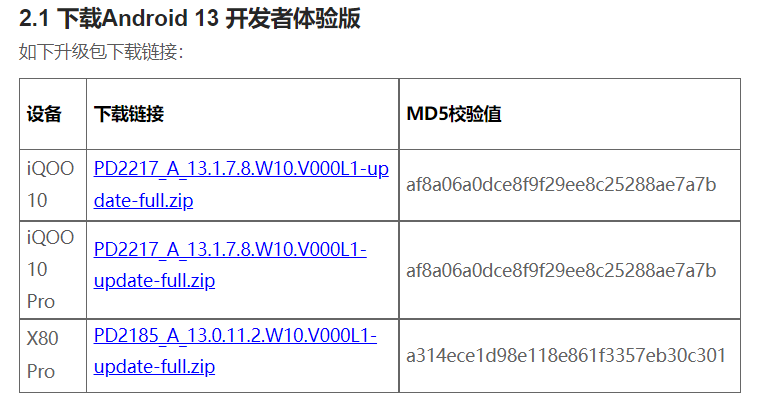
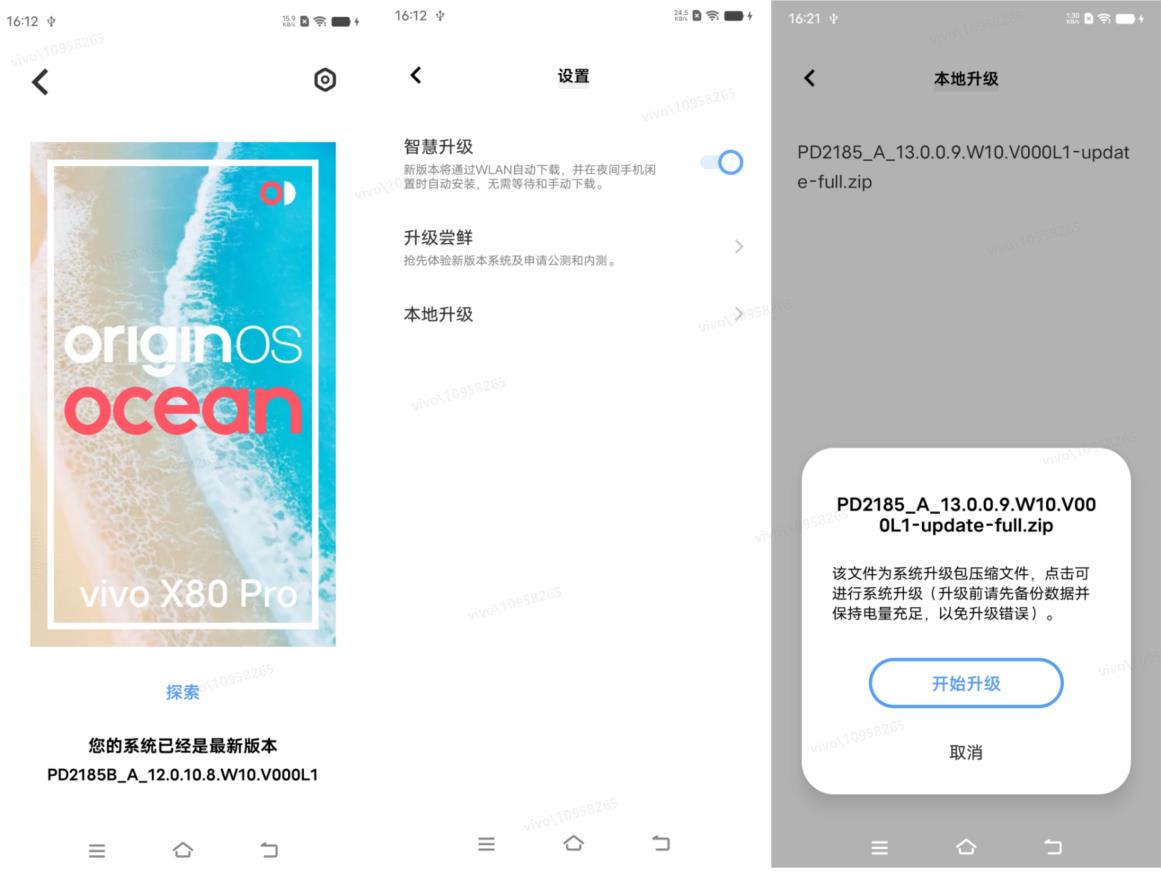
    Users of these three models can already go to the Vivo developer platform to download the firmware package and then follow these steps to burn it to the corresponding Vivo device. The following takes the X80 Pro as an example:
    (1) Download the X80 Pro Developer Experience Version software package firmware.

    (2) After the device is connected to the computer, switch the USB Settings of the mobile phone to the file transfer mode, and copy the downloaded software package firmware to the root directory of the X80 Pro mobile phone.

    (3) Repeat the preceding steps to choose Settings > System Upgrade > Local Upgrade and click the upgrade package. After the verification is complete, the upgrade starts.

    (4) Wait for the automatic upgrade to complete.
    [Notes for Upgrade]
    1. After upgrading the system, please enter Vivo App Store to update all apps to the latest version;

    2. Upgrade in a Wi-Fi network environment to avoid excessive data traffic consumption; Note The upgrade takes a long time. Do not perform other operations during the upgrade.

    3. In order to avoid irreversible failures such as data loss during the upgrade process, developers need to back up their data. Before upgrading to Android 13 Developer Experience Edition, you can use cloud services or Vivo assistant for backup.

    4. Version rollback Please use the degradation tool to perform the degradation. Click here for reference.
    [Android 13 Features]
    New features and functions, including but not limited to:

    Photo selector

    Provides a more secure way to share media without granting applications access to the entire media library.

    The control center

    Allows applications to actively add switches to the control center, making it easy for users to add control center switches for applications.

    Front office service manager

    Added the front desk service management function, you can view the running front desk service and service running time through the control center, and stop the front desk service at any time.

    【 Known problems 】
    IQOO 10, iQOO 10 Pro:

    1. Some common third-party applications of the current system are incompatible with Android 13. After the upgrade, third-party applications may fail to work properly (such as flash back, slow down, black screen, and power consumption).

    2. There is a low probability of system stability problems, such as a low probability of triggering the phone restart after the fingerprint is successfully unlocked.

    3. Connect the mobile phone to the Bluetooth device, clear the Settings in the background, re-enter the setting main interface, click search, and the setting function will blink back.

    4. There will be a probability of flower screen in the use of some three applications.

    5. The Atomic privacy system shares the video to Weibo, but the sharing fails, and the message “video format is not supported” is displayed.

    6. On the mobile phone landscape screen, slide down the control center, and the status bar shows that the current resident status is inconsistent with the actual situation.

    X80 Pro:

    1. Some common third-party applications of the current system are incompatible with Android 13. After the upgrade, third-party applications may fail to work properly (such as flash back, slow down, black screen, and power consumption).

    2. After Bluetooth is paired with dual-mode headphones, cancel the pairing. Search for the device again, the phone only displays the address, and the display is normal after the paired connection.

    3. Connect the mobile phone to the Bluetooth device, clear the Settings in the background, re-enter the setting search, and the setting function will blink back.

    4. On the mobile phone landscape screen, slide down the control center, and the status bar shows that the current resident status is inconsistent with the actual situation.

    5. After the intelligent data card switching function is enabled, the mobile phone will automatically switch data cards without sending a prompt to inform the user.

    6. Probability of connection failure occurs when connecting some intelligent vehicle-mounted devices.

    Read Also: How to Find & Outsource Software Development Services

    7. When the camera is set at 4K+ 30FPS and the AI strengthening function is enabled, the video recording in the highlighted environment will have a probability of getting stuck.

    Share. Facebook Twitter Pinterest LinkedIn Tumblr Email

    Related Posts

    Mureka: An Innovative Song Maker Empowering Music Creators Everywhere

    The 12 Major Upgrades of iPhone 18 Pro: Relax! It’s not the Notch on the Top Left Corner

    It is Reported that the Enhanced Version of Apple AirPods Pro will be launched this Year

    Leave A Reply Cancel Reply

    You must be logged in to post a comment.

    voopoo Cyph NAVI kit
    oxva xlim 3 ultra
    sp2s sen x disposable vape
    jnr 100k
    • Popular
    • 3D Printer REVIEW
    • XIAOMI
    February 8, 2026

    VOOPOO VMATE i2 vs i3: Hands-On Comparison Review

    February 2, 2026

    Voopoo Drag X3 vs Drag X2: Hands-On Comparison Review

    January 21, 2026

    VOOPOO ARGUS P3 VS ARGUS P2: Which Square Pod Suits You?

    January 21, 2026

    VOOPOO Drag X3 vs VOOPOO Drag X2: Hands-On Comparison

    December 26, 2025

    ACMER ASCARVA 4S: Precision CNC Power for Makers, DIYers & Small Workshops

    June 23, 2024

    ACMER P2 20W Laser Engraver Fixed Focus Engraving: Hands on Review

    May 30, 2024

    xTool F1 Ultra Review: World’s First 20W Fiber & 20W Diode Laser Engraver

    May 30, 2024

    Anycubic Kobra 3 Combo Review: The Multicolor Masterpiece?

    February 9, 2026

    Xiaomi 18 is the world’s first! The cost of Qualcomm Snapdragon 8 Elite Gen 6 Pro is outrageously high

    February 6, 2026

    Xiaomi 17 Ultra will make its debut at MWC: The battery capacity of the international version has been reduced to 6000mAh.

    February 4, 2026

    Xiaomi Hyper OS 4 undergoes a major upgrade: Completely eliminates old code and boosts smoothness.

    February 2, 2026

    The new 6.59-inch mid-to-high-end model of a Certain factory is tentatively scheduled to be released in the first half of this year. It is expected to be under the brand of Xiaomi.

    fc 26 coins
    New Arrivals
    • VOOPOO NAVI X Cyph 80K Disposable Vape Kit VOOPOO NAVI X Cyph 80K Disposable Vape Kit
    • OXVA Slim Stick X Vape OXVA Slim Stick X Vape
    • Geek Bar Somax 80K Disposable Vape Geek Bar Somax 80K Disposable Vape
    • Geek Bar Clio Platinum 50K Disposable Vape Kit Geek Bar Clio Platinum 50K Disposable Vape Kit
    • Motorola Edge 70 Fusion Motorola Edge 70 Fusion
    • VOOPOO Doric Go Pod System Kit VOOPOO Doric Go Pod System Kit
    • IVG Pro 2 10K Prefilled Pod Kit IVG Pro 2 10K Prefilled Pod Kit
    • Uwell Zetta Pro Pod System Kit Uwell Zetta Pro Pod System Kit
    • Uwell Caliburn Bar 80K Disposable Vape Uwell Caliburn Bar 80K Disposable Vape
    About
  • Igeekphone.com provides the first global tech news and reviews about smartphone, vapes, e-cigar, smart home, 3D printers, e-bike,tablets, RC drones, VR headset, and other accessories. It's the best platform to improve your brand and product.
  • Contact us: info@igeekphone.com
  • Check Our Privacy Policy Here.
  • Note: *Right now we have US editor and EU editors for review, especially for Amazon US and EU.
  • *Shop and Compare Price Here*
  • Facebook
  • Youtube
  • OUR BEST VAPE PARTNERS
  • VAPE ONLINE STORE
  • HAYATI PRO MAX PLUS
  • VAPORESSO
  • VOOPOO
  • OXVA
  • NEXA
  • MASKKING
  • LOSTVAPE ORIONBAR
  • MEMERS
  • TODOO
  • SP2S
  • JNR
  • VEIIK
  • OTHER BEST PARTNERS
  • SVBONY
  • Chuwi
  • Blackview
  • Fossibot
  • Unihertz
  • Flsun
  • Anycubic
  • Xtool
  • Oukitel
  • Mukkpet Ebike
  • Ugreen
  • Copyright © 2026 igeekphone

    Type above and press Enter to search. Press Esc to cancel.