







Facebook Twitter Instagram
    Trending
    • Cali Switch 50K Disposable Vape Kit Review: Features and Overview
    • What to Do if Your Xiaomi Phone’s Storage is Full and It Won’t Boot Up
    • ASUS Launches 2026 “ROG Swift PG34WCDN” 34-Inch Curved Monitor
    • Insta360 Luna Ultra Released-the World’s First 8K Leica Dual-camera Gimbal Camera and it Features a Detachable Remote Control Screen from 3,999 yuan
    • DJI Pocket 4P Camera is Expected to be Released on June 15th, starting at 3,799 yuan.
    • ANBERNIC RGVITA Review: Retro Gaming Meets Modern Android Performance
    • ZHRC ZH8 RC Quadcopter Review: Affordable FPV Drone with Screen Controller and Obstacle Avoidance
    • S669 Smartwatch Review: High-Capacity Battery Meets Advanced Health Tracking
    Facebook YouTube
    IGeeKphone China Phone, Tablet PC, VR, RC Drone News, Reviews
    • HOME
      • NEWS
        • DeepSeek
        • ChatGPT
        • Minecraft
    • Amazon
    • PHONE
      • Top Phones For Your First Choice
      • Phone Comparison
      • Xiaomi
      • Blackview
      • Doogee
      • Black Shark
      • Geekbuying
      • Banggood
      • TEMU
      • TikTok
      • Aliexpress
      • Walmart
      • MercadoLibre
      • Lazada
    • TOP VAPE Awards for 2026
    • VAPES
      • E-CIGAR Upcoming
      • Vape News
      • Vape Deals
      • Vape Comparison
      • Vape Guide
      • Giveaway
    • BEST VAPE
      • Best Vape Stores
      • Best Starter Vape Kits
      • Best Vapes for Beginners
      • Best Disposable Vapes
      • Best Pod Systems
      • Best Pod Mod Vapes
      • Best Mods
      • Best Nicotine Pouches
      • Best Clearomizers/Tanks
      • Best E-Liquid
      • Best EGO/Pens
      • Best Vapes for Nic Salt E-Juice
      • Best Vapes to Quit Smoking
      • RDA vs. RDTA vs. RTA
    • Best Vape Brand 2026
      • VAPORESSO
      • VOOPOO
      • OXVA
      • NEXA BAR
      • MASKKING VAPE
      • SP2S
      • IPLAY
      • TODOO
      • MRFOG
      • LOSTVAPE
      • VEIIK
    • REVIEW
      • E-cigar Review
      • Phones
      • Tablet PC
      • TV Box
      • RC Drone
      • Wearables
      • Camera
      • Accessories
      • VR Headset
    • MORE
      • TABLET
        • Chuwi
        • INNOCN
        • Teclast
        • Top Tablet for Your First Choice
        • Tablet/Laptop Comparison
      • RC DRONE
      • CAMERA
      • WEARABLES
        • OneOdio
        • BlitzWolf
        • Top Smartwatch for First Choice
      • 3D PRINTER
        • 3D Printer Review
        • Anycubic
        • FLSUN
        • Xtool
        • LONGER
        • Top 3D printer to Choose First
      • POWER STATION
        • Oukitel
        • FOSSIBOT
      • GAMING
        • Top Gaming Products
      • E-BIKE
        • Samebike
        • Happyrun
        • ENGWE
      • SMART HOME
      • TV BOX
      • ACCESSORIES
      • VR HEADSET
      • CLOTHES
      • AUTO CAR
    • DEAL
    • VAPE LAWS
    • Shop
    IGeeKphone China Phone, Tablet PC, VR, RC Drone News, Reviews
    You are at:Home»Guide»What to Do if Your Xiaomi Phone’s Storage is Full and It Won’t Boot Up
    Guide

    What to Do if Your Xiaomi Phone’s Storage is Full and It Won’t Boot Up

    Brady CottonBy Brady CottonJune 11, 2026
    Facebook Twitter Pinterest LinkedIn Tumblr Email

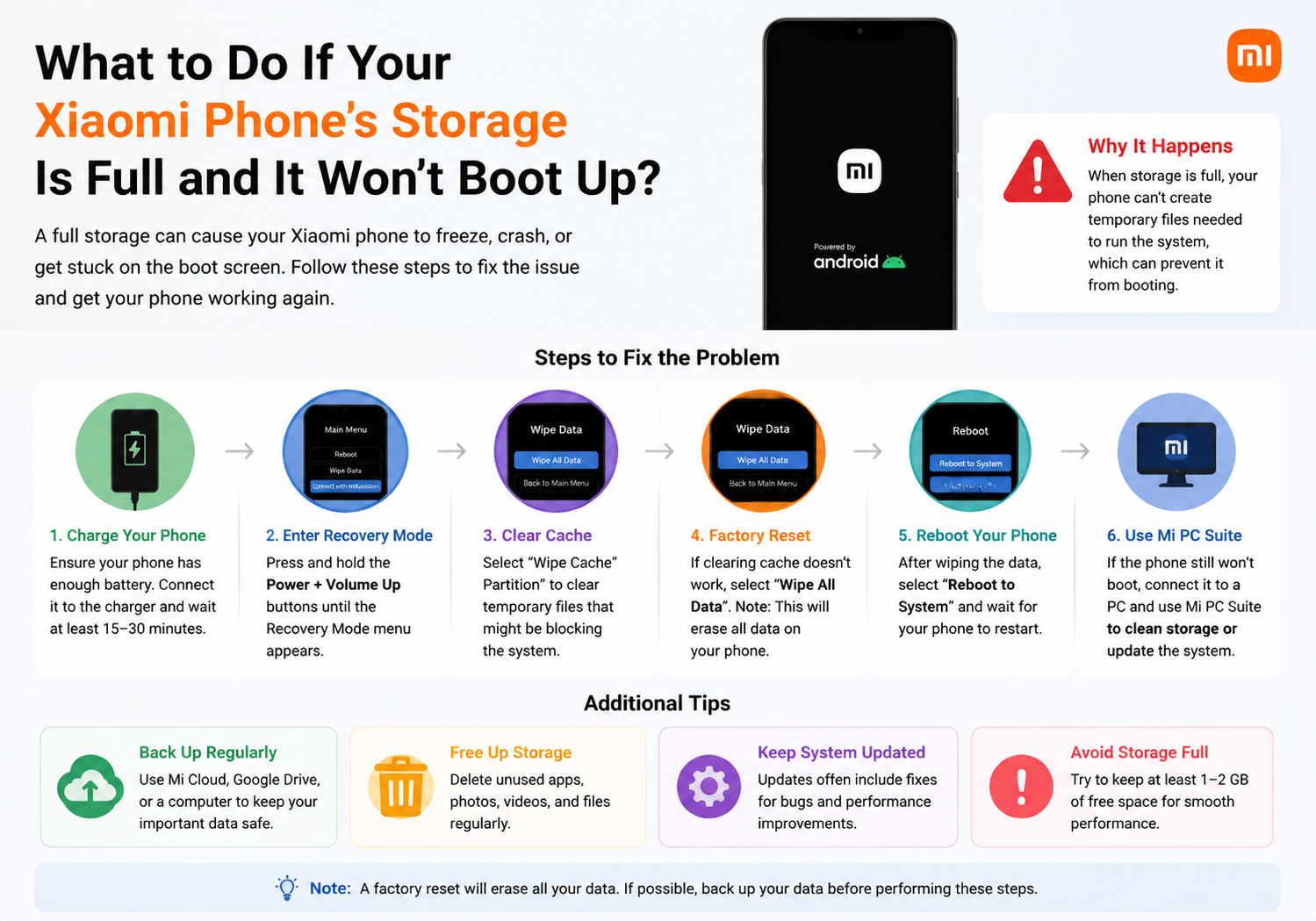
    A full storage warning on your Xiaomi phone can be more than just annoying—it can prevent your device from booting up entirely. When your phone cannot start because the internal storage is maxed out, it becomes critical to carefully troubleshoot the issue to avoid data loss. Here’s a comprehensive guide to getting your Xiaomi device back in working order.

    1. Understand Why a Full Storage Can Prevent Booting

    Xiaomi phones, like most Android devices, require a certain amount of free internal storage to operate. If storage is completely full:

    • The system may fail to initialize apps and background services.
    • Critical system files may not have enough space to load, causing boot loops or freezing.
    • Updates and cache processes cannot complete, resulting in the device getting stuck at the startup logo.

    Understanding this helps you approach the problem systematically rather than trying random fixes.

    2. Try Booting Into Safe Mode

    Safe Mode allows your Xiaomi phone to start with only essential system apps. This can free up storage temporarily if third-party apps are occupying space.

    Steps to enter Safe Mode:

    1. Power off your Xiaomi device completely.
    2. Press and hold the Power button until the logo appears.
    3. Release the Power button and immediately press and hold the Volume Down button until the device boots.
    4. You should see “Safe Mode” on the screen.

    Once in Safe Mode:

    • Open Settings → Storage to check usage.
    • Delete unnecessary files, photos, or apps to free up at least 1–2 GB of space.

    3. Use Mi PC Suite or a Computer to Free Storage

    If the phone won’t boot even in Safe Mode, connecting it to a PC can help recover storage:

    1. Download Mi PC Suite on your computer.
    2. Connect your Xiaomi phone via USB.
    3. Try accessing files, photos, or media.
    4. Delete large files or move them to your PC to free space.

    Even if the system isn’t fully operational, some files may still be accessible in File Transfer mode.

    4. Boot into Recovery Mode and Clear Cache

    Xiaomi devices come with a built-in Recovery Mode that allows system-level operations without fully booting:

    Steps:

    1. Power off the phone.
    2. Press and hold Volume Up + Power simultaneously until the Mi logo appears.
    3. Use Volume buttons to navigate to Wipe Cache Partition (not “Wipe Data” yet).
    4. Confirm with the Power button.
    5. Once completed, reboot the phone.

    Clearing the cache can free a surprising amount of space and often resolves boot issues caused by full storage.
    5. Remove Unnecessary Apps or Files via ADB (Advanced Users)

    If Recovery Mode isn’t enough and you’re familiar with ADB (Android Debug Bridge), you can delete files directly from your phone:

    1. Enable USB Debugging in Developer Options (if previously enabled).
    2. Connect the phone to a PC with ADB installed.
    3. Use the command:
    adb shell
    cd /storage/emulated/0/
    rm -rf Download/*

    ⚠️ Warning: Be extremely careful. Deleting system files can make the problem worse. Only delete personal files, downloads, or media.

    6. Factory Reset as a Last Resort

    If none of the above methods work, performing a factory reset will restore your Xiaomi phone to its original state. This deletes all user data, so only do this if you’ve backed up your files or cannot recover the system any other way.

    Steps:

    1. Boot into Recovery Mode (Volume Up + Power).
    2. Navigate to Wipe Data / Factory Reset.
    3. Confirm and wait for the process to finish.
    4. Reboot your device.

    Once reset, your phone should boot normally with enough free storage.

    7. Tips to Prevent Storage-Related Boot Issues in the Future

    • Regularly delete unnecessary apps, photos, and videos.
    • Use cloud storage (Mi Cloud, Google Photos, or OneDrive) for media files.
    • Monitor storage usage via Settings → Storage.
    • Move apps or data to an SD card if your Xiaomi device supports it.
    • Clear app caches periodically to free space without deleting important files.

    Final Thoughts

    A Xiaomi phone that won’t boot due to full storage is a common, yet solvable problem. By carefully freeing space through Safe Mode, Recovery Mode, or a PC connection, you can often restore functionality without losing critical data. Only resort to a factory reset when all else fails.

    Preventing this situation in the future is as simple as regularly monitoring storage and keeping at least 10–15% free at all times.

    Share. Facebook Twitter Pinterest LinkedIn Tumblr Email

    Related Posts

    Selenium: The Cоrnerstоne оf Autоmаtiоn Testing

    Games and Entertainment in Everyday Life

    Do Cigarette Filters Reduce the Risk of Lung Cancer?

    Leave A Reply Cancel Reply

    You must be logged in to post a comment.

    voopoo G4 Mini
    oxva xlim go lite
    sp2s sen x disposable vape
    • Popular
    • 3D Printer REVIEW
    • XIAOMI
    June 6, 2026

    Vaporesso LUXE X3 & LUXE Q3 Review. Two Paths to Exceptional Flavor

    June 6, 2026

    VOOPOO ARGUS G4 & ARGUS G4 Mini Review – Smart Flavor Meets Everyday Simplicity

    June 6, 2026

    VOOPOO NAVI x CYPH Kit 80K Review. Is This The Future of Disposable Vaping?

    May 17, 2026

    iPlay Nova 45K Review – High Puff Performance with a Futuristic Twist

    December 26, 2025

    ACMER ASCARVA 4S: Precision CNC Power for Makers, DIYers & Small Workshops

    June 23, 2024

    ACMER P2 20W Laser Engraver Fixed Focus Engraving: Hands on Review

    May 30, 2024

    xTool F1 Ultra Review: World’s First 20W Fiber & 20W Diode Laser Engraver

    May 30, 2024

    Anycubic Kobra 3 Combo Review: The Multicolor Masterpiece?

    June 10, 2026

    Xiaomi Hyper OS 3 Second Batch Beta Version Begins Recruitment: Covering Five Models Including Redmi K80 and Xiaomi MIX Flip2

    June 9, 2026

    Xiaomi has released MiMo-V2.5-Pro-UltraSpeed: The generation speed has been increased by 10 times! It can process over 1,000 tokens per second.

    June 8, 2026

    Xiaomi MIX Fold 5 will be the first to feature the Xuanji O3

    June 8, 2026

    Xiaomi 17T Series Mobile Phones are Released, Equipped with Dimensity 8500-Ultra / Dimensity 9500 chips,Starting from 2999 yuan

    fc 26 coins
    New Arrivals
    • Cali Switch 50K Disposable Vape Kit Cali Switch 50K Disposable Vape Kit
    • Apple iPhone 19E Apple iPhone 19E
    • Honor Win RT 2 Honor Win RT 2
    • VAPGO OGGI Bar 75K Disposable Vape VAPGO OGGI Bar 75K Disposable Vape
    • YiHi SXmini G Class V2 200W Box Mod YiHi SXmini G Class V2 200W Box Mod
    • OnePlus Turbo OnePlus Turbo
    • Oppo Reno16 FS Smartphone Oppo Reno16 FS Smartphone
    • Huawei Nova 16 Huawei Nova 16
    • Xiaomi 18 Ultra Xiaomi 18 Ultra
    About
  • Igeekphone.com provides the first global tech news and reviews about smartphone, vapes, e-cigar, smart home, 3D printers, e-bike,tablets, RC drones, VR headset, and other accessories. It's the best platform to improve your brand and product.
  • Contact us: info@igeekphone.com
  • Check Our Privacy Policy Here.
  • Note: *Right now we have US editor and EU editors for review, especially for Amazon US and EU.
  • *Shop and Compare Price Here*
  • Facebook
  • Youtube
  • OUR BEST VAPE PARTNERS
  • VAPE ONLINE STORE
  • HAYATI PRO MAX PLUS
  • VAPORESSO
  • VOOPOO
  • OXVA
  • NEXA
  • MASKKING
  • SP2S
  • IPLAY
  • TODOO
  • OTHER BEST PARTNERS
  • SVBONY
  • Chuwi
  • Blackview
  • Fossibot
  • Unihertz
  • Flsun
  • Anycubic
  • Xtool
  • Oukitel
  • Mukkpet Ebike
  • Ugreen
  • Copyright © 2026 igeekphone

    Type above and press Enter to search. Press Esc to cancel.