
|

|

|
Trending
- Hyper Bar LX 65K Review: Features, Battery, Flavor Options and 65,000-Puff Capacity
- Huawei Mate 90 Pro Max May Feature a 200MP Zoom Camera and New External Lens System
- Xiaomi Adds 8 More Devices to the HyperOS 4 Beta Testing Program
- UK Vaping Products Duty Begins October 1 After IVG Parent Company Gets HMRC Approval
- Maskking Super GTS+ Vape Review: Exploring Its Two-Tank Setup and 10K-Puff Capacity
- JNR Bykux 59K Vape Review: 59K-Puff Capacity, Dual Mesh Coils and Adjustable Airflow
- Rock Me Sheesha Max 200K Review: 200K Puffs, 1000mAh Battery and Mesh Coil
- Fifty Bar Air 70K Review: 70,000 Puffs, ECO/BOOST Modes and 18mL E-Liquid

 |
 |
 |
 |
 |
 |
- Shop
- Accessories
- ESCAM QF390 2 IP Camera
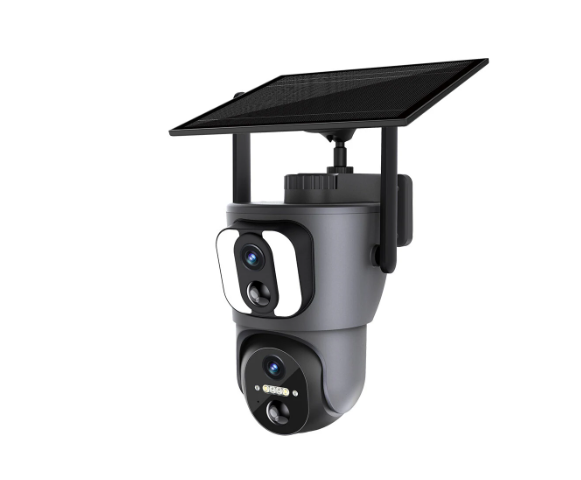
ESCAM QF390 2 IP Camera
Offers
-
 ESCAM QF390 2 IP Camera
$104.99
ESCAM QF390 2 IP Camera
$104.99
View Offer
Specifications:
| Brand | ESCAM |
| Model | QF390 |
| Resolution | 2*2MP (1920*1080P+1920*1080P, Dual Lens) |
| Main Control Chip | Ingenic-T40N |
| Sensor | GC2063 |
| Compression format | H.265 |
| Detection Mode | PIR sensor +AI human detection |
| WIFI | 2.4 GHz |
| Storage | TF Card up to 128GB supported, cloud storage |
| Battery | Built-in rechargeable 14400mAh, solar panel 6W |
| App Support | Android/IOS |
| PTZ | Pan 355° + Tilt 100° |
| Night Vision | Full-color, IR & white led, IR distance up to 30M |
| Weather Resistance | IP66 |
Features:
1. Dual-lens design for viewing different angles, each with a 2MP resolution for high-quality images.
2. Equipped with smart dual light modes, including 18pcs IR & white LED for visibility up to 30m.
3. Features two-way audio with noise cancellation for easy communication.
4. Supports Wi-Fi connection for easy setup and monitoring.
5. Comes with a built-in rechargeable 14400mAh battery, supplemented by a 6W solar panel.
Package Includes:
1 x ESCAM QF390 2*2MP WiFi Solar Camera
1 x 6W Solar Panel
1 x Camera Bracket
1 x USB Charging Cable
1 x Tweezers
2 x Screw Pack
1 x Quick Guide
Reviews
Sorry, you have not permission to write review for this product.
Disclaimer Note
You can write your own disclaimer from APS Settings -> General -> Disclaimer Note.
New Arrivals

ADVERTISE



