
|

|
- Removing Obstacles to Vaping: A Guide for People with Disabilities
- Air Bar Gem 50K Disposable Vape Review: A Gem in the World of Vaping
- TYN Pro 50K Disposable Vape Review: The Next Evolution in Vaping
- Why Agentic Orchestration Is the Missing Layer in Modern Software Quality
- Tech Innovations Shaping the Future of Personal Injury Prevention and Recovery
- Beyond The Ordinary Grill: The Magic of Kamado Cookers
- Keep It 100 40K Disposable Vape Review: The Ultimate Vaping Experience
- The VPN Apps for iPhone: A Review of the Top 10

 |
 |
 |
 |
 |
 |
- Shop
- Accessories
- AZDOME GS63H 4K Dash Cam
AZDOME GS63H 4K Dash Cam
Offers
-
 AZDOME GS63H 4K Dash Cam
$ 99.99
AZDOME GS63H 4K Dash Cam
$ 99.99
View Offer
Highlights
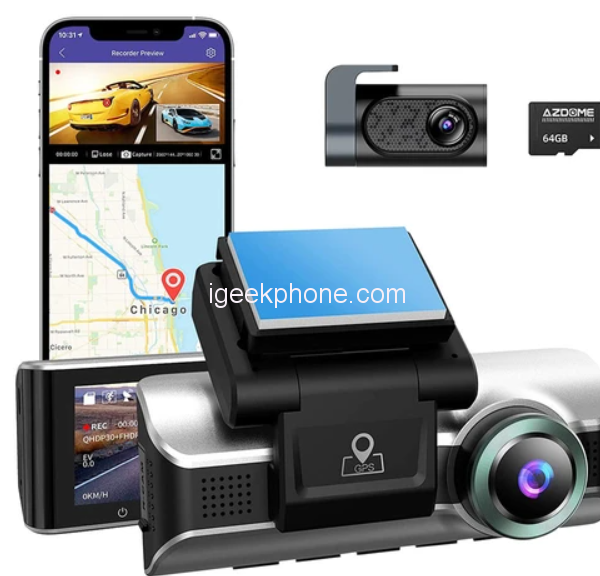
4K Resolution & 170 View Angle
Our car DVR provides a video resolution high up to 2880X2160p at 24fps and 1920X1080p at 30fps in video resolution. Cooperate with a 170 degree wide angel and F1.8 large aperture, ensure less blind spots, achieve the best image quality, night time performance and CRYSTAL-CLEAR RECORDINGS.
Built-in WiFi / GPS
“AZDOME” APP(IOS und Android) can remotely control the dashcam, change settings, real-time viewing, photo taking, video recording, playback, download the record files to your phone to edit it and to share it on social media platforms. ?It comes with GPS Geo-Tagging device that records precise GPS data into video files so you can accurately check Time / Speed / Longitude / Latitude on Google Map by “AZDOME Player” PC software.
2 Powerful Functions Loop Recording
users will have the option to record videos in loops of 3 / 5 / 10 minute video files. G-Sensor, can automatically record images and video in order to provide evidence of the car collision.
Reviews
Sorry, you have not permission to write review for this product.
Disclaimer Note
You can write your own disclaimer from APS Settings -> General -> Disclaimer Note.
More Products from Huawei


New Arrivals





ADVERTISE



