
|

|
Trending
- Vivo X300 Ultra Review: Redefines Telephoto Photography!
- Redmi Book Pro 2026 officially announced to be Released this month: Core Ultra X7 358H + 99Wh super-large battery
- Honor MagicPad 3 Pro with a 12.3-inch screen is scheduled to be released on April 23rd
- REDMI Pad 2 SE is released this month: 9.7-inch 2K screen! 70-day super long battery life
- iJoy XP50000 0% Zero Nicotine Disposable Review: A Flavorful Experience Without the Nicotine
- When Tech Hits Hard: How Emerging Consumer Gadgets Are Shaping Personal Injury Cases
- People are purchasing more on mobiles than ever before
- To conduct business effectively, utilize a Genome business account

 |
 |
 |
 |
 |
 |
- Shop
- Accessories
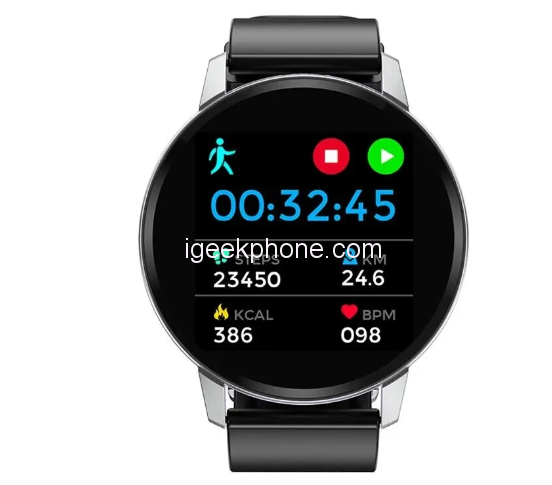
- Bakeey S01 Smart Watch
Bakeey S01 Smart Watch
Offers
-
 Bakeey S01 Smart Watch
$25.94
Bakeey S01 Smart Watch
$25.94
View Offer
-
Specification Brand Bakeey Model S01 Bluetooth Version BT 4.0 or above Compatible OS Android 4.4 or above,iOS 7.0 or above Operating Mode Full Touch APP Name Da Fit App Language Chinese, English, Korean, German, Spanish, Japanese, French, Italian, Russian, Portuguese, Arabic Band Language
Chinese, English, Korean, German, Spanish, Japanese, French, Italian, Russian, Portuguese, Arabic Special Features Waterproof IP67 Heart Rate Monitor Support Blood Pressure Monitor Support Blood Oxygen Monitor Support Step Count Support Multi-sport Modes Support Pedometer Support Call or Message Reminder Support Reject Call / Call ID Display
Support Alert Type Vibration Auto Light-up Screen Support Stopwatch Support More Functions Support Alarm,Calender,Sedentary reminder,Camera remote control,Anti-lost,Weather display Technical Parameters Sensor G-sensor,Heart Rate Sensor Screen Size: 1.22inch
Type: IPS
Resolution: 240*240pixelsBattery Battery Capacity: 150 mAh
Standby Time: About 10 days
Using time: About 7 days
Charging Time: About 2 hours
Charging Type: Dock chargingAppearance & Details Weight and Size Dial Size: About 41mm
Band Size: about 41*10*220mm
Product Weight: about 55g1*Bakeey S01 Smart Bracelet 1*Charging Cable 1*User Manual
Reviews
Sorry, you have not permission to write review for this product.
Disclaimer Note
You can write your own disclaimer from APS Settings -> General -> Disclaimer Note.


New Arrivals






ADVERTISE



