
|

|
Trending
- Vivo X300 Ultra Review: Redefines Telephoto Photography!
- Redmi Book Pro 2026 officially announced to be Released this month: Core Ultra X7 358H + 99Wh super-large battery
- Honor MagicPad 3 Pro with a 12.3-inch screen is scheduled to be released on April 23rd
- REDMI Pad 2 SE is released this month: 9.7-inch 2K screen! 70-day super long battery life
- iJoy XP50000 0% Zero Nicotine Disposable Review: A Flavorful Experience Without the Nicotine
- When Tech Hits Hard: How Emerging Consumer Gadgets Are Shaping Personal Injury Cases
- People are purchasing more on mobiles than ever before
- To conduct business effectively, utilize a Genome business account

 |
 |
 |
 |
 |
 |
- Shop
- E-cigar NEW
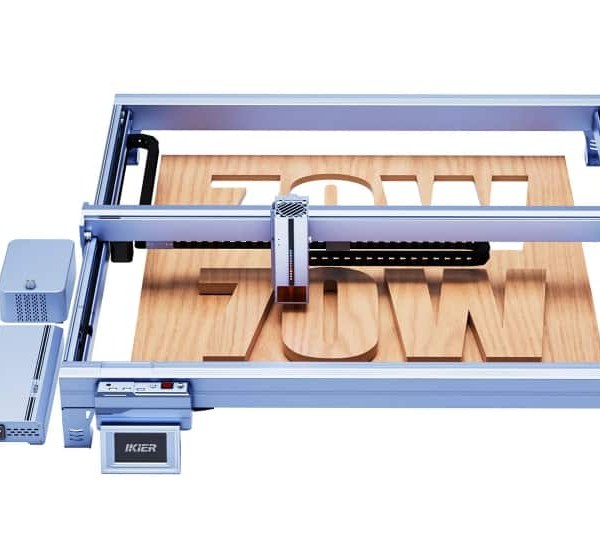
- iKier K70 Max 70W Laser Engraver
iKier K70 Max 70W Laser Engraver
Offers
-
iKier K70 Max 70W Laser Engraver
View Offer
Specifications:
Brand/Model: iKier K70 Max
Engraving Size: 850mm × 800mm
Laser Power: Switchable between 70W/35W
Spot Size: 0.15mm × 0.2mm (70W) / 0.1mm × 0.15mm (35W)
Engraving Precision: 0.01mm
Laser Wavelength: 455±5nm
Motorized Z-Axis: Auto sinking cutting during operation
Focusing Method: Auto focus and manual focus, with red light positioning assistance
Max Moving Speed: 400mm/s
Total Power Consumption: 360W
Supported Operating Systems: Windows, macbook OS, Android, iOS
Control Software: LightBurn, LaserGRBL
Supported File Types: PNG, JPEG, JPG, BMP, GIF, DXF, SVG, WebP
Data Transfer Methods: USB, Wi-Fi
Air Assist Flow Rate: 0-60 L/min, steplessly adjustable
Recommended Engraving Materials: Wood, bamboo, plastic, leather, cardboard, oxidized aluminum, painted metals, glass, ceramic, slate, 304 mirror stainless steel
Recommended Cutting Materials: Cardboard, non-woven fabric, wood, acrylic, thin plastic sheets
Features:
1.Large Engraving Surface (850mm × 800mm): Provides ample space for large-format engraving projects.
2.Auto-Sinking Cutting Technology: Smoothly adjusts height during cutting, ensuring precise and clean cuts.
3.Switchable Laser Power (70W/35W): Allows flexible usage for intricate engraving or powerful cutting needs.
4.Automatic Accessory Recognition: Automatically detects attached modules, simplifying setup and operation.
5.Power Loss Resume Technology: Safeguards projects by resuming operations in the event of power interruptions.
Package Included:
1 x X Rail
1 x Laser Module
1 x Control Screen
1 x Power Supply (K70 MAX)
Reviews
Sorry, reviews are closed for this product.
Disclaimer Note
You can write your own disclaimer from APS Settings -> General -> Disclaimer Note.

New Arrivals






ADVERTISE



