
|

|
- Vivo X300 Ultra Review: Redefines Telephoto Photography!
- Redmi Book Pro 2026 officially announced to be Released this month: Core Ultra X7 358H + 99Wh super-large battery
- Honor MagicPad 3 Pro with a 12.3-inch screen is scheduled to be released on April 23rd
- REDMI Pad 2 SE is released this month: 9.7-inch 2K screen! 70-day super long battery life
- iJoy XP50000 0% Zero Nicotine Disposable Review: A Flavorful Experience Without the Nicotine
- When Tech Hits Hard: How Emerging Consumer Gadgets Are Shaping Personal Injury Cases
- People are purchasing more on mobiles than ever before
- To conduct business effectively, utilize a Genome business account

 |
 |
 |
 |
 |
 |
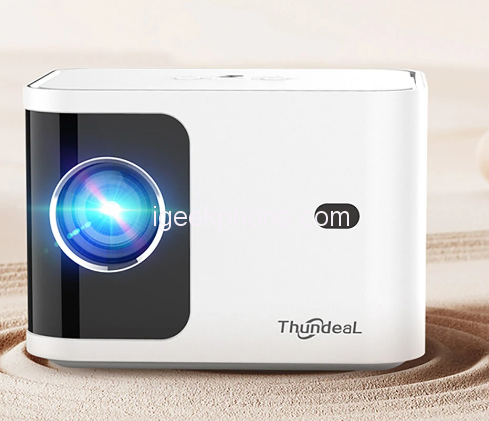
ThundeaL Mini Projector TD91W Home Theater
Offers
-
 ThundeaL Mini Projector TD91W Home Theater
$109.99
ThundeaL Mini Projector TD91W Home Theater
$109.99
View Offer
Projector Specification:
– Real Native Resolution: 1280 x 720P
– Max Resolution: from HD Signal Support 2K 4K UHD
– Brightness: 5000 Lumens
– Lens: Electric focus and Keystone ,the Android Version support Auto Keystone
– Image Flip:360 degree flip
– Working Voltage:AC100-240V / 50-60Hz
– 3D Function : Support red blue 3D
– Contrast Ratio: 5000:1
– EU standard power plug for convenient use
– System: Android 9.0 OS
– Support AC3 MOV MKV , pls download the vlc player or MX player from store frist
– Support App play store, APK install
– Contact with smart phone: Yes ,Support WiFi wireless contact with IOS and Android Phone
– CPU: MSD6A358 Cortex-A35
– GPU: Mali-400 MP
– Memory: 1G RAM + 8G ROM
– WIFI: 2.4G 5G WiFi
– Play store: Download and install APP
– Bluetooth-Compatible
– Zoom 50%-100%
– 6D Keystone: Support 4 point Corner electric keystone correction for side projection , Left and right 60 Degree ,Up and down 60 Degree and Auto Vertical Keystone +/-60 Degree
Package includes:
1 x ThundeaL TD91 projector
1 x Power cable
1 x Remote control
1 x User manual
Reviews
Sorry, you have not permission to write review for this product.
Disclaimer Note
You can write your own disclaimer from APS Settings -> General -> Disclaimer Note.
New Arrivals






ADVERTISE



