
|

|
- VOOPOO UFORCE-X Tank II Review: Next-Level Flavor and Airflow Performance
- Eachine Spitfire Brushless RC Airplane Review-Aerobatic Warbird Fun for All Skill Levels
- How Technology Can Help You Write Better Essays
- How to Transform Your Excel Spreadsheets Into PDF Using Gogopdf Tool
- SP2S Ocean vs Friobar IC18K: Comparison Review
- Pachamama 75K Disposable Vape Review: Long‑Lasting Performance Meets Premium Flavor
- Heycute G126 OWS Earbuds Review-Affordable Wireless Audio with Smart Features
- iGaming Marketing Trends for 2025: The Future of Innovation and Engagement

 |
 |
 |
 |
 |
 |
- Shop
- E-cigar NEW
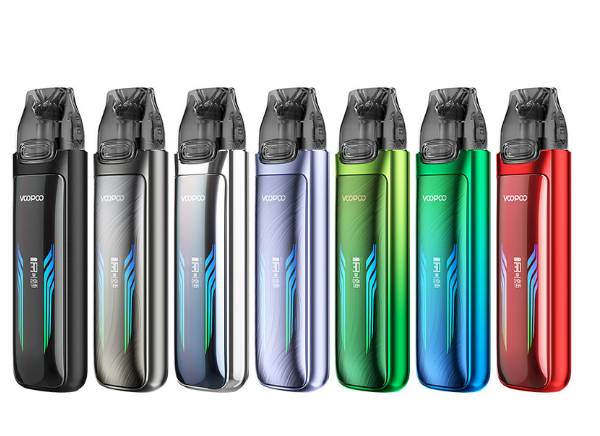
- VOOPOO Vmate Max Pod System Kit
VOOPOO Vmate Max Pod System Kit
Offers
-
 VOOPOO Vmate Max Pod System Kit
View Offer
Features:
1. Built-in 1200mAh Battery
2. 3ml E-Juice Capacity
3. Type-C Fast Recharging
4. Top Filling System
5. 30W Max Output Power
6. Interactive Screen and Lights
7. Airflow Adjustment
Brand: Voopoo
Size: 103*29*18.7mm
E-liquid Capacity:3 ml/ 2 ml (TPD)
Wattage Range: 5-30 W Adjustable
Recommended E-liquid: ≤50mg (Freebase / Nicotine Salt)
E-liquid Filling:Top Filling
Cartridge Including
VMATE Top Fill Cartridge 0.4 ohm(18-30W,Freebase)
VMATE Top Fill Cartridge 0.7ohm(15-25W; Freebase /Nic Salt)
Battery Capacity: 1200 mAh
Output Voltage:3.2-4.2V
Resistance Range:0.4-3.0ohm
Charging: Type-C 5V/2A
Airflow: Stepless Airflow Adjustment
Screen Display: Hidden Horizon Screen + Dual 256-Color LED Light Bar
Material: Zinc Alloy
E-liquid Filling: Top Filling
Compatibility: All the Vmate Cartridge
Each set contain:
1pc VMATE MAX Device
1pc VMATE Top Fill Cartridge 0.4ohm (3ml)
1pc VMATE Top Fill Cartridge 0.7ohm (3ml)
1pc Type-C Cable
1pc User Manual
Reviews
Sorry, you have not permission to write review for this product.
Disclaimer Note
You can write your own disclaimer from APS Settings -> General -> Disclaimer Note.
New Arrivals






ADVERTISE



