
|

|
- VOOPOO UFORCE-X Tank II Review: Next-Level Flavor and Airflow Performance
- Eachine Spitfire Brushless RC Airplane Review-Aerobatic Warbird Fun for All Skill Levels
- How Technology Can Help You Write Better Essays
- How to Transform Your Excel Spreadsheets Into PDF Using Gogopdf Tool
- SP2S Ocean vs Friobar IC18K: Comparison Review
- Pachamama 75K Disposable Vape Review: Long‑Lasting Performance Meets Premium Flavor
- Heycute G126 OWS Earbuds Review-Affordable Wireless Audio with Smart Features
- iGaming Marketing Trends for 2025: The Future of Innovation and Engagement

 |
 |
 |
 |
 |
 |
- Shop
- Accessories
- Xiaomi Mini PC Intel Core i5 16GB DDR4 512GB SSD
Xiaomi Mini PC Intel Core i5 16GB DDR4 512GB SSD
Offers
-
 Xiaomi Mini PC Intel Core i5 16GB DDR4 512GB SSD
$ 876.99
Xiaomi Mini PC Intel Core i5 16GB DDR4 512GB SSD
$ 876.99
View Offer
Highlights
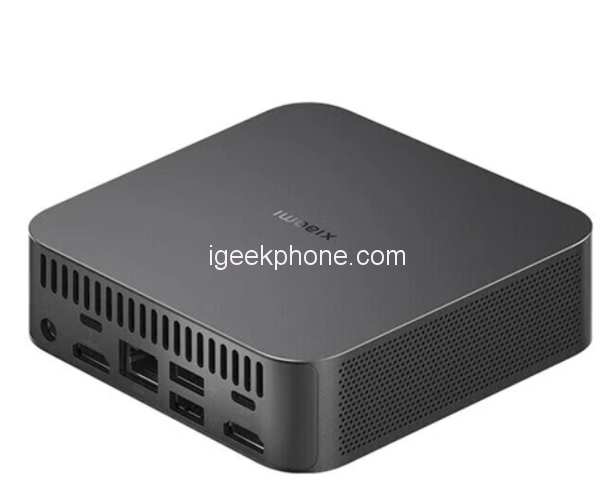
Xiaomi’s latest computers are powered by a 12th-generation Core i5 processor and have a 12-core, 16-thread heterogeneous design. The processor in Xiaomi’s Mini PC tops out at 4.4GHz.
Intel Iris Xe graphics card (80 UE) and ports for external graphics cards and hard drives.
A Xiaomi mini computer pre-installed with Windows 11. Users can also choose to migrate to Ubuntu, OpenWRT, UNRAID, and EXSI operating systems.
Both variants include 16GB of DDR4 RAM, while the standard variant includes 512GB of PCIe 4.0 SSD storage. This can optionally be expanded to 32GB of RAM and 4TB SSD storage.
In terms of heat dissipation, the Mi Mini PC comes with a 4,600 RPM fan and dual heat pipe cooling system
In terms of design, the Mi Minicomputer has a rectangular aluminum body.
For connectivity, the PC offers Bluetooth 5.3 and Wi-Fi 802.11ax support. The device also includes a 3.5mm headphone jack, three USB 3.4 Type-A Gen 2 ports, one USB Type-A 2.0 port, two Thunderbolt 4 ports, two HDMI 2.1 ports, and an Ethernet port. In addition, it measures 112 x 112 x 38mm and weighs 437g.
Reviews
Sorry, you have not permission to write review for this product.
Disclaimer Note
You can write your own disclaimer from APS Settings -> General -> Disclaimer Note.
More Products from Xiaomi
New Arrivals






ADVERTISE



