|

|
Trending
- Redmi TV A55 2027 Launches With 4K 165Hz Display, HyperOS 4 and XiaoAI Assistant
- Drones in Accident Reconstruction: Revolutionizing Evidence Gathering for Personal Injury Lawyers
- Joyetech WideWick-C Pod System Review: 1100mAh Removable Battery and WideWick Technology
- A Beginner’s Guide to Create Videos with Vidnoz AI
- IPL 2024: The Cricketing Festival
- Supreme Reports 7% Vape Revenue Growth as UK Vape Duty Puts Pressure on Manufacturers
- ANBERNIC RG 47G1 Unveiled: Game Boy-Inspired Retro Handheld With a 120Hz Display and Snapdragon G1 Gen 2
- How to Smoke Electronic Cigarettes Correctly (Guide)

 |
 |
 |
 |
 |
 |


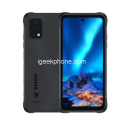
UMIDIGI S5 Pro
-
Processor
-
RAM
-
Storage
-
Display
-
Camera
-
Operating System
Offers
-
 UMIDIGI S5 PRO
View Offer
UMIDIGI S5 Pro – Specs
Product Details
-
FeaturesDisplay: 6.5 inch 2400*1080 pixels Capacitive screen
CPU: Helio G90T
System: Android 10.0
Storage: 6GB RAM + 128GB ROM
Cameras: 64.0MP four back cameras and 32.0MP front cameras -
SpecificationModel: S5 Pro ( 8GB+128GB)
Sim Card: Dual nano-SIM and TF Card(3-Card Shot)
Style: Bar
Color: Comet Blue, Comet White
Build: Glass front (Gorilla Glass 5), plastic back, plastic frame
OS: Android 10.0
CPU: MT6785 Helio G90T (12 nm), Octa-core (2×2.05 GHz Cortex-A76 & 6×2.0 GHz Cortex-A55)
GPU: Mali-G76 MC4
RAM: 8GB
ROM: 128GBDisplay Size: 6.5 inch, 102.0 cm2 (~90.5% screen-to-body ratio)
Type: IPS LCD capacitive touchscreen, 16M colors
Resolution: 1080 x 2400 pixels, FHD+, 20:9 ratio (~405 ppi density)AI Quad Rear Camera: 64MP+8MP+2MP+2MP
64MP Ultra high-resolution wide-angle camera
8MP Ultra wide-angle lens
2MP B&W Portrait lens
2MP Macro lensNon-removable Li-Po 5120mAh Battery
-
Package content1 x Umidigi S5 Pro Smartphone
1 x USB Type-C Cable
1 x 30W IN Charge Adapter
1 x Protect Case
1 x Protect Film
1 x SIM Needle
1 x Quick Start Guide
1 x Important Product Information
Specs
General
Hardware
Display
Camera
Network
OS
Other Features
Battery
Dimensions and Weight
Reviews
Sorry, you have not permission to write review for this product.
Disclaimer Note
You can write your own disclaimer from APS Settings -> General -> Disclaimer Note.
More Products from Umidigi
New Arrivals

ADVERTISE