
|

|

|
Trending
- Hyper Bar LX 65K Review: Features, Battery, Flavor Options and 65,000-Puff Capacity
- Huawei Mate 90 Pro Max May Feature a 200MP Zoom Camera and New External Lens System
- Xiaomi Adds 8 More Devices to the HyperOS 4 Beta Testing Program
- UK Vaping Products Duty Begins October 1 After IVG Parent Company Gets HMRC Approval
- Maskking Super GTS+ Vape Review: Exploring Its Two-Tank Setup and 10K-Puff Capacity
- JNR Bykux 59K Vape Review: 59K-Puff Capacity, Dual Mesh Coils and Adjustable Airflow
- Rock Me Sheesha Max 200K Review: 200K Puffs, 1000mAh Battery and Mesh Coil
- Fifty Bar Air 70K Review: 70,000 Puffs, ECO/BOOST Modes and 18mL E-Liquid

 |
 |
 |
 |
 |
 |
- Shop
- Accessories
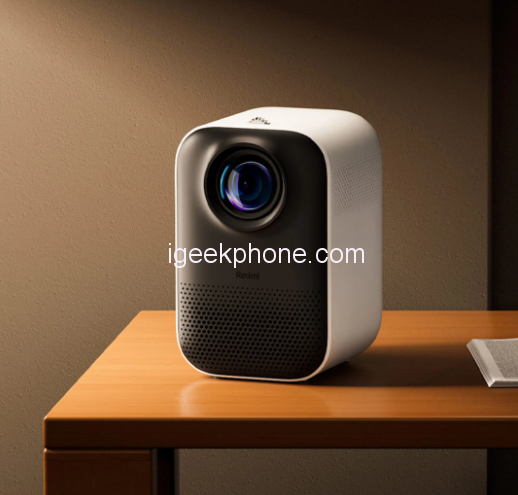
- Xiaomi Redmi Projector 150Ansi
Xiaomi Redmi Projector 150Ansi
Offers
-
 Xiaomi Redmi Projector 150Ansi
$259.99
Xiaomi Redmi Projector 150Ansi
$259.99
View Offer
Main Feature:
● 1080P physical resolution provides clear, crisp picture quality and realistic colour.
● It offers an easy 100-inch screen projection with a 1.2:1 reach ratio.
● A self-developed omnidirectional rectification AI clever algorithm can do this automatically without repeated manual operation.
● The display features 150ANSI true brightness and is certified for SGS low blue light.
● Built-in low-noise dual circulation air cooling system, efficient heat dissipation, noise as low as 26dB
● Diffuse reflection principle imaging, protect eyes
● The screen does not need to be adjusted, and it is automatically corrected in all directions
● Support 4-point keystone correction + automatic vertical correction
● Support 2.4GHz/5GHz dual-band Wi-Fi, play HD video without lag.
Please read this clearly before payment:
It is the Chinese version. support Chinese and English. Default Chinese, when you received the projector please change the language first. our link have the step show you how to change the language. When you change to English, there will still be some pages and apps just suit on China that will not be translated into English, which will not affect your use. please know it clearly before order.
Reviews
Sorry, you have not permission to write review for this product.
Disclaimer Note
You can write your own disclaimer from APS Settings -> General -> Disclaimer Note.
More Products from Xiaomi


New Arrivals

ADVERTISE



