
|

|

|
Trending
- Hyper Bar LX 65K Review: Features, Battery, Flavor Options and 65,000-Puff Capacity
- Huawei Mate 90 Pro Max May Feature a 200MP Zoom Camera and New External Lens System
- Xiaomi Adds 8 More Devices to the HyperOS 4 Beta Testing Program
- UK Vaping Products Duty Begins October 1 After IVG Parent Company Gets HMRC Approval
- Maskking Super GTS+ Vape Review: Exploring Its Two-Tank Setup and 10K-Puff Capacity
- JNR Bykux 59K Vape Review: 59K-Puff Capacity, Dual Mesh Coils and Adjustable Airflow
- Rock Me Sheesha Max 200K Review: 200K Puffs, 1000mAh Battery and Mesh Coil
- Fifty Bar Air 70K Review: 70,000 Puffs, ECO/BOOST Modes and 18mL E-Liquid

 |
 |
 |
 |
 |
 |
- Shop
- 3D Printer
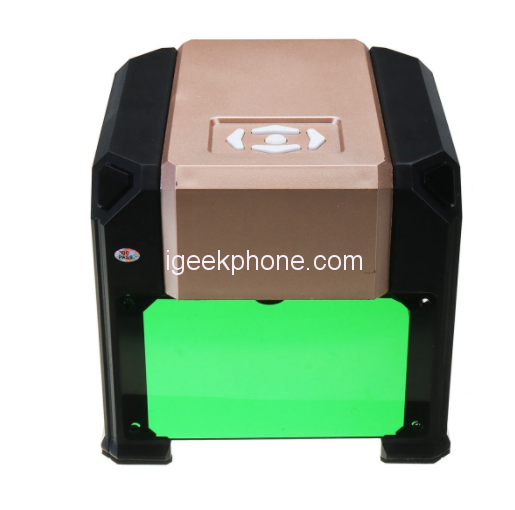
- Bakeey BK-K4 Laser Engraver
Bakeey BK-K4 Laser Engraver
Offers
-
 Bakeey BK-K4 Laser Engraver
$159.99
Bakeey BK-K4 Laser Engraver
$159.99
View Offer
Specifications:
| Brand | Bakeey |
| Name | Laser Engraver |
| Model | K3 |
| Material | ABS(Acrylonitrile Butadiene Styrene plastic) + Aluminium alloy |
| Color | Black + Gold |
|
Size
|
15.2×16.6×14.3cm (6″x6.5″x5.6″) |
| Voltage | AC 110-220V |
| Laser power | 3000mW |
| Carving area | 80x80mm(3.1″x3.1″) |
| Carving depth | 1mm |
| Applicable range | Plane surface |
| Supporting Systems | Macs & Windows XP/7/8/10 |
| Supporting image format | JPEG/ JPG/ PNG/ BMP |
| Features | a laser carving machine for home use,used for carving wood, plastic, leather, etc. |
Note:
1. The product is a laser carving machine for home use, a tool machine, can not be compared with laser carving machine for industrial use.
2. Do not use the laser head to point at human or livestock,do not use laser to point at people’s eyes.
3. Laser has power.skin exposure to laser is strictly prohibited.
4. The caving machine should not be stopped while working,it will cause a damage.
5. This product not suitable for kids under age of 14.
6. Software can support Macs /Windows XP/7/8/10
7. Do not fall or make any collision to the product.
8. The shell with laser cutting technology,sharp edge,please pick up and down gently to prevent scratches.
9. Metal, glass, crystal and transparent or translucent stuff are can not be engraved.
10. The color of the item may vary slightly due to photography and different PC monitor, and the size might be slightly errored due to manual measurement. Your kindly understanding would be appreciated.
11. You might need to temporarily shut down the antiviruss software before downloading the software. Otherwise some files in the software would be mistaken for viruss and deleted by antiviruss software.
12. Please according to the user manual to operate the machine. After 20 minutes of working, it need to take a break, can not work continuously for a long time.
Usage:
Operation instruction video: https://drive.google.com/drive/folders/0B1YOCyE7igQgRWh2OUNOWEhEbWM
Software download: https://drive.google.com/file/d/1V3FMLE5Qec3kU-UlsgyVv_f_ozqvArYl/view
Step 1: Insert the USB disk
Step 2: Install the “driver.exe”
Step 3: Must Copy the “English zip” to Computer desktop and then unzip it.
Step 4: Connect the engraver to computer
Step 5: Open the “scarve-en.exe” which is unzip from the “English zip”
The latest installation software, please click here.
User Manual, Please Click Here
Package includes:
1 x Laser Engraver
1 x Power Cord (US Plug)
1 x USB Disk
1 x USB Cable
2 x Wooden Board
1 x Laser Focusing Paper
1 x Screw Driver
5 x Screws
5 x Screw Caps
Reviews
Sorry, reviews are closed for this product.
Disclaimer Note
You can write your own disclaimer from APS Settings -> General -> Disclaimer Note.
New Arrivals
ADVERTISE



