






Facebook Twitter Instagram
    Trending
    • R36Hpromax 22000+ Games Handheld Game Console Review: The Ultimate Portable Retro Gaming Experience
    • Rlaarlo Storm for Breaker SBK10 RC Car Review: The Ultimate Off-Road Racing Experience
    • BlitzWill BWL-FL6 36W Smart RGB Floor Lamp Review: A Game-Changer for Home Lighting
    • OXVA XLIM PRO 3 vs XLIM Pro 2 DNA: Hands-On Review
    • OXVA XLIM PRO 3 vs XLIM Pro 2 DNA Pod Vape Unboxing Review
    • OXVA XLIM PRO 3 vs XLIM GO 2: Hands-On Review
    • Lost Mary MT35000 Turbo Nixodine Edition Review: The Ultimate High-Puff Disposable Vape
    • Luffbar Cue 60K Disposable Vape Review: The Ultimate Vaping Experience
    Facebook YouTube
    Login Register
    IGeeKphone China Phone, Tablet PC, VR, RC Drone News, Reviews
    • HOME
      • NEWS
        • DeepSeek
        • ChatGPT
        • Minecraft
    • Amazon
    • PHONE
      • Top Phones For Your First Choice
      • Phone Comparison
      • Xiaomi
      • Blackview
      • Doogee
      • Black Shark
      • Geekbuying
      • Banggood
      • TEMU
      • TikTok
      • Aliexpress
      • Walmart
      • MercadoLibre
      • Lazada
    • TOP VAPE Awards for 2026
    • VAPES
      • E-CIGAR Upcoming
      • Vape News
      • Vape Deals
      • Vape Comparison
      • Vape Guide
      • Giveaway
    • BEST VAPE
      • Best Vape Stores
      • Best Starter Vape Kits
      • Best Vapes for Beginners
      • Best Disposable Vapes
      • Best Pod Systems
      • Best Pod Mod Vapes
      • Best Mods
      • Best Nicotine Pouches
      • Best Clearomizers/Tanks
      • Best E-Liquid
      • Best EGO/Pens
      • Best Vapes for Nic Salt E-Juice
      • Best Vapes to Quit Smoking
      • RDA vs. RDTA vs. RTA
    • Best Vape Brand 2026
      • VAPORESSO
      • VOOPOO
      • OXVA
      • NEXA BAR
      • ORIONBARTECH
      • MASKKING VAPE
      • MEMERS
      • SP2S
      • JNR
      • TODOO
      • MRFOG
      • VEIIK
    • REVIEW
      • E-cigar Review
      • Phones
      • Tablet PC
      • TV Box
      • RC Drone
      • Wearables
      • Camera
      • Accessories
      • VR Headset
    • MORE
      • TABLET
        • Chuwi
        • INNOCN
        • Teclast
        • Top Tablet for Your First Choice
        • Tablet/Laptop Comparison
      • RC DRONE
      • CAMERA
      • WEARABLES
        • OneOdio
        • BlitzWolf
        • Top Smartwatch for First Choice
      • 3D PRINTER
        • 3D Printer Review
        • Anycubic
        • FLSUN
        • Xtool
        • LONGER
        • Top 3D printer to Choose First
      • POWER STATION
        • Oukitel
        • FOSSIBOT
      • GAMING
        • Top Gaming Products
      • E-BIKE
        • Samebike
        • Happyrun
        • ENGWE
      • SMART HOME
      • TV BOX
      • ACCESSORIES
      • VR HEADSET
      • CLOTHES
      • AUTO CAR
    • DEAL
    • VAPE LAWS
    • Shop
    IGeeKphone China Phone, Tablet PC, VR, RC Drone News, Reviews
    You are at:Home»FAQ»How to Unlock iPhone Passcode with WooTechy iDelock
    FAQ

    How to Unlock iPhone Passcode with WooTechy iDelock

    Reyan SiddiquiBy Reyan SiddiquiOctober 22, 2021
    Facebook Twitter Pinterest LinkedIn Tumblr Email

    When you forget your Apple ID, iPhone unlocks password, iTunes backup password, or iPhone has MDM settings, many people who want to solve the problem may directly seek Apple’s official assistance, but anyone who has tried it knows that the process is very cumbersome and you must know the original Some security issues are set, but not everyone can remember. In fact, it doesn’t have to be so troublesome, because you only need this all-around iPhone passcode unlocker software “WooTechy iDelock”, you can easily solve the above problems without JB, and the operation is simple, even those who are not familiar with computers don’t need to worry, Both Windows and Mac versions are available, and I will teach you how to use them one by one.

    Update 2022: If you want to unlock your iPhone from passcode or iCloud Activation Lock, the best way is to use the most powerful iPhone unlocker – StarzSoft KeyPass.

    In addition, for friends who have been holding iPhones for a long time, it is actually quite recommended to collect this set, because it is possible to encounter similar problems in the process of use, even relatives and close friends, so if you have iDelock If so, the problem can be solved immediately. Please continue to see how to unlock iPhone without password teaching.

    Remove multiple locks with WooTechy iDelock

    As we know, the Apple ecosystem is one of the most reserved and closed to the general public. Rightly or wrongly, Apple has endowed its devices with powerful security measures and counterweights, which make access very difficult and can make life difficult for us in many situations. Admittedly, there are many hardware and software companies that invest heavily in an attempt to contradict Apple policy and make it easier for everyone to access what should be a natural right.

    So, this is where WooTechy comes with its iDelock, available for Windows or Mac, whose main highlight lies in the fact that it presents itself as a powerful tool that allows:

    • 1 Mode: Unlock Apple ID
    • 2 Mode: Unlock iPhone Screen Passcode
    • 3 Mode: Unlock Passcode screen timecode
    • 4 Mode: Bypass Mobile Device Management (MDM)
    • 5 Mode: Unlock iTunes Backup Password
    • 6 Mode: Remove iTunes Backup Encryption Settings

    Beforehand, we are in a position to state that we have reached a level above what has been seen so far, and it is now possible to remove several blocks.

    Main Features of iDelock

    Right away, so that everyone can understand how easy it is to remove various blocks, we show the main features of the software itself. And then we have:

    • Multifunctional software, that is, it is not limited to one or a pair of functions;
    • iDelock offers 6 main ways to resolve different types of protections on iOS, including iOS14
    • The unlocking effected is permanent;
    • Once unlocked, you can have access to your device for its entire lifetime;
    • Unlocking can be done at home or wherever you want without the need for extra devices;
    • iDelock recognizes all iDevices on all iOS versions;
    • 24/7 customer service: support team at any time when you have any queries.

    Why do I need WooTechy iDelock?

    In any case, there are several ways and justifications for the need to use WooTechy iDelock. Of course, outside of any lyricism, there is the possibility of using this program for illegal activities; however, we recommend that any and all users use this program correctly and within the applicable legal rules.

    On the other hand, you may need to unlock one of our iOS devices so that it runs out of access codes or protection in any of the situations described below:

    • For forgetting the iOS device’s passcode, but intending to access it to perform more operations;
    • Buy a second-hand iPhone/iPad with a locked screen and you need to unlock it before you can use it;
    • iPhone/iPad has been disabled after entering several wrong passwords;
    • The iPhone/iPad screen is broken and cannot be used;
    • Your iPhone/iPad password has been set by others; whether for fun or not, and now you have no way of knowing what the password was.

    In fact, there are countless situations where software like iDelock can become a man’s true best friend. However, it is important to mention that this software only has a paid version and you can consult the various price modalities here.

    Guides and tutorials

    Currently, one of the main fears of those who buy software is the fact; that they might not know how to make the most of it. However, WooTechy iDelock always has its users in mind and uses the creation of the best guides to guide its users.

    Among others, and despite being in English, we can find and follow, for example, ways to apply various solutions by mode:
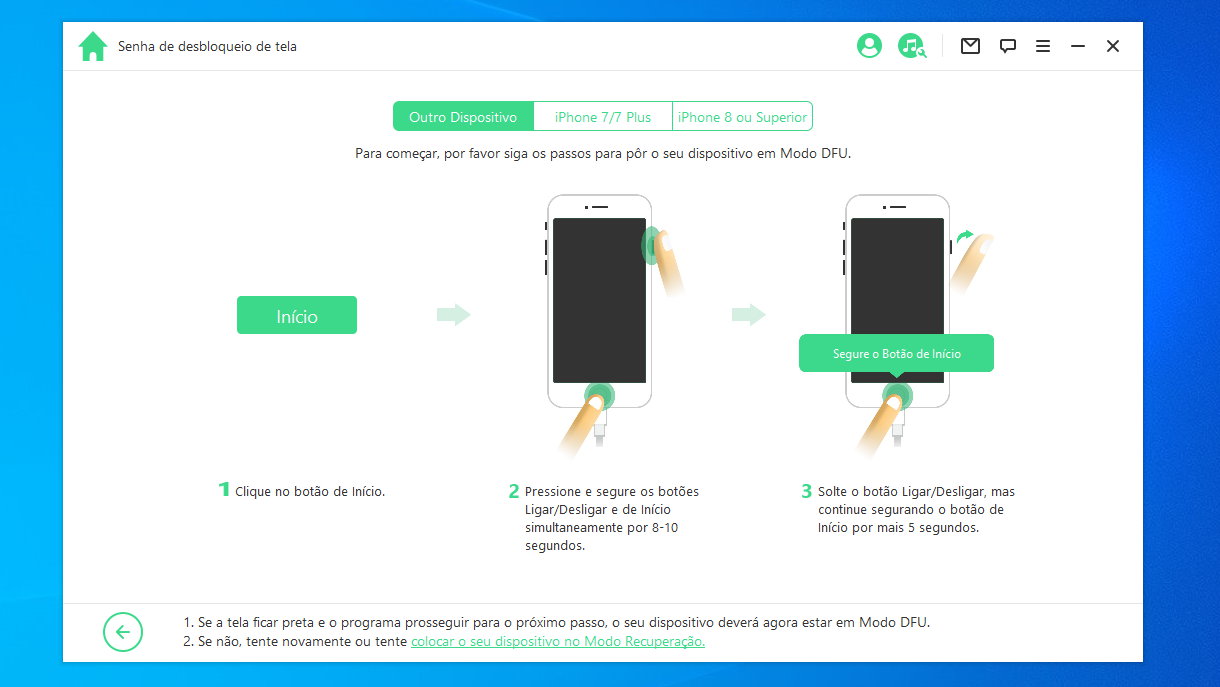
    • Remove iPhone Screen Lock
    • Bypass Screen Time & Restrictions Passcode
    • Bypass MDM Activation Screen & Remove MDM Profile
    • Remove Apple ID without Password
    Share. Facebook Twitter Pinterest LinkedIn Tumblr Email

    Related Posts

    Play at Online Games with Mobile Casino Apps

    Is there a reliable method for selecting trustworthy online gambling sites?

    FOODS THAT ARE NOT AS HEALTHY AS YOU THINK

    Leave A Reply Cancel Reply

    You must be logged in to post a comment.

    voopoo drag 6
    oxva xlim 3 ultra
    sp2s sen x disposable vape
    jnr 100k
    • Popular
    • 3D Printer REVIEW
    • XIAOMI
    March 5, 2026

    OXVA XLIM PRO 3 vs XLIM Pro 2 DNA: Hands-On Review

    March 5, 2026

    OXVA XLIM PRO 3 vs XLIM GO 2: Hands-On Review

    March 2, 2026

    OXVA XLIM PRO 3 vs XLIM 3 ULTRA: Hands-On Review

    February 23, 2026

    Voopoo DRAG S3 vs DRAG X3 Review – Which One Fits Your Vaping Lifestyle?

    December 26, 2025

    ACMER ASCARVA 4S: Precision CNC Power for Makers, DIYers & Small Workshops

    June 23, 2024

    ACMER P2 20W Laser Engraver Fixed Focus Engraving: Hands on Review

    May 30, 2024

    xTool F1 Ultra Review: World’s First 20W Fiber & 20W Diode Laser Engraver

    May 30, 2024

    Anycubic Kobra 3 Combo Review: The Multicolor Masterpiece?

    March 3, 2026

    Starting from 7,999 yuan, Leica Announces that Leica Version of Xiaomi 17 Ultra in Black and Silver will be Available on Official Channels

    March 3, 2026

    Xiaomi Releases the second phase recruitment announcement for the ‘Hyper OS 3 Beta’: ends at 0:00 on March 6th

    February 26, 2026

    Xiaomi 17 Ultra mobile phone has received the upgrade to Hyper OS 3.0.15.0

    February 24, 2026

    Xiaomi 17T Series Phones have been Registered: Equipped with MediaTek 8/9 Flagship Platform and Featuring Leica Imaging Technology

    fc 26 coins
    New Arrivals
    • Lost Mary MT35000 Turbo Nixodine Edition Lost Mary MT35000 Turbo Nixodine Edition
    • Luffbar Cue 60K Disposable Vape Luffbar Cue 60K Disposable Vape
    • Upends UP9 50K Disposable Pod Upends UP9 50K Disposable Pod
    • Gold Bar Max 50K Nixodine Disposable Vape Gold Bar Max 50K Nixodine Disposable Vape
    • Geek Bar Clio X 50K Disposable Vape Kit Geek Bar Clio X 50K Disposable Vape Kit
    • Navabar Zero Nicotine 55K Disposable Vape Navabar Zero Nicotine 55K Disposable Vape
    • Vaporesso Luxe Q3 Pod System Kit Vaporesso Luxe Q3 Pod System Kit
    • HIDI Max 50K Zero Nicotine Disposable Vape HIDI Max 50K Zero Nicotine Disposable Vape
    • iJOY XP35000 Disposable Vape iJOY XP35000 Disposable Vape
    About
  • Igeekphone.com provides the first global tech news and reviews about smartphone, vapes, e-cigar, smart home, 3D printers, e-bike,tablets, RC drones, VR headset, and other accessories. It's the best platform to improve your brand and product.
  • Contact us: info@igeekphone.com
  • Check Our Privacy Policy Here.
  • Note: *Right now we have US editor and EU editors for review, especially for Amazon US and EU.
  • *Shop and Compare Price Here*
  • Facebook
  • Youtube
  • OUR BEST VAPE PARTNERS
  • VAPE ONLINE STORE
  • HAYATI PRO MAX PLUS
  • VAPORESSO
  • VOOPOO
  • OXVA
  • NEXA
  • MASKKING
  • LOSTVAPE ORIONBAR
  • MEMERS
  • TODOO
  • SP2S
  • JNR
  • VEIIK
  • OTHER BEST PARTNERS
  • SVBONY
  • Chuwi
  • Blackview
  • Fossibot
  • Unihertz
  • Flsun
  • Anycubic
  • Xtool
  • Oukitel
  • Mukkpet Ebike
  • Ugreen
  • Copyright © 2026 igeekphone

    Type above and press Enter to search. Press Esc to cancel.