
|

|
Trending
- Guide for online poker players: equipment and how to set the perfect environment
- iJOY XP35000 Disposable Vape Review: Unmatched Performance and Flavor in Every Puff
- Ways Fast Crypto Payments Can Help Mobile Gaming Grow
- Vape Cartridge Usage Guide: Safe Operation, Expiry Period Analysis
- The British island of Jersey plans to impose an e-cigarette tax: It is expected to generate £467,000 in revenue in 2026 and will come into effect in the second half of the year.
- SICPA has been awarded a five-year contract for UK Vape Tax Tickets
- How to Turn off the Ads on Redmi K90 Pro Max?
- Completely changing the rules of the game! I’ve replaced my only gaming earphones

 |
 |
 |
 |
 |
 |
- Shop
- Accessories
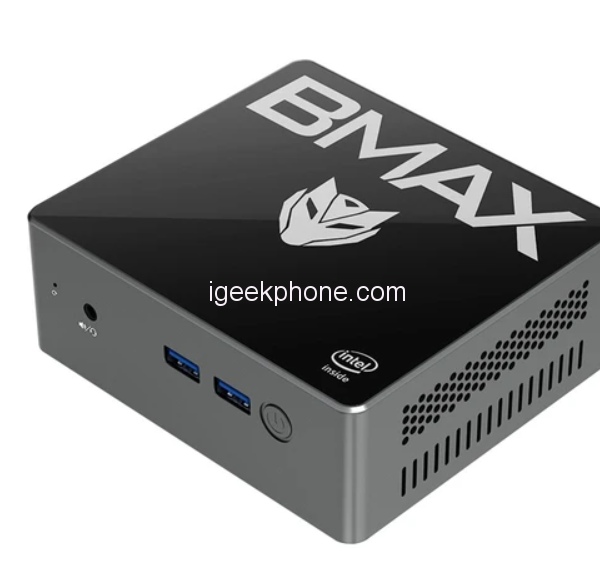
- BMAX B2S Mini PC
BMAX B2S Mini PC
Offers
-
 BMAX B2S Mini PC
$ 99.16
BMAX B2S Mini PC
$ 99.16
View Offer
-
Highlights
Powerful Performance
Processor: Intel® Celeron® N4000/N4020 with 2 cores and 2 threads.
Frequency: Base Frequency of 1.10GHz and Burst Frequency of 2.80GHz.
Memory: 6GB DDR4 RAM for smooth multitasking.We will send out BMAX B2S Mini PC with N4000 (2 Cores 2 Threads up to 2.60GHz) or N4020 (2 Cores 2 Threads up to 2.80GHz) CPU randomly.
Storage Options
Storage: 128GB eMMC storage for fast boot times and ample storage capacity.
Graphics and Operating System
Graphics: Intel® UHD Graphics 600 for enhanced visuals and multimedia capabilities.
Operating System: Microsoft Windows 11 (64-bit) pre-installed with support for 13 languages.Compact and Stylish Design
Dimensions: Compact size measuring 125mm(L)×112mm(W)×44.0mm(H).
Weight: Lightweight at approximately 300g.
Color: Sleek Space Grey exterior for a modern and elegant look.Connectivity and Expansion
Networking: Wired LAN with 1Gbps speed and Wi-Fi support for 802.11a/b/g/n/ac protocols on 2.4GHz/5GHz bands.
Expansion Slots: Includes an SSD slot (M.2_SATA_2280 x1) and an HDD bay (2.5-inch notebook hard drive SATA interface x1) for storage expansion.
Ports: Offers various ports, including USB 3.0 x4, HDMI x1, VGA x1, RJ45 x1, 3.5mm audio jack x1, and TF (Micro SD) card reader x1.
Reviews
Sorry, you have not permission to write review for this product.
Disclaimer Note
You can write your own disclaimer from APS Settings -> General -> Disclaimer Note.



New Arrivals


ADVERTISE



