|

|
Trending
- Redmi TV A55 2027 Launches With 4K 165Hz Display, HyperOS 4 and XiaoAI Assistant
- Joyetech WideWick-C Pod System Review: 1100mAh Removable Battery and WideWick Technology
- Supreme Reports 7% Vape Revenue Growth as UK Vape Duty Puts Pressure on Manufacturers
- ANBERNIC RG 47G1 Unveiled: Game Boy-Inspired Retro Handheld With a 120Hz Display and Snapdragon G1 Gen 2
- Ulefone Armor 35 Pro: Rugged Smartphone Combines a 1,200m Laser Rangefinder, 800-Lumen Camping Light and 11,000mAh Battery
- Elon Musk Pledges Two SpaceX Shares for Every US Child, Promises Annual Stock Donations
- Xiaomi AI Glasses 2 May Launch in December With a New Display Edition
- Vaporesso History: How the Vape Brand Grew, the Challenges It Faced, and How It Adapted

 |
 |
 |
 |
 |
 |


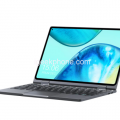
Chuwi LapBook SE
-
Processor
Intel Celeron N4100 processor -
RAM
4GB/6GB -
ROM
64 GB/128GB -
Display
13.3 with 1080p resolution -
Camera
5.0MP front camera -
OS
Windows 10
Offers
-
Chuwi LapBook SE
View Offer -
 Chuwi LapBook SE
View Offer -
Chuwi LapBook SE
View Offer -
 Chuwi LapBook SE
View Offer -
Chuwi LapBook SE
View Offer
Specs
General
| Device Type | Notebook |
| Model | Chuwi LapBook SE |
Display
| Screen type | IPS Screen |
| Screen size | 13.3 with |
| Screen resolution | 1080p resolution |
Hardware
| CPU | Intel Celeron N4100 processor |
| RAM | 4GB/6GB |
| ROM | 64 GB/128GB |
| External Memory | TF card up to 128GB (not included) |
OS
| Operating System | Windows 10 |
Network
Camera
| Camera type | Single camera |
| Front camera | 5.0MP |
Other Features
| I/O Interface | 1 x USB 3.0+1 x USB2.0 , Micro HDMI slot, 3.5mm Headphone Jack |
| Bluetooth Version | Bluetooth 4.0 |
| Features | HDMI Output Expands Your Viewing Options, Multi-language |
Dimensions and Weight
| Product size | 317mm x 215mm x 15.9mm |
| Product weight | 1.5KG |
Battery
| Battery Capacity (mAh) | 7.4V / 9000mAh, Polymer Li-ion battery |
| Battery Type | Li-Ion (Lithium Ion) |
Reviews
Sorry, you have not permission to write review for this product.
Disclaimer Note
You can write your own disclaimer from APS Settings -> General -> Disclaimer Note.
New Arrivals



ADVERTISE