
|

|
- EA FC 26: 4 Best Goalkeepers to Build Your Ultimate Squad
- Exploring the Science of Luck: How Chance Influences Slot Online Outcomes
- Which Pod Vape Has the Longest-Lasting Coils?
- The Ultimate Beginner’s Guide to Pod Vapes
- How Digital Asset Management Software Can Transform Your Workflow
- 4 Apps for Sports Betting Success for your life
- How to Turn an Iphone into a New Phone
- RAZ RX50K Batch Edition Disposable Vape Review: A Premium Vaping Experience

 |
 |
 |
 |
 |
 |
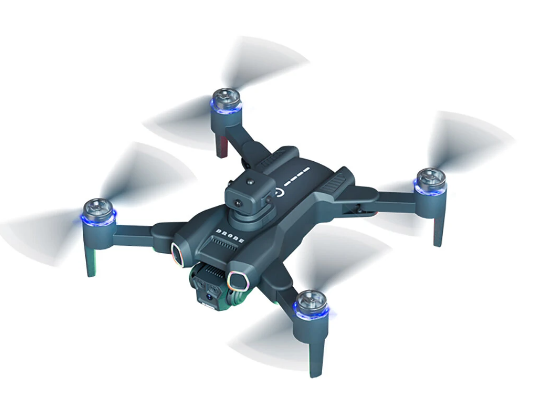
JJRC H117 RC Drone
Offers
-
 JJRC H117 RC Drone
$34.99
JJRC H117 RC Drone
$34.99
View Offer
Specifications:
Item NO.: H117
Item Name: Sunsdow
Color: Black
Frequency: 2.4G Channel: 4CH
Gyro: 6-Axis
Motor: Brushless
R/C Distance: About 100m
FPV: 2.4G WiFi
FPV Distance: About 50m
Camera: 480P
Positioning System: Optical Flow Positioning
Features:
– Optical flow fixed point hover provides stable flight.
– Surround action will enable the aircraft flying in a circle, providing cooler shooting perspective.
– Waypoint flight mode, just draw a route on the screen, the copter as the give path. – With 3.7V 1800mAh battery, the fly time up to 12 mins.
– With One key to return function makes it easily to find the way home.
– One Key Takeoff /Landing. One press automatically taking off or landing, the drone will take off or go back to the position where it took off.
– 5GHz Technology Adopted for Anti-Interference. – 4 Channel which can do ascend, descend, forward, backward, left sideward fly, right sideward fly.
– 6-axis g-yro which can have more stable flying and be easy to control. – It have 3-level flight speed to switch that can make more fun with the flying.
Package Included:
1 x JJRC H117 Quadcopter 1 x Remote Control 1 x 3.7V Battery 1 x USB Charging Cable 2 x Spare Propeller 1 x Screwdriver 1 x Manual 1 x Storage Bag
Reviews
Sorry, you have not permission to write review for this product.
Disclaimer Note
You can write your own disclaimer from APS Settings -> General -> Disclaimer Note.
New Arrivals




ADVERTISE



