
|

|
- Flash Sale Alert: Save Up to 30% on FC26 Coins (Limited Time Only)
- VOOPOO UFORCE-X Tank II Review: Next-Level Flavor and Airflow Performance
- Eachine Spitfire Brushless RC Airplane Review-Aerobatic Warbird Fun for All Skill Levels
- How Technology Can Help You Write Better Essays
- How to Transform Your Excel Spreadsheets Into PDF Using Gogopdf Tool
- SP2S Ocean vs Friobar IC18K: Comparison Review
- Pachamama 75K Disposable Vape Review: Long‑Lasting Performance Meets Premium Flavor
- Heycute G126 OWS Earbuds Review-Affordable Wireless Audio with Smart Features

 |
 |
 |
 |
 |
 |
- Shop
- Accessories
- KRD Q22 Walking Pad
KRD Q22 Walking Pad
Offers
-
 KRD Q22 Walking Pad
€ 176.20
KRD Q22 Walking Pad
€ 176.20
View Offer
Highlights
Effective Shock-absorbing Technology
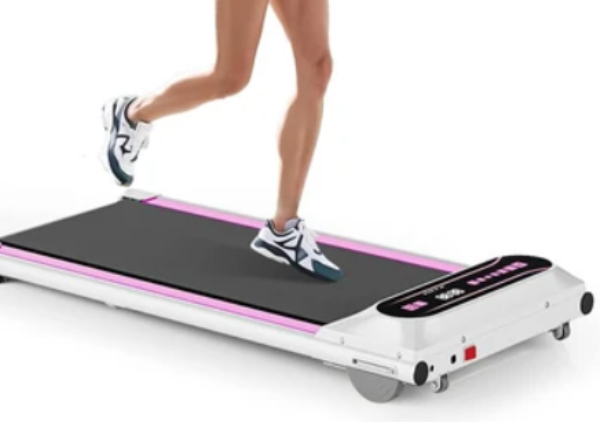
This walking pad features a 5-layer running belt, 8 silicone shock absorbers, and 2 soft rubber pads to protect the user’s knees, increase running comfort, and reduce noise.
Compact and Portable
The under-desk treadmill measures 46.02 x 20.51 x 5.39 inches, making it easy to store under a desk, bed, or couch. This treadmill for home weighs only 36.6 pounds and has two wheels on the bottom, making it easy to lift and move and saving space.
Quiet Treadmills for Home/Office
This walking treadmill is equipped with a quiet motor with a speed range of 0.5-4 mph. It features a dual shock absorbing system with a noise level of less than 45 decibels, which allows you to work out at home or in the office anytime, anywhere, without disturbing your co-workers and neighbors.
LED Display & Remote Control
The display shows speed, distance, time, and calories, users can track the workout data at any time. In addition, it is equipped with a remote control with a one-touch cancel beep function for easy adjustment, and there is a remote control card slot on the side of the treadmill, which can be placed in the slot when not in use to prevent loss.
Reviews
Sorry, you have not permission to write review for this product.
Disclaimer Note
You can write your own disclaimer from APS Settings -> General -> Disclaimer Note.
More Products from Xiaomi

New Arrivals






ADVERTISE



