
|

|
Trending
- Vape Airflow Made Simple: How to Find Your Ideal Pull?
- iJoy XP50000 Disposable Vape Review– Long‑Lasting Performance With Powerful Features
- OXBAR ROVOTA DTL 40K Disposable Vape Review-Long-Lasting Power Meets Deep DTL Flavor
- OXBAR Introduces the New DTL Product ROVOTA
- Fume Korea will launch the IQOS Iluma i One in “electric purple” color and it will be available in mainstream convenience stores starting from May.
- How to Enter BIOS on a Computer (2026 Universal Key Operation Guide)?
- Fastest Electric Bikes in 2026: Speed, Safety & What to Look For
- Lenovo has launched the 11th generation IdeaPad 5i two-in-one notebook, available with Intel Panther Lake and AMD Gorgon Point platforms.

 |
 |
 |
 |
 |
 |
- Shop
- E-cigar NEW
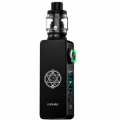
- Lost Vape Centaurus M200 Vape Mod Kit with Centaurus Sub Ohm V2 Tank
Lost Vape Centaurus M200 Vape Mod Kit with Centaurus Sub Ohm V2 Tank

Offers
-
 Lost Vape Centaurus M200 Vape Mod Kit with Centaurus Sub Ohm V2 Tank
View Offer
Features:
1. Powered by Quest 2.0 chipset for reliable performance and fast firing.
2. Dual 18650 batteries (not included) with 200W max output.
3. Replaceable side panels for customizable appearance.
4. Centaurus Sub-Ohm V2 Tank with 5ml capacity and top-fill design.
5. Adjustable top-to-bottom airflow for rich flavor and dense vapor.
6. Compatible with UB Max mesh coils (0.15ohm & 0.30ohm included).
7. Ergonomic design with lightweight aluminum alloy body.
8. Bright OLED screen with intuitive interface.
Brand: Lostvape
Mod Dimensions: 93mm x 56.7mm x 26mm
Mod Material: Aluminum Alloy & Stainless Steel
Weight: 150g (without batteries)
Battery: Dual 18650 (not included)
Output Power: 5–200W
Output Voltage: 0.7–10V
Resistance Range: 0.1–5.0ohm
Tank Capacity: 5ml
Filling: Top-fill
Airflow: Top-to-bottom adjustable
Coils: UB Max 0.15ohm / UB Max 0.30ohm
Drip Tip: 810
Reviews
Sorry, you have not permission to write review for this product.
Disclaimer Note
You can write your own disclaimer from APS Settings -> General -> Disclaimer Note.


New Arrivals






ADVERTISE



