
|

|
- No-fog mode + transparent display, Kanger launches Subox Mix 50K in the US
- Japan Tobacco has Launched Three Ploom AURA Collaboration Panels, Inspired by “Japanese Sake” Design
- How to Partition a Portable Hard Drive: A Step-by-Step Guide
- Official Images of OPPO Find X9 Ultra have been Released: Circular module + Stitched back panel – full of Hasselblad style.
- Xiaomi 18 Ultra continues to feature continuous optical zoom: the industry’s exclusive multi-focal range optical zoom without loss of image quality.
- Huawei Pura 90 Pro Max proudly introduces Kirin 9030 Pro: The strongest chip in Huawei’s history, unveiled on April 20th
- Xiaomi’s first phone with built-in fan for cooling has been officially announced. Redmi K90 Max is scheduled to be released on April 21st.
- OneXPlayer Super V two-in-one tablet-laptop has been Launched overseas, with the initial price at $1899.

 |
 |
 |
 |
 |
 |
- Shop
- Accessories
- Gaming
- MIYOO Mini Plus Game Console
MIYOO Mini Plus Game Console
Offers
-
 MIYOO Mini Plus Game Console
$ 72.99
MIYOO Mini Plus Game Console
$ 72.99
View Offer
Highlights
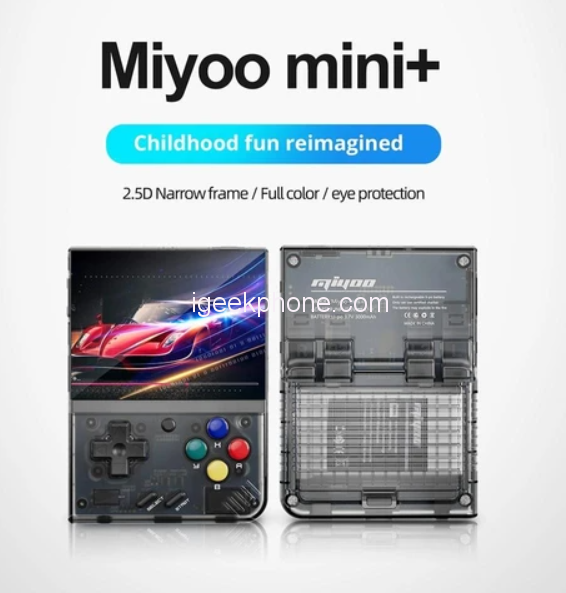
MIYOO Mini+(plus) Main Features:
MIYOO Mini Plus is a well-made, reliable game console that will fit into your pocket. It has a 3.5-inch full-lamination screen with a resolution of 640*680p. MIYOO Mini Plus lasts for about 5-6 hours thanks to its built-in 3000mAh battery. Moreover, you can add your own games through the device’s SD card slot as the MIYOO Mini Plus supports a maximum TF card expansion of 128GB. When it comes to gaming capabilities, games up to PS1 perform flawlessly.
- Full 3.5-inch Lamination Screen
- 640*680P resolution
- 3000mAh battery for 5-6 hours of playing time
- Comes with WiFi
- Supports a maximum expansion of 128GB
What’s more, MIYOO Mini Plus includes a professional optimization system that allows for settings of game collection, background music, system sleep, system language, key mapping, and one-click system restoration. The console enables a great variety of settings options and playing methods, with a more stable optimization system, making it a second-to-none choice for portable gaming enthusiasts.
Reviews
Sorry, you have not permission to write review for this product.
Disclaimer Note
You can write your own disclaimer from APS Settings -> General -> Disclaimer Note.
New Arrivals






ADVERTISE



