
|

|
- Redmi Book Pro 2026 officially announced to be Released this month: Core Ultra X7 358H + 99Wh super-large battery
- Honor MagicPad 3 Pro with a 12.3-inch screen is scheduled to be released on April 23rd
- REDMI Pad 2 SE is released this month: 9.7-inch 2K screen! 70-day super long battery life
- iJoy XP50000 0% Zero Nicotine Disposable Review: A Flavorful Experience Without the Nicotine
- When Tech Hits Hard: How Emerging Consumer Gadgets Are Shaping Personal Injury Cases
- People are purchasing more on mobiles than ever before
- To conduct business effectively, utilize a Genome business account
- The Mini Vape Phone: Smoke and Surf in Style

 |
 |
 |
 |
 |
 |
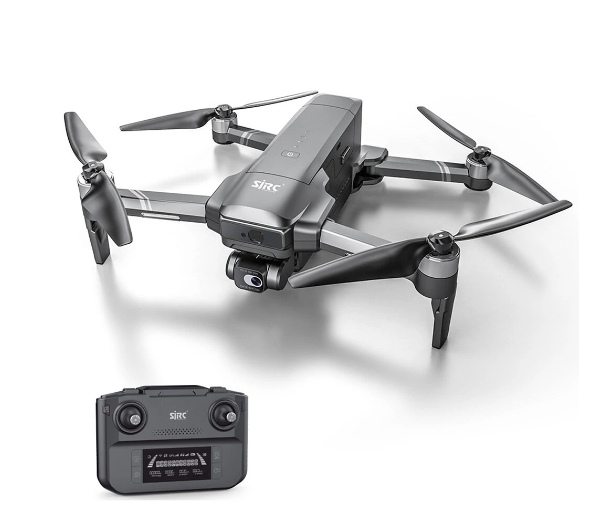
SJRC F22 S2 PRO+ RC Drone
Offers
-
 SJRC F22 S2 PRO+ RC Drone
$299.99
SJRC F22 S2 PRO+ RC Drone
$299.99
View Offer
Specification:
Brand Name: SJRC
Item No.: F22 S2 PRO+
Color: Silvery Grey
Motor: 1806 Brushless
Operating Frequency: 2.4 G+5G Bridge
Drone Battery: 11.1V 3500mAh Lipo (Included)
Flight Time: About 40 min
Charging Time: About 4.5 hours
USB Charging: 5V/3A Type-C
Remote Control Mode: Mode 2 (Left Hand Throttle)
Remote Control Battery: Built-in 7.4V 550mAh (x2PCS)
Control Distance: About 6000m (No Interference, No Obstruction)
Transmitter Charging Time: About 1 hours
Transmitter Operating Time: About 2.5 hours
FPV: 5G USB Digital Image Transmission
FPV Range: About 6000m (No Interference, No Obstruction)
Camera Pixel: 4K
Camera Lens: FOV 100°
Photo Resolution: 3840x2160P
Video Resolution: 1280x720P
Photo Resolution(SD Card): 3840x2160P
Video Resolution(SD Card): 3840x2160P
Frame Rate: 30fps
Photo Format: JPG
Video Format: MP4
SD Card: 32G-128G (Not Included) Class 10/U1 or above
Gimbal: 2 -Axis Mechanical
Tilt(X): -35° – +35°,
Roll(Y): -100°- +70°
Adjustable Angle: -80°- +0°
Gesture Shooting: 1-3 M
Image Follow Me: 3-10M
GPS Follow Me: 10-100M
Optical Flow Mode: Yes Position: GPS / GLONASS / BDS
Obstacle Avoidance Systems: Laser Obstacle Avoidance
Mobile Device System Version: iOS 9.0 or later / Android 5.0 or later
Take-off Weight: 620 g
Reviews
Sorry, you have not permission to write review for this product.
Disclaimer Note
You can write your own disclaimer from APS Settings -> General -> Disclaimer Note.
New Arrivals






ADVERTISE



