
|

|
- DJI Osmo Mobile SE 3-Axis Gimbal Stabilizer Review: Capture Smooth, Cinematic Shots with Ease
- ATTACK SHARK L80PRO Tri-mode Gaming Headset Review: The Ultimate Audio Experience for Gamers
- Yesido TWS38 TWS Earbuds Review at $16.99: Ultimate Wireless Audio Experience
- Pocket 5K HD Action Camera Review: The Ultimate Mini Sports Camera for Adventurers
- E-shisha Vape Comparison: Maskking FEXO 45000 vs. Al Fakher Crown Bar Mega Max 40K
- Vaporesso XROS PRO 2 vs. VIBE SE 2: Which Pod Is Right for You?
- SP2S Ocean vs VapeSourcing Friobar IC18K: Comparison Review
- OXVA SlimStick X vs OXVA SlimStick: Which One Is Right for You?

 |
 |
 |
 |
 |
 |
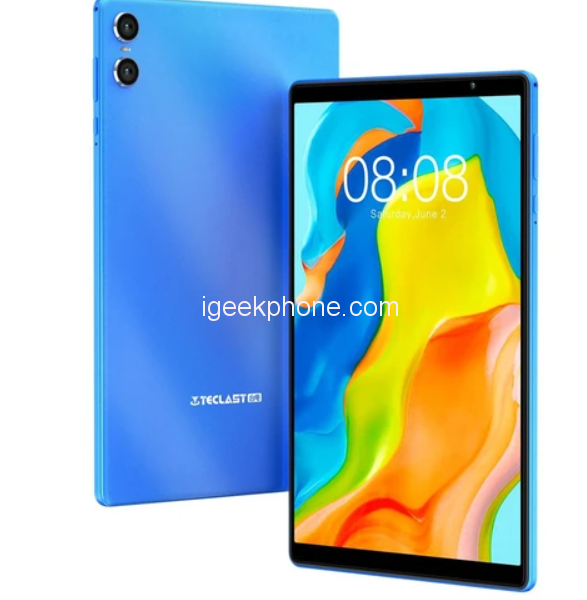
Teclast P26T Tablet PC
-
Processor
-
RAM
-
ROM
-
Display
-
Camera
-
OS
Offers
-
 Teclast P26T Tablet PC
$ 99.99
Teclast P26T Tablet PC
$ 99.99
View Offer
-
Highlights
Blue Wave Texture Design
P26T features two unique exterior designs-sparkling blue color and a non-slip wave texture body design. Not only is it visually appealing, but the texture also provides a secure grip.
Ultra-thin Bezels
P26T features a 10.1-inch display with a 6mm ultra-thin bezel wide edge. 1280×800 IPS resolution and wide viewing angles ensure a vivid, immersive viewing experience.
Android 13 OS
P26T features the Android 13 operating system, which gives you the flexibility to customize the apps and media player to your liking. You can adjust enhanced security and privacy features providing you with powerful control over app permissions, effectively protecting your digital data.
4+4GB Expandable RAM
P26T comes with a base 4GB of RAM and an additional expandable 4GB of virtual memory to ensure smooth multitasking. 64GB of storage and a Micro SD card slot for expansion provide plenty of room for expansion.
Octa-core Processor
P26T is designed with an advanced octa-core A55 architecture and is powered by an octa-core processor. Experience more than six times the performance of A53 for smoother, more efficient, and more reliable performance.
Specs
General
Display
Hardware
OS
Network
Camera
Other Features
Dimensions and Weight
Battery
Reviews
Sorry, you have not permission to write review for this product.
Disclaimer Note
You can write your own disclaimer from APS Settings -> General -> Disclaimer Note.


New Arrivals





ADVERTISE



