
|

|
Trending
- Vivo X300 Ultra Review: Redefines Telephoto Photography!
- Redmi Book Pro 2026 officially announced to be Released this month: Core Ultra X7 358H + 99Wh super-large battery
- Honor MagicPad 3 Pro with a 12.3-inch screen is scheduled to be released on April 23rd
- REDMI Pad 2 SE is released this month: 9.7-inch 2K screen! 70-day super long battery life
- iJoy XP50000 0% Zero Nicotine Disposable Review: A Flavorful Experience Without the Nicotine
- When Tech Hits Hard: How Emerging Consumer Gadgets Are Shaping Personal Injury Cases
- People are purchasing more on mobiles than ever before
- To conduct business effectively, utilize a Genome business account

 |
 |
 |
 |
 |
 |
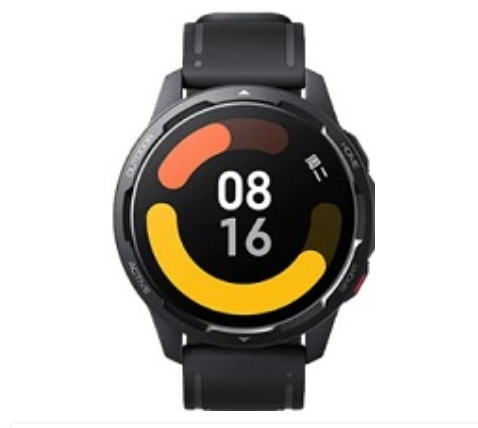
Xiaomi Watch H
Offers
-
 Xiaomi Watch H
View Offer
Xiaomi Watch H Specifications
| BASIC INFO | |
| Brand | Xiaomi |
| Model | Watch H |
| Status | Coming soon |
| Release date | 2024, February |
| BODY | |
| Dimensions | 47.6 x 41.1 x 10.5 mm (1.87 x 1.62 x 0.41 in) |
| Weight | 31.5 g (1.13 oz) |
| Colors | Black, White |
| Body Material | Plastic back, aluminum frame |
| SIMs | No |
| Water/Dust | Waterproof (5ATM) 50m water resistant |
| DISPLAY | |
| Size | 1.97 inches |
| Type | AMOLED, 600 nits (peak) |
| Resolutions | 450 x 390 pixels |
| PPI | 302 ppi density |
| Multi touch | Yes |
| Protection | No |
| NETWORKS | |
| 2G | N/A |
| 3G | N/A |
| Speed | No |
| GPRS | No |
| EDGE | No |
| CAMERA | |
| Rear | No |
| Front | No |
| HARDWARE | |
| YOU | HyperOS |
| Chipset | No |
| CPU | No |
| GPU | No |
| RAM | No |
| Internal | No |
| Card Slot | No |
| BATTERY | |
| Type | Li-Po |
| Capacity | 470 mAh |
| Removable | Non-Removable |
| Talk Time | N/A |
| Stand By | N/A |
| Charging | Standard Charger |
| Wireless Charging | Yes |
| COMMONS | |
| Sound | Loudspeaker Yes 3.5mm Jaxk No |
| Sensors | Accelerometer, heart rate, compass, gyro, SpO2 |
| Bluetooth | 5.2, A2DP, LE |
| GPS | GPS, GLONASS, GALILEO, BDS, QZSS |
| USB | No |
| Wi Fi | No |
| NFC | Yes (market/region dependent) |
Reviews
Sorry, you have not permission to write review for this product.
Disclaimer Note
You can write your own disclaimer from APS Settings -> General -> Disclaimer Note.

New Arrivals






ADVERTISE



