







Facebook Twitter Instagram
    Trending
    • Why High-Puff Vapes Are Adding Screens and Adjustable Modes: The Malux 50K Case Study
    • OXVA XLIM 4 vs XLIM Pro 3 Review: Which Pod Kit Fits Your Vaping Style?
    • GT12 Smartwatch Review: A Feature-Packed Wearable with Bluetooth Calling and Built-In Flashlight
    • HXSJ X81 Mechanical Keyboard Review: A Compact 75% Keyboard with Tri-Mode Wireless and an 8000mAh Battery
    • HT30 Smartwatch Review: Large Screen, Long Battery Life and Smart Features
    • REDMI Headphones Neo Review: Features, ANC Performance and Battery Life
    • Amazfit T-Rex Dual Solar: How Dual-Sided Solar Charging Extends Battery Life
    • K90 Dual View Security Camera Review: A 2K Window Camera With Two Viewing Angles
    Facebook YouTube
    IGeeKphone China Phone, Tablet PC, VR, RC Drone News, Reviews
    • HOME
    • BREAKING NEWS
      • AI NEWS
    • Amazon
    • PHONE
      • Top Phones For Your First Choice
      • Phone Comparison
      • Xiaomi
      • Blackview
      • Doogee
      • Black Shark
      • Geekbuying
      • Banggood
      • TEMU
      • TikTok
      • Aliexpress
      • Walmart
      • MercadoLibre
      • Lazada
    • TOP VAPE Awards for 2026
    • VAPES
      • E-CIGAR Upcoming
      • Vape News
      • Vape Deals
      • Vape Comparison
      • Vape Guide
      • VAPE LAWS
      • Giveaway
    • BEST VAPE
      • Best Vape Stores
      • Best Starter Vape Kits
      • Best Vapes for Beginners
      • Best Disposable Vapes
      • Best Pod Systems
      • Best Pod Mod Vapes
      • Best Mods
      • Best Nicotine Pouches
      • Best Clearomizers/Tanks
      • Best E-Liquid
      • Best EGO/Pens
      • Best Vapes for Nic Salt E-Juice
      • Best Vapes to Quit Smoking
      • RDA vs. RDTA vs. RTA
    • Best Vape Brand 2026
      • VAPORESSO
      • VOOPOO
      • OXVA
      • NEXA BAR
      • MASKKING VAPE
      • SP2S
      • IPLAY
      • TODOO
      • MRFOG
      • LOSTVAPE
      • VEIIK
    • REVIEW
      • E-cigar Review
      • Phones
      • Tablet PC
      • TV Box
      • RC Drone
      • Wearables
      • Camera
      • Accessories
      • VR Headset
    • MORE
      • TABLET
        • Chuwi
        • INNOCN
        • Teclast
        • Top Tablet for Your First Choice
        • Tablet/Laptop Comparison
      • RC DRONE
      • CAMERA
      • WEARABLES
        • OneOdio
        • BlitzWolf
        • Top Smartwatch for First Choice
      • 3D PRINTER
        • 3D Printer Review
        • Anycubic
        • FLSUN
        • Xtool
        • LONGER
        • Top 3D printer to Choose First
      • POWER STATION
        • Oukitel
        • FOSSIBOT
      • GAMING
        • Top Gaming Products
      • E-BIKE
        • Samebike
        • Happyrun
        • ENGWE
      • SMART HOME
      • TV BOX
      • ACCESSORIES
      • VR HEADSET
      • CLOTHES
      • AUTO CAR
    • DEAL
    • Shop
    IGeeKphone China Phone, Tablet PC, VR, RC Drone News, Reviews
    You are at:Home»NEWS»Reviews and Product Details of Tenorshare 4DDiG 2022
    NEWS

    Reviews and Product Details of Tenorshare 4DDiG 2022

    Brady CottonBy Brady CottonSeptember 28, 2022
    Facebook Twitter Pinterest LinkedIn Tumblr Email

    Have you unintentionally erased essential items, including papers, films, and photos? Unknowingly removed files from the recycle bin only to discover afterward that they were really important to you? Now, are you concerned about what to do? Well, you have come to the best place as we have the best solution to this problem. There is numerous free data recovery software. We recommend you use Tenorshare 4DDIG data recovery software in such a case.

    The Overview of Tenorshare 4DDiG

    Data recovery software called Tenorshare 4DDiG offers consumers strong information security safeguards. The tool restores files lost by viruses, damaged, or deleted accidentally. The tool can also retrieve data from partitions and portable storage units like USB sticks and external discs. It also saves time by providing a preview of the media that can be recovered before you commit to a time-consuming recovery procedure. Installation of Tenorshare 4DDiG is possible on both Windows and Mac computers. Read this Tenorshare 4DDIG review will be helpful for you!
    Special Features of Tenorshare 4DDiG:

    Below are some of the features of Tenorshare 4DDIG,

    • Files that have been harmed by viruses, documents that have been corrupted, and information that has been inadvertently deleted are all recovered by Tenorshare 4DDiG from your empty recycle bin.
    • The program makes file recovery possible for various file kinds, RAR/ZIP compressed data,and system files such as NTFS and FAT, including office documents.
    • Media recovery tools are included with this package to assist customers in restoring music, picture, and video data from corrupted storage media.
    • The application can recover data from various hardware and operating systems, including laptops, desktop computers, formatted storage media, and external media such as CDs/DVDs and USB thumb drives.
    • Before committing to time-consuming, exhaustive recovery scans, the program lets you see recovered data. As long as they haven’t been replaced with fresher data, the company promises that all files—even those completely deleted—can be recovered.

    How do I use Tenorshare 4DDiG Windows data recovery?

    With this best data recovery software tool, you may recover a wide variety of data from various IT settings, such as hard discs, partitions, and digital cameras. The application safeguards the most widely used Mac and Windows operating systems.

    You may evaluate recoverable data before committing to time-consuming recovery operations, saving you time. Tenorshare 4DDiG may be the best option for your business if you seek comprehensive data recovery software to recover files and data from your IT environment.

    Here’s how to operate Tenorshare 4DDiG on Windows in three easy steps:

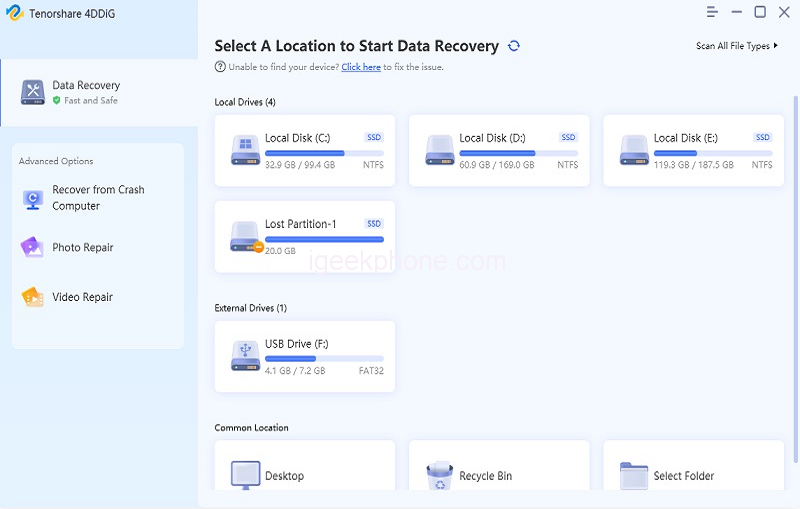
    Step 1: You will see the home interface containing Data Recovery & Advanced Options after installing and launching Tenorshare 4DDiG Data Recovery. Select the local disc where you lost your data from a list of hard discs in our case, and then click Start to get started. Before scanning, choose the target file types in the upper-right corner.
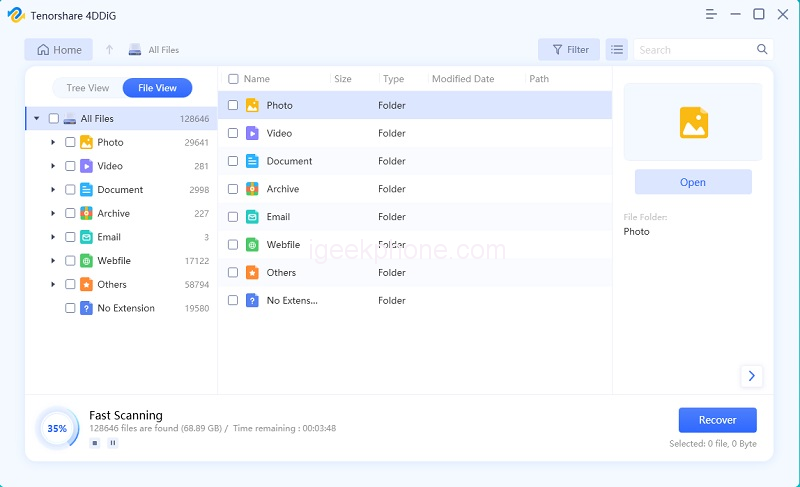
    Step 2: If you’ve found the files you wish to recover, you may pause or end the search at any moment. 4DDiG quickly scans the chosen disc all around for missing data. Below the Tree View, there’re sections for Existing Files, Deleted Files, Lost Location, RAW Files, and Tag Files. You can also switch to File View to examine file kinds like photos, videos, documents, Audio, Email, and others. Additionally, on the right side of the panel, you may utilize Filter to focus your search or search for target files.
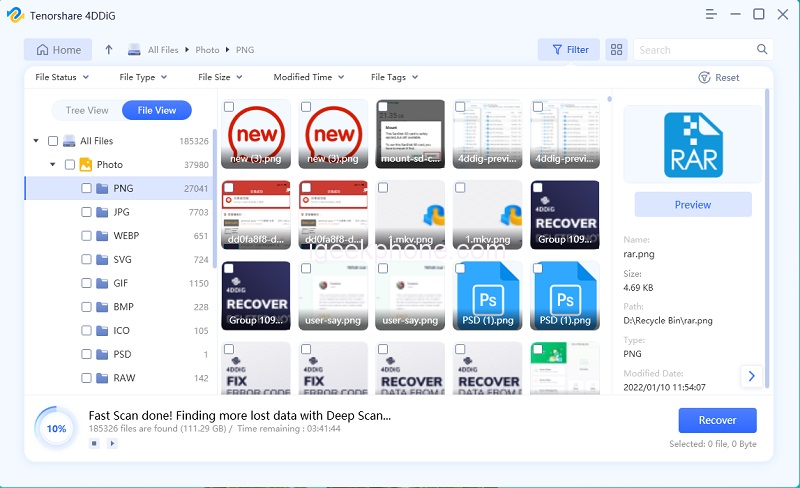
    Step 3: You may preview and restore the target files to a safe place when they have been found. Please avoid saving to the same drive or partition where you lost data in case of disc overwriting as well as permanent data loss.
    What if your computer system is Mac? Don’t worry, Tenorshare 4DDiG also supports Mac system, and unlike other data recovery software, it doesn’t need to turn off SIP.

    Pros and Cons of Tenorshare 4DDiG:

    Below are some of the pros and cons of Tenorshare 4DDIG,

    Pros:

    • Several users said that the software was simple to use and that file recovery did not interfere with the operation of any other programs.
    • Because they could recover data from every nook and cranny of their system, customers loved the program’s deep scanning features.
    • Several users agreed that the tool could very certainly retrieve any kind of lost file from their PCs.

    Cons:

    • A few users complained that they could not scan certain folders to recover lost data.
    • According to one user, recovering data greater than 3 GB proved challenging.
    • Some customers thought the device was a little pricey considering the features offered.

    FAQs about Tenorshare 4DDiG

    1. Is Tenorshare 4DDiG free?

    Users get 1GB of recoverable data for free from the seller. After that, customers can purchase the Standard, Professional, or Premium versions for a one-time license cost.

    2. How long does Tenorshare 4DDiG take to scan?

    It does not take a long time to scan like other software.

    3. Is Tenorshare 4DDiG safe to use?

    Yes, it is entirely safe to use!

    Conclusion

    Excellent recovery program, 4DDiG, can quickly locate and restore any lost file type. The greatest thing is that you can restore those data with a few clicks regardless of how you lost them. 4DDiG can recover anything, whether you mistakenly erased your data or lost them due to partition recovery, a virus assault, a formatted disc, or a damaged computer. This Tenorshare review will be very helpful to you.

    Share. Facebook Twitter Pinterest LinkedIn Tumblr Email

    Related Posts

    Amazfit T-Rex Dual Solar: How Dual-Sided Solar Charging Extends Battery Life

    Xiaomi 18 Pro Max Transparent Edition Review: 200MP Camera and 8500mAh Battery

    HMD Slate Tab 5G Full Specifications Leak: 10.6-Inch 2K 90Hz Display and Snapdragon 7s Gen 2

    Comments are closed.

    voopoopintch
    oxva vprime 2
    nomadz
    • Popular
    • 3D Printer REVIEW
    • XIAOMI
    October 1, 2026

    VOOPOO ARGUS Z3 Review – Flip the Pod, Change the Vape! Keep It Simple!

    September 27, 2026

    Vaporesso ARMOUR OCTA Review – Built Like a Tank, Vapes Like a Beast

    September 27, 2026

    VOOPOO ARGUS Multi-Ohm Cartridge Review – One Magic Pod, Three Completely Different Vapes

    September 18, 2026

    OXVA VPRIME 2 vs VPRIME: What’s New in the Latest Version

    December 26, 2025

    ACMER ASCARVA 4S: Precision CNC Power for Makers, DIYers & Small Workshops

    June 23, 2024

    ACMER P2 20W Laser Engraver Fixed Focus Engraving: Hands on Review

    May 30, 2024

    xTool F1 Ultra Review: World’s First 20W Fiber & 20W Diode Laser Engraver

    May 30, 2024

    Anycubic Kobra 3 Combo Review: The Multicolor Masterpiece?

    October 7, 2026

    REDMI Headphones Neo Review: Features, ANC Performance and Battery Life

    October 7, 2026

    Xiaomi 18 Pro Max Transparent Edition Review: 200MP Camera and 8500mAh Battery

    September 30, 2026

    Xiaomi Door and Window Sensor 3 Launches With Tunnel Magnetoresistance Sensor and 3-Year Battery

    September 23, 2026

    Xiaomi Pad 9 Pro Launches With 12.5-Inch 3.2K 144Hz Display and 11,000mAh Battery

    fc 26 coins
    New Arrivals
    • Vaporesso Armour GS2 Pod System Kit 80W Vaporesso Armour GS2 Pod System Kit 80W
    • iJOY XP100K Zero Nicotine Refillable Disposable Vape Kit iJOY XP100K Zero Nicotine Refillable Disposable Vape Kit
    • JNR PowerMate Pro JNR PowerMate Pro
    • MAXRAY RUSH 80K Disposable Vape MAXRAY RUSH 80K Disposable Vape
    • MERRYMI Blade 30000 Disposable Vape MERRYMI Blade 30000 Disposable Vape
    • Dip Devices Dipper Portable Vaporizer Dip Devices Dipper Portable Vaporizer
    • Exxus Vape Mini Plus Vaporizer Exxus Vape Mini Plus Vaporizer
    • JNR Lion King Shisha JNR Lion King Shisha
    • Fumot Eco 4-in-1 80K Disposable Vape Fumot Eco 4-in-1 80K Disposable Vape
    About
  • Igeekphone.com provides the first global tech news and reviews about smartphone, vapes, e-cigar, smart home, 3D printers, e-bike,tablets, RC drones, VR headset, and other accessories. It's the best platform to improve your brand and product.
  • Contact us: info@igeekphone.com
  • Check Our Privacy Policy Here.
  • Note: *Right now we have US editor and EU editors for review, especially for Amazon US and EU.
  • *Shop and Compare Price Here*
  • Facebook
  • Youtube
  • OUR BEST VAPE PARTNERS
  • VAPE ONLINE STORE
  • VAPORESSO
  • VOOPOO
  • OXVA
  • NEXA
  • MASKKING
  • SP2S
  • IPLAY
  • TODOO
  • OTHER BEST PARTNERS
  • SVBONY
  • Chuwi
  • Blackview
  • Fossibot
  • Unihertz
  • Flsun
  • Anycubic
  • Xtool
  • Oukitel
  • Mukkpet Ebike
  • Ugreen
  • Copyright © 2026 igeekphone

    Type above and press Enter to search. Press Esc to cancel.