






Facebook Twitter Instagram
    Trending
    • Acer has launched the AR Vision GR0 and GI0 smart glasses. The former is equipped with a Micro OLED screen.
    • It is reported that the new Honor phone has been designed with a 6.89-inch screen and a large 7-inch straight screen
    • RH-BM11 Tuya WiFi Baby Monitor Review: Smart Monitoring for Modern Parents
    • How to Remove the CPU Fan in 2026: A Safe Step-by-Step Tutorial
    • Aviator – A Virtual Round for All Risk Preferences!
    • FLASH SALE: 16% OFF ALL RAZ TN9000 FLAVORS  |  LIMITED TIME ONLY
    • Bitcoin Is Becoming Immensely Popular In The Market Of Cryptocurrency!
    • Vaporock X1 Pod System Kit Review–Stylish, Powerful & Easy to Use
    Facebook YouTube
    IGeeKphone China Phone, Tablet PC, VR, RC Drone News, Reviews
    • HOME
      • NEWS
        • DeepSeek
        • ChatGPT
        • Minecraft
    • Amazon
    • PHONE
      • Top Phones For Your First Choice
      • Phone Comparison
      • Xiaomi
      • Blackview
      • Doogee
      • Black Shark
      • Geekbuying
      • Banggood
      • TEMU
      • TikTok
      • Aliexpress
      • Walmart
      • MercadoLibre
      • Lazada
    • TOP VAPE Awards for 2026
    • VAPES
      • E-CIGAR Upcoming
      • Vape News
      • Vape Deals
      • Vape Comparison
      • Vape Guide
      • Giveaway
    • BEST VAPE
      • Best Vape Stores
      • Best Starter Vape Kits
      • Best Vapes for Beginners
      • Best Disposable Vapes
      • Best Pod Systems
      • Best Pod Mod Vapes
      • Best Mods
      • Best Nicotine Pouches
      • Best Clearomizers/Tanks
      • Best E-Liquid
      • Best EGO/Pens
      • Best Vapes for Nic Salt E-Juice
      • Best Vapes to Quit Smoking
      • RDA vs. RDTA vs. RTA
    • Best Vape Brand 2026
      • VAPORESSO
      • VOOPOO
      • OXVA
      • NEXA BAR
      • MASKKING VAPE
      • SP2S
      • IPLAY
      • TODOO
      • MRFOG
      • LOSTVAPE
      • VEIIK
    • REVIEW
      • E-cigar Review
      • Phones
      • Tablet PC
      • TV Box
      • RC Drone
      • Wearables
      • Camera
      • Accessories
      • VR Headset
    • MORE
      • TABLET
        • Chuwi
        • INNOCN
        • Teclast
        • Top Tablet for Your First Choice
        • Tablet/Laptop Comparison
      • RC DRONE
      • CAMERA
      • WEARABLES
        • OneOdio
        • BlitzWolf
        • Top Smartwatch for First Choice
      • 3D PRINTER
        • 3D Printer Review
        • Anycubic
        • FLSUN
        • Xtool
        • LONGER
        • Top 3D printer to Choose First
      • POWER STATION
        • Oukitel
        • FOSSIBOT
      • GAMING
        • Top Gaming Products
      • E-BIKE
        • Samebike
        • Happyrun
        • ENGWE
      • SMART HOME
      • TV BOX
      • ACCESSORIES
      • VR HEADSET
      • CLOTHES
      • AUTO CAR
    • DEAL
    • VAPE LAWS
    • Shop
    IGeeKphone China Phone, Tablet PC, VR, RC Drone News, Reviews
    You are at:Home»NEWS»5 Hot Mac Apps you didn’t know you needed
    NEWS

    5 Hot Mac Apps you didn’t know you needed

    Brady CottonBy Brady CottonAugust 4, 2022
    Facebook Twitter Pinterest LinkedIn Tumblr Email

    Creative work, productivity, entertainment, and even gaming can all be done on a Mac if you select the apps wisely.

    For the top hot Mac applications of 2022, there’s a lot to choose from, from the utilitarian note-taking software out there, to the ones that make your life and work on your Mac that much simpler and you didn’t even realize you needed.

    So, let’s take a look at the top 5 hot Mac apps you didn’t know you needed:

    UPDF – Beautiful PDF Editor

    UPDF – a free PDF editor for Mac computers – is the ultimate PDF solution! With UPDF, you’ll have a fantastic, feature-rich, and completely free PDF editor at your disposal on your MacBook. UPDF has a variety of features that are only available in subscription and premium PDF editors. Let’s have a look at the most important UPDF features:

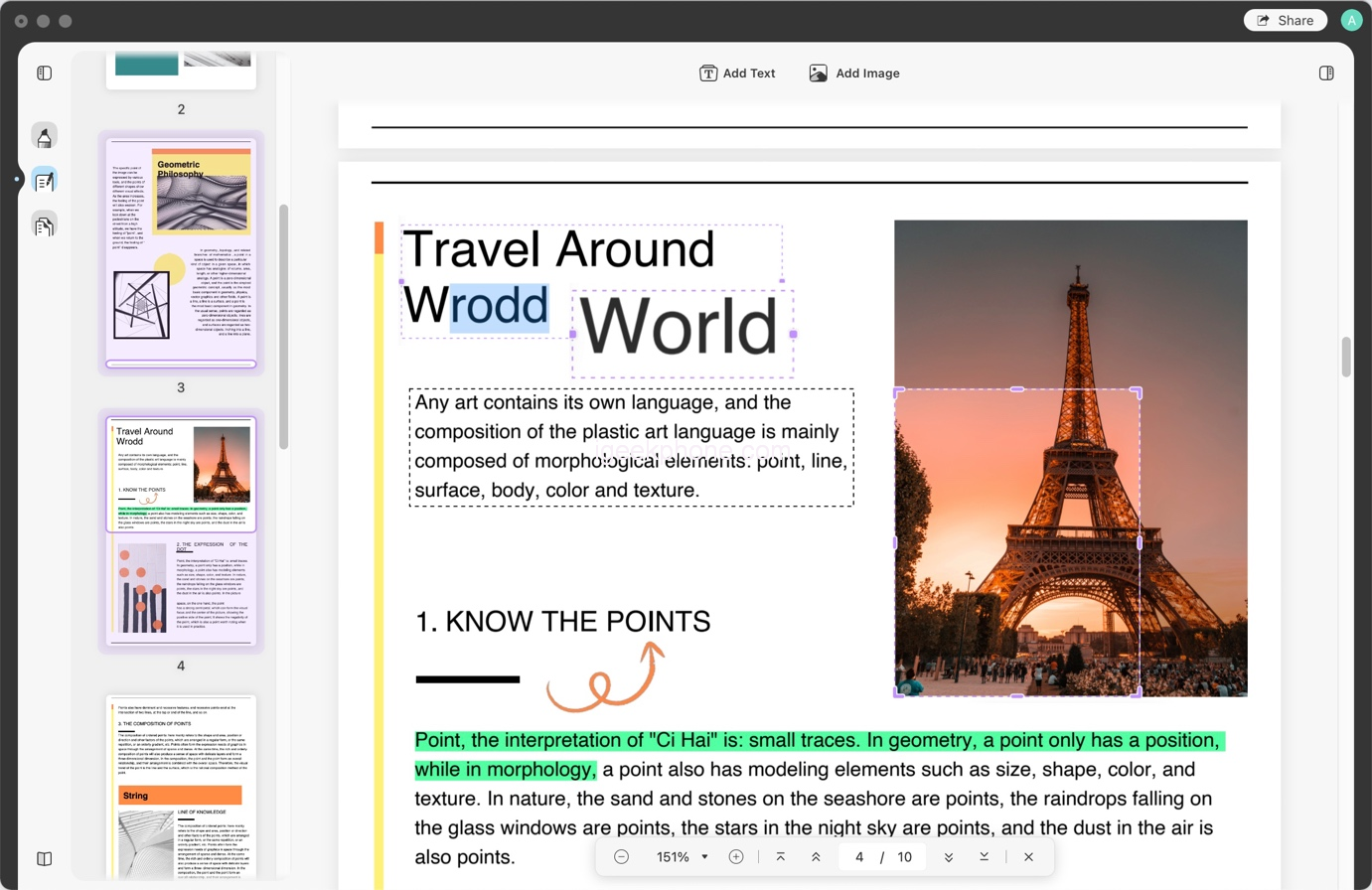
    Using UPDF’s editing capabilities, you may simply make changes to text and graphics in PDFs. You have a wide variety of options when it comes to typefaces and fonts. Also, you can add text or add image to PDF.
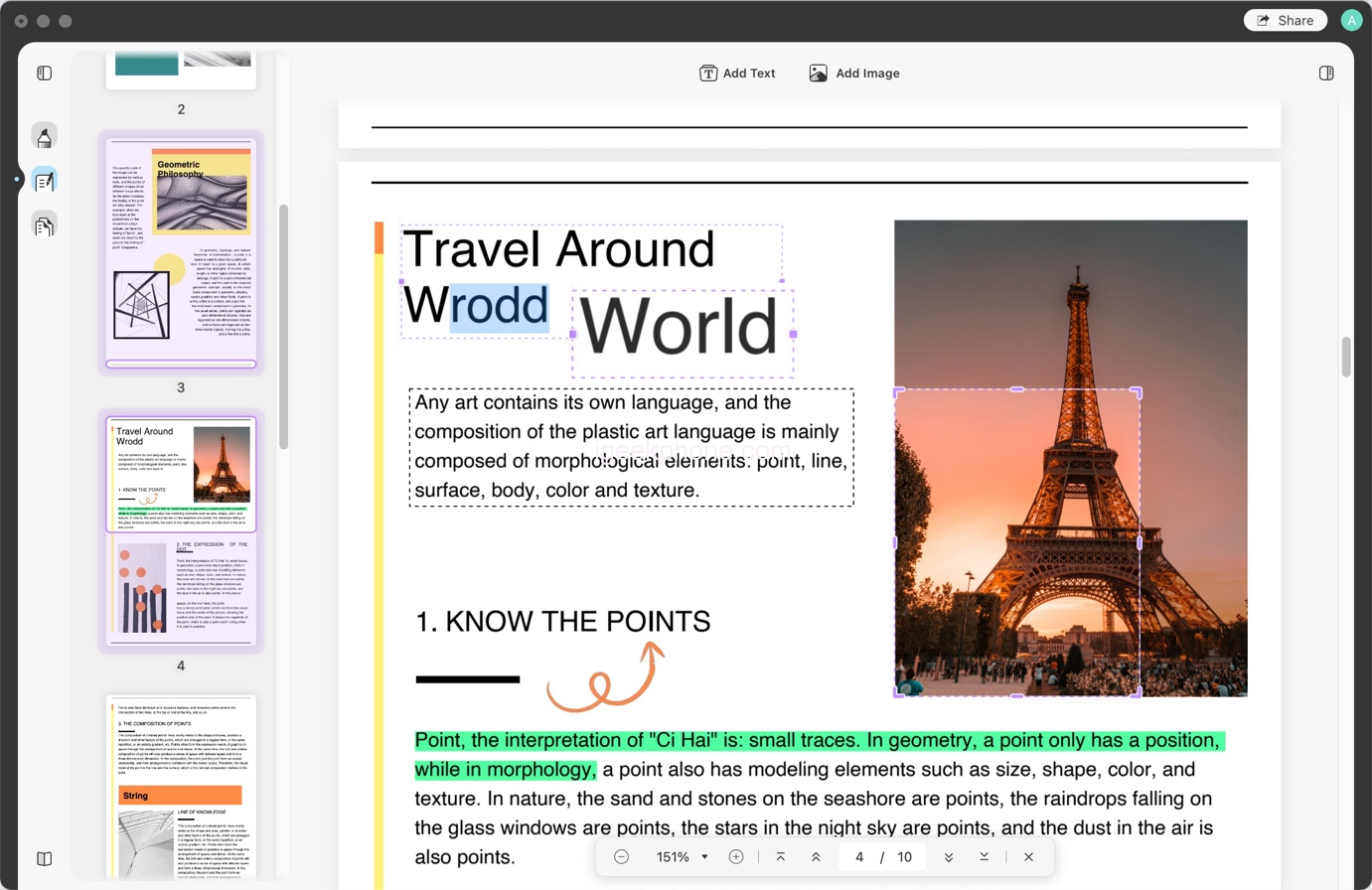
    It’s possible to annotate PDF documents with UPDF. To make it easier to communicate your comments, you may highlight, underline, and add notes and comments to the text. Shapes, stamps, signatures, and stickers may all be added. You’ll discover a wide range of forms and sizes on UPDF.

    After finishing up with the editing, the next important step is to organize the pages in your document. Extract, change, add, or remove pages with the help of UPDF. You may also adjust the page orientation. UPDF, a fundamental PDF editor, allows you to reorganize and rearrange the pages in PDF as well.

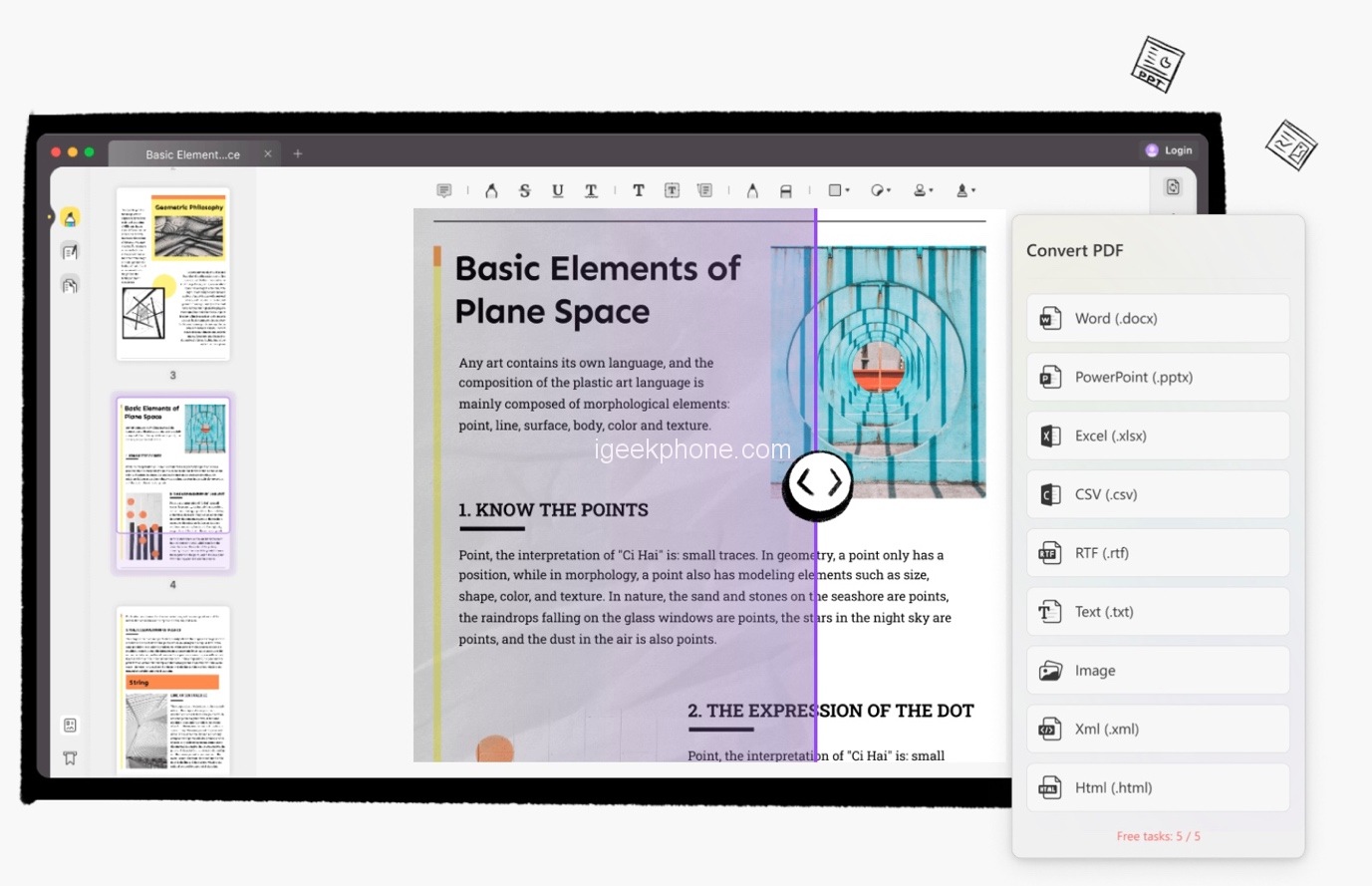
    UPDF also supports converting PDF to other formats such as Excel, Word, PowerPoint, Images, PDF/A, HTML, XML and Text. It also has OCR technology which refers to Optical Character Recognition. So you can make scanned document to editable formats.
    Considering all these features, UPDF is on the top of 5 hot Mac apps you should use to improve your efficiency. It is 100% secure and reliable. Most PDF editors have a watermark on output files, however, UPDF does not use a watermark on the output files if you only work on one file per day. It also works on Windows and mobile system like iOS and Android. You can free download UPDF on all platforms. UPDF is second to no other editors out there.

    In Your Face – Meeting Reminder

    Just in time for the meeting, In Your Face puts a stop to everything on your screen. The reminder is almost difficult to overlook.

    In Your Face automatically recognizes video conference links in calendar events, making it ideal for remote working and work from home.

    It’s not until you need it that In Your Face becomes a problem. The menu bar is where you’ll find all of the app’s functions. See what’s happening now and what’s coming up on the menu, and then hop right into a video call.

    Be reminded of everything, even if there is no specific date on the calendar. You may use custom reminders to keep track of your time-sensitive chores quickly and reliably.

    In Your Face allows you to generate reminders if you don’t want to use calendar events. Add a reminder by selecting New Reminder from the app’s system menu and entering a name, note, date, time, and interval. You handle these reminders internally.

    Be Focused – Focus Timer

    Our generation appears to have a hard time staying on track. Using the Be Focused technique, you may get more done by dividing up your work into smaller, more manageable chunks, punctuated by brief rests.

    Retaining motivation and concentration can be accomplished in this manner. Create assignments, and scheduled breaks, and monitor your progress throughout the day, week, or any custom period of time that you choose. All of your devices are constantly in sync, no matter which one you use.
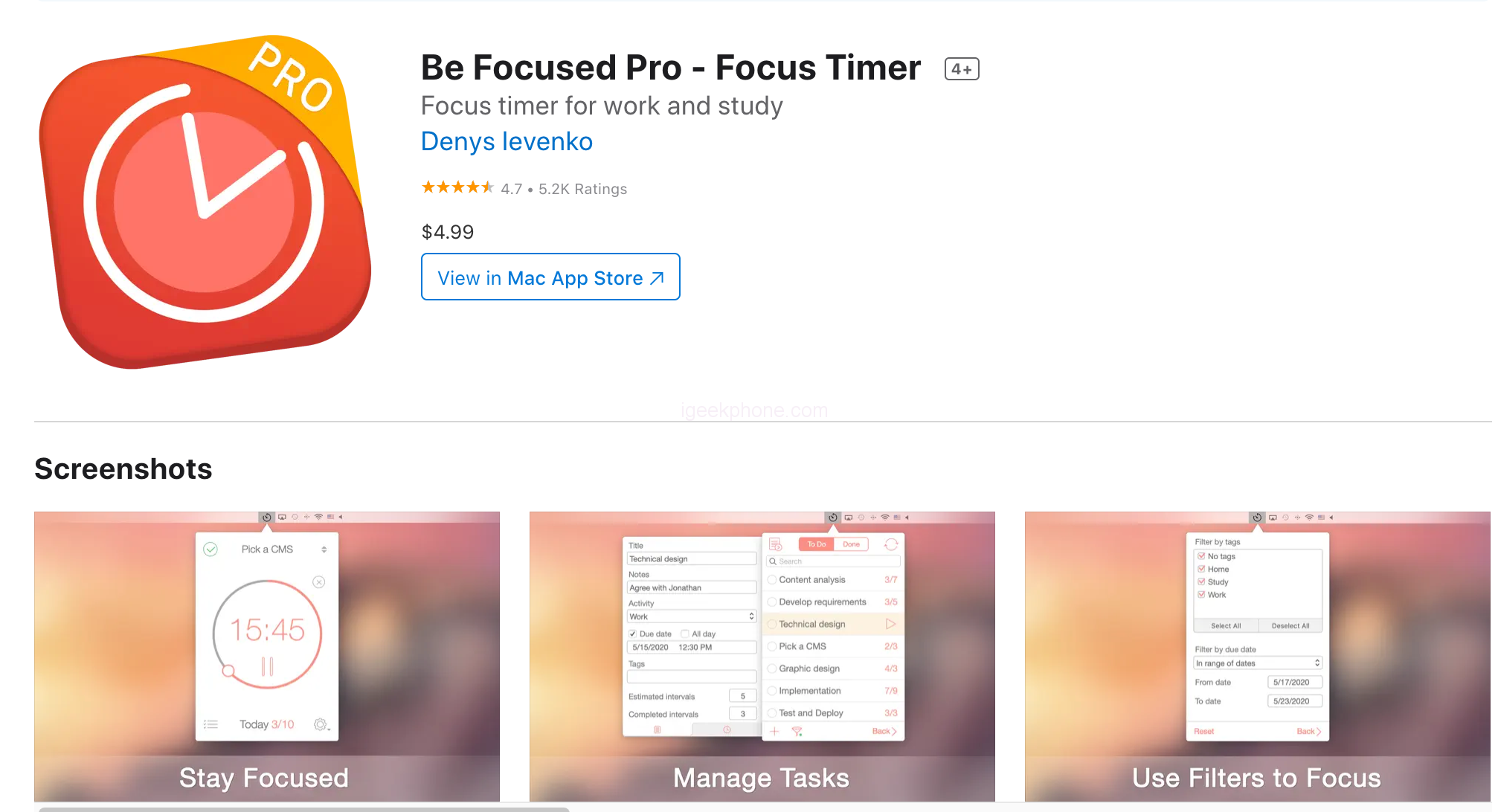
    A 25-minute timer may be easily set up. You may choose from 5 to 60-minute intervals. It’s possible to create a daily to-do list with the help of this app. By pressing the add button in the bottom left corner of the menu, you can simply create a new assignment.

    With Be Focused Pro, you have complete control over the sounds and notifications you receive.

    Agenda

    A calendar-based method for note-taking on the Mac, Agenda, is a fascinating new solution. In terms of style and functionality, the 1.0 version of the app is impressive for a 1.0, but it lacks an iOS version and collaborative capabilities, which may restrict its appeal to some users.

    In order to categorize notes, the Agenda uses projects, which are subcategories. The Agenda’s main window displays notes for each project, with panels on either side for moving among them.

    As a result, even if many of Agenda’s functions may already be recognizable to its users, it retains a distinct feel. Agenda is unique in that it approaches note-taking from a calendar-centric standpoint.

    Search, filters, tags, and connections to surface notes are used to create a flat organizational structure in Agenda. If you’re looking for a more granular hierarchy, you may want to consider looking elsewhere.

    Cardhop

    Cardhop is a cross-platform application. It originally began as a Mac menu bar app. As the app evolved, Cardhop was made available for the iPhone and iPad.

    It is possible to add and edit contacts using natural language with this iOS and Mac app. It’s a general-purpose parser that can figure out what fields the text you enter belongs in.

    Simply fill out the search area with as much information as you have on the subject. On a contact card, Cardhop arranges them in the correct order. It’s also possible to modify current contact information in this manner.

    A contact manager for the Mac, iPhone, and iPad isn’t all that Cardhop is. You may also communicate with anybody or any group on the list using this feature.

    Activate a conversation by typing “call” followed by the name of an existing contact, for example, “John.” If the first word is a verb and the second word is a noun, Cardhop will recognize this. Since it can figure out your intentions, it is able to do so.

    Conclusion

    Considering all the 5 top hot apps for Mac, we recommend you to use UPDF. It is a must-have application for every Mac user to help them with PDF editing needs easily. So, download UPDF today!

    Share. Facebook Twitter Pinterest LinkedIn Tumblr Email

    Related Posts

    Acer has launched the AR Vision GR0 and GI0 smart glasses. The former is equipped with a Micro OLED screen.

    It is reported that the new Honor phone has been designed with a 6.89-inch screen and a large 7-inch straight screen

    Vape Smoke Pod: IGeekPhone’s Step-by-Step Guide

    Leave A Reply Cancel Reply

    You must be logged in to post a comment.

    voopoo G4 Mini
    oxva xlim 3 ultra
    sp2s sen x disposable vape
    • Popular
    • 3D Printer REVIEW
    • XIAOMI
    May 17, 2026

    iPlay Nova 45K Review – High Puff Performance with a Futuristic Twist

    May 17, 2026

    Vaporesso XROS 6 & XROS 6 Mini Review – The Evolution of Portable Vaping

    May 7, 2026

    OXVA Xlim Go Lite Review: Compact, Powerful, and Beginner-Friendly

    April 18, 2026

    VOOPOO DRAG 6 Hands on Review: Vape Beast with Smart Power & Premium Control

    December 26, 2025

    ACMER ASCARVA 4S: Precision CNC Power for Makers, DIYers & Small Workshops

    June 23, 2024

    ACMER P2 20W Laser Engraver Fixed Focus Engraving: Hands on Review

    May 30, 2024

    xTool F1 Ultra Review: World’s First 20W Fiber & 20W Diode Laser Engraver

    May 30, 2024

    Anycubic Kobra 3 Combo Review: The Multicolor Masterpiece?

    May 29, 2026

    Xiaomi 17T/Pro overseas launch: 7000mAh battery “the largest for international versions to date”, starting at 749 euros

    May 28, 2026

    Redmi K100 Specifications Leaked: The most powerful Redmi king has arrived – two swords, large and small, strike simultaneously

    May 28, 2026

    Xiaomi Bluetooth Speaker C is now available: 3D dazzling lights, multiple units can be connected for simultaneous playback

    May 27, 2026

    Xiaomi 18 is launched! Hyper OS 4 has leaked out: A major overhaul of the underlying system, making it more smooth.

    fc 26 coins
    New Arrivals
    • Uwell Caliburn Air Pod System Kit Uwell Caliburn Air Pod System Kit
    • DotMod DotPod Max Link Pod System Kit DotMod DotPod Max Link Pod System Kit
    • Honor Magic 9 Pro Honor Magic 9 Pro
    • Lenovo Idea Tab 2 Lenovo Idea Tab 2
    • Oppo Watch X3 Mini Oppo Watch X3 Mini
    • Suonon Switch 80K Disposable Vape Kit Suonon Switch 80K Disposable Vape Kit
    • Motorola Edge 80 Fusion Motorola Edge 80 Fusion
    • Motorola Edge 80 Fusion Plus Motorola Edge 80 Fusion Plus
    • Nothing Phone 5a Pro Nothing Phone 5a Pro
    About
  • Igeekphone.com provides the first global tech news and reviews about smartphone, vapes, e-cigar, smart home, 3D printers, e-bike,tablets, RC drones, VR headset, and other accessories. It's the best platform to improve your brand and product.
  • Contact us: info@igeekphone.com
  • Check Our Privacy Policy Here.
  • Note: *Right now we have US editor and EU editors for review, especially for Amazon US and EU.
  • *Shop and Compare Price Here*
  • Facebook
  • Youtube
  • OUR BEST VAPE PARTNERS
  • VAPE ONLINE STORE
  • HAYATI PRO MAX PLUS
  • VAPORESSO
  • VOOPOO
  • OXVA
  • NEXA
  • MASKKING
  • SP2S
  • IPLAY
  • TODOO
  • OTHER BEST PARTNERS
  • SVBONY
  • Chuwi
  • Blackview
  • Fossibot
  • Unihertz
  • Flsun
  • Anycubic
  • Xtool
  • Oukitel
  • Mukkpet Ebike
  • Ugreen
  • Copyright © 2026 igeekphone

    Type above and press Enter to search. Press Esc to cancel.