
|

|

|
- VOOPOO ARGUS Z3 Review – Flip the Pod, Change the Vape! Keep It Simple!
- Vaporesso ARMOUR GS2 vs ARMOUR G2 Review: Which Pod Mod Fits Your Setup?
- 0.15Ω vs 0.3Ω GTX Coils: Which Vaporesso Coil Should You Choose?
- Vaporesso ARMOUR GS2 Review: 80W Pod Mod With 18650 Battery and GTX Dual Mesh
- iJOY XP100K Zero Nicotine Kit Review: Nixodine, 100K Puffs and Dual-Battery Design
- Xiaomi Door and Window Sensor 3 Launches With Tunnel Magnetoresistance Sensor and 3-Year Battery
- Google Pixel 11a Renders Leak With Tensor G6 Chip and MediaTek Modem
- Samsung Galaxy Tab S12 Ultra Leak Reveals 7 Years of Android Updates and AI Features

 |
 |
 |
 |
 |
 |
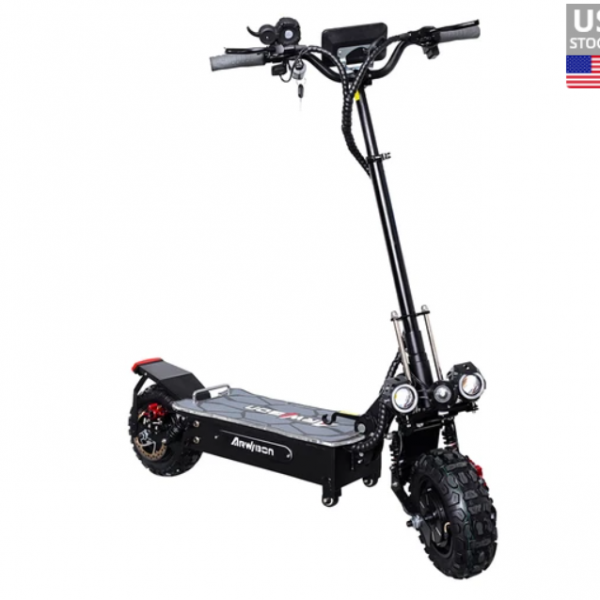
ARWIBON Q06 Pro Electric Scooter
Offers
-
 ARWIBON Q06 Pro Electric Scooter
$ 1321.99
ARWIBON Q06 Pro Electric Scooter
$ 1321.99
View Offer
Highlights
Powerful and Fast
The Arwibon Q06 Pro electric scooter features dual 60V2800W*2 motors, with a total power of 5600W. It provides high power and reaches a maximum speed of 55-75KM per hour, delivering a surprising and thrilling riding experience.
Enhanced Visibility
The scooter is equipped with front U7 lights and a tail light with running lights, brake lights, and integrated turn signals. This improves visibility during night rides and enhances safety. The body also features running lights for a cool effect at night.
Strong Braking Performance
The scooter is equipped with front and rear hydraulic brakes, offering stronger braking power and shorter braking distances, ensuring safer driving.
Compact Dimensions
The scooter has a length of 1.3m, a net weight of 44kg, a pedal length of 0.57m, and a width of 0.25m. It offers a range of 50-70km, providing a balance between portability and range.
Off-road Tires
With 11-inch off-road vacuum tires, the scooter provides a smoother and less slippery driving experience, making it suitable for various terrains.
Dual Charging Head Function
The Q06 Pro features dual charging heads, enabling faster charging times and serving as a backup charging port.
Reviews
Sorry, you have not permission to write review for this product.
Disclaimer Note
You can write your own disclaimer from APS Settings -> General -> Disclaimer Note.

New Arrivals



ADVERTISE



