
|

|

|
Trending
- Your Phone Is Your Crypto Wallet: 9 Security Settings to Check Before Your First Trade
- Vaporesso ARMOUR G2 vs ARMOUR GS2: Which Pod Mod Should You Choose?
- HMD Slate Tab 5G Full Specifications Leak: 10.6-Inch 2K 90Hz Display and Snapdragon 7s Gen 2
- Amazfit T-Rex Dual Solar Launches in China with Dual-Sided Solar Charging
- Google Fitbit Edge Fitness Tracker Leaked: 7-Day Battery, GPS and Altimeter
- AULA L99 Review: A Gaming Keyboard That Puts a Touchscreen on Your Desk
- PHILIPSTAS3209 Review: IPX7 Portable Bluetooth Speaker with RGB Lights and TWS
- K90 Dual View Security Camera Review: A Smarter Way to Watch Through a Window

 |
 |
 |
 |
 |
 |
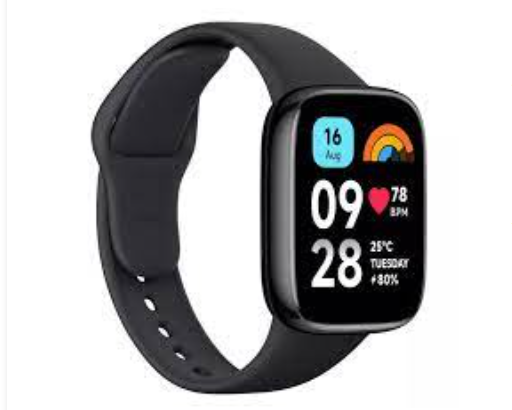
Redmi Watch 5 Active
Offers
-
 Redmi Watch 5 Active
View Offer
Redmi Watch 5 Active Specifications
| BASIC INFO | |
| Brand | Redmi |
| Model | Watch 5 Active |
| Status | Coming soon |
| Release date | 2025, December |
| BODY | |
| Dimensions | 42.6 x 36.6 x 10 mm |
| Weight | 37 g |
| Colors | Black, White |
| Body Material | Plastic back, plastic frame |
| SIMs | No |
| Water/Dust | Waterproof (5ATM) 50m water resistant |
| DISPLAY | |
| Size | 1.8 inches |
| Type | AMOLED, 600 nits (peak) |
| Resolutions | 450 x 390 pixels |
| PPI | 341 ppi density |
| Multi touch | Yes |
| Protection | No |
| NETWORKS | |
| 2G | N/A |
| 3G | N/A |
| Speed | No |
| GPRS | No |
| EDGE | No |
| CAMERA | |
| Rear | No |
| Front | No |
| HARDWARE | |
| YOU | Proprietary OS |
| Chipset | No |
| CPU | No |
| GPU | No |
| RAM | No |
| Internal | No |
| Card Slot | No |
| BATTERY | |
| Type | Li-Ion |
| Capacity | 320 mAh |
| Removable | Non-Removable |
| Talk Time | N/A |
| Stand By | N/A |
| Charging | Wireless charging |
| Wireless Charging | Yes |
| COMMONS | |
| Sound | Loudspeaker Yes 3.5mm Jaxk No |
| Sensors | Accelerometer, heart rate, compass, gyro, SpO2 |
| Bluetooth | 5.2, A2DP, LE |
| GPS | GPS, GLONASS, GALILEO, BDS, QZSS |
| USB | No |
| Wi Fi | No |
| NFC | Yes |
Reviews
Sorry, you have not permission to write review for this product.
Disclaimer Note
You can write your own disclaimer from APS Settings -> General -> Disclaimer Note.

New Arrivals




ADVERTISE



