
|

|
- No-fog mode + transparent display, Kanger launches Subox Mix 50K in the US
- Japan Tobacco has Launched Three Ploom AURA Collaboration Panels, Inspired by “Japanese Sake” Design
- How to Partition a Portable Hard Drive: A Step-by-Step Guide
- Official Images of OPPO Find X9 Ultra have been Released: Circular module + Stitched back panel – full of Hasselblad style.
- Xiaomi 18 Ultra continues to feature continuous optical zoom: the industry’s exclusive multi-focal range optical zoom without loss of image quality.
- Huawei Pura 90 Pro Max proudly introduces Kirin 9030 Pro: The strongest chip in Huawei’s history, unveiled on April 20th
- Xiaomi’s first phone with built-in fan for cooling has been officially announced. Redmi K90 Max is scheduled to be released on April 21st.
- OneXPlayer Super V two-in-one tablet-laptop has been Launched overseas, with the initial price at $1899.

 |
 |
 |
 |
 |
 |
- Shop
- Accessories
- T-bao N9N Pro Mini PC
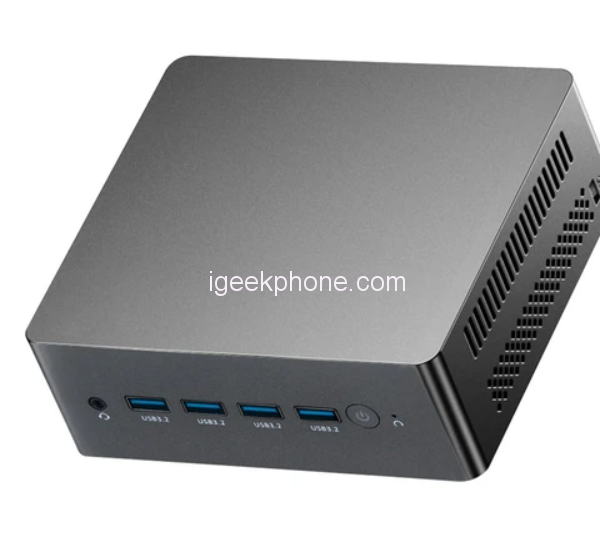
T-bao N9N Pro Mini PC
Offers
-
 T-bao N9N Pro Mini PC
$ 199.99
T-bao N9N Pro Mini PC
$ 199.99
View Offer
Highlights
Windows 11 Pro for Productivity and Entertainment
The T-bao N9N Pro mini PC is equipped with Windows 11 Pro operating system, making it ideal for productivity and entertainment purposes.
Powerful Performance
With an Intel® Alder Lake N100 CPU and Intel® UHD Graphics Gen12 GPU, this mini PC delivers powerful performance for various tasks.
Ample Storage with 8GB RAM and 256GB ROM
The mini PC comes with 16GB RAM and 512GB ROM, providing ample storage space for your files and applications.
Multiple Connectivity Options for Versatile Use
It has multiple connectivity options including WiFi5, Bluetooth 4.2, 2 x RJ45 LAN ports, 5 USB3.2 ports, 1 HDMI port, 1 DP port, 1 TYPE-C port, 1 TF card slot, and 1 DCIN 12V port.
Compact and Lightweight with Easy Setup
The T-bao N9N Pro mini PC is compact and lightweight, weighing only 403g, and comes with a wall hanging support, user manual, HDMI cable, and power adapter for easy setup and use.
Reviews
Sorry, you have not permission to write review for this product.
Disclaimer Note
You can write your own disclaimer from APS Settings -> General -> Disclaimer Note.


New Arrivals






ADVERTISE



