
|

|
Trending
- Science Popularization: Unveiling the Components of Vape Liquid and Investigating Its Effects on the Human Body
- Navabar Zero Nicotine 55K Disposable Vape Review: Long-Lasting Flavor with No Nicotine
- Vaporesso Luxe Q3 Pod System Kit Review: The Ultimate Vaping Experience with Style and Performance
- What is Virtual Gambling Industry: The Consequences Of A Total Lockdown
- Revolutionizing Digital Access: Learning More About Fiber Internet
- HIDI Max 50K Zero Nicotine Disposable Vape Review: The Ultimate Choice for Flavor Without the Nicotine
- SportsBook Live: comprehending online wagering
- The reason that People Are Using The Text To Give Church App More Often

 |
 |
 |
 |
 |
 |
Ulefone Armor 21 Rugged Smartphone
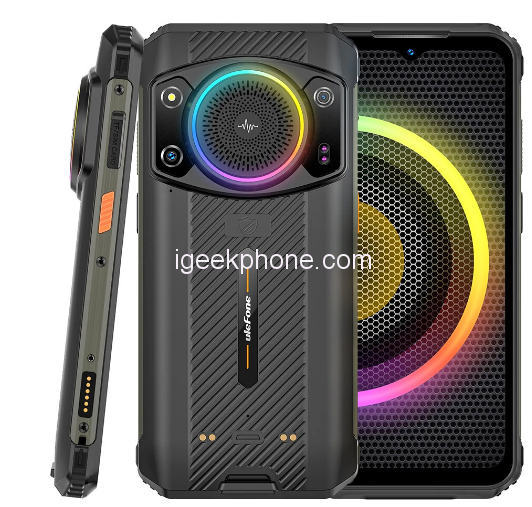
-
Processor
-
RAM
-
Storage
-
Display
-
Camera
-
Operating System
Offers
-
 Ulefone Armor 21 Rugged Smartphone
$269.99
Ulefone Armor 21 Rugged Smartphone
$269.99
View Offer
Specification:
Model
Ulefone Armor 21
Network
2G: GSM/EDGE B2/3/5/8(1900/1800/850/900)
3G: WCDMA B1/2/4/5/8(2100/1900/1700/850/900)
4G: LTE-FDD B1/2/3/4/5/7/8/12/17/19/20/28A/28B/66(2100/1900/1800/1700/850/2600/900/700/700/850/800/700/700/1700)
LTE-TDD B34/38/39/40/41(2015/2500/2600/1900/2300/2500)
*Not compatible with AT&T or Cricket activations or with CDMA Networks like Verizon, Sprint
SIM Card Slots: Dual SIM Card Dual Standby (Nano SIM), 1 Nano-SIM+ 1 Nano-SIM+ 1 microSD
Click Here for network frequency of your country. Please check with your carrier / provider before purchasing this item.
Hardware
OS: Android 13
CPU: Helio G99 MT6789 Octa-core, 2 x Arm Cortex-A76 2.2GHz, 6 x Arm Cortex-A55 2.0GHz, 6nm process, up to 2.2GHz
GPU: Arm Mali-G57 MC2, up to 1GHz
RAM: 16GB = 8GB + 8GB expansion (8GB is the virtual memory expansion, which can be optionally disabled)
ROM: 256GB
Card Extend: Supports an external TF card up to 2TB (VFAT)
Display
Display Size: 6.58 inch 20:9 Waterdrop Screen
Type: FHD+ All-screen LCD Multi-Touch display with IPS technology
Refresh rate: 120Hz
Resolution: 1080*2408 pixels, 401PPI
Multitouch: 10 points
Specs
General
Hardware
Display
Camera
Network
OS
Other Features
Battery
Dimensions and Weight
Reviews
Sorry, you have not permission to write review for this product.
Disclaimer Note
You can write your own disclaimer from APS Settings -> General -> Disclaimer Note.
More Products from Doogee
New Arrivals



ADVERTISE



