
|

|
Trending
- How to Partition a Portable Hard Drive: A Step-by-Step Guide
- Official Images of OPPO Find X9 Ultra have been Released: Circular module + Stitched back panel – full of Hasselblad style.
- Xiaomi 18 Ultra continues to feature continuous optical zoom: the industry’s exclusive multi-focal range optical zoom without loss of image quality.
- Huawei Pura 90 Pro Max proudly introduces Kirin 9030 Pro: The strongest chip in Huawei’s history, unveiled on April 20th
- Xiaomi’s first phone with built-in fan for cooling has been officially announced. Redmi K90 Max is scheduled to be released on April 21st.
- OneXPlayer Super V two-in-one tablet-laptop has been Launched overseas, with the initial price at $1899.
- AIR Mini Palm Selfie Drone Review: The Perfect Compact Drone for Stunning Aerial Shots
- PJC D26 RC Quadcopter Review at $21.99: A Comprehensive Review of the Feature-Packed Drone

 |
 |
 |
 |
 |
 |
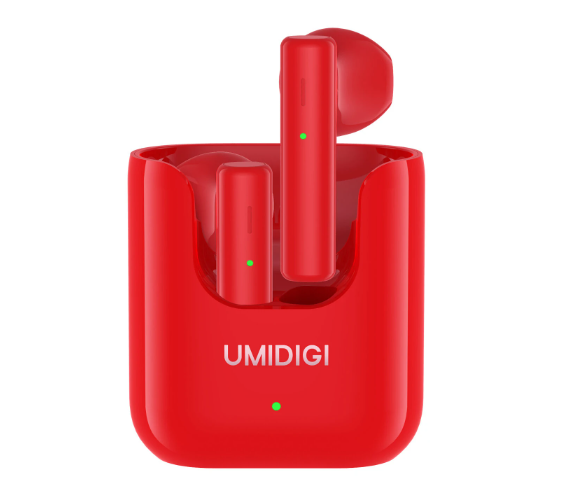
UMIDIGI AirBuds U TWS Wireless Earphones
-
Processor
-
RAM
-
Storage
-
Display
-
Camera
-
Operating System
Offers
-
 UMIDIGI AirBuds U TWS Wireless Earphones
$29.99
UMIDIGI AirBuds U TWS Wireless Earphones
$29.99
View Offer
Features:
All New U-shaped Design
13mm Dynamic Driver
Environment Noise Cancellation
24-hour Day Playback
Intelligent Touch Control
UMIDIGI APP Intelligent Control
Specification:
| Brand model | UMIDIGI Airbuds U |
| bluetooth version | BT 5.1 |
| Effective bluetooth range | 10m (open space without obstacles) |
| Color | Rock Red |
| Driver | 13 mm dynamic |
| Frequency response range | 10 Hz – 10 kHz |
| Audio codec | SBC / AAC |
| Calling | ENC (Environment Noise Cancellation Technology) |
| Battery Life | AirBuds U: Up to 5 hours of listening time with a single charge
Up to 4 hours of talk time with a singel charge AirBuds U with charging box: Up to 24 hours of listening time Up to 20 hours of talk time |
| Charging time | 2 hours |
| Charging port | USB Type-C |
| Sweat and Water Resistant | Sweat and Water Resistant: IPX5 (earphones) |
| Earphones | 35.43*20.38*16.91mm |
| Charging box | Charging box: 44.1*40.5*25mm |
| Weight | about 30g |
Package Contents:
2 * UMIDIGI AirBuds U (Left and Right)
1 * Type-C charging cable
Specs
General
Hardware
Display
Camera
Network
OS
Other Features
Battery
Dimensions and Weight
Reviews
Sorry, you have not permission to write review for this product.
Disclaimer Note
You can write your own disclaimer from APS Settings -> General -> Disclaimer Note.
More Products from Umidigi
New Arrivals






ADVERTISE



