
|

|

|
Trending
- Hyper Bar LX 65K Review: Features, Battery, Flavor Options and 65,000-Puff Capacity
- Huawei Mate 90 Pro Max May Feature a 200MP Zoom Camera and New External Lens System
- Xiaomi Adds 8 More Devices to the HyperOS 4 Beta Testing Program
- UK Vaping Products Duty Begins October 1 After IVG Parent Company Gets HMRC Approval
- Maskking Super GTS+ Vape Review: Exploring Its Two-Tank Setup and 10K-Puff Capacity
- JNR Bykux 59K Vape Review: 59K-Puff Capacity, Dual Mesh Coils and Adjustable Airflow
- Rock Me Sheesha Max 200K Review: 200K Puffs, 1000mAh Battery and Mesh Coil
- Fifty Bar Air 70K Review: 70,000 Puffs, ECO/BOOST Modes and 18mL E-Liquid

 |
 |
 |
 |
 |
 |
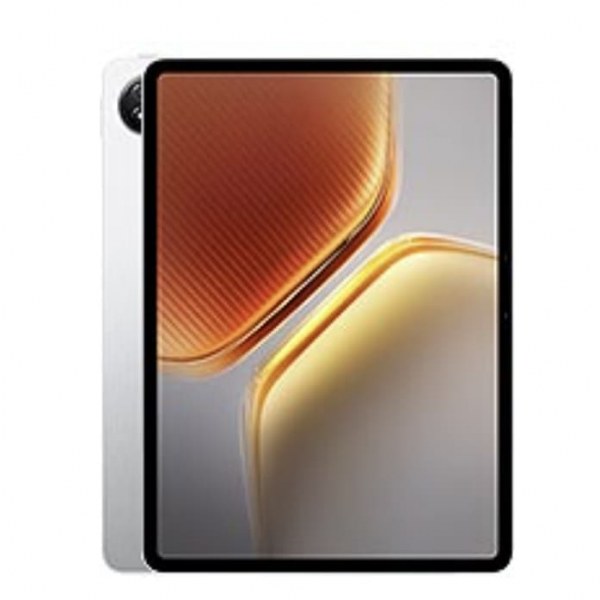
Vivo IQOO Pad 5e
-
Processor
-
RAM
-
Storage
-
Display
-
Camera
-
Operating System
Offers
-
 Vivo IQOO Pad 5e Tablet PC
View Offer
Vivo IQOO Pad 5e Specifications
| BASIC INFO | |
| Brand | Vivo |
| Model | iQOO Pad 5e |
| Status | Coming Soon |
| Release Date | 2025, September |
| BODY | |
| Dimensions | 266.4 x 192 x 6.6 mm (10.49 x 7.56 x 0.26 in) |
| Weight | |
| Colors | Gray, Green, Silver |
| Body Material | Glass front, aluminum back, aluminum frame |
| SIMs | No |
| Water & Dust | Stylus support |
| DISPLAY | |
| Size | 12.1 inches, 444.4 cm2 (~86.9% screen-to-body ratio) |
| Type | IPS LCD, 1B colors, 144Hz, HDR10, 900 nits (peak) |
| Resolutions | 1968 x 2800 pixels |
| PPI | 283 ppi density |
| Multi touch | Yes |
| Protection | No |
| NETWORKS | |
| 2G | N/A |
| 3G | N/A |
| 4G | N/A |
| 5G | N/A |
| Speed | N/A |
| GPRS | No |
| EDGE | No |
| CAMERA | |
| Rear Single | 13 MP |
| Features | LED flash, panorama |
| Videos | 1080p@30fps |
| Front | 8 MP 1080p@30fps |
| HARDWARE | |
| YOU | Android 15, OriginOS 5 |
| Chipset | Qualcomm Snapdragon 8s Gen 3 (4 nm) |
| CPU | Octa-core (1×3.4 GHz Cortex-X4 & 3×2.85 GHz Cortex-X4 & 4×2.0 GHz Cortex-A720) |
| GPU | Adreno 735 |
| RAM | 8GB / 12GB |
| Storage | 128GB / 256GB / 512GB |
| Card Slot | No |
| BATTERY | |
| Type | Li-Po |
| Capacity | 10000 mAh |
| Removable | Non-Removable |
| Talk Time | N/A |
| Stand By | N/A |
| Charging | 66W wired, PD 5W reverse wired |
| Wireless Charging | No |
| COMMONS | |
| Sound | Loudspeaker Yes, with stereo speakers (6 speakers) 3.5mm Jack No |
| Sensors | Accelerometer, gyro, proximity, compass |
| Bluetooth | 5.4, A2DP, LE |
| GPS | No |
| USB | USB Type-C 3.2, OTG, DisplayPort, magnetic connector |
| Wi-Fi | Wi-Fi 802.11 a/b/g/n/ac/6/7, dual-band, Wi-Fi Direct |
| NFC | No |
Specs
General
Hardware
Display
Camera
Network
OS
Other Features
Battery
Dimensions and Weight
Reviews
Sorry, you have not permission to write review for this product.
Disclaimer Note
You can write your own disclaimer from APS Settings -> General -> Disclaimer Note.
More Products from VIVO

New Arrivals


ADVERTISE



