
|

|
- Vivo X300 Ultra Review: Redefines Telephoto Photography!
- Redmi Book Pro 2026 officially announced to be Released this month: Core Ultra X7 358H + 99Wh super-large battery
- Honor MagicPad 3 Pro with a 12.3-inch screen is scheduled to be released on April 23rd
- REDMI Pad 2 SE is released this month: 9.7-inch 2K screen! 70-day super long battery life
- iJoy XP50000 0% Zero Nicotine Disposable Review: A Flavorful Experience Without the Nicotine
- When Tech Hits Hard: How Emerging Consumer Gadgets Are Shaping Personal Injury Cases
- People are purchasing more on mobiles than ever before
- To conduct business effectively, utilize a Genome business account

 |
 |
 |
 |
 |
 |
- Shop
- Accessories
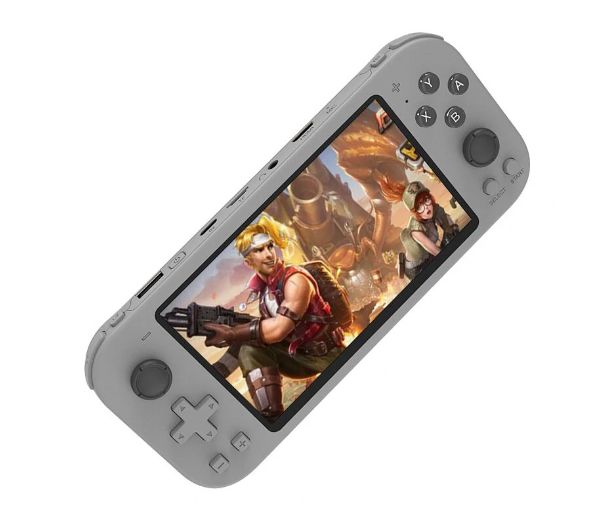
- X20 Max Portable Game Console
X20 Max Portable Game Console
Offers
-
 X20 Max Portable Game Console
$42.99
X20 Max Portable Game Console
$42.99
View Offer
Specifications:
Model: X20 MAX
Screen Size: 5.1-inch HD Screen (800 X 400)
Product Size: Approximately 19.5*8.6*1.66 CM
Charging Port: TYPE-C
Control Method: Button/Joystick
Save Function: One-click Save/Read
Download Method: Connect to the computer’s USB port for download
Supported Game Formats: GBA, GBC, GB, NES, SFC, FC, MD, CPS, MAME, SMD, SMC, for GG, SMS, NEOGEO, FBA.
Multiplayer: Supports Wired and Wireless Dual Controllers (Controllers need to be purchased separately)
Expansion Function: Supports HD HDMI-Compatible TV output, Language switching
Features:
1. Large Screen Display: 5.1-inch high-definition screen provides a comprehensive and vivid game visual experience.
2. Wide Format Support: Supports almost all types of game formats including GBA, GB, NES, SFC, CPS, MAME, and more.
3. Multi-function Console: Supports music, voice recording, e-books, pictures, videos, and more, adding extra entertainment value.
4. Multiplayer Gaming: Wired and wireless dual controllers support allows engaging multiplayer gameplay.
5. HDMI-Compatible Output: The console supports high-definition HDMI-Compatible output to TV, enabling games to be played on a larger screen.
Package Include:
1x X20 Max Portable Game Console
1x Charging Cable (Type-C)
1x User Manual
1x Earphone Cable
Reviews
Sorry, you have not permission to write review for this product.
Disclaimer Note
You can write your own disclaimer from APS Settings -> General -> Disclaimer Note.
More Products from VIVO
New Arrivals






ADVERTISE



