|

|
- LDRC LD1297 1:14 RC Pajero Review: A Classic Off-Road SUV Built for Scale Crawling
- How to Compress Videos on Your Smartphone Without Losing Too Much Quality?
- 8 most common transmission issues and how to resolve them
- How to Perform Vape Tricks: Beginner Techniques and Advanced Cloud Effects
- How to clean Vape atomizer?
- JNR Bykux Shisha 90K: Inside Its 63ml E-Liquid System, 1100mAh Battery and Architectural Design
- Geek Bar Pulse X2 50K Zero Nicotine Review: A Closer Look at Its Hardware, Flavors and 0mg Formula
- Spain Approves New Vape and Nicotine Pouch Regulations: Tobacco-Only Flavors and Reported 4mg Nicotine Limit

 |
 |
 |
 |
 |
 |


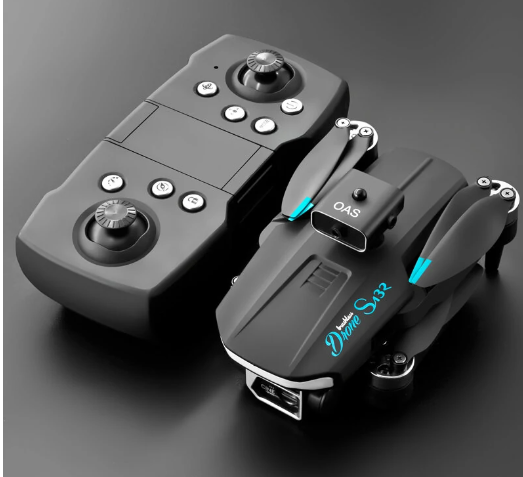
YLR/C S132 RC Quadcopter
Offers
-
 YLR/C S132 RC Quadcopter
$68.99
View Offer
Specifications:
Item NO.: S132
Color: Black
Frequency: 2.4G Channel: 4CH
Gyro: 6-Axis
R/C Distance: About 2000m
FPV: 5G WiFi
FPV Distance: 500m
Camera: 720P HD
Video Resolution: 1920*1080P
Photo Resolution: 7680*4320P
Positioning System: GPS + Optical Flow Positioning
– GPS positioning mode provides a more accurate flight.
– Optical flow fixed point hover provides stable flight.
– 5G WiFi FPV distance up to 2000m.
– Surround action will enable the aircraft flying in a circle, providing cooler shooting perspective.
– Waypoint flight mode, just draw a route on the screen, the copter as the give path. – With 3.7V 1800mAh battery, the fly time up to 18 mins.
– With One key to return function makes it easily to find the way home.
– One Key Takeoff /Landing. One press automatically taking off or landing, the drone will take off or go back to the position where it took off.
– 5GHz Technology Adopted for Anti-Interference. – 4 Channel which can do ascend, descend, forward, backward, left sideward fly, right sideward fly.
– 6-axis g-yro which can have more stable flying and be easy to control. – It have 3-level flight speed to switch that can make more fun with the flying.
1 x 3.7V Battery
1 x Screwdriver 1 x Manual
Reviews
Sorry, reviews are closed for this product.
Disclaimer Note
You can write your own disclaimer from APS Settings -> General -> Disclaimer Note.
New Arrivals



ADVERTISE